Problem with stop loss

Viewing 8 posts - 1 through 8 (of 8 total)

  • Author
    Posts
  • #200950 quote
    JiackyJiacky
    Participant
    Junior
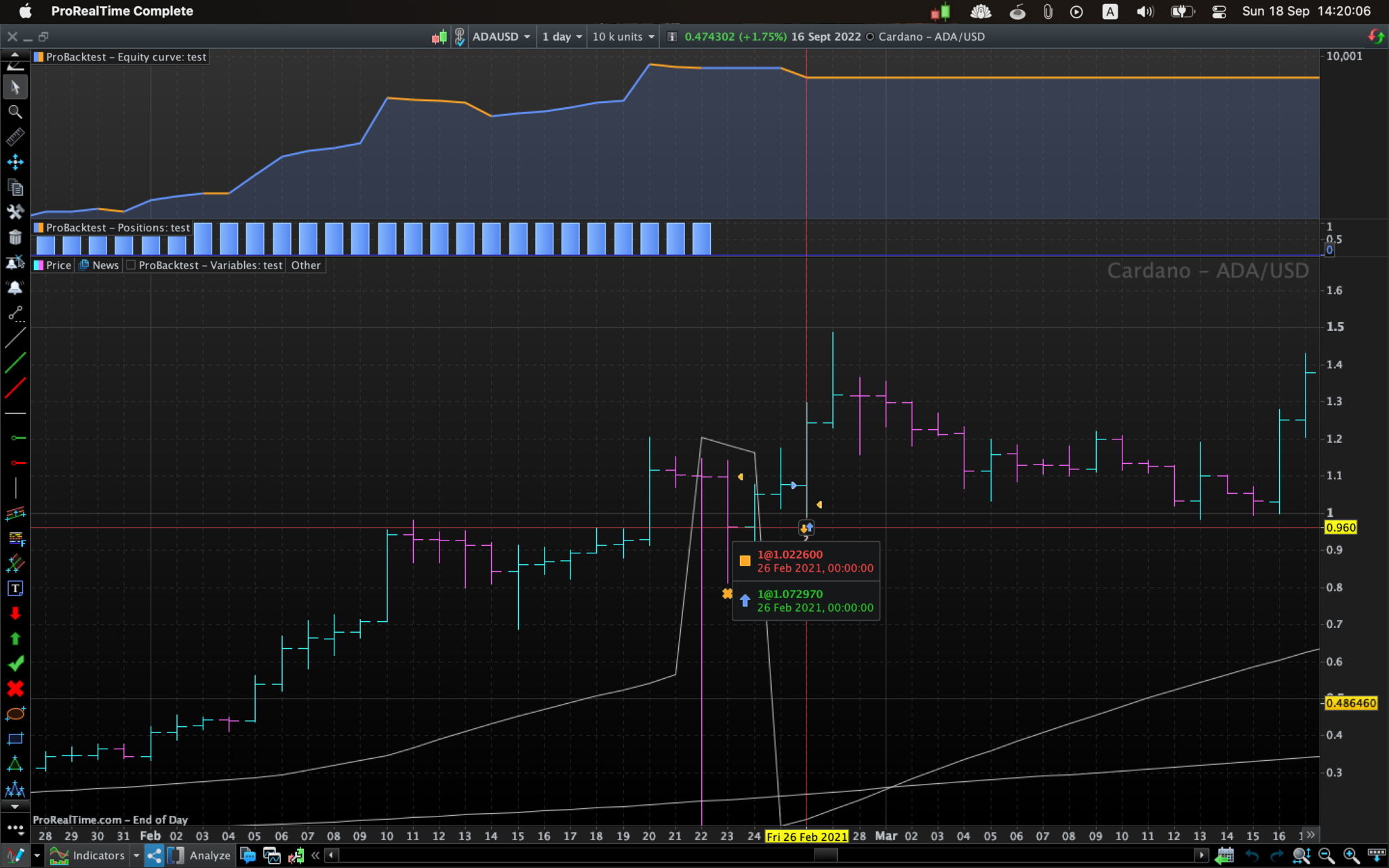
    I use the non broker version of PRT.And I use Parabolic SAR as my stop loss level. However on ADAUSD 26 Feb 2021 using setting SAR[0.02,0.001,0.1] (as shown in the screenshot) it doesn’t set the stop loss as I intended. It uses the stop loss from last order. Is it a bug or it’s the problem of my code. Thank you I made a simplified version of my code as attached: C1 = SAR[0.02,0.001,0.1] C2 = average[200](close) // Conditions to enter long positions IF NOT LongOnMarket AND close crosses over C1 and close > c2 THEN Risk = abs(C1-Close) BUY 1 CONTRACTS AT MARKET set stop loss Risk ENDIF // Conditions to exit long positions If LongOnMarket AND close crosses under C1 THEN SELL AT MARKET ENDIF // Conditions to enter short positions IF NOT ShortOnMarket AND close crosses under C1 and close < c2 THEN Risk = abs(C1-Close) SELLSHORT 1 CONTRACTS AT MARKET set stop loss Risk ENDIF // Conditions to exit short positions IF ShortOnMarket AND close crosses over C1 THEN EXITSHORT AT MARKET ENDIF // Stops and targets : Enter your protection stops and profit targets here graphonprice C1 graphonprice C2
    Screenshot-2022-09-18-at-14.20.06.png Screenshot-2022-09-18-at-14.20.06.png test.itf
    #200955 quote
    robertogozzirobertogozzi
    Moderator
    Legend
    When writing your Stop Loss in the line you marked “stops and profit targets here”, that value will always overwrite any previous value, as code is read sequentially. Moreover, it is not subject to any condition, so it would overwrite any other value no matter where you would write it. You have already set your SL when entering a position, there’s no need to write those additional lines.
    #200956 quote
    JiackyJiacky
    Participant
    Junior
    Thanks for your reply. I used the new template from PRT to create a simply demonstration. As you can see, it’s in the comment section. After I delete this line the problem persists. And it does not happen anywhere except on ADAUSD 26 Feb 2021 Candle as far as I saw. I was trying to troubleshoot the whole morning until I made this simplified version. There is no error that I can find.
    #200957 quote
    JSJS
    Participant
    Master

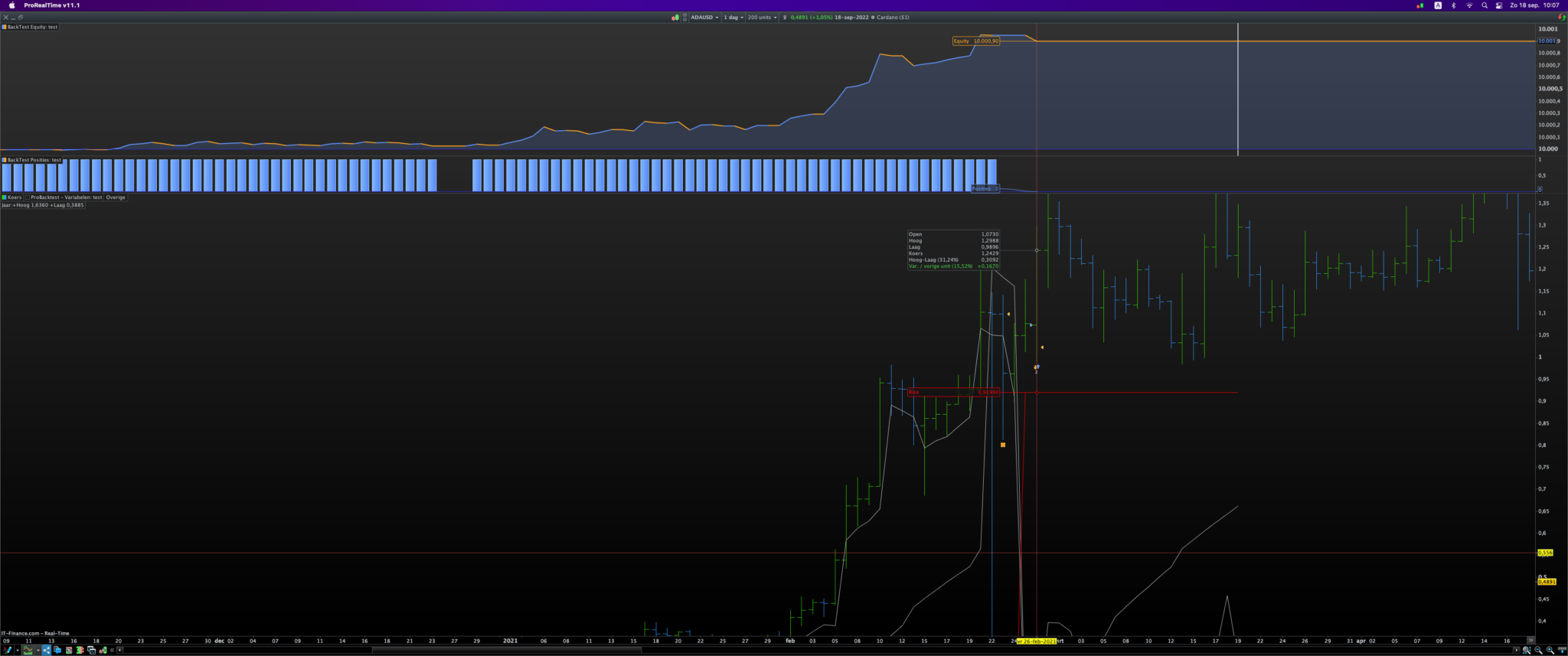
    I don’t think the calculation of your Stop Loss is right:

    If you look at Thursday, February 25, 2021, the SAR has had a huge dip to a value of 0.156. On this Thursday your conditions are true to buy and your stop loss is calculated:

    Abs(C1 – Close) = Abs(0.15600 – 1.0759) = 0.9194

    So you now have an insanely large Stop Loss that is 0.9194 below your purchase price (Open). So your “Risk” is extremely high here.

    It is true that in the last trade on February 26th the Stop Loss of the previous order was used but I don’t see why that happens, it must be something in your code because this happens in a BackTest and not live…

    #200960 quote
    JiackyJiacky
    Participant
    Junior
    Thanks for spending your time. The calculation should be right. However the strategy maybe isn’t. I can’t see why it happens. It bothers me knowing that there’s a problem in my backtesting. Guess I have to use another strategy then…
    #200961 quote
    JSJS
    Participant
    Master

    I don’t think your calculation of your Stop Loss is good… 🙂

    I think your calculated “Risk” is placed below your purchase price so here:

    SL = Open – Risk = 1,0730 – 0,9194
    Schermafbeelding-2022-09-18-om-10.07.24.png Schermafbeelding-2022-09-18-om-10.07.24.png
    #200963 quote
    JiackyJiacky
    Participant
    Junior
    Well, that’s the basis of my strategy. I was planning to set the stop loss where the SAR is when entering a trade. And use SAR forward as a trailing stop. It works fine under most conditions. Only in that extreme case, it f.ed up. I can see it’s not a good strategy based on that scenario. I am now thinking using ATR as my risk. But still curious why it doesn’t set up the stop loss correctly.
    #201034 quote
    NicolasNicolas
    Keymaster
    Legend
    Place the stoploss and SAR that will follow its value:
    set stop price SAR[0.02,0.001,0.1]
    Jiacky thanked this post
Viewing 8 posts - 1 through 8 (of 8 total)
  • You must be logged in to reply to this topic.

ProRealAI ProRealAI New

Stuck on this ProBuilder code?

Describe what this topic is trying to build, in plain English, and ProRealAI writes the ProRealTime™ indicator, screener or system for you.

Available in 7 languages
Try ProRealAI

Problem with stop loss


ProOrder: Automated Strategies & Backtesting

New Reply
Author
author-avatar
Jiacky @jiacky Participant
Summary

This topic contains 7 replies,
has 4 voices, and was last updated by NicolasNicolas

4 years ago.

Topic Details
Forum: ProOrder: Automated Strategies & Backtesting
Language: English
Started: 09/18/2022
Status: Active
Attachments: 3 files
ProRealCode ProRealCode
Loading...