Problem with minstop

Viewing 14 posts - 1 through 14 (of 14 total)

  • Author
    Posts
  • #177595 quote
    SkynetBotsPRT
    Participant
    Average

    A bot is disconnected because It tries to send an order to place stop below the Minimum stop required by the broker.

    A Solution?

    #177596 quote
    Nicolas
    Keymaster
    Master

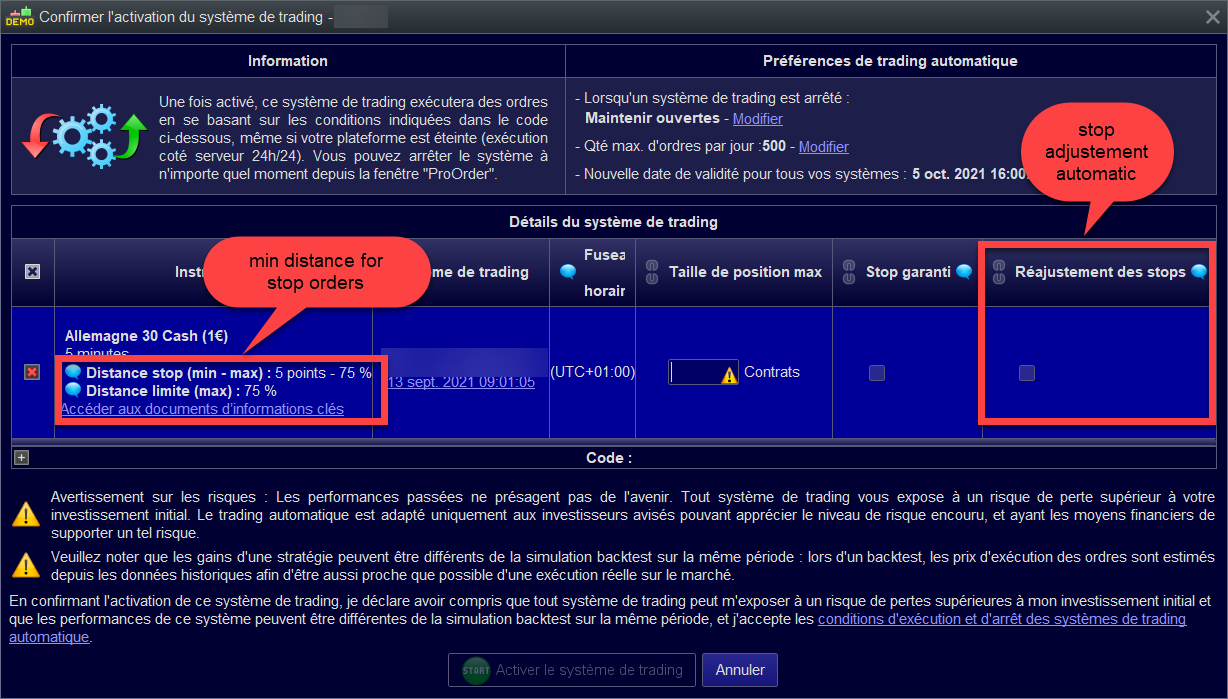
    Find what is the minimum stop distance allowed by the broker for that particular instrument and adapt your code or use the stop adjustement function available when you launch a ProOrder code (checkbox). See below attached picture, sorry in French.

    minimum-stop-distance-prorealtime.png minimum-stop-distance-prorealtime.png
    #177603 quote
    SkynetBotsPRT
    Participant
    Average

    Thanks Nicolás.

    #177616 quote
    SkynetBotsPRT
    Participant
    Average

    And how to include on the Code?

    #177680 quote
    JS
    Participant
    Senior

    Once MinStopDist = 10

    If StopDist < MinStopDist then

    StopDist = MinStopDist

    EndIf

    Set Stop Loss StopDist

    #177690 quote
    robertogozzi
    Moderator
    Master

    Once MinStopDist = 10

    If StopDist < MinStopDist then
    StopDist = MinStopDist
    EndIf
    Set Stop Loss StopDist

    It can also be written this way:

    Once MinStopDist = 10
    StopDist = max(MinStopDist,StopDist)
    Set Stop Loss StopDist
    #177712 quote
    JS
    Participant
    Senior

    Yes, there are many different ways to code it…

    #177721 quote
    Nicolas
    Keymaster
    Master

    Ask Terminator if you dont know 😆

    JS thanked this post
    #177739 quote
    GraHal
    Participant
    Master

    below the Minimum stop required by the broker.

    I’m sure your SL’s are > 10 anyway, so what is probably happening is that your code is trying to place a SL during periods of high volatility? This is when IG increases min stop distances to 30, 50, 100 or even many 100’s at times … daft though it sounds.

    To guarantee never to be rejected then we would need to use a value for SL that is > the maximum value IG has ever set the minimum  distance.  So being rejected at times is something we have to live with.

    I have ticked the ‘Guaranteed Stop’ AND ‘Readjust Stop’ boxes when starting my Algos and they still get rejected!

    #178487 quote
    SkynetBotsPRT
    Participant
    Average
    if longonmarket AND  c2 and c6 and close<positionprice then
    sell at market
    endif
    If shortonmarket and c1 and c5 and close>positionprice then
    exitshort at market
    endif
    
    I need what this instruction close the operation, but only if price save the minstoploss of broker
    #178489 quote
    robertogozzi
    Moderator
    Master

    I can’t understand what you mean by

    I need what this instruction close the operation, but only if price save the minstoploss of broker”.

    Can you explain better?

    #178493 quote
    SkynetBotsPRT
    Participant
    Average

    The bot launches an order to close the operation, but when the price is below the minimum stop required by the broker, the bot is deactivated.

    That is the code to close the operation, I need the instruction to save the minimum stop required by the broker.

    #178497 quote
    SkynetBotsPRT
    Participant
    Average

    The bot has its own stop loss.

    These orders are separate from that stop loss.

    If the operation goes wrong, the operation can be closed with those orders, but the price has to be saving the minimum stop required by the broker, depending on the index it can be 5 pips, 8 pips, 10 pips …

    #178552 quote
    robertogozzi
    Moderator
    Master

    To exit using a pending order you have to:

    • set a DISTANCE to be taken into account when placing a pending order
    • choose among STOP, LIMIT and AT MARKET orders according to the position of the current price compared to the exit price (stop loss in this case).

    There you go:

    ONCE Distance = 6 * PipSize    //Distance required by the broker (pips)
    //
    // StopLoss must have been defined elsewhere in your code (and cleared when not OnMarket)
    //
    IF StopLoss > 0 THEN
       IF LongOnMarket THEN                        //LONG  trades
          IF (close + Distance) > StopLoss THEN
             SELL AT StopLoss STOP                      //exit at a worse price than the current one
          ELSIF (close - Distance) < StopLoss THEN
             SELL AT StopLoss LIMIT                     //exit at a better price than the current one
          ELSE
             SELL AT Market                             //exit at market if not within the DISTANCE (you may comment out his line not to exit at market, thus waiting for the next bar to close)
          ENDIF
       ELSIF ShortOnmarket THEN                    //SHORT trades
          IF (close + Distance) < StopLoss THEN
             EXITSHORT AT StopLoss STOP                 //exit at a worse price than the current one
          ELSIF (close - Distance) > StopLoss THEN
             EXITSHORT AT StopLoss LIMIT                //exit at a better price than the current one
          ELSE
             EXITSHORT AT Market                        //exit at market if not within the DISTANCE (you may comment out his line not to exit at market, thus waiting for the next bar to close)
          ENDIF
       ENDIF
    ENDIF
Viewing 14 posts - 1 through 14 (of 14 total)
  • You must be logged in to reply to this topic.

Problem with minstop


ProOrder: Automated Strategies & Backtesting

New Reply
Author
Summary

This topic contains 13 replies,
has 5 voices, and was last updated by robertogozzi
4 years, 4 months ago.

Topic Details
Forum: ProOrder: Automated Strategies & Backtesting
Language: English
Started: 09/15/2021
Status: Active
Attachments: 1 files
Logo Logo
Loading...