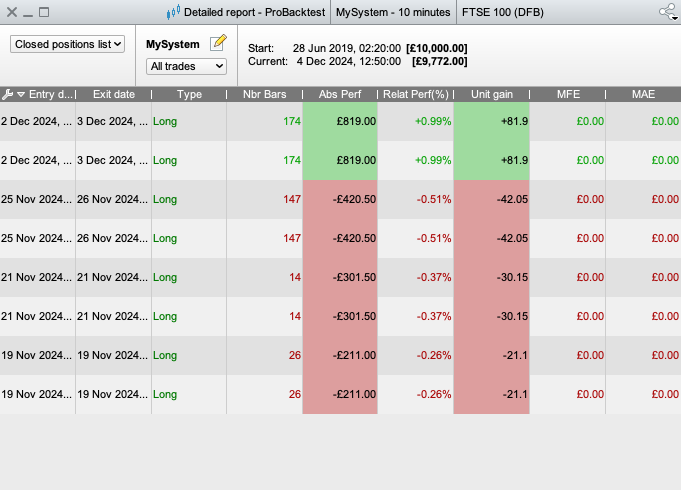
Hello everyone, I have a simple problem and I hope someone here may be able to help me. When I write out a list of simple entry and exit commands PRT’s ‘detailed report’ within its backtest does not like 2 trades being held simultaneously. The overall loss is correct in this example, its just when two trades are on at the same time, you can see it duplicates entry dates and it simply halves the overall realised figure between the simultaneous trades within the closed positions list.
For example the trades listed 2 dec are actually placed at different times, so the realised figures should be different, prt has simply totalled it up and halved it. Another example dated 25.11.24 shows two trades which list different losses as there entrys are different, however again prt backtest lumps them together as they were on at the same time. The other examples are a loss and a win, but im sure you get the idea. It also simply duplicates dates I note even if they were placed on different dates. I hope someone can help.
Heres the code;
// Stop loss in points

STOPLOSS = 1000


// Initialize execution flags for each trade

IF barindex = 0 THEN

tradeExecuted1 = 0

tradeExecuted2 = 0

tradeExecuted3 = 0

tradeExecuted4 = 0

tradeExecuted5 = 0

tradeExecuted6 = 0

tradeExecuted7 = 0

tradeExecuted8 = 0

ENDIF


// Trade 1: 02.12.24 - 10:00 exit at 03.12.24 - 15:00

IF (date = 20241202 AND time >= 100000 AND time < 100100 AND tradeExecuted1 = 0) THEN

BUY 10 CONTRACT AT MARKET

SET STOP LOSS STOPLOSS

tradeExecuted1 = 1

ENDIF


IF (ONMARKET AND date = 20241203 AND time >= 150000 AND tradeExecuted1 = 1) THEN

SELL AT MARKET

ENDIF


// Trade 2: 02.12.24 - 15:00 exit at 03.12.24 - 15:00

IF (date = 20241202 AND time >= 150000 AND time < 150100 AND tradeExecuted2 = 0) THEN

BUY 10 CONTRACT AT MARKET

SET STOP LOSS STOPLOSS

tradeExecuted2 = 1

ENDIF


IF (ONMARKET AND date = 20241203 AND time >= 150000 AND tradeExecuted2 = 1) THEN

SELL AT MARKET

ENDIF


// Trade 3: 25.11.24 - 08:30 exit at 26.11.24 - 09:00

IF (date = 20241125 AND time >= 083000 AND time < 083100 AND tradeExecuted3 = 0) THEN

BUY 10 CONTRACT AT MARKET

SET STOP LOSS STOPLOSS

tradeExecuted3 = 1

ENDIF


IF (ONMARKET AND date = 20241126 AND time >= 090000 AND tradeExecuted3 = 1) THEN

SELL AT MARKET

ENDIF


// Trade 4: 25.11.24 - 09:30 exit at 26.11.24 - 09:00

IF (date = 20241125 AND time >= 093000 AND time < 093100 AND tradeExecuted4 = 0) THEN

BUY 10 CONTRACT AT MARKET

SET STOP LOSS STOPLOSS

tradeExecuted4 = 1

ENDIF


IF (ONMARKET AND date = 20241126 AND time >= 090000 AND tradeExecuted4 = 1) THEN

SELL AT MARKET

ENDIF


// Trade 5: 21.11.24 - 07:00 exit at 21.11.24 - 15:50

IF (date = 20241121 AND time >= 070000 AND time < 070100 AND tradeExecuted5 = 0) THEN

BUY 10 CONTRACT AT MARKET

SET STOP LOSS STOPLOSS

tradeExecuted5 = 1

ENDIF


IF (ONMARKET AND date = 20241121 AND time >= 155000 AND tradeExecuted5 = 1) THEN

SELL AT MARKET

ENDIF


// Trade 6: 21.11.24 - 08:10 exit at 21.11.24 - 09:20

IF (date = 20241121 AND time >= 081000 AND time < 081100 AND tradeExecuted6 = 0) THEN

BUY 10 CONTRACT AT MARKET

SET STOP LOSS STOPLOSS

tradeExecuted6 = 1

ENDIF


IF (ONMARKET AND date = 20241121 AND time >= 092000 AND tradeExecuted6 = 1) THEN

SELL AT MARKET

ENDIF


// Trade 7: 19.11.24 - 09:40 exit at 19.11.24 - 14:00

IF (date = 20241119 AND time >= 094000 AND time < 094100 AND tradeExecuted7 = 0) THEN

BUY 10 CONTRACT AT MARKET

SET STOP LOSS STOPLOSS

tradeExecuted7 = 1

ENDIF


IF (ONMARKET AND date = 20241119 AND time >= 140000 AND tradeExecuted7 = 1) THEN

SELL AT MARKET

ENDIF


// Trade 8: 19.11.24 - 11:30 exit at 20.11.24 - 07:30

IF (date = 20241119 AND time >= 113000 AND time < 113100 AND tradeExecuted8 = 0) THEN

BUY 10 CONTRACT AT MARKET

SET STOP LOSS STOPLOSS

tradeExecuted8 = 1

ENDIF


IF (ONMARKET AND date = 20241120 AND time >= 073000 AND tradeExecuted8 = 1) THEN

SELL AT MARKET

ENDIF
Hi there Bill,
This will be the same issue as this thread talks about (or runs into after a couple of posts) : https://www.prorealcode.com/topic/no-or-incorrect-display-of-drawdown-in-v12/
People still report this once in a while, and now you. So this is apparently still not solved.
After reading into that thread, it would be good if you send it as a Technical Report (via Help in the main menu), so that the developers have more data points.
Best regards,
Peter
Thankyou for replying so promtly Peter that is great and appreciated. Ive looked through it’s quite a long chain, I cant seem to find anything specific on this other than overall annoyance at tech issues with the backtest feature. Ill take it as this is a technical issue that is unresovled at PRT and theres nothing I can do to amend my code? If you can confirm that that would be great. I will take your advice and forward this issue to them. It seems strange that somethign so fundamentel is overlooked by them, is the backtest particularly new or something.
What I suggested myself in that thread, is that you can put an end date/time in the backtest so you’d force the Detailed Report not to do a final recalculation for the current moment (which would incur for the double trades, as I see it). That end date/time can just be from an hour or so ago. For me this works, I hope for you too.
BillTarrej if you close the Detailed Report and open it again … do the figures then show as correct?
Thanks for reply, no unfortunately same effect if I open close and run script again. Lists as duplicate trades, divides final figures of symaltaneuos trades.
Thankyou for the response, I gave this a try same effect. Its not happy with this either.
Check your Orders List also, see attached …
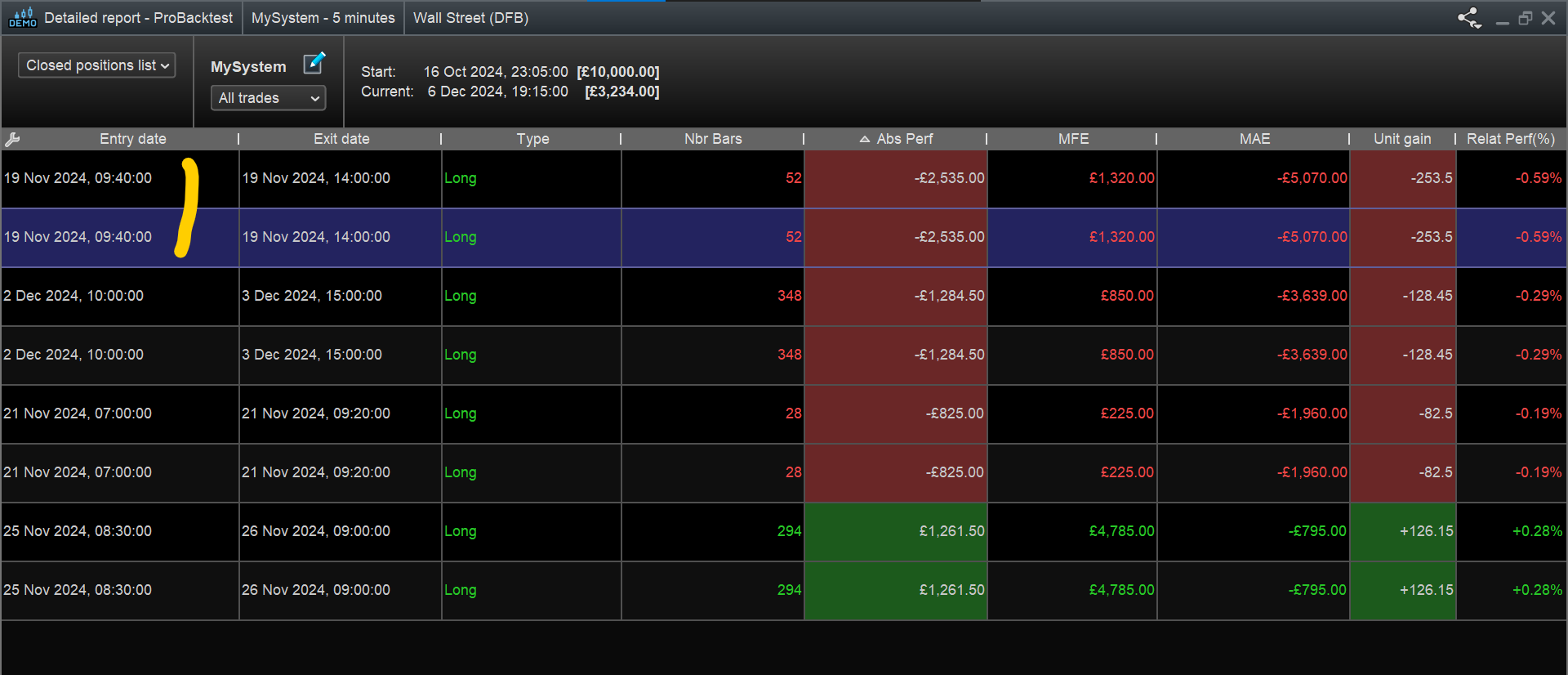
- Image1 Closed Positions List – yellow squiggle looks like duplicates for 19 Nov 24?
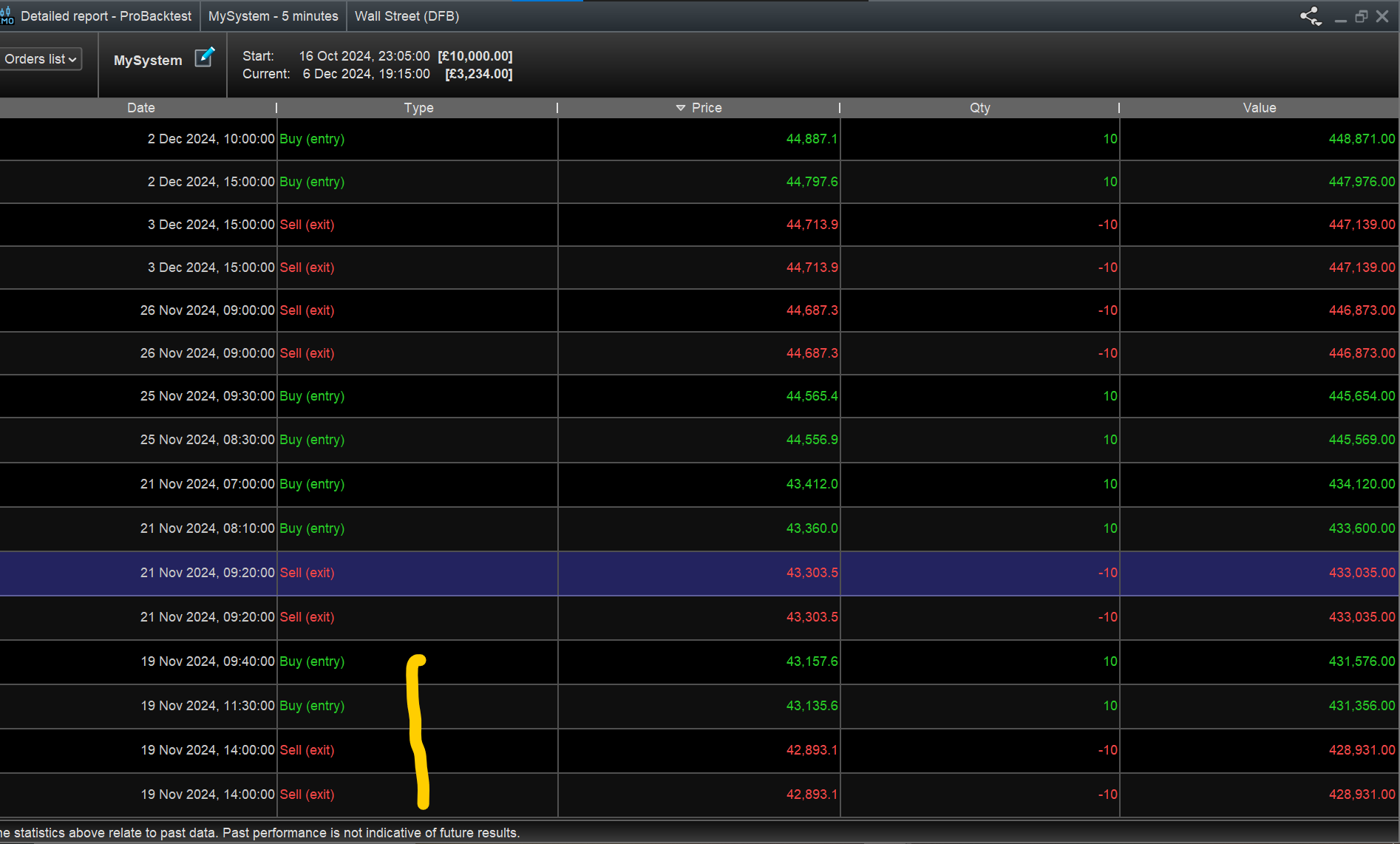
- Image2 Orders List – yellow squiggle shows 2 separate buys at different times for 19 Nov 24.
Does above help?
 JS
JSParticipant
Veteran
Hi,
Are you looking for this kind of report?
BillTarrej problem is that …
- The Orders List shows 2 entries at 2 different times.
- Closed Positions List shows the above 2 entries both at the same identical entry time (also both trades exit at the same time, so they look like duplicated trades in the Closed Position List)
You can see above in the screenshots I posted as I ran BillTarrej code on my Platform.
JSParticipant
Veteran
That’s correct, I noticed that too, but isn’t that solved in ‘my’ reports…?
It appears so, but what does Bill need to do to achieve same as you show?
JSParticipant
Veteran
“The ‘problem’ is that Bill opens an order while the other order is still active, resulting in cumulative orders. You know how PRT handles this: the purchase prices are averaged, and when this cumulative position is closed, the profits are evenly distributed…
Technically, the report isn’t incorrect, but it differs due to the cumulative positions…
If you want to handle the orders separately, you need to use:
DefParam CumulateOrders = False”
On first impressions, this was perfect and listed the trades individually so no cumultative total, however the issue is that it doesnt allow for all symaltaneous orders to go through. Your getting the first one and then it doesnt allow for the second, etc if the first is still open. Thanks a lot for your help so far
Thanks for all your help so far JS, it would be really great if you could take a look at this again, as the issue is that it doesnt allow for all symultaneous orders to go through. Your getting the first one and then it doesnt allow for the second, etc if the first is still open