Problem accessing data of current bar

Viewing 8 posts - 1 through 8 (of 8 total)

  • Author
    Posts
  • #45743 quote
    S. Sjolander
    Participant
    Junior

    Hi,

    When defining “set stop loss x”, I can not access the data of the current bar. E.g. “range” becomes the range of the next bar and “range[1]” becomes the range of the previous bar.

    In contrary, when defining entry parameters I can access the data of the current bar.

    I am attaching the relevant code.

    //Entry parameters--------------------------------------------------------------------------------------------------------------
    MyATR=AverageTrueRange[5](close)//Average True Range
    E1=high+0.2*MyATR //Entry in units
    
    //Money, risk and position management--------------------------------------------------------------------------------------------
    Capital = 100000
    Risk = 0.01
    Equity = Capital + StrategyProfit
    Maxrisk = round(Equity*Risk)
    StopLoss=range+0.2*MyATR+MyATR//Stop loss in units relative to entry
    
    PositionSize = round((Maxrisk/StopLoss)/PointValue)*PointSize //No. of contracts of position
    
    //Stop order initialization-----------------------------------------------------------------------------------------------------
    IF MA1h and Zone and (c1 or c2 or c3) THEN
    BUY PositionSize CONTRACTS AT E1 STOP //Stop order valid 1 bar by default
    ENDIF
    
    //Stop Loss and Target----------------------------------------------------------------------------------------------------------------
    SET STOP LOSS StopLoss //Stop loss in units relative to entry


    Appreciate the feedback!

    #45757 quote
    Despair
    Blocked
    Master

    I’m not sure if I understand you correctly but PRT evaluates the code at the end of the candle. High, Close, Range and all this give you the values for the bar that just finished and not of the bar that is in the making.

    Not sure if this answered your question.

    #45764 quote
    S. Sjolander
    Participant
    Junior

    Thank you Despair for your input.

    Yes, PRT should evaluate the code at the end of the candle. As I have no problem with this for the rest of the code, I suspect that something within the “SET STOP LOSS X”- command might be causing the problems.

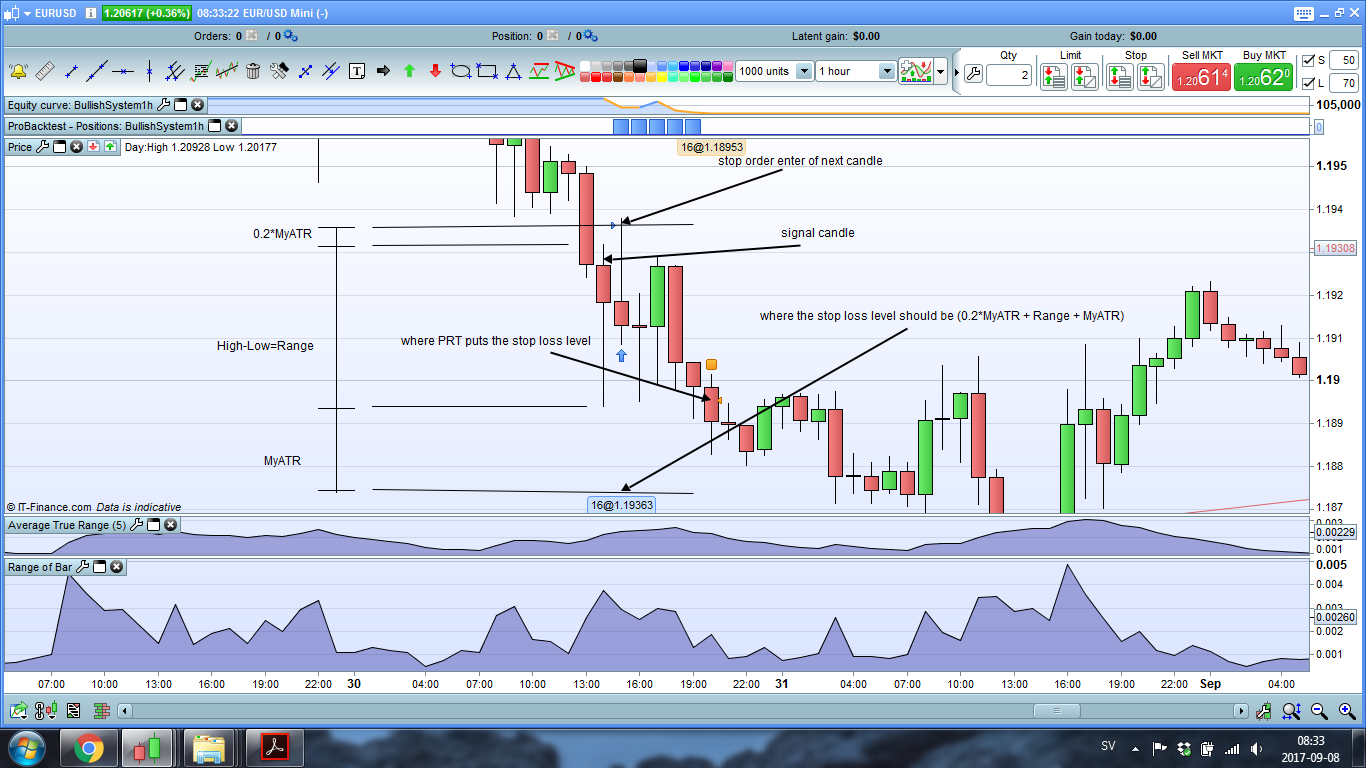
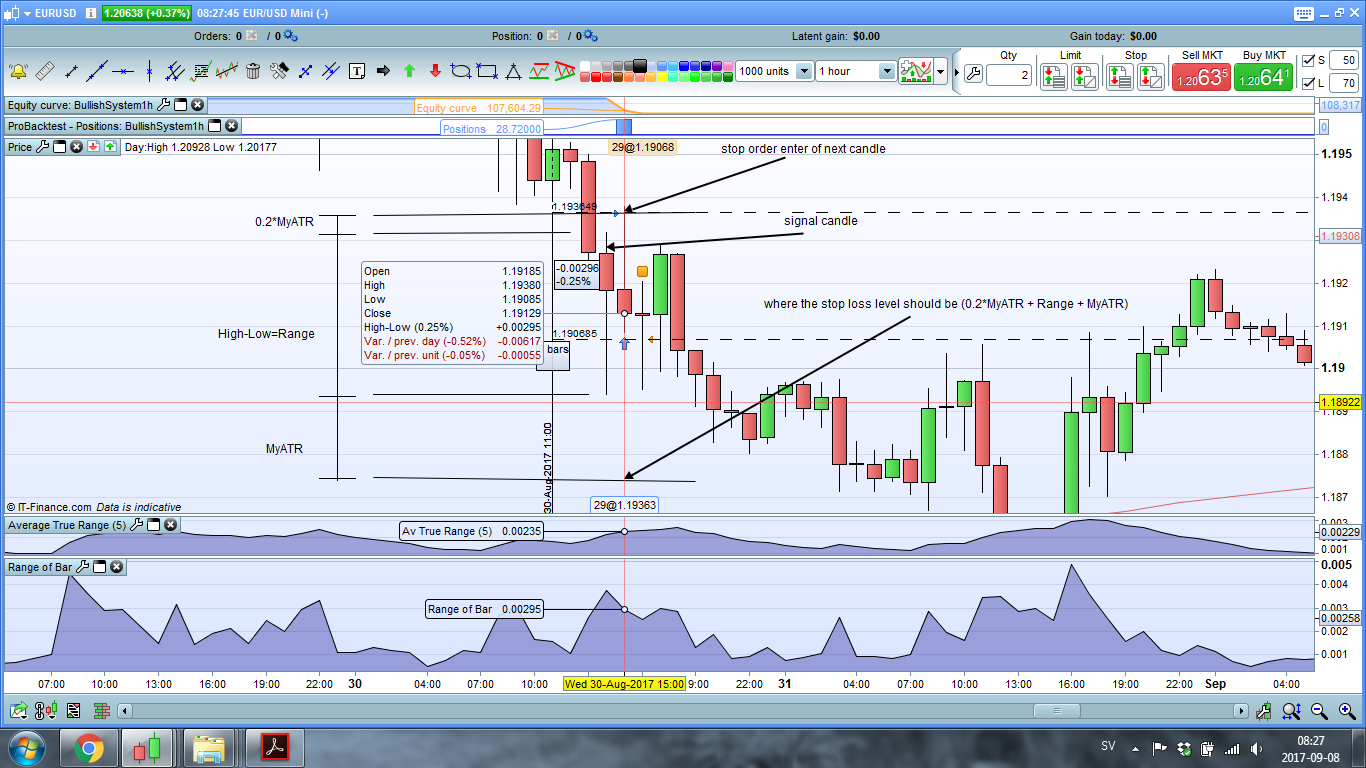
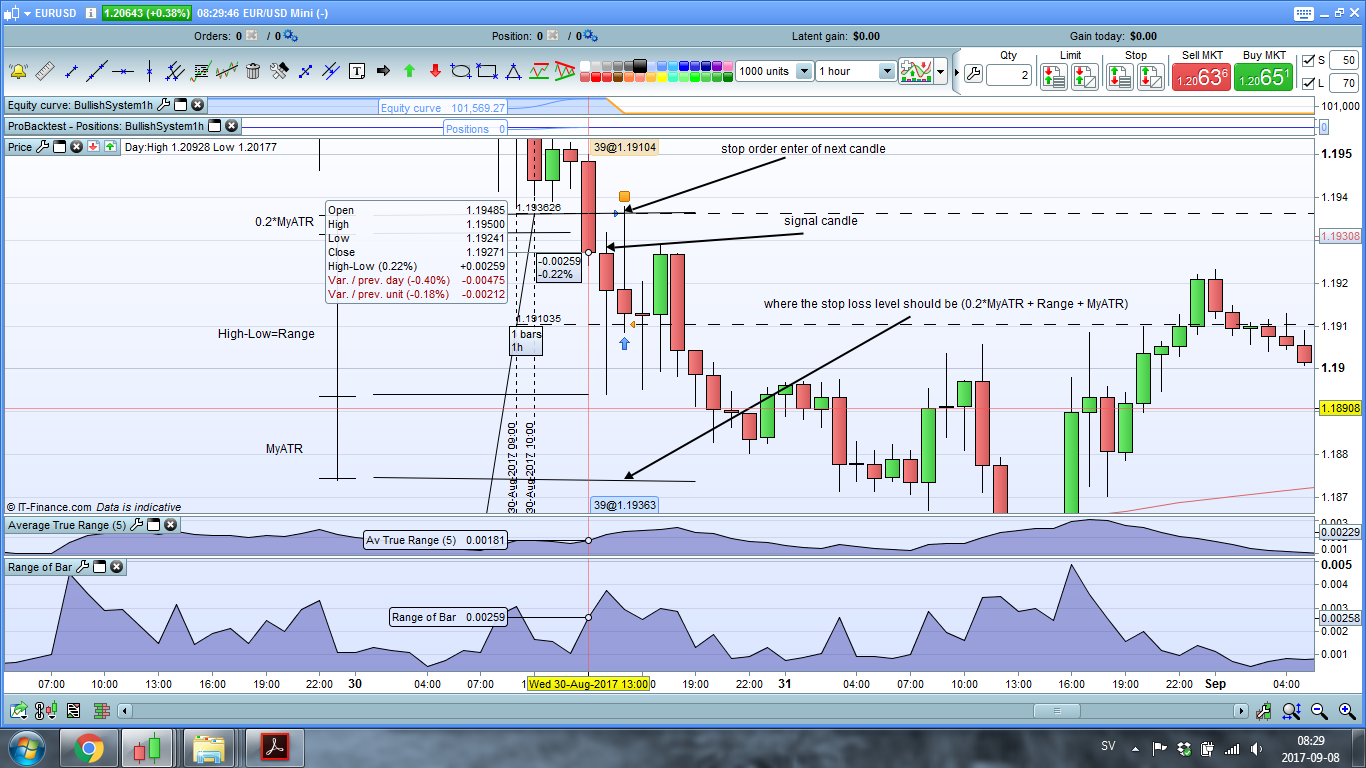
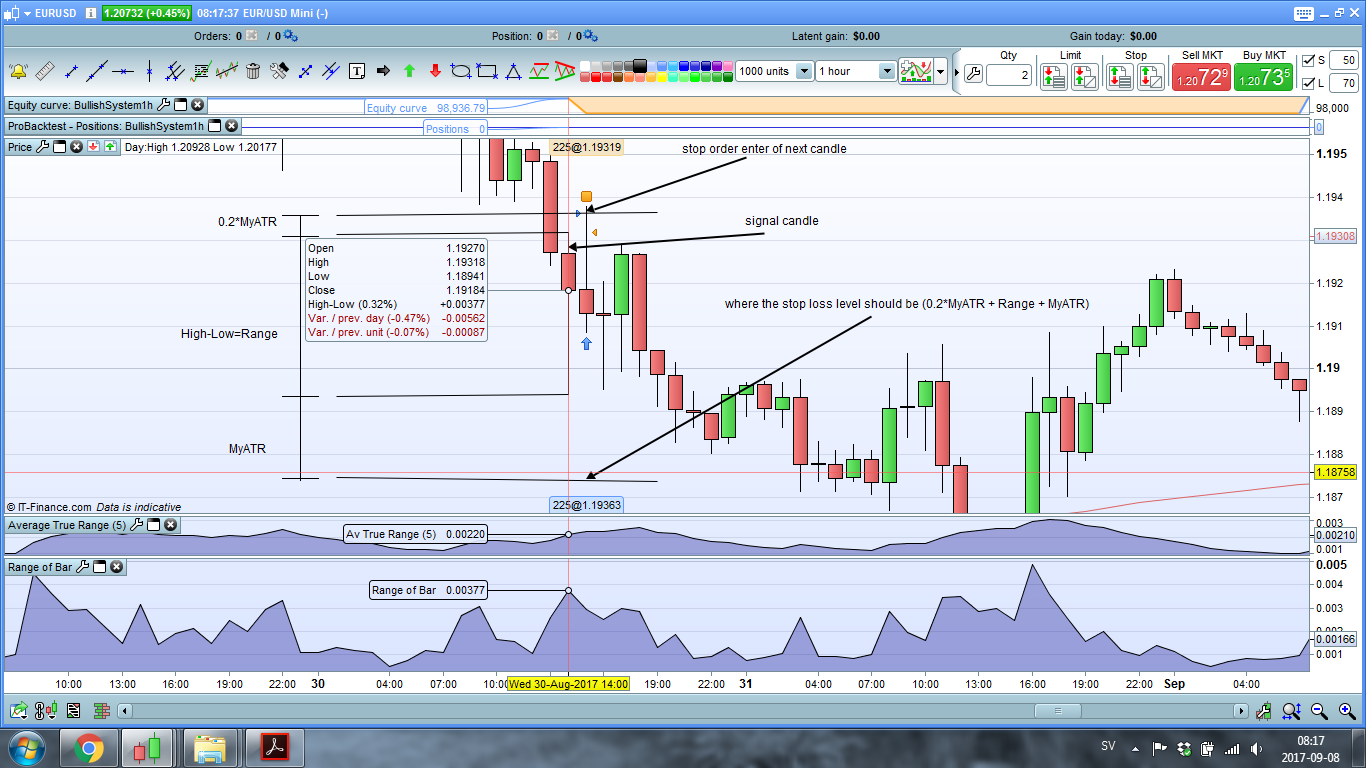
    I will add pictures describing a stop loss that has been triggered in pro backtest, consisting of:

    1. 0.2*MyATR                                        (OK. Evaluates the ATR of the signal candle, as it should do.)
    2. Range                                                   (NOT OK. Should evaluate the range of the signal candle, but evaluates the range of the next candle.)
    3. Range[1]                                              (OK. Evaluates the length of the bar previous to the signal candle bar, as it should do.)
    4. 0.2*MyATR+MyATR+Range         (NOT OK. This should give the full length of the stopp loss, evidently it does not.)

    I hope this explains the problem further.

    #45767 quote
    S. Sjolander
    Participant
    Junior

    Additional pictures.

    #45810 quote
    S. Sjolander
    Participant
    Junior

    What it all comes down to, is that I am unable to add the “range” of the signal candle to the definition of the “set stop loss x”.

    In addition, I tried to add “AverageTrueRange[1](close)” of the signal candle (which is basically the same as “range”) as the stop loss, with the same result as adding “range”. “AverageTrueRange[2](close)” has the same issue, but “AverageTrueRange[3](close)” and upwards (4, 5, 6… etc.) seems to take the data from the signal candle.

    Very strange indeed.

    #45813 quote
    Despair
    Blocked
    Master

    Try replacing your stop loss line with the following:

    set stop ploss stoploss/pipsize

    Then i have a hard time following you when you write “next candle”. Next to what?

    BTW: Your post would belong in the proorder forum and not here in pro builder. This under forum is just for indicators.

    #45816 quote
    S. Sjolander
    Participant
    Junior

    Thanks for the feedback Despair, and thanks for the headsup. I mistook pro builder for pro order, sorry about that.

    It is a bad explanation by me, though it seems it is difficult to describe the problem.

    Thanks again and I will keep the thread updated if I come up with a solution.

    #45818 quote
    S. Sjolander
    Participant
    Junior

    I solved the problem.

    When initializing the pending stop order you have to include the stop loss in the IF-loop.

    Like this:

    ————————————————————————————————
    IF MA1h and Zone and (c1 or c2 or c3) THEN

    StopLoss=0.2*MyATR+Range+MyAtr
    BUY PositionSize CONTRACTS AT E1 STOP //Stop order valid 1 bar by default
    ENDIF


    And not like this:

    ———————————————————————————————-

    IF MA1h and Zone and (c1 or c2 or c3) THEN
    BUY PositionSize CONTRACTS AT E1 STOP //Stop order valid 1 bar by default
    ENDIF

    StopLoss=0.2*MyATR+Range+MyAtr


    Otherwise PRT will not interprete the stop loss right.

Viewing 8 posts - 1 through 8 (of 8 total)
  • You must be logged in to reply to this topic.

Problem accessing data of current bar


ProBuilder: Indicators & Custom Tools

New Reply
Author
Summary

This topic contains 7 replies,
has 2 voices, and was last updated by S. Sjolander
8 years, 5 months ago.

Topic Details
Forum: ProBuilder: Indicators & Custom Tools
Language: English
Started: 09/07/2017
Status: Active
Attachments: 4 files
Logo Logo
Loading...