Probacktest – variable Window resize v11.1

Viewing 3 posts - 1 through 3 (of 3 total)

  • Author
    Posts
  • #154519 quote
    Fei_Fei_
    Participant
    Junior

    Hi,

    Everytime when i click a backtest in the trading system, the probacktest -variable windows will resize itself bigger and screw up the rest of my chart sizing.

    Is it possible to stop the re-sizing?

    Thanks!

    #156225 quote
    NicolasNicolas
    Keymaster
    Legend

    I can’t replicate this. The window is keeping the size that I have changed, for the current strategy. But if you close the strategy window (ProBacktest) and re-open it, the window size come in its default size, is it the behavior you are talking about? If yes, then there is no way to change how it behaves actually (window will resize itself to the default state).

    #156240 quote
    PeterStPeterSt
    Participant
    Master

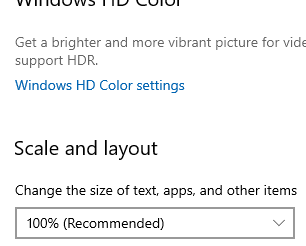
    RightClick at the Desktop – Display settings :


    [attachment file=”156241″]

    Fei_, If you don’t have this set at 100%, I think there’s a fair chance it’s that …
    ?

    image_2021-01-04_141325.png image_2021-01-04_141325.png
Viewing 3 posts - 1 through 3 (of 3 total)

  • You must be logged in to reply to this topic.

ProRealAI ProRealAI New

Stuck on this ProBuilder code?

Describe what this topic is trying to build, in plain English, and ProRealAI writes the ProRealTime™ indicator, screener or system for you.

Available in 7 languages
Try ProRealAI

Probacktest – variable Window resize v11.1


Platform Support: Charts, Data & Broker Setup

New Reply
Author
author-avatar
Fei_ @chowfei Participant
Summary

This topic contains 2 replies,
has 3 voices, and was last updated by PeterStPeterSt

5 years, 9 months ago.

Topic Details
Forum: Platform Support: Charts, Data & Broker Setup
Language: English
Started: 12/20/2020
Status: Active
Attachments: 1 files
ProRealCode ProRealCode
Loading...