Probacktest text color/cursor.

Viewing 3 posts - 1 through 3 (of 3 total)
  • Author
    Posts
  • #192478 quote
    Razor_BillRazor_Bill
    Participant
    New

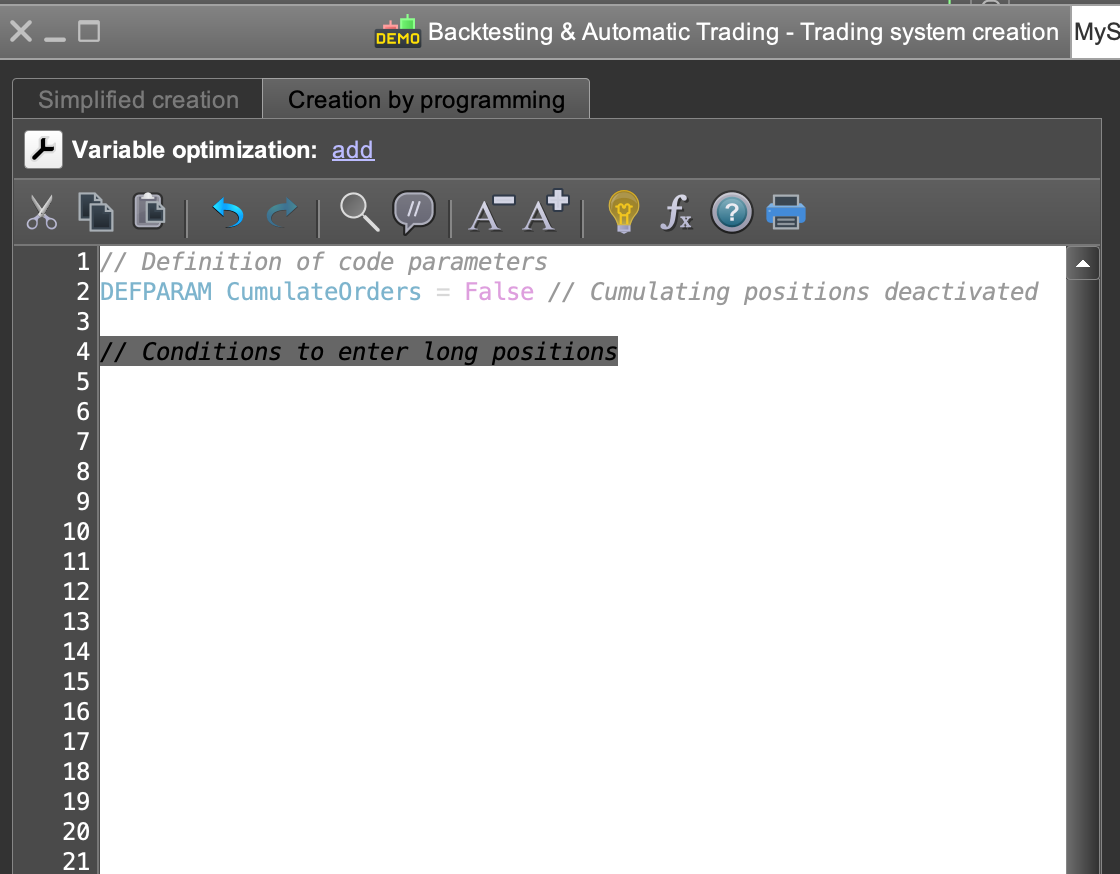
    How does one change the color of the text and the cursor in the backtesting code window?

    I have found the settings for the background, but I cannot change the text and cursor colors. As it is now, I can barely see the cursor as it is white on white.

    I’m running a dark theme, which might have something to do with it.

    Screenshot-2022-05-01-at-13.08.35.png Screenshot-2022-05-01-at-13.08.35.png
    #192480 quote
    GraHalGraHal
    Participant
    Master

    I find the ‘native black theme’ works best for me.

    It seems many others think the same because most screenshots posted on here show the black background.

    #192578 quote
    Razor_BillRazor_Bill
    Participant
    New

    Thanks, I’ll try that out.

Viewing 3 posts - 1 through 3 (of 3 total)

  • You must be logged in to reply to this topic.

ProRealAI ProRealAI New

Stuck on this ProBuilder code?

Describe what this topic is trying to build, in plain English, and ProRealAI writes the ProRealTime™ indicator, screener or system for you.

Available in 7 languages
Try ProRealAI

Probacktest text color/cursor.


Platform Support: Charts, Data & Broker Setup

New Reply
Author
author-avatar
Razor_Bill @razor_bill Participant
Summary

This topic contains 2 replies,
has 2 voices, and was last updated by Razor_BillRazor_Bill
4 years, 5 months ago.

Topic Details
Forum: Platform Support: Charts, Data & Broker Setup
Language: English
Started: 05/01/2022
Status: Active
Attachments: 1 files
ProRealCode ProRealCode
Loading...