Probacktest returns no data

Viewing 11 posts - 1 through 11 (of 11 total)

  • Author
    Posts
  • #204212 quote
    cyrillic
    Participant
    Junior

    Hi

    I am having trouble with backtest.

    The program seems to scan my submission but result is “no data”

    It’s the same with other codes like stochastic

    #204217 quote
    cyrillic
    Participant
    Junior
    DEFPARAM CumulateOrders = False
    DEFPARAM FlatBefore = 140000
    DEFPARAM FlatAfter= 210000
    //buy signal
    a=Average[50](Close)
    b=Average[50](1)
    c=a>b
     if c then
    // Detection of a bullish engulfing line
    Condition1 = Close[1] < Open[1]
    Condition2 = Open < Close[1]
    Condition3 = Close > Open[1]
    Condition4 = Open < Close
    
    // Detection of a bearish engulfing line
    Condition5 = Close[1] > Open[1]
    Condition6 = Close < Open
    Condition7 = Open > Close[1]
    Condition8 = Close < Open[1]
    IF Condition1 AND Condition2 AND Condition3 AND Condition4 THEN
    buy at market
    set target $profit 55
    set stop ploss 5
    endif
    endif
    
    #204219 quote
    GraHal
    Participant
    Master

    Try Line 6 as …

    b=Average[50](Close[1])

    What Instrument and timeframe and I’ll try it on my Platform.

    cyrillic thanked this post
    #204221 quote
    GraHal
    Participant
    Master

    result is “no data”

    I tried on DJI 1 min TF and I get 72 trades and equity curve etc.

    What do you mean by …’no data’

    cyrillic thanked this post
    #204231 quote
    cyrillic
    Participant
    Junior

    Now I get arrows on the chart but the statistics of closed trades all read zero
    My chart is the Nasdaq 100 1 min and 2 mins
    I am interested in the MACD also but as soon as MACDline appears a warning is flagged up….(line 2 )

    /// Calculation of the MACD line
    MACDLine = ExponentialAverage[12](Close) – ExponentialAverage[26](Close)

    // buy condition
    If MACDline crosses under MACDSignalLine then
    Buy at market
    Endif/ Calculation of the MACD line
    MACDLine = ExponentialAverage[12](Close) – ExponentialAverage[26](Close)

    I have to change the MACD line…
    Would it be possible to change it to a MACDSignalLine to b then
    A = ExponentialAverage[12](Close) – ExponentialAverage[26](Close)

    b = ExponentialAverage[9](a)

    // buy condition
    If a crosses under b then
    Buy at market
    Endif
    SET STOP %LOSS 10
    //sell condition
    if a crosses over b then
    sell at market

    #204234 quote
    GraHal
    Participant
    Master

    statistics of closed trades all read zero My chart is the Nasdaq 100 1 min and 2 mins

    Try your code on DJI 1 min TF with SL at 80 and TP at 80 (line 22 and 23 on your original code on your 2nd post above) … tell us what you get?

    cyrillic thanked this post
    #204255 quote
    cyrillic
    Participant
    Junior

    Have tried the DJI 1 min tp 80 and sl 80 with same results, Dashboard has activity but detailed report all rows zero or n/a
    One thing, I had 2 alerts at 1147 and 1200 , one stoploss and one profit close.
    80 profit in 1 min ??

    #204264 quote
    GraHal
    Participant
    Master

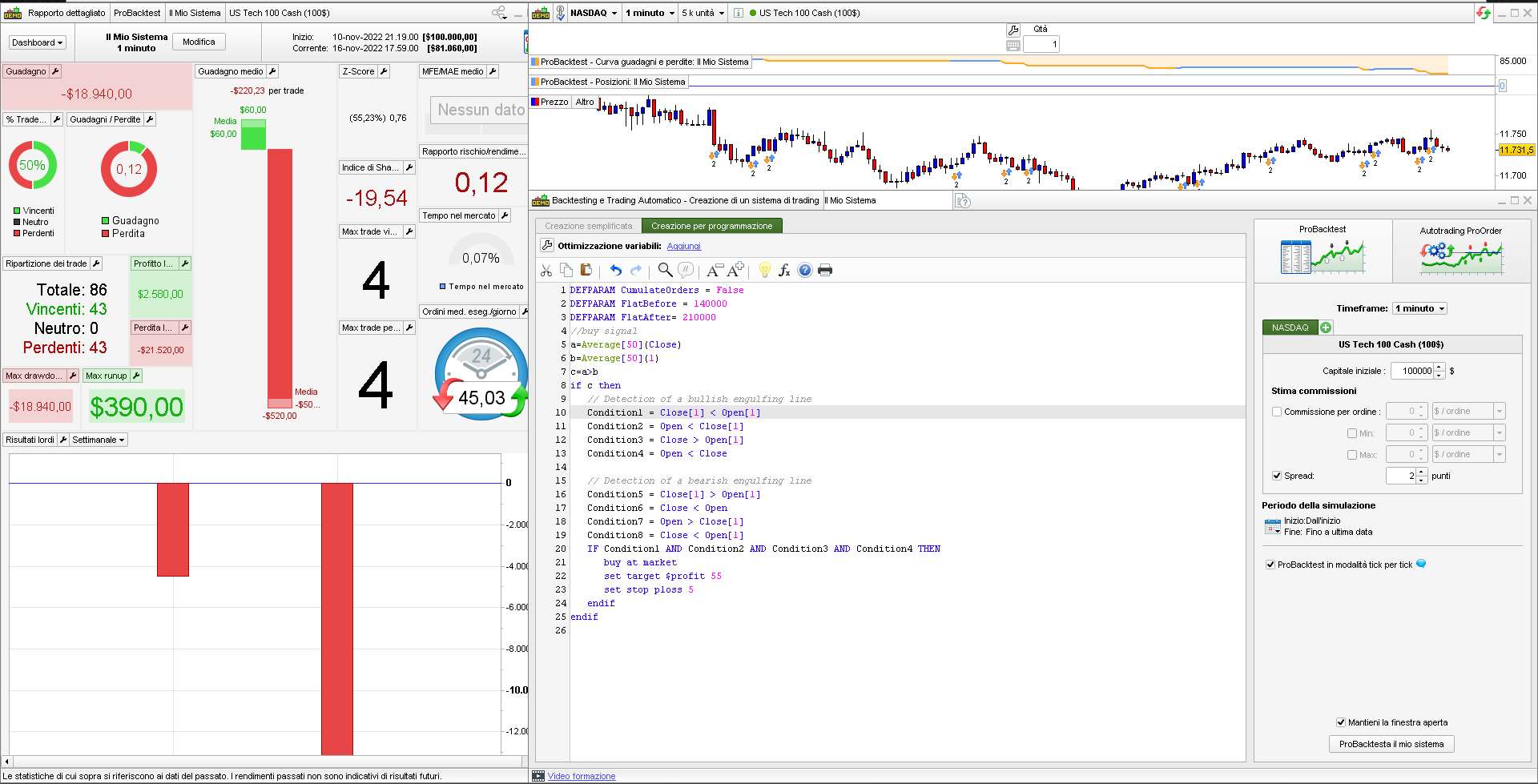
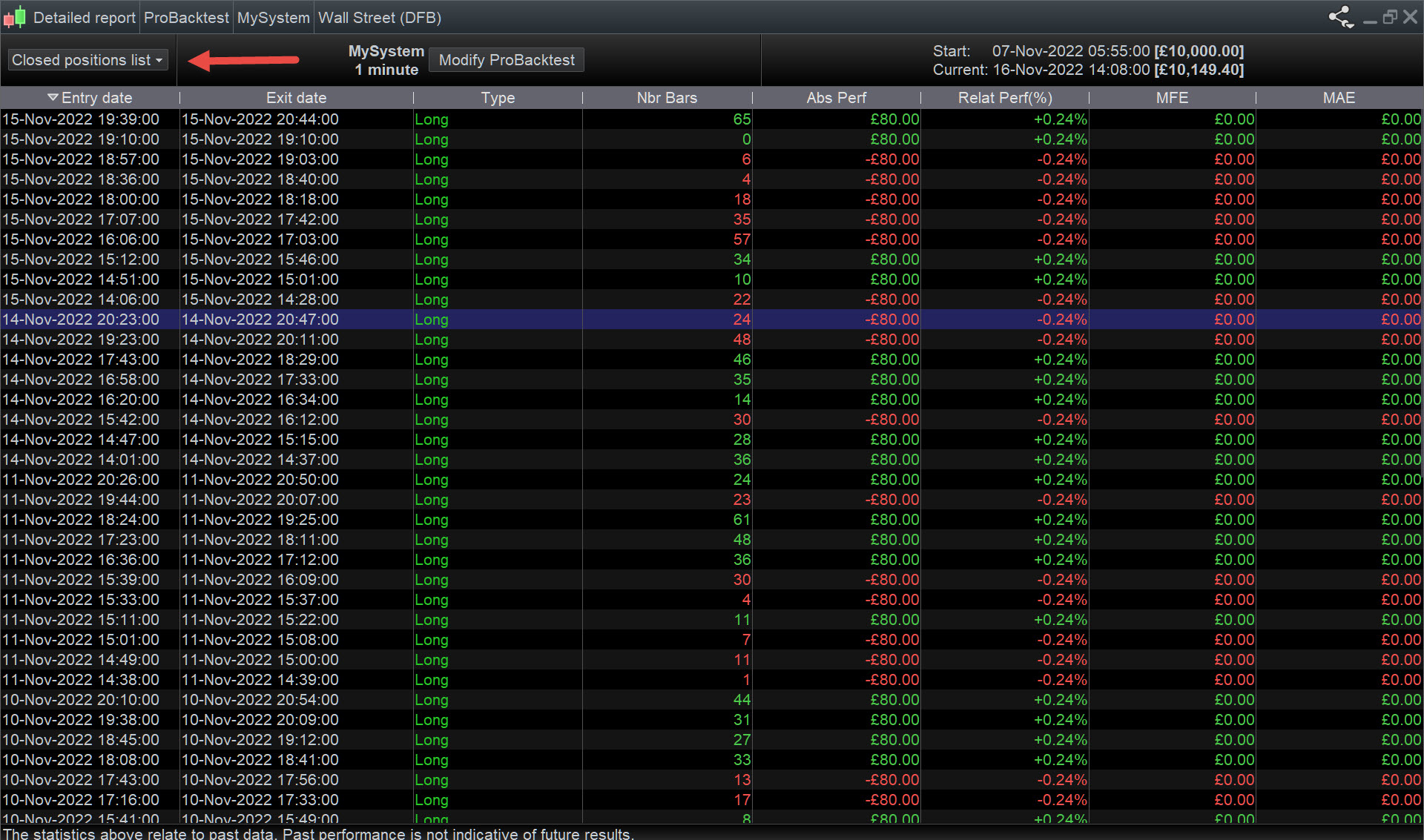
    Screenshots help loads to understand what you are referring to?

    See attached what I get.  Please post screenshot of same screen that you get?

    cyrillic thanked this post
    Cyrrylic.jpg Cyrrylic.jpg
    #204279 quote
    robertogozzi
    Moderator
    Master

    As you can see from the attached pic, your first code entered quite a lot of tradesover 5K units of 1-minute TF on Nasdaq 100.

    Try checking the number of units used, capital and spread…I can’t figure out why!

    cyrillic thanked this post
    x-5.jpg x-5.jpg
    #204282 quote
    GraHal
    Participant
    Master

    Cyrillic has a Stop Loss of 5 points so positions will be in, out, in, out in short time.

    cyrillic thanked this post
    #204658 quote
    cyrillic
    Participant
    Junior

    Hi

    I have found the answer to this problem.

    The “Launch program” brings up the latest version V11 which will not produce statistics.

    Trying the previous version, V10.3 returns complete stats and overview.

    I attempted a simple MACD bullish crossover but the backtest panel flagged the first “MACD” so I had to change it.

    Is this a valid coding ?

    It backtests but some of the flags are not the same as the chart I am observing.

    Amended MACD

    a = ExponentialAverage[12](Close) – ExponentialAverage[26](Close)

    b = ExponentialAverage[9](a)
    // buy condition
    If a crosses under b then
    Buy at market
    Endif
    SET STOP $LOSS 10

Viewing 11 posts - 1 through 11 (of 11 total)
  • You must be logged in to reply to this topic.

Probacktest returns no data


ProOrder: Automated Strategies & Backtesting

New Reply
Author
author-avatar
cyrillic @cyrillic Participant
Summary

This topic contains 10 replies,
has 3 voices, and was last updated by cyrillic

3 years, 3 months ago.

Topic Details
Forum: ProOrder: Automated Strategies & Backtesting
Language: English
Started: 11/15/2022
Status: Active
Attachments: 2 files
Logo Logo
Loading...