


probacktest issue: results on optimize report does not match detailed report

Forums ProRealTime English forum ProOrder support probacktest issue: results on optimize report does not match detailed report

Viewing 6 posts - 1 through 6 (of 6 total)

  • #118542

    Hi,

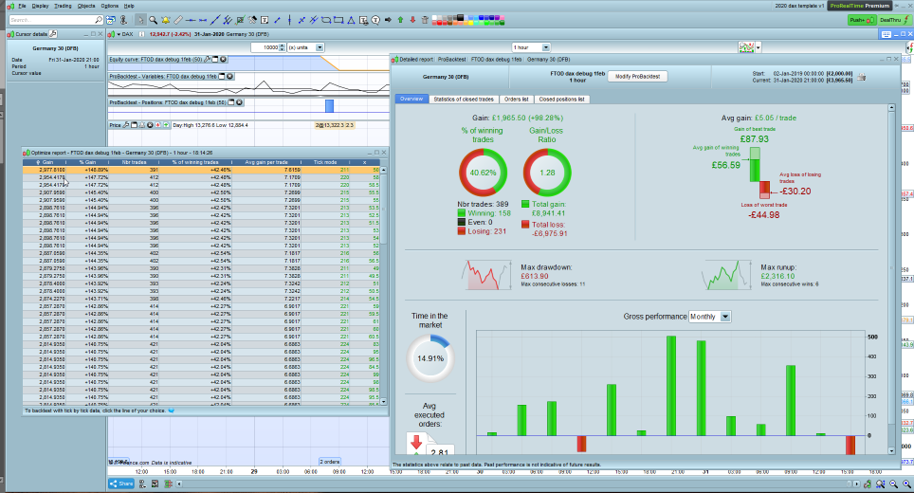
    Could you please explain why do we get the differences btw the optimize report results and the detailed report results?

    Not too sure which one the results to trust for my strategies…  Please see the attachment showing the discrepancy.

    I checked for open orders, but there aren’t any…so, again, I am not sure why the results do not match

    Please help!


    #118550

    For faster execution, the optimizer tool doesn’t use the tick-by-tick mode, even if you have checked it. That’s why there is a “tick  mode” column in the results list, to alert you on how many candlesticks a difference could occur. So the less count, the better!

    #118558
    #118573

    Thanks for replying Nicola,

    but then what does the difference tell us? – does the optimizer give us the best scenario and the detailed report gives the worst scenario?

    Does it mean that I should not trust the results of the backtest at all if the “tick mode” column is populated with any number?

    Should I select from the optimizer list the result row that has the smallest tick mode number?

    I thought the “tick mode” column showed the nb of trades that were verified against the tick chart – to verify execution according to the order of the tick prices to provide the most accurate result…

    Please help to clarify the understanding.

    #118578

    Prior to version 10.3, there was no intra bars checking of the behaviour of orders during the candlesticks, so sometimes the takeprofit was triggered after a stoploss, but the backtest was considering the takeprofit. It was named the “zero bar issue” or “0 bar bug”.. To check correctly inside a bar, the new ProBacktest engine is now using all existing timeframes in a single bar: if you use a 5 minutes bar for the strategy, it will check all the orders behavior inside all available TF to see if the SL has triggered before the TP or not. It will also now check precisely whenever a pending order has triggered.

    But due to performance issue, the optimizer is not doing this, therefore the “ticks mode” column exist. If it found that a probable “0 bar issue” exist during a bar, it increments the column. It doesn’t mean that the result will be worse, but it alerts you on the fact that you should run an analysis in tick-by-tick checking before considering the result as near as posible than it would be in real time.

    #118581

    A good and easy to understand explanation Nicolas … you should put that as a sticky to save losing it and then when newbies ask we can refer them to your sticky?

Viewing 6 posts - 1 through 6 (of 6 total)
Create your free account now and post your request to benefit from the help of the community
Register or Login


