Hi.
Got some time to code again while on vacation and now got the new version 11.1. Something that’s really bugging me is the constantly resizing of the areas on the graph. Is there a way to stop the crazy resizing?
Explanation:
We all have a setup were the indicators takes up some space, the chart normally takes up the biggest space and if backtesting, the ProBacktest takes up some space on the top. But when running the backtest of a strategy for the first time of todays session, ProBacktest takes up much more space than needed and the chart is squished together.
Then I drag the areas back as wanted and the areas stays there even after changes and retests of the strategy, good.
Then if checking a variable with the graph command, the same problem arise with the unnecessary big size taken away from the chart area. Ok, then you think it’s just to change the size of the areas again to once liking. BUT, opposed to the previous example, the graph command panel takes up that crazy big size each time even if there is no changes in the code (shouldn’t change even if changes are made in the code either). So every run of the backtest with the graph command I have to resize the areas to be able to see the chart normally/not squished.
So is there any information about this behavior and a solution to the time consuming and irritating “bug” of constantly have to resizing the areas back?
Sincerely,
Daniel.
I hadn’t noticed the connection to GRAPH but the initial sizing of the equity curve and position size windows has certainly been bugging me! Why do I need a position size chart that is as big or bigger than the price chart? Hopefully these minor graphical v11 bugs/annoyances will be ironed out as more of them are reported.
Have you sent a suggestion to PRT?
I will move your topic to the Platform Support forum as it is not really an indicator problem or question and so should not be in the ProBuilder forum.
_ ProRealTime Platform Support: only platform related issues.
_ ProOrder: only strategy topics.
_ ProBuilder: only indicator topics.
_ ProScreener: only screener topics
_ General Discussion: any other topics.
_ Welcome New Members: for new forum members to introduce themselves.
Hi Vonasi.
Thanks for your reply and the move of topic. No I haven’t reported anything yet, I wanted to check here first if there was an easy fix or setting that solved the issue that I didn’t know about. I will report it tomorrow.
/Daniel
Have you sent a suggestion to PRT?
Someone should plainly suggest that everything in the backtesting area should be subject to being saved … because plainly nothing is.
It will drive you crazy.
So this very subject is not really about the equity graph being a bit large-ish … it is merely about your dragging it smaller is not saved.
Also, try a next strategy (or different time period, whatever) and you will have two of those graphs in your chart which do not want to listen to your “commands”.
Notice that this all has been so for a year, but because this was not on the IG-PRT platform (only V10.3 there) it formally could not be reported. Well, at least I did not. I guess nobody did. And maybe even nobody was backtesting on the direct PRT platform (but me).
So now all this sh*t will drop at once on PRT development and I don’t see it all be solved soon …
Have you sent a suggestion to PRT?
Someone should plainly suggest that everything in the backtesting area should be subject to being saved … because plainly nothing is.
It will drive you crazy.
So this very subject is not really about the equity graph being a bit large-ish … it is merely about your dragging it smaller is not saved.
Also, try a next strategy (or different time period, whatever) and you will have two of those graphs in your chart which do not want to listen to your “commands”.
Notice that this all has been so for a year, but because this was not on the IG-PRT platform (only V10.3 there) it formally could not be reported. Well, at least I did not. I guess nobody did. And maybe even nobody was backtesting on the direct PRT platform (but me).
So now all this sh*t will drop at once on PRT development and I don’t see it all be solved soon …
I’m using IG-PRT too and I always run PRT from their site, so I guess they use v11.1 now. Which means you then can report it.
I’m using IG-PRT too and I always run PRT from their site, so I guess they use v11.1 now. Which means you then can report it.
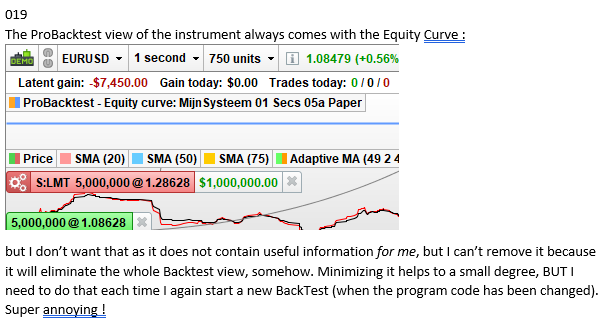
Yes, I agree with that. And (not) coincidentally I contemplated this morning to send in my document. It is only that it would be good if there’s consensus from many people, so PRT may give a highest priority to it. This first requires a small test whether I can actually upload a Word document for review. Anyway, here is #019 from my document :
[attachment file=”155760″]
And so I have 35 more.
Testing a Word document :
… wow … that unexpectedly works.
Ok, let’s see how to put this in a workable format (in a new topic).