Probacktest errors on calculation of take profit and stop loss

Viewing 15 posts - 1 through 15 (of 15 total)
  • Author
    Posts
  • #60902 quote
    maximus78
    Participant
    Senior

    Good evening to everybody.

    I open this post because I was experimenting some systems when i have noticed some backtest errors on setting stop loss and take profit, so I’ve made a test with a simple breakout strategy and the errors keep on being.

    The strategy is simple: I buy nextbaropen when price close over an highest[30](high)[1] and i set a stop loss at the lowest[10](low) and the same distance i set as take profit.

    The system goes like this:

    defparam cumulateorders=false
    entry=close
    SL=entry-lowest[10](low)
    if entry>highest[30](high)[1]then
    buy 1 shares at market
    set stop loss SL
    set target profit SL
    endif
    
    graph (entry-SL) coloured(255,0,0) as "stoploss"
    graph (entry+SL) coloured(0,0,255) as "takeprofit"
    graph entry coloured(0,0,0) as "entry"

    I also set the graph to see how probuilder it calculates stop loss, entry and take profit and actually they are alright! (I also verified manually).

    But then probacktest makes substantial mistakes on closing positions of 20 or 30 pips most of the times!

    I’d like someone to verify and see some comments about.


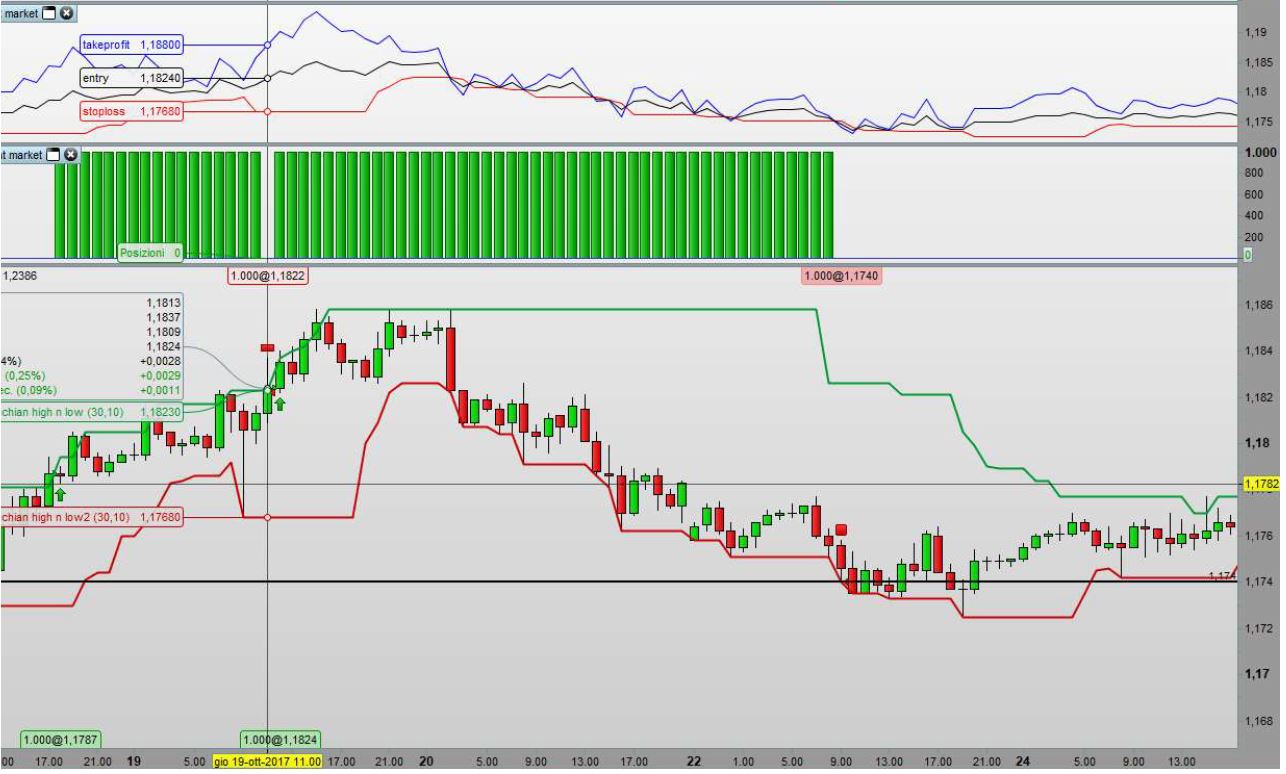
    I attach a screenshot with 2 examples of mistakes.

    1° example:  stop loss error

    Graph levels:

    1,1880 take profit

    1,1824 entry

    1,1768 stop loss

    Probacktest enter buy correctly at 1,1824 but exit selling at 1,1740 that is 28 pips under where it should sell according to my stop loss that is 1,1768 and as you can see there’s no gaps around there.

    2° example: take profit error

    Graph levels:

    1,1844 take profit

    1,1787 entry

    1,1730 stop loss

    Probacktest enter buying correctly at  1,1787 but exit selling at 1,1822 that is 22 pips under to where it should sell according to my take profit that is 1,1844

    I wait for some comments about, maybe I am mistaking or missing something.

    Thanks a lot.

    Max

    Stop-loss-error.jpg Stop-loss-error.jpg take-profit-error.jpg take-profit-error.jpg
    #60906 quote
    MaoRai54
    Participant
    Master

    HI,

    WHICH TIME FRAME?

    #60907 quote
    Vonasi
    Moderator
    Master

    All the calculations are done at the close of a candle so your SL will be the levels calculated at the candle one before the candle the position is closed in. Hover your mouse one candle back and I suspect the SL calculations will match the exit prices.

    #60908 quote
    maximus78
    Participant
    Senior

    Thanks guys for the reply….

    I have tested on some forex crosses,  and many timeframes…the screenshots has been taken from EUR/USD timeframe 1 hour, with no spread and of tick by tick.

    Vonasi, I also tried your advice but it’ doesn’t work the same.

    Actually some trades works as I have set the graph, but are very few compared to all the other that fails of many pips.

    If you have some moments take a look  with probacktest.

    Max

    #60910 quote
    maximus78
    Participant
    Senior

    The price levels of stop loss and take profit shown on the graph are calculated on the “set up”candle that is when close[0] is highest than highest[30](high)[1] and therefore it’s prior to the entry being this at nextbaropen.

    #60913 quote
    Vonasi
    Moderator
    Master

    The SL will be recalculated at every candle that meets the conditions after a position has been opened – but the BUY instruction will be ignored due to DEFPARAM CumulateOrders = FALSE. You need to add an IF NOT ONMARKET condition if you want the SL to be kept at the level of the set up candle for the duration of the trade.

    Nicolas thanked this post
    #60920 quote
    maximus78
    Participant
    Senior

    Thanks so much Vonasi!

    yes now it works perfectly, I didn’t considered that aspect! actually it makes sense what you say and I didn’t thought about.

    As you see I was missing an important part.

    Have a nice day!

    Max

    #60931 quote
    Vonasi
    Moderator
    Master

    No problem Maximus78. It took me a while to realise that was what was happening when I first started writing strategies too.

    …..and don’t forget that you can always press the ‘THANKS’ button on each post if think someone’s reply deserves it 🙂

    maximus78 thanked this post
    #60935 quote
    maximus78
    Participant
    Senior

    Yes I actually use it but I thought it wasn’t strickly necessary to apply to only a Long strategy like this…

    doing that i also used the instruction defparam cumulateorder false.

    I have learned something new, still thanks!

    Max

    #60938 quote
    Madrosat
    Participant
    Master

    hello maximus I did not understand well can you display the complete code rectified
    thank you

    #60965 quote
    maximus78
    Participant
    Senior

    Hello madrosat,

    you just have to add “if not onmarket” in the buy instructions to block the SL at the level of the set up candle for the duration of the trade,

    if not the SL is recalculated at every candle that meets the conditions after a position has been opened.

    So it goes like this:

    defparam cumulateorders=false
    entry=close
    SL=entry-lowest[10](low)
    
    if not onmarket and entry>highest[30](high)[1]then
    buy 1 shares at market
    set stop loss SL
    set target profit SL
    endif
     
    graph (entry-SL) coloured(255,0,0) as "stoploss"
    graph (entry+SL) coloured(0,0,255) as "takeprofit"
    graph entry coloured(0,0,0) as "entry"
    #60980 quote
    Madrosat
    Participant
    Master
    369/5000
    Hello Maximus, Vonasi
    I use when I’m long “if not longonmarket” the question I ask is that in case of long position the fact of putting” if not on market” in place of “if not longonmarket” changes something ???
    The instruction longonmarket is taken at the opening of the candle following the entrance
    I guess for ” if on market” it’s the same thing? yes, no?
    #61006 quote
    Vonasi
    Moderator
    Master
    369/5000
    Hello Maximus, Vonasi I use when I’m long “if not longonmarket” the question I ask is that in case of long position the fact of putting” if not on market” in place of “if not longonmarket” changes something ??? The instruction longonmarket is taken at the opening of the candle following the entrance I guess for ” if on market” it’s the same thing? yes, no?

    Yes in this situation it does not matter if you use ONMARKET or LONGONMARKET the result is the same. ONMARKET checks for trades that are either long or short. LONGONMARKET only checks for long trades and SHORTONMARKET only checks for short trades.

    #61146 quote
    maximus78
    Participant
    Senior

    Madrosat, as Vonasi said, in this case there’s no difference between if not onmarket and if not longonmarket because it’s a only long strategy.

    There’s a difference when you use long and short strategies together.

    If you use the command if not longonmarket with buy conditions and you are in a short trade, when the “buy conditions” are met, the system closes the short trade and immediately open the short trade, even if you didn’t hit stop loss or take profit, cause it takes in consideration only the fact that you are not longonmarket (actually you are shortonmarket).

    If you use the command if not shortonmarket with sell conditions and you are in a long trade, when the “sell conditions” are met, the system closes the long trade and immediately open the short trade, even if you didn’t hit stop loss or take profit, cause it takes in consideration only the fact that you are not shortonmarket (actually you are longonmarket).

    If you use if not on market, and you are in a long trade, when the “sell conditions” are met, the system will ignore it cause you are already “on market”, so the trade will be closed when stop loss or take profit will be hit.

    The same happens when you are in a short trade and the system will ignore the “buy conditions” when they are met, so the trade will be closed when stop loss or take profit will be hit.

    Maxx

    Nicolas thanked this post
    #61176 quote
    Madrosat
    Participant
    Master

    Maximus

    thank you for the clarification

Viewing 15 posts - 1 through 15 (of 15 total)
  • You must be logged in to reply to this topic.

Probacktest errors on calculation of take profit and stop loss


ProOrder: Automated Strategies & Backtesting

New Reply
Author
author-avatar
maximus78 @maximus78 Participant
Summary

This topic contains 14 replies,
has 4 voices, and was last updated by Madrosat

8 years, 1 month ago.

Topic Details
Forum: ProOrder: Automated Strategies & Backtesting
Language: English
Started: 01/29/2018
Status: Active
Attachments: 2 files
Logo Logo
Loading...