


Pro screener programming glitch

Viewing 9 posts - 1 through 9 (of 9 total)
  • Author
    Posts
  • #162396 quote
    Malibu1
    Participant
    New

    Hi

    I am having an issue with the screener.

    I have 3 conditions for a bull screen.

    Average[38}(close)<Average[38](close)[10] (daily)

    Average[38](close)>Average[38](close)[1](daily)

    Average[5](close)>Average[5](close)[1](daily)

    So the idea is to have the 38moving average lower than it was 10 days ago. Also to have the 38moving average higher than the previous day. And to have the 5 moving average as higher than the previous day. I have set it that all conditions have to be met.

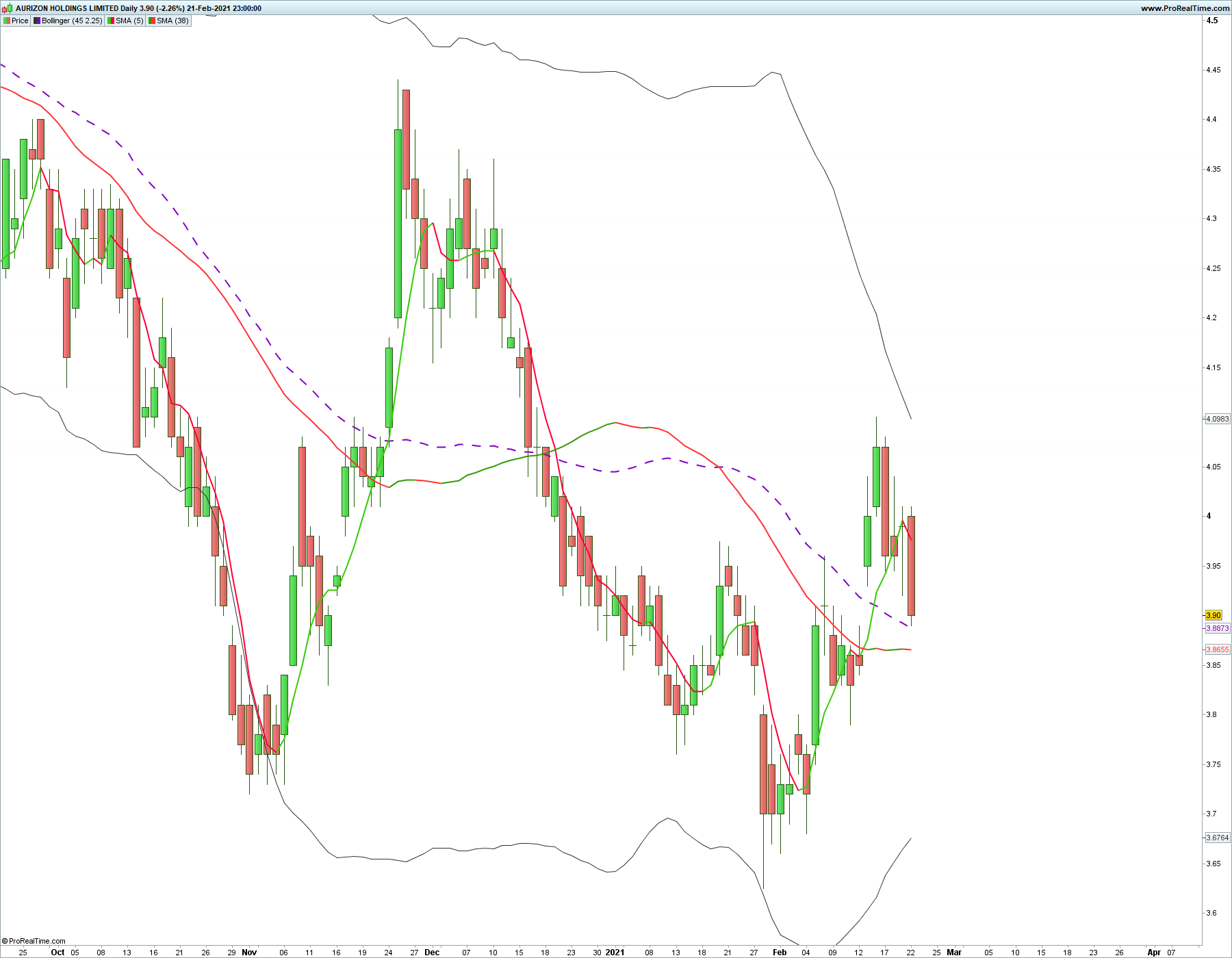
    When I program and test this against a list of shares that I have I get ASX:AZJ coming up in the scan. But it is actually lower on the 38moving average than the day before. Admittedly it measures to 4 decimal places on the moving average and it is only the last 2 that show it lower. 3.8655 is lower than 3.8665, which means the 38moving average is still going down.

    Can someone explain why this is happening? I am new to using the proscreener so it is most likely the way I have programmed it.


    Thanks,

    Shane

    AZJ-Daily.png AZJ-Daily.png
    #162399 quote
    robertogozzi
    Moderator
    Master

    If you post the code (using the ‘Insert PRT Code’ button) we can try to replicate your results.

    On which TF?

    On which list?

    #162412 quote
    Malibu1
    Participant
    New
    Average[38](close)
     < Average[38](close)
    [10]
    Average[38](close)
     > Average[38](close)
    [1]
    Average[5](close)
     > Average[5](close)
    [1]

    It looks like after it updated for a day that it is reading correctly. I had trying to restart but it still was throwing up the false reading.

    I was looking at the daily, which i wrote in the original post.

    #162423 quote
    Vonasi
    Moderator
    Master

    Did you cut and paste incorrectly?

    Your code should look like this:

    Average[38](close) < Average[38](close[10])
    Average[38](close) > Average[38](close[1])
    Average[5](close) > Average[5](close[1])
    #162425 quote
    Malibu1
    Participant
    New

    I just went cntrl C And then cntrl V and thats how it printed using the insert prt code button.

    #162426 quote
    Vonasi
    Moderator
    Master

    close[10] is actually 11 candles back including the current one which is candle zero. Perhaps this is why results are different to your expectations?

    #162427 quote
    robertogozzi
    Moderator
    Master

    I use both that code as a screener and as an indicator (to spot previous days), but I was never  reported ASX:AZJ:

    x = Average[38](close) < Average[38](close)[10]
    y = Average[38](close) > Average[38](close)[1]
    z = Average[5](close)  > Average[5](close)[1]
    RETURN x AND y AND z AS "xyz"

    it’s performing correctly.

    #162429 quote
    Malibu1
    Participant
    New

    Cool. Thanks for testing it for me.

    Must of just needed a day to update before it would work correctly.

    #165617 quote
    Malibu1
    Participant
    New

    Hi again,

    I have been thinking about adding a daily % change indicator to the above indicator, to show when the trend starts to kick, mainly to isolate small cap shares that are about to rise significantly. How do I program it to look for a positive increase of between 3 and 10%? The simplified creation tool doesn’t allow for this. I am not really sure what the indicator for this would even look like.

    Thanks,

    Shane

Viewing 9 posts - 1 through 9 (of 9 total)
  • You must be logged in to reply to this topic.

Pro screener programming glitch


ProScreener: Market Scanners & Detection

New Reply
Author
author-avatar
Malibu1 @malibu1 Participant
Summary

This topic contains 8 replies,
has 3 voices, and was last updated by Malibu1

4 years, 11 months ago.

Topic Details
Forum: ProScreener: Market Scanners & Detection
Language: English
Started: 02/23/2021
Status: Active
Attachments: 1 files
Logo Logo
Loading...


