print with changing colour

Viewing 5 posts - 1 through 5 (of 5 total)

  • Author
    Posts
  • #225883 quote
    killerplatuze
    Participant
    New

    Hi,

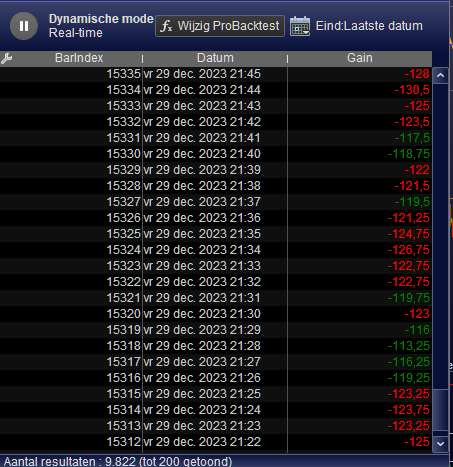
    is it possible to change the cell in the print window? For example, if the direction is short the cell should be red, if not then green.

    PRINT

    Or can i  write short or lon g in the upper right corner of the chart?

    #225886 quote
    PeterSt
    Participant
    Master

    Sure. Quick example which shows Red when the Gain is less than -120 :

    If Gain < -120 then
      Print Gain Coloured("Red") as "Gain"
    else
      Print Gain Coloured("Green") as "Gain"
    endif
    

    Of course you can adapt this to If ShortOnMarket then …

    killerplatuze thanked this post
    image_2024-01-02_014015017.png image_2024-01-02_014015017.png
    #226463 quote
    killerplatuze
    Participant
    New

    To print a number isnt a problem, but how can i print text? Or isnt possible?

    #226470 quote
    PeterSt
    Participant
    Master

    Unfortunately that doesn’t seem possible. However, I think you should be able to make something in an indicator ? There we can write “text” as such. But it seems a lot of trouble for something which can be done in other ways ? (simple Graph in the program code).

    killerplatuze thanked this post
    #226472 quote
    robertogozzi
    Moderator
    Master

    Use DrawYext to print text embedded in quotes, not text data as the alphanumeric data type is not supported.

    killerplatuze thanked this post
Viewing 5 posts - 1 through 5 (of 5 total)
  • You must be logged in to reply to this topic.

print with changing colour


ProBuilder: Indicators & Custom Tools

New Reply
Author
Summary

This topic contains 4 replies,
has 3 voices, and was last updated by robertogozzi
2 years, 1 month ago.

Topic Details
Forum: ProBuilder: Indicators & Custom Tools
Language: English
Started: 01/01/2024
Status: Active
Attachments: 1 files
Logo Logo
Loading...