Print HH HL LL LH in PRTv11

Viewing 7 posts - 1 through 7 (of 7 total)

  • Author
    Posts
  • #154895 quote
    ashehzi
    Participant
    Average

    Hi,

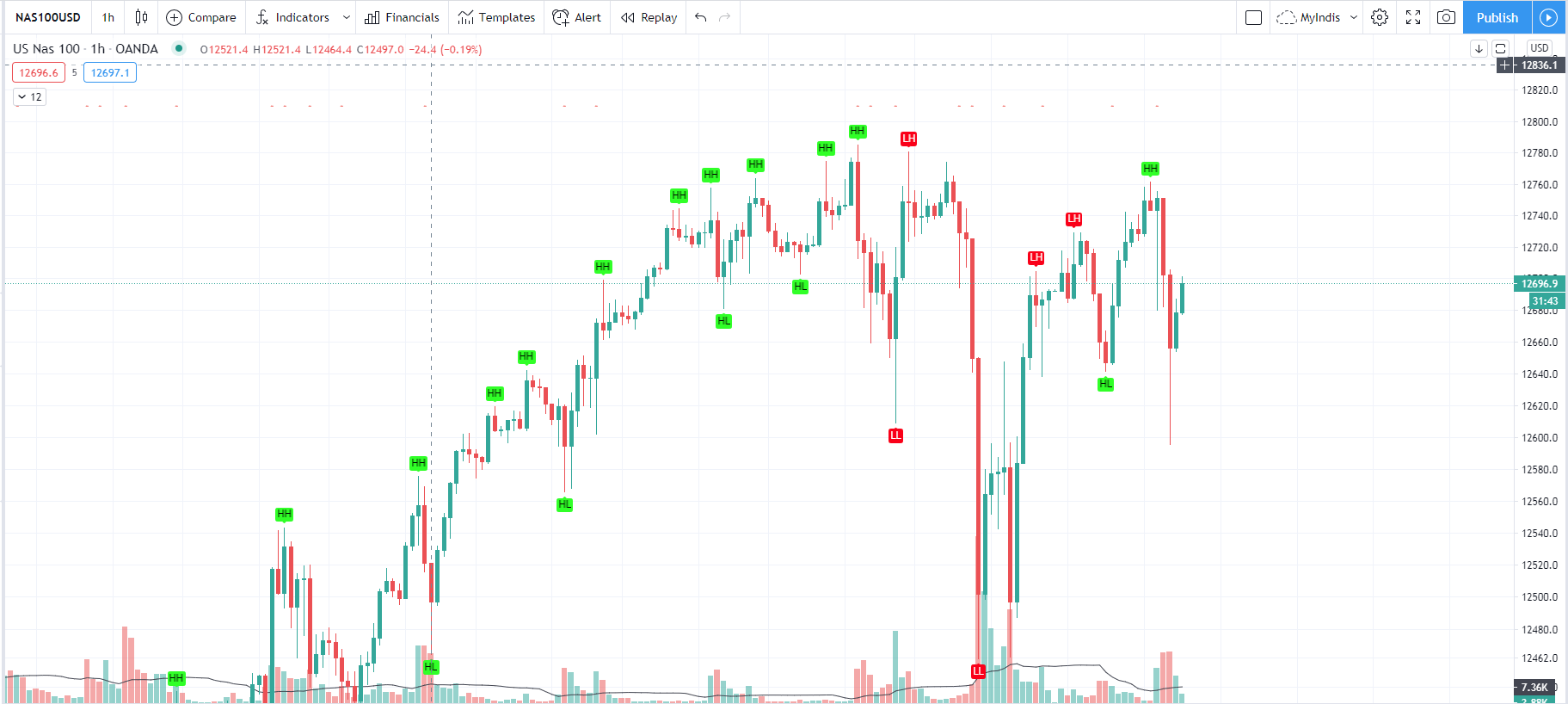
    I use below code to print HH HL LL and LH in tradingview. I am looking for same in PRT. I have seen some topics here but mostly allow me to print e.g. the value but is it possible to determine HH HL LL and LH in PRT e.g. using Arrays?

    Andrea, Ale, anyone? Appreciate your helping hands. Thanks.

    //Only prints HH HL LL LH
    
    //@version=3
    study("HH HL LH LL", overlay =true)
    lb = input(3, title="Left Bars", minval = 1)
    rb = input(6, title="Right Bars", minval = 1)
    
    mb = lb + rb + 1
    
    ph = iff(not na(high[mb]), iff(highestbars(high, mb) == -lb, high[lb], na), na) // Pivot High
    pl = iff(not na(low[mb]), iff(lowestbars(low, mb) == -lb, low[lb], na), na) // Pivot Low
    
    hl = na
    hl := iff(ph, 1, iff(pl, -1, na)) // Trend direction
    zz = na
    zz := iff(ph, ph, iff(pl, pl, na)) // similar to zigzag but may have multiple highs/lows
    zz :=iff(pl and hl == -1 and valuewhen(hl, hl, 1) == -1 and pl > valuewhen(zz, zz, 1), na, zz)
    zz :=iff(ph and hl == 1  and valuewhen(hl, hl, 1) == 1  and ph < valuewhen(zz, zz, 1), na, zz)
    
    hl := iff(hl==-1 and valuewhen(hl, hl, 1)==1 and zz > valuewhen(zz, zz, 1), na, hl)
    hl := iff(hl==1 and valuewhen(hl, hl, 1)==-1 and zz < valuewhen(zz, zz, 1), na, hl)
    zz := iff(na(hl), na, zz)
    
    findprevious()=>  // finds previous three points (b, c, d, e)
        ehl = iff(hl==1, -1, 1)
        loc1 = 0.0, loc2 = 0.0, loc3 = 0.0, loc4 = 0.0
        xx = 0
        for x=1 to 1000
            if hl[x]==ehl and not na(zz[x])
                loc1 := zz[x]
                xx := x + 1
                break
        ehl := hl
        for x=xx to 1000
            if hl[x]==ehl and not na(zz[x])
                loc2 := zz[x]
                xx := x + 1
                break
        ehl := iff(hl==1, -1, 1)
        for x=xx to 1000
            if hl[x]==ehl and not na(zz[x])
                loc3 := zz[x]
                xx := x + 1
                break
        ehl := hl
        for x=xx to 1000
            if hl[x]==ehl and not na(zz[x])
                loc4 := zz[x]
                break
        [loc1, loc2, loc3, loc4]
    
    a = na, b = na, c = na, d = na, e = na
    if not na(hl)
        [loc1, loc2, loc3, loc4] = findprevious()
        a := zz 
        b := loc1
        c := loc2
        d := loc3
        e := loc4
    
    _hh = zz and (a > b and a > c and c > b and c > d)
    _ll = zz and (a < b and a < c and c < b and c < d)
    _hl = zz and ((a >= c and (b > c and b > d and d > c and d > e)) or (a < b and a > c and b < d))
    _lh = zz and ((a <= c and (b < c and b < d and d < c and d < e)) or (a > b and a < c and b > d))
    
    plotshape(_hl, text="HL", title="Higher Low", style=shape.labelup, color=lime, textcolor=black, location=location.belowbar, transp=0, offset = -lb)
    plotshape(_hh, text="HH", title="Higher High", style=shape.labeldown, color=lime, textcolor=black, location=location.abovebar, transp=0, offset = -lb)
    plotshape(_ll, text="LL", title="Lower Low", style=shape.labelup, color=red, textcolor=white, location=location.belowbar, transp=0, offset = -lb)
    plotshape(_lh, text="LH", title="Lower High", style=shape.labeldown, color=red, textcolor=white, location=location.abovebar, transp=0, offset = -lb)
    

    Regards,

    Ash

    #154898 quote
    Vonasi
    Moderator
    Master

    ashehzi  – Your topic has been moved to the ProBuilder forum as it is an indicator topic and not a general discussion topic.

    When posting any further topics please follow the forum rules that you will find just above the submit button:

    • Post your topic in the correct forum:
      _ ProRealTime Platform Support: only platform related issues.
      _ ProOrder: only strategy topics.
      _ ProBuilder: only indicator topics.
      _ ProScreener: only screener topics
      _ General Discussion: any other topics.
      _ Welcome New Members: for new forum members to introduce themselves.

    Also there is a standard format for coding requests – see here:

    https://www.prorealcode.com/free-code-conversion/

    Images of how the indicator looks are useful so that the person converting your code know how the indicator is supposed to look without having to do further research.

    #154910 quote
    ashehzi
    Participant
    Average

    Thanks for moving to the correct forums.

    If we run above code in tradingview, it would look like the attachment.

    HHLL-Example-NAS.png HHLL-Example-NAS.png
    #154957 quote
    ashehzi
    Participant
    Average

    I’ve created new post in code conversion section. The URL is:

    https://www.prorealcode.com/topic/printing-hh-hl-ll-lh-in-prtv11/

    Admins, please remove this post if possible.

    Thanks a lot.

    #154966 quote
    Vonasi
    Moderator
    Master

    That now just creates a double post which leads to confusion and wasted time. You have provided the required info in this topic so the other unnecessary one has been deleted.

    Nicolas will add your request to his long list of conversion requests and try to fit it in between mouthfuls of turkey! 🙂

    #157504 quote
    ashehzi
    Participant
    Average

    Hi Vonasi, Nic, Ale,

    Is it possible to have a look here in the near future? I know you guys are always busy.

    Regards,

    Ash

    #157513 quote
    Monobrow
    Participant
    Senior

    Also check out the snippet library.

    Your very own code snippet library


    loads of good stuff in here, likely what you need or will give you the info to code it.

Viewing 7 posts - 1 through 7 (of 7 total)

  • You must be logged in to reply to this topic.

Print HH HL LL LH in PRTv11


ProBuilder: Indicators & Custom Tools

New Reply
Author
author-avatar
ashehzi @ashehzi Participant
Summary

This topic contains 6 replies,
has 3 voices, and was last updated by Monobrow

5 years, 1 month ago.

Topic Details
Forum: ProBuilder: Indicators & Custom Tools
Language: English
Started: 12/22/2020
Status: Active
Attachments: 1 files
Logo Logo
Loading...