I’m sure this will be simple for any of the experts on here, so if you could spare a minute I’d be very grateful…
I have a program that only enters trades in pre-defined time zones. I want it to only enter once during each time zone. I’ve tried very hard to read the manual and understand ONCE statements but I can’t seem to make them work. I also think there might be a simple solution to make my “entered=1” flag work at the right times, without needing a ONCE.
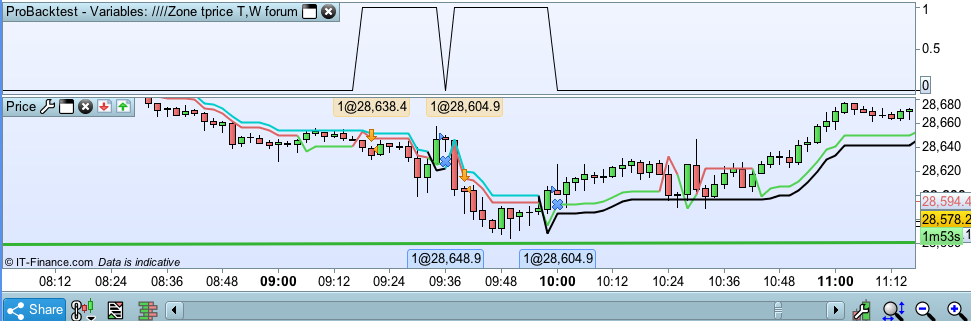
I’ve attached a screengrab of what my entered flag is currently doing. In short, I want “entered” to remain at 1 until the end of the current time zone (in this case, until 100600). It currently dips to zero once the first entry is finished and allows another entry, which I don’t want. Or alternatively I’d be happy for it to remain at 1 and be reset by the new time zone (in this case, 155200).
Any ideas?
DEFPARAM CumulateOrders = False

daystart= 060000
dayend= 160000

longentry1= close crosses over SuperTrend[1.5,34]
shortentry1= close crosses under SuperTrend[1.5,34]
longexit1= close crosses under SuperTrend[1.5,34]
shortexit1= close crosses over SuperTrend[1.5,34]

tue1start=000000
tue1end=004200
tue2start=035200
tue2end=044000
tue3start=091800
tue3end=100600
tue4start=155200
tue4end=164000
tue5start=184600
tue5end=193400
tue6start=000000
tue6end=000034
tue7start=0
tue7end=0
tue8start=0
tue8end=0

wed1start=001200
wed1end=001000
wed2start=065000
wed2end=073800
wed3start=081200
wed3end=085800
wed4start=094600
wed4end=103400
wed5start=150400
wed5end=155200
wed6start=182800
wed6end=191600
wed7start=220800
wed7end=224800
wed8start=0
wed8end=0


entered=0
tuesday=0
wednesday=0
timezone=0

if onmarket then
entered=1
endif

if time >= daystart and time <= dayend then
timezone=1
endif

if timezone=1 then
if time >=tue1start and time <=tue1end or time >=tue2start and time <=tue2end or time >=tue3start and time <=tue3end or time >=tue4start and time <=tue4end or time >=tue5start and time <=tue5end or time >=tue6start and time <=tue6end or time >=tue7start and time <=tue7end or time >=tue8start and time <=tue8end then
tuesday=1
endif
if not entered=1 and opendayofweek=2 and tuesday=1 and longentry1 then
BUY 1 PERPOINT AT MARKET
entered=1
endif
endif

if timezone=1 then
if time >=tue1start and time <=tue1end or time >=tue2start and time <=tue2end or time >=tue3start and time <=tue3end or time >=tue4start and time <=tue4end or time >=tue5start and time <=tue5end or time >=tue6start and time <=tue6end or time >=tue7start and time <=tue7end or time >=tue8start and time <=tue8end then
tuesday=1
endif
if not entered=1 and opendayofweek=2 and tuesday=1 and shortentry1 then
Sellshort 1 PERPOINT AT MARKET
entered=1
endif
endif


if timezone=1 then
if time >=wed1start and time <=wed1end or time >=wed2start and time <=wed2end or time >=wed3start and time <=wed3end or time >=wed4start and time <=wed4end or time >=wed5start and time <=wed5end or time >=wed6start and time <=wed6end or time >=wed7start and time <=wed7end or time >=wed8start and time <=wed8end then
wednesday=1
endif
if not entered=1 and wednesday=1 and opendayofweek=3 and longentry1 then
BUY 1 PERPOINT AT MARKET
entered=1
endif
endif

if timezone=1 then
if time >=wed1start and time <=wed1end or time >=wed2start and time <=wed2end or time >=wed3start and time <=wed3end or time >=wed4start and time <=wed4end or time >=wed5start and time <=wed5end or time >=wed6start and time <=wed6end or time >=wed7start and time <=wed7end or time >=wed8start and time <=wed8end and opendayofweek=3 then
wednesday=1
endif
if wednesday=1 and not entered=1 and opendayofweek=3 and shortentry1 then
Sellshort 1 PERPOINT AT MARKET
entered=1
endif
endif


if longonmarket and longexit1 then
sell at close stop
endif

if shortonmarket and shortexit1 then
exitshort at close stop
endif


graph entered
Lines 28-29 are a bit odd, starting time is AFTER ending time.
You should define a flag variable for each TZ, say tueFlag1, tueFlag2,… then wedFlag1, wedFlag2,… and set them to 1 each new day (when IntraDayBarIndex = 0).
Then whenever you enter a trade, be it Long or Short, set each one of them (according to correct TZ at that moment) to 0. You’ll have to use multiple IF…ENDIF blocks to achieve that.
Finally you’ll have to add each one of those flags to your conditions to open a trade.
You will have to add tens of lines of code (with IF…ENDIF) to your code to achieve that.
If you are patient enough to wait a few months you will take advantage of the upcoming ARRAY support (now in the works) which will make this job way too esier!
Thanks for the suggestion. I’ll try it out later.
Yes, I must say I was surprised that there wasn’t a specific array function when I first looked through the PRT manual. I think it will shorten a lot of our code once it comes out!
Roberto,
I’ve tried to follow your instructions but I still can’t get it right. I’ve simplified the code to be just one time zone so it is easier for us to understand.
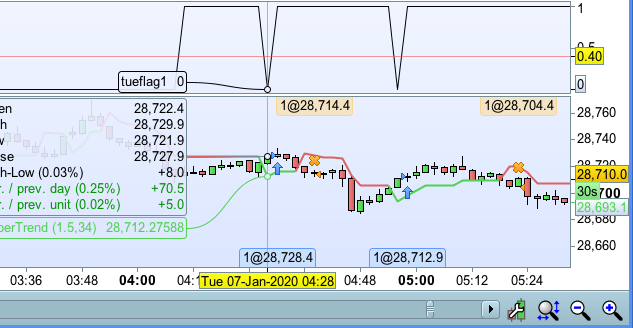
As you can see from the screengrab, tueflag1 correctly becomes 1 at the beginning of the time zone and then correctly becomes 0 when I enter the market. But the problem is that the flag resets itself to 1 on the next bar. How can I stop the flag reseting itself to 1?
DEFPARAM CumulateOrders = False

daystart= 000000
dayend= 160000

longentry1= close crosses over SuperTrend[1.5,34]
shortentry1= close crosses under SuperTrend[1.5,34]
longexit1= close crosses under SuperTrend[1.5,34]
shortexit1= close crosses over SuperTrend[1.5,34]

tue1start=041200
tue1end=052600

if intradaybarindex=0 then
tueflag1=0
endif


if time >= daystart and time <= dayend then
timezone=1
endif

if timezone=1 then
if time >=tue1start and time <=tue1end and opendayofweek=2 then
tueflag1=1
endif
endif

if not onmarket and tueflag1=1 and longentry1 then
BUY 1 PERPOINT AT MARKET
tueflag1=0
endif
if not onmarket and tueflag1=1 and shortentry1 then
Sellshort 1 perpoint at market
tueflag1=0
endif


if longonmarket and longexit1 then
sell at close stop
endif

if shortonmarket and shortexit1 then
exitshort at close stop
endif

graph tueflag1
Only switch the flag at the beginning and end. Change lines 24 to 28 to:
if timezone=1 then
if time=tue1start and opendayofweek=2 then
tueflag1=1
endif

if time=tue1end and opendayofweek=2 then
tueflag1=0
endif
endif
Thank you!
Oh man I was so stupid! I now realise that “time >=X and time <=X” creates a constant positive loop within that zone.
there wasn’t a specific array function when I first looked through the PRT manual. I think it will shorten a lot of our code once it comes out!
Indeed! and i’m currently testing it. Array works very well so far as an alpha version and it’s pleasant now to know that we can almost code anything with them.