Pre market high/low indicator

Viewing 11 posts - 1 through 11 (of 11 total)

  • Author
    Posts
  • #249591 quote
    jonseddon
    Participant
    New

    Does anyone have a simple indicator that shows the pre market high and low as lines on a given chart?  Would be grateful for the code.  Thanks

    #249592 quote
    JS
    Participant
    Senior

    What times do you want to use for the pre-market and what time frame…?

    #249593 quote
    jonseddon
    Participant
    New
    Hi JS
    1 European Markets –  12am to 8am UK time
    2 US Markets – 5am to 2:30pm UK time
    Many thanks
    #249594 quote
    jonseddon
    Participant
    New
    And ideally the the PML and PMH lines would then show until the start of the next premarket.  Alternatively, unbroken continuous lines for the currect PMH and PML would suffice.  I would like these to appear on the chart irrespective of the chosen timeframe.  Thanks
    #249595 quote
    JS
    Participant
    Senior

    Hi,

    When you work with times then the time frame must be adjusted accordingly, for example the end time in the US pre market is 14:30:00 so you can only use a time frame of 30 minutes or lower, moreover the highest time frame (here 30 minutes) must be a multiple of the lowest time frame (for example you can use ten minutes because 3×10=30 but not eleven minutes because 3×11<>30)

    #249596 quote
    jonseddon
    Participant
    New
    Hi JS OK I understand and agree with you point.  Thats fine
    #249597 quote
    JS
    Participant
    Senior

    This one is for the “European Markets”…

    //European Markets
    
    TimeFrame(30 minutes, UpdateOnClose)
    
    If OpenTime=073000 then
    xHighest=Highest[16](High)
    xLowest=Lowest[16](Low)
    EndIf
    
    Return xHighest as "High" Coloured("Green"), xLowest as "Low" Coloured("Red")

    #249598 quote
    JS
    Participant
    Senior
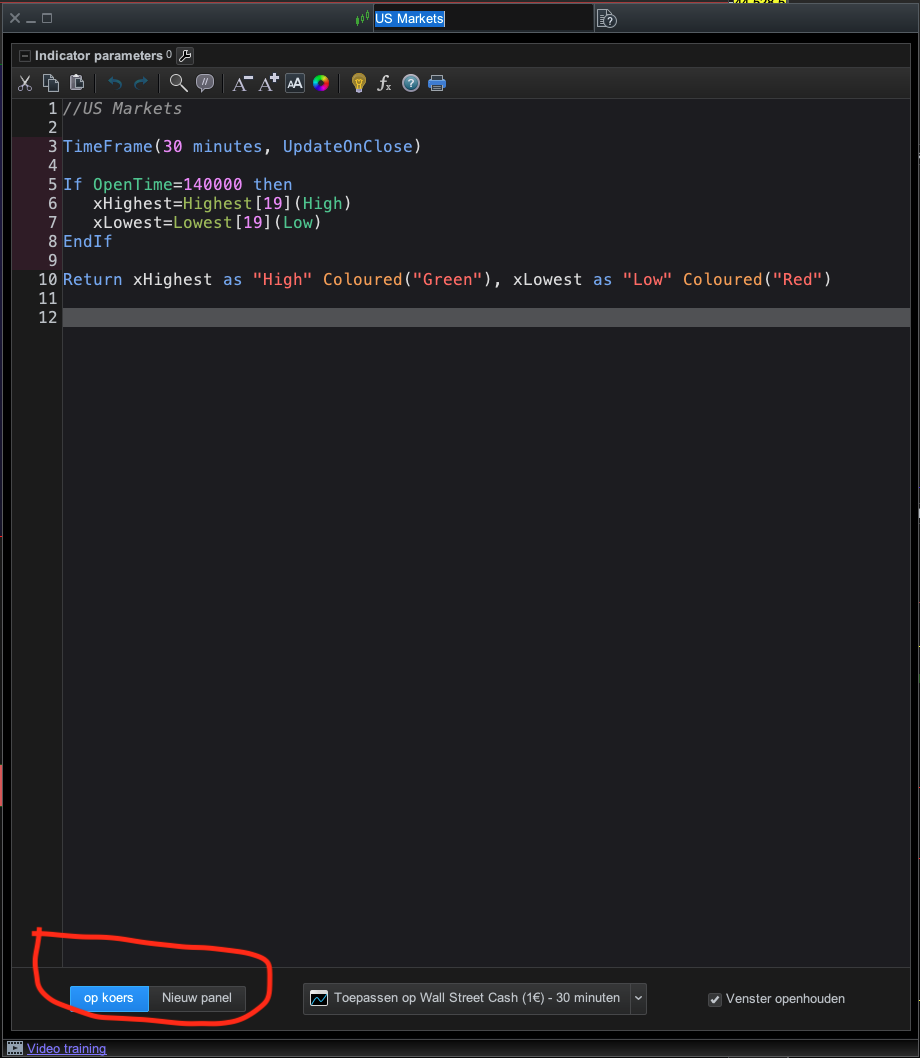
    This one is for the “US Markets”…
    //US Markets
    
    TimeFrame(30 minutes, UpdateOnClose)
    
    If OpenTime=140000 then
    xHighest=Highest[19](High)
    xLowest=Lowest[19](Low)
    EndIf
    
    Return xHighest as "High" Coloured("Green"), xLowest as "Low" Coloured("Red")
    #249599 quote
    jonseddon
    Participant
    New
    Thanks for the code.  The indicators appears in a separate window.  Is it possible to have these lines drawn on the actual chart?
    #249601 quote
    JS
    Participant
    Senior

    Hi,

    Use “op koers = on graph” and the other is “nieuw paneel=new panel” you have to choose and in this case “On Graph”…

    On-Graph.png On-Graph.png
    #249618 quote
    jonseddon
    Participant
    New
    THANK YOU!!  This is working perfectly and exactly what I want.  Much appreciated. Cheers
    JS thanked this post
Viewing 11 posts - 1 through 11 (of 11 total)
  • You must be logged in to reply to this topic.

Pre market high/low indicator


ProBuilder: Indicators & Custom Tools

New Reply
Author
author-avatar
jonseddon @jonseddon Participant
Summary

This topic contains 10 replies,
has 2 voices, and was last updated by jonseddon
6 months, 3 weeks ago.

Topic Details
Forum: ProBuilder: Indicators & Custom Tools
Language: English
Started: 08/10/2025
Status: Active
Attachments: 1 files
Logo Logo
Loading...