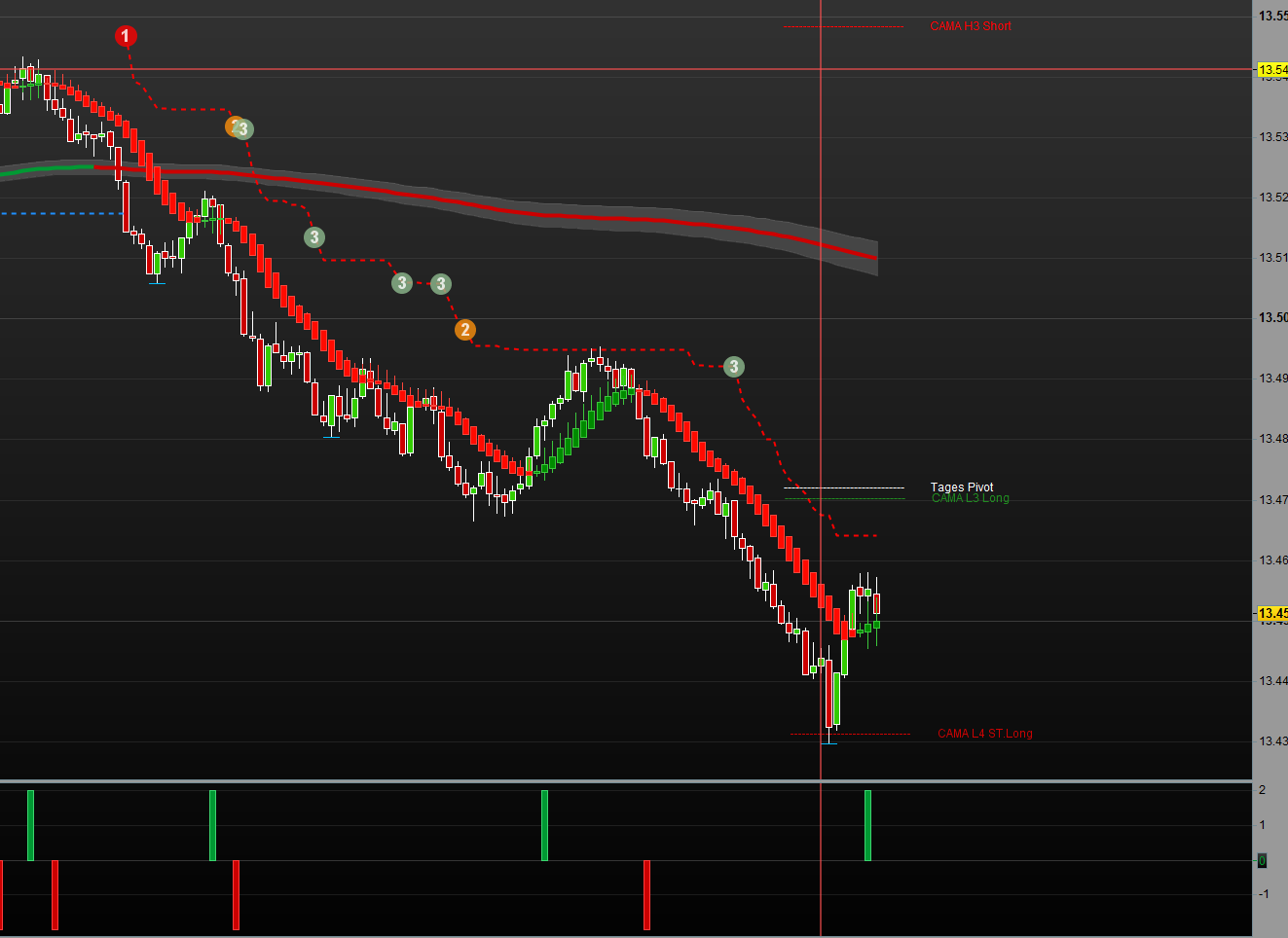
PRC_HPT Heikin Ashi Smoothed change

Viewing 7 posts - 1 through 7 (of 7 total)
  • Author
    Posts
  • #116426 quote
    RazzRazz
    Participant
    Master
    //PRC_HPT Heikin Ashi Smoothed | indicator
    //25.04.2017
    //Nicolas @ www.prorealcode.com
    //Sharing ProRealTime knowledge
    //translated from MT4 indicator code
    
    //---settings
    //MaPeriod=6
    //MaPeriod2=2
    //---end of settings
    
    once maOpen=Open
    once maClose=Close
    once maLow=Low
    once maHigh=High
    
    if barindex>0 then
    maOpen=(maOpen[1]*(MAperiod-1)+Open)/MAPeriod
    maClose=(maClose[1]*(MAperiod-1)+Close)/MAPeriod
    maLow=(maLow[1]*(MAperiod-1)+Low)/MAPeriod
    maHigh=(maHigh[1]*(MAperiod-1)+High)/MAPeriod
    
    haOpen=(ExtMapBuffer5[1]+ExtMapBuffer6[1])/2
    haClose=(maOpen+maHigh+maLow+maClose)/4
    haHigh=Max(maHigh, Max(haOpen, haClose))
    haLow=Min(maLow, Min(haOpen, haClose))
    if (haOpen<haClose) then      //0,191,255
    r=0
    g=139
    b=0
    ExtMapBuffer7=haLow
    ExtMapBuffer8=haHigh
    else
    r=255
    g=10
    b=0
    ExtMapBuffer7=haHigh
    ExtMapBuffer8=haLow
    endif
    ExtMapBuffer5=haOpen
    ExtMapBuffer6=haClose
    
    ExtMapBuffer1=weightedaverage[MAperiod2](ExtMapBuffer7)
    ExtMapBuffer2=weightedaverage[MAperiod2](ExtMapBuffer8)
    ExtMapBuffer3=weightedaverage[MAperiod2](ExtMapBuffer5)
    ExtMapBuffer4=weightedaverage[MAperiod2](ExtMapBuffer6)
    endif
    DRAWCANDLE(ExtMapBuffer3,ExtMapBuffer2,ExtMapBuffer1,ExtMapBuffer4) coloured(r,g,b)
    
    short = ExtMapBuffer7[1]>ExtMapBuffer8[1] and ExtMapBuffer7[2]<ExtMapBuffer8[2] and ExtMapBuffer7[0]>ExtMapBuffer8[0]
    long = ExtMapBuffer7[1]<ExtMapBuffer8[1] and ExtMapBuffer7[2]>ExtMapBuffer8[2] and ExtMapBuffer7[0]<ExtMapBuffer8[0]
    
    RETURN long as "long signal", short as "short signal"


    I want the indicator to only be displayed as a histogram, for example. green candles +2 red candles -2. Unfortunately I didn’t get it changed, can someone help me?
    Thank you

    #116427 quote
    robertogozzirobertogozzi
    Moderator
    Legend

    Try adding replacing lines 52 and 53 with:

    x = 0
    Is Long then
       x = 2
    elsif Short then
       x = -2
    Endif
    Return x

    then use properties to set it as a histogram.

    #116428 quote
    robertogozzirobertogozzi
    Moderator
    Legend

    Also comment out line 48 and all references to unused variables.

    #116438 quote
    RazzRazz
    Participant
    Master

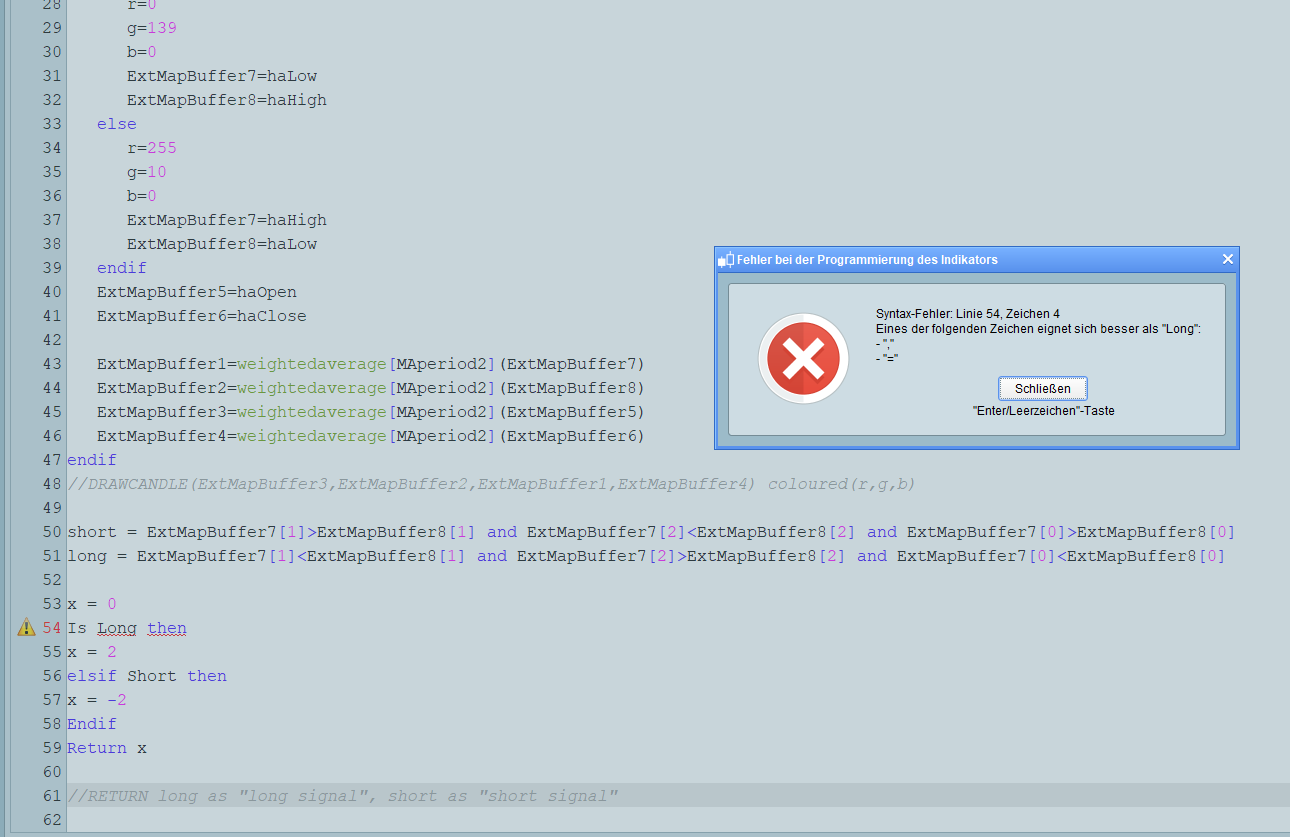
    Hello Robert Thank you for your help but I get the following error message see picture

    HeikAshFehler.png HeikAshFehler.png
    #116440 quote
    RazzRazz
    Participant
    Master

    Ok I found the error, the display should keep its color until the change comes, currently only the first change is shown.

    HeikAshFehler1.png HeikAshFehler1.png
    #116445 quote
    NicolasNicolas
    Keymaster
    Legend

    Just remove “X=0” from the code Roberto has shared, it will prevent the signal to reset on each new bar.

    #116447 quote
    RazzRazz
    Participant
    Master

    Thank you very much Robert + Nicolas now everyone is fine

Viewing 7 posts - 1 through 7 (of 7 total)
  • You must be logged in to reply to this topic.

ProRealAI ProRealAI New

Stuck on this ProBuilder code?

Describe what this topic is trying to build, in plain English, and ProRealAI writes the ProRealTime™ indicator, screener or system for you.

Available in 7 languages
Try ProRealAI

PRC_HPT Heikin Ashi Smoothed change


ProBuilder: Indicators & Custom Tools

New Reply
Author
author-avatar
Razz @razz Participant
Summary

This topic contains 6 replies,
has 3 voices, and was last updated by RazzRazz

6 years, 8 months ago.

Topic Details
Forum: ProBuilder: Indicators & Custom Tools
Language: English
Started: 01/11/2020
Status: Active
Attachments: 2 files
ProRealCode ProRealCode
Loading...