Bonjour,
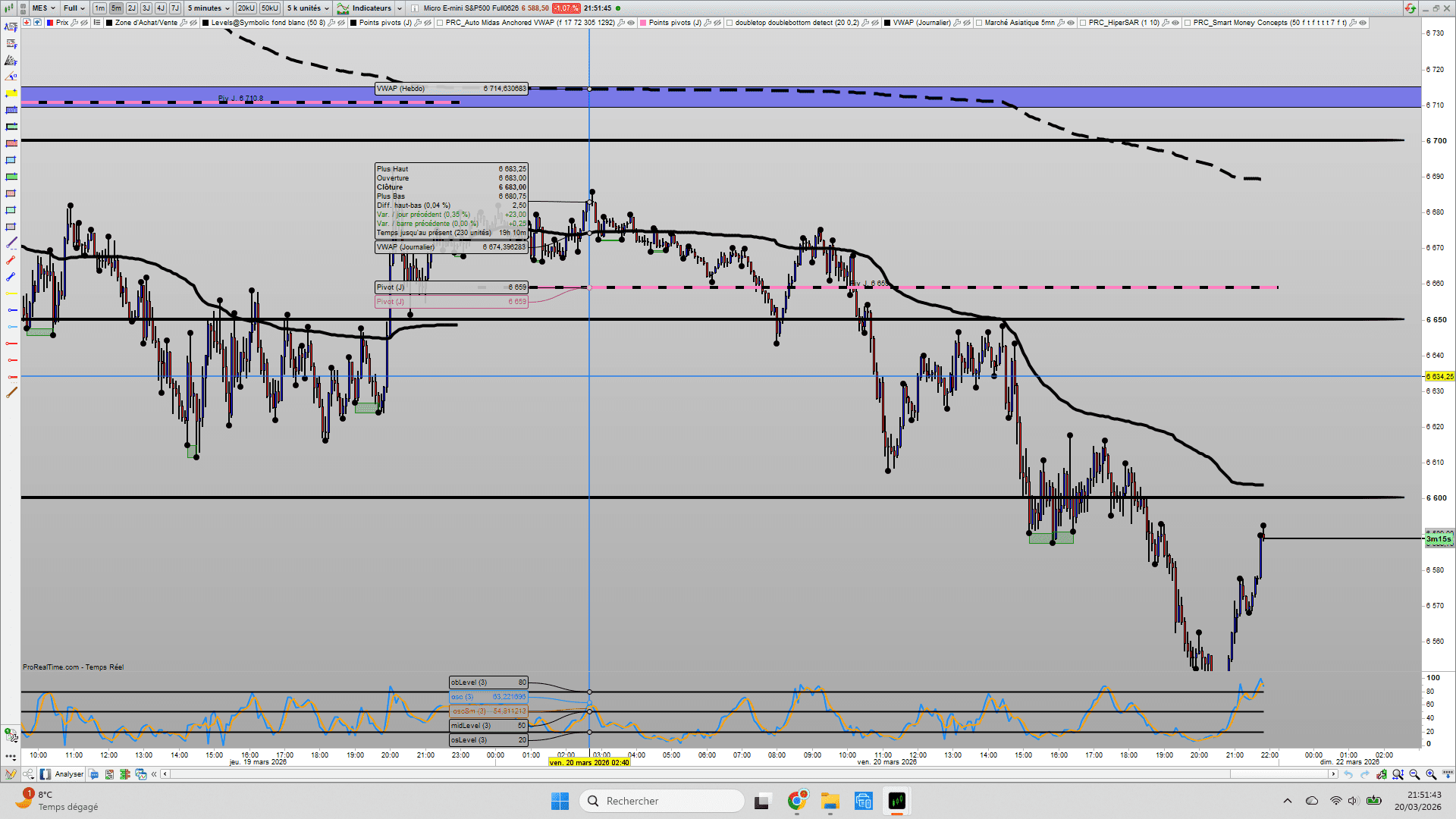
Ci-dessous le code double top et bottom sur lequel il doit y avoir un problême.En effet ,il ne dessine que les doubles bottoms, malgré que les deux options soit cochés.
//----------------------------------------------------------//
//PRC_Double Top and Bottom
//version = 0
//16.07.2024
//Iván González @ www.prorealcode.com
//Sharing ProRealTime knowledge
//----------------------------------------------------------//
//-----inputs
//prd = 5
//tol = 15
//showPivot=1
//Show2Bot=1
//Show2Top=1
//ShowShort=1
//ShowLong=1
src1 = low
src2 = high
//----------------------------------------------------------//
//-----Pivots High&Low--------------------------------------//
ph = high=highest[prd](high)
pl = low=lowest[prd](low)
//----------------------------------------------------------//
//-----Direction Calculation--------------------------------//
if ph and pl=0 then
dir=1
elsif pl and ph=0 then
dir=-1
else
dir=dir
endif


dirchanged=dir<>dir[1]
//----------------------------------------------------------//
//-----Calculate Arrays for each pivot----------------------//
if ph or pl then
if dirchanged then
if dir=1 then
$zigzag[t+1]=highest[prd](high)
$zigzagidx[t+1]=barindex
$dir[t+1]=1
t=t+1
elsif dir=-1 then
$zigzag[t+1]=lowest[prd](low)
$zigzagidx[t+1]=barindex
$dir[t+1]=-1
t=t+1
endif
else
if dir=1 and highest[prd](high)> $zigzag[t] then
$zigzag[t]=highest[prd](high)
$zigzagidx[t]=barindex
elsif dir=-1 and lowest[prd](low)< $zigzag[t] then
$zigzag[t]=lowest[prd](low)
$zigzagidx[t]=barindex
endif
endif
endif
//----------------------------------------------------------//
if t>4 then
//-----Double Top pattern----------------------------//
htop=($zigzag[t-3]+$zigzag[t-1])/2-$zigzag[t-2]
TopHigh=$zigzag[t-3]+htop*tol/100
BotHigh=$zigzag[t-3]-htop*tol/100
DoubleTop=($zigzag[t-1]>=BotHigh and $zigzag[t-1]<=TopHigh) and ($zigzag[t-3]>y1 and $zigzag[t-3]>$zigzag[t-2] and $zigzag[t-1]>$zigzag[t-2])


if DoubleTop and not DoubleTop[1] then
checkTop=1
short=0
x1=$zigzagidx[t-4]
y1=$zigzag[t-4]
x2=$zigzagidx[t-3]
y2=$zigzag[t-3]
x3=$zigzagidx[t-2]
y3=$zigzag[t-2]
x4=$zigzagidx[t-1]
y4=$zigzag[t-1]
x5=$zigzagidx[t]
y5=$zigzag[t]
dist=abs(y3-min(y2,y4))
if Show2Top then
drawrectangle(x2,y2,x4,y4)coloured("red")fillcolor("red",50)
endif
endif
if checkTop and ShowShort then


if not short and close crosses under y3 then
short=1
tpsh=(y3-dist)
slsh=max(y2,y4)
drawarrowdown(barindex,high)coloured("blue")
drawsegment(x3,y3,barindex,y3)coloured("blue")
endif


if short and low crosses under tpsh then
short=0
checkTop=0
Drawsegment(x3,tpsh,barindex,tpsh)coloured("blue")style(dottedline)
drawarrowup(barindex,low)coloured("orange")
endif


if short and close crosses over slsh then
checkTop=0
short=0
Drawsegment(x4,slsh,barindex,slsh)coloured("blue")style(dottedline)
drawarrowup(barindex,low)coloured("orange")
endif
endif
//-----Double Bottom pattern------------------------//


hbot=$zigzag[t-2]-($zigzag[t-3]+$zigzag[t-1])/2
topLow=$zigzag[t-3]+hbot*tol/100
botLow=$zigzag[t-3]-hbot*tol/100
DoubleBot=($zigzag[t-1]>=botLow and $zigzag[t-1]<=toplow) and ($zigzag[t-3]<$zigzag[t-4] and $zigzag[t-3]<$zigzag[t-2] and $zigzag[t-1]<$zigzag[t-2])
if DoubleBot and not DoubleBot[1] then
checkBot=1
xx1=$zigzagidx[t-4]
yy1=$zigzag[t-4]
xx2=$zigzagidx[t-3]
yy2=$zigzag[t-3]
xx3=$zigzagidx[t-2]
yy3=$zigzag[t-2]
xx4=$zigzagidx[t-1]
yy4=$zigzag[t-1]
xx5=$zigzagidx[t]
yy5=$zigzag[t]
dist1=abs(yy3-min(yy2,yy4))
if Show2Bot then
drawrectangle(xx2,yy2,xx4,yy4)coloured("green")fillcolor("green",50)
endif
endif
if checkbot and ShowLong then


if not long and close crosses over yy3 then
long=1
tp=yy3+dist1
sl=min(yy2,yy4)
drawarrowup(barindex,low)coloured("green")
drawsegment(xx3,yy3,barindex,yy3)coloured("blue")
endif


if long and high crosses over tp then
long=0
checkBot=0
Drawsegment(xx3,tp,barindex,tp)coloured("blue")style(dottedline)
drawarrowdown(barindex,high)coloured("red")
endif


if long and close crosses under sl then
checkBot=0
long=0
Drawsegment(xx4,sl,barindex,sl)coloured("blue")style(dottedline)
drawarrowdown(barindex,high)coloured("red")
endif
endif
endif
//-----Draw Pivots------------------------------------------//
if islastbarupdate  and showPivot then
for i=t downto 4 do
drawpoint($zigzagidx[i],$zigzag[i],2)coloured("BLACK")
next
endif
//----------------------------------------------------------//
return
merci
On va regarder pour corriger.
Merci pour la rédaction d’un titre plus efficace la prochaine fois stp. Je viens de l’optimiser. Le but c’est de retrouver ultérieurement la discussion pour d’autres utilisateurs avec son titre si il décrit de manière courte ce dont parle le sujet. Bon week-end.