


pprofit

Viewing 10 posts - 1 through 10 (of 10 total)

  • Author
    Posts
  • #76997 quote
    Real Pro
    Participant
    Average

    Hello,

    If I use:  pprofit = averagetruerange[14](close)

    … can someone tell me how PRT calculates the profit level?

    If the profit target is not met on the first bar (after buy cond is met), does it re-calculate the level using the new bar?  Does it continue to do this with each new bar?

    Many thanks.


    PS/ notify of follow ups via email sometimes doesn’t work.

    #76998 quote
    Vonasi
    Moderator
    Master

    If you are using SET to set the level then any time SET is read in the code then an order is sent to market and if the value is different to the previous level then it will be set at the new level. If your SET instruction is within an IF THEN ENDIF and the conditions are not met then it may not be updated.

    Real Pro thanked this post
    #77000 quote
    Real Pro
    Participant
    Average

    Thanks Vonasi,

    The backtest works better if I use SET, so I will go with that.  Now I’m trying to get my indicator to match the backtest.

    If the backtest says:  set target pprofit = averagetruerange[14](close)

    …could you tell me how to draw this as a dynamic line as an indicator please?  Is it possible?

    #77002 quote
    Vonasi
    Moderator
    Master

    The value you will be using is the value at the close of the last candle so this will tell you what that was as an indicator:

    a = averagetruerange[14](close)
    
    return a[1]
    #77006 quote
    Real Pro
    Participant
    Average

    I think I’ve got it now, thank you.

    buycond =*buy conditions*
    
    if buycond then
    closepricewhenbuy = close
    endif
    
    atr = closepricewhenbuy + averagetruerange[14](close)
    
    return atr[1]
    #77007 quote
    Vonasi
    Moderator
    Master

    The problem with that is that is that the indicator is constantly updating on the current forming candle and so you will need to see if your conditions were met on the last candle and then set the closepricewhenbuy to the open value of the current candle and the ATR value to the previous candle to get a true picture of the trade.

    buycond = (buy conditions)
     
    if buycond[1] then
    closepricewhenbuy = open
    endif
     
    atr = closepricewhenbuy + averagetruerange[14](close[1])
     
    return atr

    Not tested.

    Real Pro thanked this post
    #77008 quote
    Real Pro
    Participant
    Average

    That looks good thanks, but for some reason doesn’t appear to work.  Some signals are correctly placed; others not.

    #77009 quote
    Real Pro
    Participant
    Average
    buycond = (buy conditions)
     
    if buycond[1] then
    closepricewhenbuy = open
    endif
     
    atr = closepricewhenbuy + averagetruerange[1](close)
     
    return atr
    #77010 quote
    Vonasi
    Moderator
    Master

    With this:

    averagetruerange[1](close)
    

    you are just getting the currently forming ATR for a period of 1 so just this currently forming bar. That is not information that you can use in a strategy. My last version works exactly as it should be.

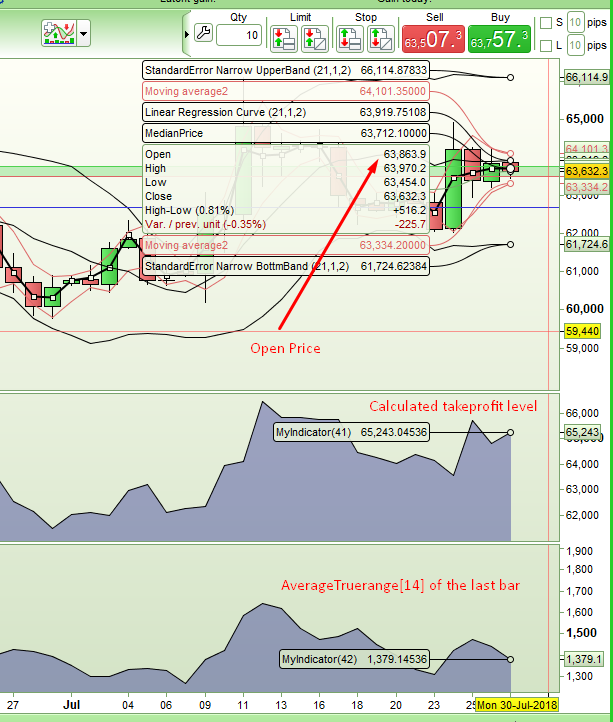
    In this image the bottom indicator is showing AVERAGETRUERANGE[14](close[1]) which is the value a strategy would get at the close of a bar when it makes its decision. The OPEN of the current bar is the price you would open your trade at. Added together we get your take profit price which is shown in the top indicator which is my code.

    OPEN + AVERAGETRUERANGE[14](close) = ?

    63863.9 + 1379.14356 = 65243.04536

    [attachment file=77011]

    GraHal, Real Pro and Nicolas thanked this post
    Screenshot_1-14.png Screenshot_1-14.png
    #77013 quote
    Real Pro
    Participant
    Average

    Thanks again.  I made a typo (1 instead of 14), but I undersatand your explanation.

Viewing 10 posts - 1 through 10 (of 10 total)
  • You must be logged in to reply to this topic.

pprofit


ProOrder: Automated Strategies & Backtesting

New Reply
Author
author-avatar
Real Pro @real-pro Participant
Summary

This topic contains 9 replies,
has 2 voices, and was last updated by Real Pro

7 years, 7 months ago.

Topic Details
Forum: ProOrder: Automated Strategies & Backtesting
Language: English
Started: 07/29/2018
Status: Active
Attachments: 1 files
Logo Logo
Loading...
