PPO on OBV

Viewing 5 posts - 1 through 5 (of 5 total)
  • Author
    Posts
  • #111275 quote
    renzocariocarenzocarioca
    Participant
    Junior

    I am mainly focused on e-mini & micro mini S&P 500 futures.

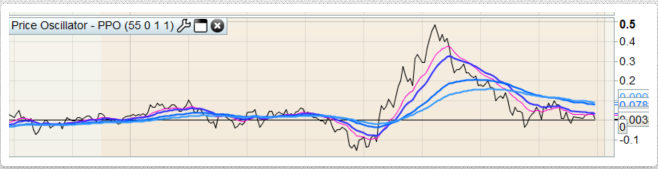
    I would like to use the OBV indicator as a source price for a PPO.  ( I use PPO on securities price). When I go to edit the OBV, I can add other indicator (like MA, EMA) but I am unable to add the PPO . I would make the “original” invisible to just show the PPO.  Anybody has a solution, idea to fix this?

    here is a printscreen link of the PPO on price as an example.  http://prntscr.com/pofylz

    thank you

    Renzo

    Screenshot_3-2.png Screenshot_3-2.png
    #111279 quote
    VonasiVonasi
    Moderator
    Master

    renzocarioca – Please attach an image using the file attachment feature when posting a comment rather than provide links to where you have stored an image. I have attached one for you this time. 🙂

    #111337 quote
    renzocariocarenzocarioca
    Participant
    Junior

    my apologies,   I will do next time. Thanks for adding the charts.

    #111343 quote
    VonasiVonasi
    Moderator
    Master

    I’m not sure that I fully understand your request but this code gives a PPO calculation based on the returned value of the OBV indicator.

    SlowP      = 26                    //Periods of Slow Average
    FastP      = 12                    //Periods of Fast Average
    AvgType    = 0                     //Average Type 
    
    AvgType    = max(0,min(6,AvgType))    //0 - 6
    SlowAvg    = Average[SlowP,AvgType](OBV(close))
    FastAvg    = Average[FastP,AvgType](OBV(close))
    
    Difference = FastAvg - SlowAvg
    Difference = (Difference / SlowAvg) * 100
    
    RETURN Difference,0
    #111543 quote
    renzocariocarenzocarioca
    Participant
    Junior

    thank you,  it works.  It is interesting to compare the price and OBV PPO since you can use PPO to measure distance from a moving average.

Viewing 5 posts - 1 through 5 (of 5 total)

  • You must be logged in to reply to this topic.

ProRealAI ProRealAI New

Stuck on this ProBuilder code?

Describe what this topic is trying to build, in plain English, and ProRealAI writes the ProRealTime™ indicator, screener or system for you.

Available in 7 languages
Try ProRealAI

PPO on OBV


ProBuilder: Indicators & Custom Tools

New Reply
Author
Summary

This topic contains 4 replies,
has 2 voices, and was last updated by renzocariocarenzocarioca
6 years, 11 months ago.

Topic Details
Forum: ProBuilder: Indicators & Custom Tools
Language: English
Started: 10/26/2019
Status: Active
Attachments: 1 files
ProRealCode ProRealCode
Loading...