Pourcentage entre 2 ” close “

Viewing 15 posts - 1 through 15 (of 15 total)
  • Author
    Posts
  • #199755 quote
    supertiti
    Participant
    Master

    bonsoir à tous,

    Une idée m’est venue , voyons si elle est réalisable ?

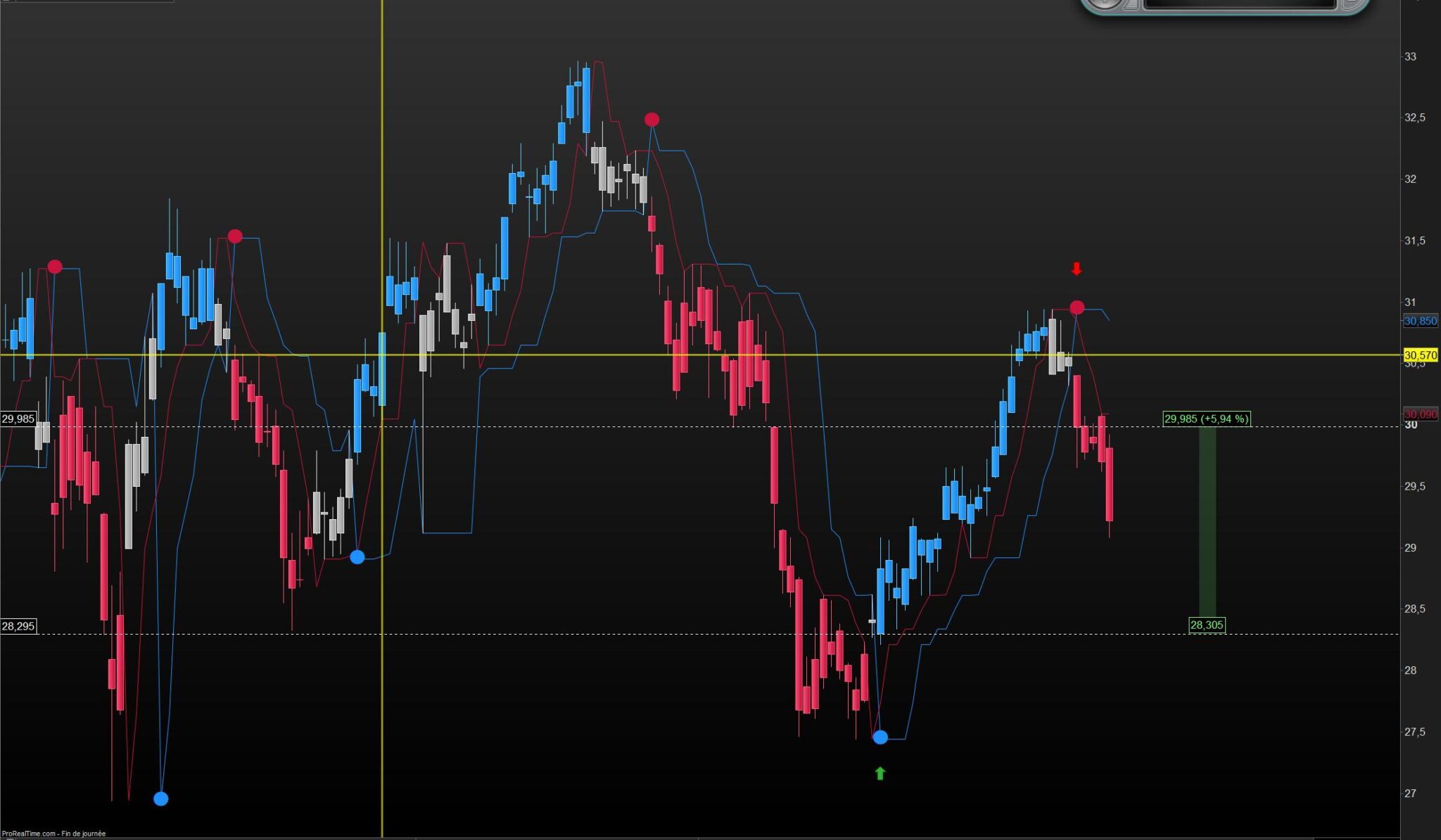
    J’aimerai faire apparaitre sur le graphe le pourcentage acquis entre les deux derniers ” close ” d’un signal.
    Ici les points ronds du ” drawtext ”
    Ainsi on aurait la performance instantanée d’un indicateur, en l’occurrence le perfect trendline 2

    merci de votre aide

    // PerfectTrendLine 2 PRC  indicator  //05.11.2020
    //Nicolas @ www.prorealcode.com //Sharing ProRealTime knowledge
    //converted from MT5 version (original author mladen)
    //enhanced version by Nicolas
     
    // --- settings
    SlowLength         = 7 // Slow length
    FastLength         = 3 // Fast length
    // --- end of settings
     
    fasthigh = Highest[SlowLength](high)//[1]
    fastlow  = Lowest[SlowLength](low)//[1]
    slowhigh = Highest[FastLength](high)//[1]
    slowlow  = Lowest[FastLength](low)//[1]
     
    if high<slowhigh then
    thighs=slowhigh 
    else 
    thighs=high
    endif
    if low>slowlow then 
    tlows=slowlow
    else
    tlows=low
    endif 
    if high<fasthigh then 
    thighf=fasthigh
    else
    thighf=high
    endif 
    if low>fastlow then 
    tlowf=fastlow
    else
    tlowf=low
    endif
     
    if close>slowln[1] then 
    slowln=tlows
    else
    slowln=thighs
    endif
    if close>fastln[1] then 
    fastln=tlowf
    else
    fastln=thighf
    endif
     
    once trend=-1
    if close<slowln and close<fastln then 
    trend=1
    endif
    if close>slowln and close>fastln then 
    trend=0
    endif
     
    if trend<>trend[1] then
    if trend=0 then
      r=30
      g=144
      b=255
    else
      r=200
      g=20
      b=60
    endif
    drawtext("●",barindex,fastln,Dialog,Bold,10) coloured(r,g,b)
    endif
    drawcandle(open,high,low,close) coloured(168,168,168)
    if trend=0 then 
    if close>slowln then
      drawcandle(open,high,low,close) coloured(30,144,255)
    endif
    elsif trend=1 then 
      if close<slowln then 
       drawcandle(open,high,low,close) coloured(200,20,60)
      endif
    endif
     
     
    return fastln coloured(30,144,255) as "fast line",slowln coloured(200,20,60) as "slow line", trend as "trend"
    BOUYGUES-PT2-PRC.jpg BOUYGUES-PT2-PRC.jpg
    #199757 quote
    JC_Bywan
    Moderator
    Master

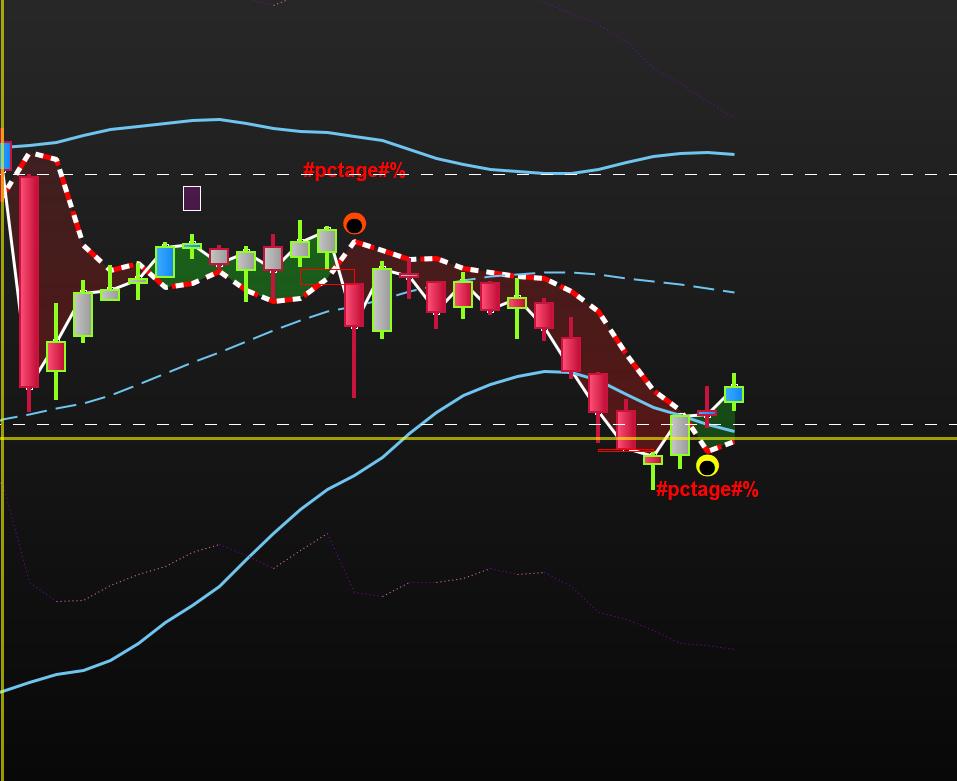
    Ecrit dessus/dessous plutôt qu’à côté, car dans le même drawtext que les points ça aurait décaler la position des points. On peut changer le deltaY si on veut modifier l’espacement vertical.

    // PerfectTrendLine 2 PRC indicator //05.11.2020
    //Nicolas @ www.prorealcode.com //Sharing ProRealTime knowledge
    //converted from MT5 version (original author mladen)
    //enhanced version by Nicolas
    
    // --- settings
    SlowLength = 7 // Slow length
    FastLength = 3 // Fast length
    // --- end of settings
    
    fasthigh = Highest[SlowLength](high)//[1]
    fastlow = Lowest[SlowLength](low)//[1]
    slowhigh = Highest[FastLength](high)//[1]
    slowlow = Lowest[FastLength](low)//[1]
    
    if high<slowhigh then
    thighs=slowhigh
    else
    thighs=high
    endif
    if low>slowlow then
    tlows=slowlow
    else
    tlows=low
    endif
    if high<fasthigh then
    thighf=fasthigh
    else
    thighf=high
    endif
    if low>fastlow then
    tlowf=fastlow
    else
    tlowf=low
    endif
    
    if close>slowln[1] then
    slowln=tlows
    else
    slowln=thighs
    endif
    if close>fastln[1] then
    fastln=tlowf
    else
    fastln=thighf
    endif
    
    once trend=-1
    if close<slowln and close<fastln then
    trend=1
    endif
    if close>slowln and close>fastln then
    trend=0
    endif
    
    if trend<>trend[1] then
    if trend=0 then
    r=30
    g=144
    b=255
    deltaY=-range/2
    else
    r=200
    g=20
    b=60
    deltaY=range/2
    endif
    oldsignal=newsignal
    newsignal=close
    pctage=100*(newsignal-oldsignal)/oldsignal
    drawtext("●",barindex,fastln,Dialog,Bold,10) coloured(r,g,b)
    drawtext("#pctage#%",barindex,fastln+deltaY,Dialog,Bold,10) coloured(0,0,0)
    endif
    drawcandle(open,high,low,close) coloured(168,168,168)
    if trend=0 then
    if close>slowln then
    drawcandle(open,high,low,close) coloured(30,144,255)
    endif
    elsif trend=1 then
    if close<slowln then
    drawcandle(open,high,low,close) coloured(200,20,60)
    endif
    endif
    
    return fastln coloured(30,144,255) as "fast line",slowln coloured(200,20,60) as "slow line", trend as "trend"
    #199783 quote
    supertiti
    Participant
    Master

    Bonjour à tous

    Merci JC pour ton aide toujours bienvenue, les chiffres sur le graphe donnent une autre réalité de la performance en rapport à l’optique pure, l’oeil est souvent trompeur.

    Bons trades

    #199812 quote
    supertiti
    Participant
    Master

    @ JC

    Serait-il possible pour alléger le graphique de n’avoir à l’écran que 2 décimales après la virgule ?
    merci

    #199816 quote
    JC_Bywan
    Moderator
    Master

    En remplaçant la ligne 70:

    pctage=100*(newsignaloldsignal)/oldsignal

    par:

    pctage=round(100*(newsignaloldsignal)/oldsignal,2)

    #199840 quote
    supertiti
    Participant
    Master

    Tip top j’ai remplacé la ligne et c’est nickel

    merci et bonne soirée

    #206350 quote
    JC_Bywan
    Moderator
    Master

    En réponse à : https://www.prorealcode.com/topic/perfect-trendline-2-prc-nicolas/#post-206339

    Remplacer la ligne 72 par:

    if newsignal>=oldsignal then
     rtext=0
     gtext=255
     btext=0
    else
     rtext=255
     gtext=0
     btext=0
    endif
    
    drawtext("#pctage#%",barindex,fastln+deltaY,Dialog,Bold,10) coloured(rtext,gtext,btext)

    ici écrit avec un simple vert/rouge, on peut remplacer les 2 jeux de rtext=… gtext=… btext=… pour d’autres couleurs personnalisées

    #206357 quote
    supertiti
    Participant
    Master

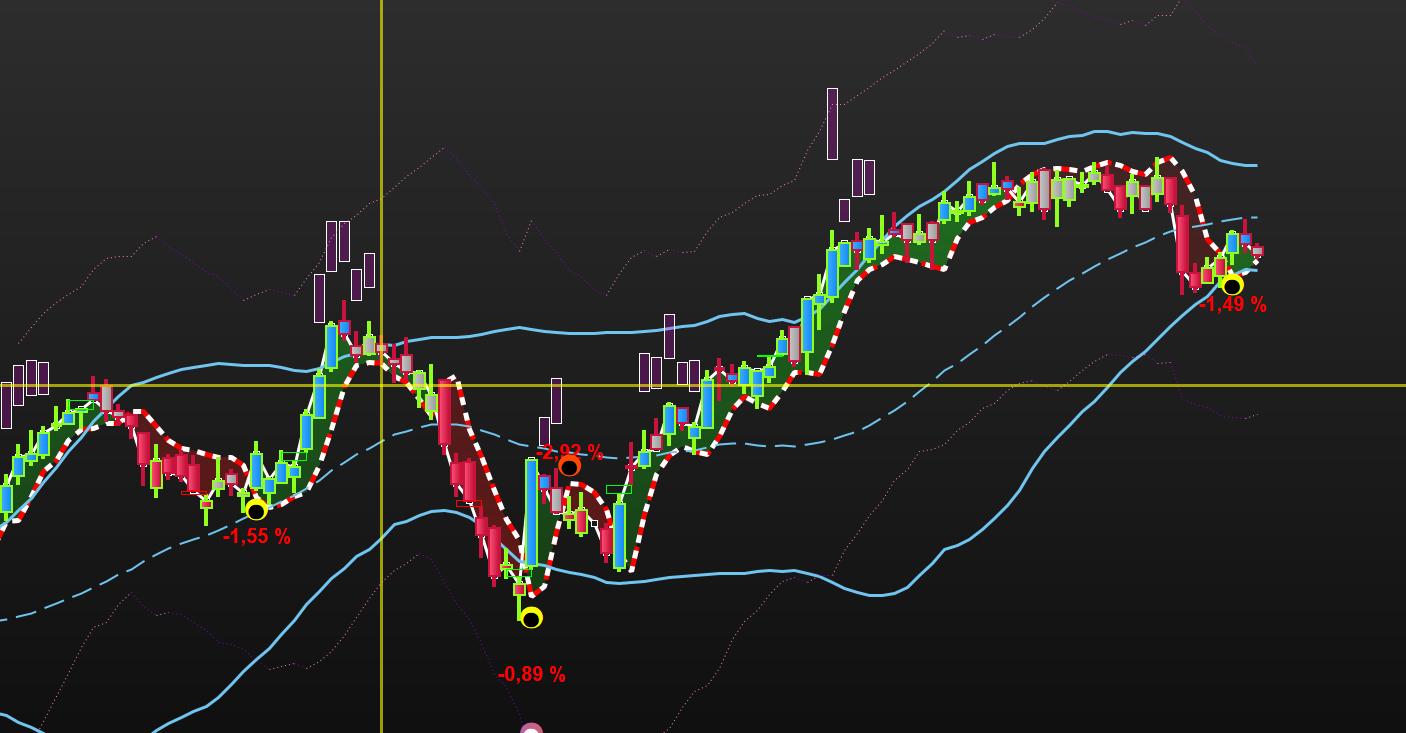
    Merci JC pour le code cependant le résultat n’est pas celui escompté

    je joins une image du résultat

    (control F5 ne marche pas pour insérer le code !)

    if trend<>trend[1] then
    if trend=0 then
    r=247//30 // jaune
    g=255//144
    b=0//255
    deltaY= -range/2
    else
    r=255//200 // Orange
    g=72//20
    b=0//60
    deltaY= range/2
    endif
    /////////////////////////////////////////////////////////
    oldsignal=newsignal
    newsignal=close
    //pctage=100*(newsignal-oldsignal)/oldsignal
    //pctage=round(100*(newsignal-oldsignal)/oldsignal,2)
    /////////////////////////////////////////////////////////
    if newsignal>=oldsignal then
    rtext=0
    gtext=255
    btext=0
    else
    rtext=255
    gtext=0
    btext=0
    drawtext(“#pctage#%”,barindex,fastln+deltaY,Dialog,Bold,20) coloured(rtext,gtext,btext)
    /////////////////////////////////////////////////////////
    drawtext(“●”,barindex,fastln,Dialog,Bold,30) coloured(r,g,b)
    drawtext(“●”,barindex,fastln,Dialog,Bold,20) coloured(0,0,0)
    //drawtext(“#pctage#%”,barindex,fastln+deltaY,Dialog,Bold,20) coloured(239,216,7)//jaune
    endif
    endif
    //////////////////////////////////////////////////////////////////

    PT2-couleurs-.jpg PT2-couleurs-.jpg
    #206361 quote
    supertiti
    Participant
    Master

    en remettant l’ancien code on a bien des % mais que les négatifs !

    /////////////////////////////////////////////////////////
    oldsignal=newsignal
    newsignal=close
    //pctage=100*(newsignal-oldsignal)/oldsignal
    pctage=round(100*(newsignal-oldsignal)/oldsignal,2)
    /////////////////////////////////////////////////////////

    #206362 quote
    supertiti
    Participant
    Master
    #206372 quote
    JC_Bywan
    Moderator
    Master

    Dans le post https://www.prorealcode.com/topic/pourcentage-entre-2-close/#post-206357

    tu as mis des // devant la ligne pctage=round(100*(newsignal-oldsignal)/oldsignal,2)

    il faut les enlever pour que la variable pctage soit bien calculée et s’affiche à l’écran en valeur numérique au lieu du texte #pctge#

    Afin de vérifier si les positifs manquent ou pas, il faut partir d’un cas qu’on connait positif avant modification, ainsi qu’éventuellement vérifier que les rtext,gtext,btext ne soient pas mis sur la même couleur que le fond de fenêtre 0,0,0 lors de modifs intermédiaires, à part ça je vois pas ce qui pourrait empêcher les cas positifs d’apparaitre

    #206396 quote
    supertiti
    Participant
    Master

    Merci JC

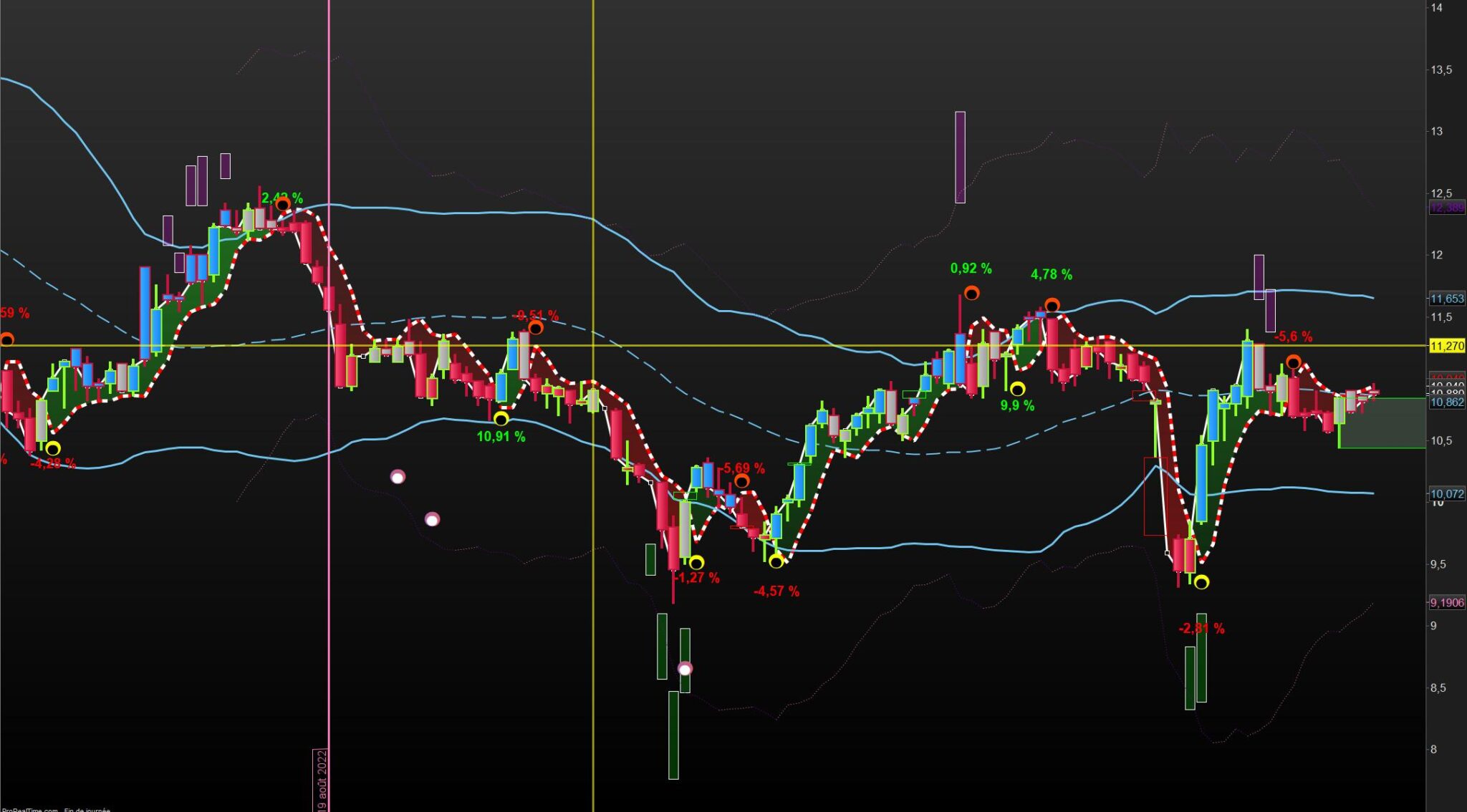
    réponse tardive mais j’étais pas mal occupé. ça fonctionne bien. en se concentrant un peu ça va mieux.

    bonnes fêtes .

    PT2-V1-ciego.jpg PT2-V1-ciego.jpg
    #206724 quote
    supertiti
    Participant
    Master

    Désolé le ctrl+f5 ne fonctionne pas pour entrer le code.

    @JCbyWan

    En réalité je viens de m’apercevoir que le code renvoit des pourcentages qui sont faux avec ce qui est ci-dessous.

    moyen de voir d’où vient l’erreur ?

    merci

    meilleurs voeux pour 2023

    //////////////////////////////////////////////////////////////////////////////////////////////////////
    
    // PERFECT TRENDLINE2 MULTICOLORE V1 by DID 25.07.2022 modifié JCbyWan 28.12.2022
    
    // PerfectTrendLine 2 PRC indicator //05.11.2020 modifié DID le 22.07.2022
    //Nicolas @ http://www.prorealcode.com //Sharing ProRealTime knowledge
    //converted from MT5 version (original author mladen)
    //enhanced version by Nicolas
    // OUVRIR le graphe PRIX en premier puis mettre les indicateurs …
    // — settings
    //SlowLength = 7
    //FastLength = 3
    //p=2
    //m = type de moyenne perso = pondérée (2)
    // — end of settings
    defparam calculateonlastbars = 150
    fasthigh = Highest[SlowLength](high)//[1]
    fastlow = Lowest[SlowLength](low)//[1]
    slowhigh = Highest[FastLength](high)//[1]
    slowlow = Lowest[FastLength](low)//[1]
    
    if high<slowhigh then
    thighs=slowhigh
    else
    thighs=high
    endif
    if low>slowlow then
    tlows=slowlow
    else
    tlows=low
    endif
    if high<fasthigh then
    thighf=fasthigh
    else
    thighf=high
    endif
    if low>fastlow then
    tlowf=fastlow
    else
    tlowf=low
    endif
    
    if close>slowln[1] then
    slowln=tlows
    else
    slowln=thighs
    endif
    if close>fastln[1] then
    fastln=tlowf
    else
    fastln=thighf
    endif
    
    once trend=-1
    if close<slowln and close<fastln then
    trend=1
    endif
    if close>slowln and close>fastln then
    trend=0
    endif
    
    if trend<>trend[1] then
    if trend=0 then
    r=247//30 // jaune
    g=255//144
    b=0//255
    deltaY= -range/2
    else
    r=255//200 // Orange
    g=72//20
    b=0//60
    deltaY= range/2
    endif
    /////////////////////////////////////////////////////////////////////////////
    if newsignal>=oldsignal then
    rtext=0
    gtext=255
    btext=0
    else
    rtext=255
    gtext=0
    btext=0
    endif
    drawtext(“#pctage#%”,barindex,fastln+deltaY,Dialog,Bold,20) coloured(rtext,gtext,btext)
    /////////////////////////////////////////////////////////////////////////////
    
    oldsignal=newsignal
    newsignal=close
    //pctage=100*(newsignal-oldsignal)/oldsignal
    pctage=round(100*(newsignal-oldsignal)/oldsignal,2)
    drawtext(“●”,barindex,fastln,Dialog,Bold,30) coloured(r,g,b)
    drawtext(“●”,barindex,fastln,Dialog,Bold,20) coloured(0,0,0)
    //drawtext(“#pctage#%”,barindex,fastln+deltaY,Dialog,Bold,20) coloured(239,216,7)//jaune
    endif
    //////////////////////////////////////////////////////////////////
    If close > open then
    drawcandle(open,high,low,close) coloured(30,144,255) bordercolor (143,255,31)
    endif
    If close < open then
    drawcandle(open,high,low,close) coloured(200,20,60) bordercolor (200,20,60)
    endif
    
    /////////////////////////////////////////////////////////////////
    drawcandle(open,high,low,close) coloured (168,168,168)
    
    if trend=0 then
    if close>slowln then
    drawcandle(open,high,low,close) coloured(30,144,255)
    endif
    elsif trend=1 then
    if close<slowln then
    drawcandle(open,high,low,close) coloured(200,20,60)
    endif
    endif
    ////////////////////////////////////////////////////
    MASLOW = average [p,m](slowln)
    MASFAST = average [p,m](fastln)
    /////////////////////////////////////////////////////
    /////////////////////////////////////////////////////////////////////////////////////
    ONCE CciPeriod = 20
    ONCE RsiPeriod = 12 //perso = 12
    ONCE N = 14
    ONCE K = 3
    ONCE DiPeriod = 14
    ONCE MAperiod = 20 // perso = 7 NON UTILISE
    ONCE MAtype = 0 // 0=SMA NON UTILISE
    ONCE UseCci = 1 // BOOLEEN VRAI =1 // CANDLE + COMMODITY CHANNEL INDEX
    ONCE UseRsi = 1 //BOOLEEN VRAI =1 // CANDLE + RSI COLOUR
    ONCE UseStochastic = 1 //BOOLEEN VRAI =1 // CANDLE + STOCASTIC COLOUR
    ONCE UseCycle = 1 //BOOLEEN VRAI =1 // CANDLE + CYCLE COLOUR
    ONCE UseDI = 1 //BOOLEEN VRAI =1 // CANDLE + DIRECTIONAL INDEX
    // — end of settings
    
    If UseCci then // CANDLE + COMMODITY CHANNEL INDEX COLOUR
    MyCci = Cci[max(1,CciPeriod)](customclose)
    R = (200-MyCci)
    G = (200+MyCci)
    Elsif UseRsi then // CANDLE + RSI COLOUR
    MyRsi = RSI[max(1,RsiPeriod)](customclose)
    R =50+(200-(MyRsi-50)*12)
    G =50+(200+(MyRsi-50)*12)
    Elsif UseStochastic then // CANDLE + STOCHASTIC COLOUR
    MyStoch = Stochastic[max(1,N),max(1,K)](customclose)
    R =50+(200-(MyStoch-50)*6)
    G =50+(200+(MyStoch-50)*6)
    Elsif UseCycle then // CANDLE + CYCLE COLOUR
    MyCycle = Cycle(customclose)
    R = (200-MyCycle*10)
    G = (200+MyCycle*10)
    Elsif UseDI then // CANDLE + DIRECTIONAL INDEX
    MyDi = DI[max(1,DiPeriod)](customclose)
    R = 50+(200-MyDi*10)
    G = 50+(200+MyDi*10)
    endif
    ////////////////////////////////////////////////////////////
    // BANDES de BOLLINGER DID by Nicolas 02.09.2022
    
    data = customclose
    MA = average[20,m1](data)
    BolUp = MA+STD[20]*dev
    BolDn = MA-STD[20]*dev
    
    // Return MA as ” MM34 ” , Bolup as ” Bolup ” , Boldn as ” Boldn ”
    
    // Variables
    // period = 20
    // dev = 2
    // m1 = 0 simple
    //////////////////////////////////////////////////////////////////////////////////////
    //////////////////////////////////////////////////////////////////////////////////////
    return fastln coloured(30,144,255) as “fast line”,slowln coloured(200,20,60) as “slow line” , MASLOW as ” MASLOW ” coloured (R,G,0) , MASFAST as ” MASFAST ” , MASFAST as ” MASFAST ” ,close as “close” , MA as ” MM34 ” , Bolup as ” Bolup ” , Boldn as ” Boldn ” //, trend as “trend”

    #206731 quote
    robertogozzi
    Moderator
    Master

    Je l'ai converti en code PRT.

    JC_Bywan thanked this post
    #206739 quote
    JC_Bywan
    Moderator
    Master

    Meilleurs voeux,

    en regardant juste le code a priori pour le moment je vois pas, il faudrait partir d’un exemple spécifique de pourcentage considéré comme faux, en précisant en plus de la valeur du pourcentage pour quel instrument, timeframe et horaire de la bougie, et quelle est la valeur attendue considérée comme juste, pour mieux explorer d’où peut venir la différence

Viewing 15 posts - 1 through 15 (of 15 total)
  • You must be logged in to reply to this topic.

Pourcentage entre 2 ” close “


ProBuilder : Indicateurs & Outils Personnalisés

New Reply
Author
author-avatar
supertiti @supertiti Participant
Summary

This topic contains 14 replies,
has 3 voices, and was last updated by JC_Bywan
3 years, 2 months ago.

Topic Details
Forum: ProBuilder : Indicateurs & Outils Personnalisés
Language: French
Started: 08/28/2022
Status: Active
Attachments: 4 files
Logo Logo
Loading...