When I take a trade, the open position appears on my charts as well as linked stop and target orders. I do not wish to have my trades with stops and limits all displayed on my charts as it is a distraction.
Is there a way to hide this information?
Hello,
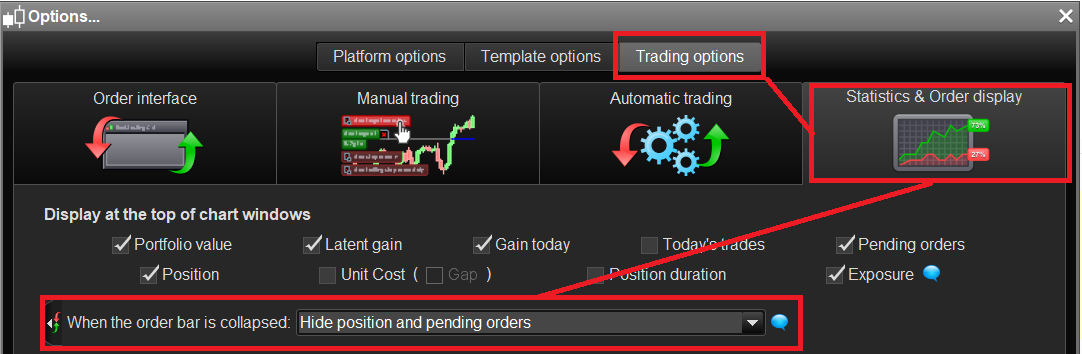
Please go to the dropdown-menu “Options ” => “Trading options” and choose “Statistics & Order display”.
Then activate the option “Do not show positions and pending orders on charts when the trading interface is hidden”.
After that go to the chart and collapse the interface window. The order lines will be automatically hidden.
[attachment file=63552]
You may also configure via this window the information you wish to display at the top of the chart windows such as Portfolio value, Latent gain, Gain today, Pending order, Positions, Exposure etc…
Hope this helps!
Ulrike
That’s great. Thanks a lot !!
I have another question, please.
When I launch the app the charts are really small including the fonts. I have tried to modify the screen to adjust to the screen size however the text is really small.
Can you please let me know what I need to do to fix this problem?
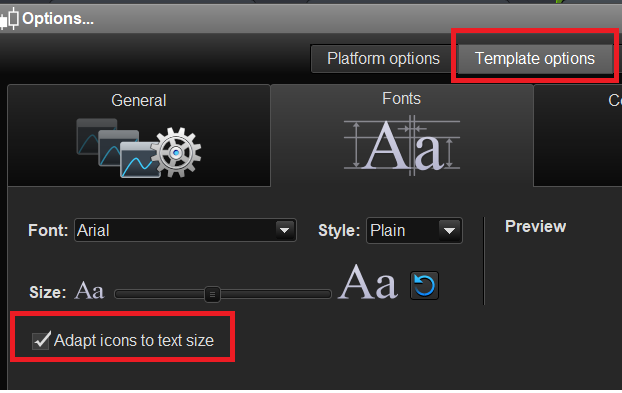
You can customize the font size via the “template options” in the main tool bar.
I also advise to activate the option “Adapt icons to text size” as shown in the image below.
[attachment file=63565]