pointillé sur “drawsegment”

Viewing 5 posts - 1 through 5 (of 5 total)
  • Author
    Posts
  • #237659 quote
    geroniman
    Participant
    Junior

    Bonjour

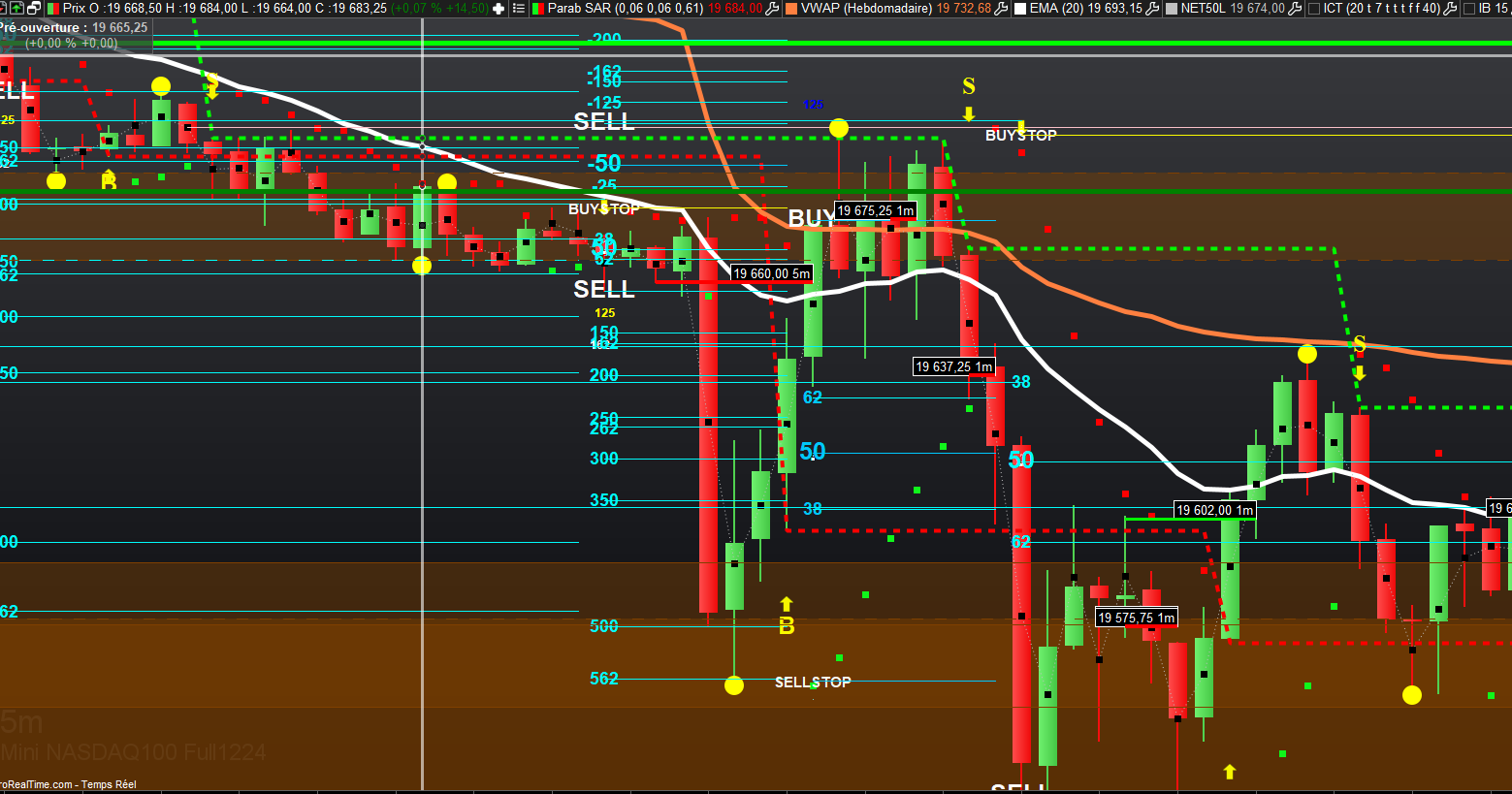
    Sur l ITF suivant, j’aimerais avoir des pointillés sur la ligne “drawsegment” au lieu de traits pleins . Qui saurait faire ça? Nicolas? Merci


    //PRC_Scalping with Parabolic SAR and Fibonacci | indicator
    //03.09.2019
    //Nicolas @ http://www.prorealcode.com
    //Sharing ProRealTime knowledge

    // — settings
    //plotbar=10 //bars duration for plotting the fib zones
    // — end of settings

    sarfast=SAR[0.02,0.02,0.2]
    sarslow=SAR[0.005,0.005,0.05]

    //colors
    if close>sarfast then //bullish trend
    r=0
    g=255
    else //bearish trend
    r=255
    g=0
    endif

    //highs and lows
    if close<sarfast then
    ll=min(ll,low)
    else
    hh=max(hh,high)
    endif

    if close>sarfast and close[1]<sarfast[1] then //new bullish signal
    fibo0=ll
    ll=sarslow //reset ll
    if close>sarslow then
    startbar=barindex
    irange=high-fibo0
    entry = fibo0+(irange/2)
    itarget = fibo0+irange*0.01
    istop = fibo0-2*pointsize
    //drawarrowup(startbar,fibo0) coloured(255,255,255)
    drawtext(“.”,barindex,entry-0.05*pointsize,dialog,bold,20) coloured(255,255,255)
    //drawtext(“sl”,barindex,istop-0.8*pointsize,dialog,bold,10) coloured(255,255,255)
    drawtext(“SELLSTOP”,barindex,itarget-0.02*pointsize,dialog,bold,15) coloured(250,250,240)
    endif
    endif
    if close<sarfast and close[1]>sarfast[1] then //new bearish signal
    fibo0=hh
    hh=0 //reset hh
    if close<sarslow then
    startbar=barindex
    irange=fibo0-low
    entry = fibo0-(irange/2)
    itarget = fibo0-irange*0.01
    istop = fibo0+2*pointsize
    //drawarrowdown(startbar,fibo0) coloured(255,255,0)
    drawtext(“.”,barindex,entry+0.5*pointsize,dialog,bold,20) coloured(255,255,255)
    //drawtext(“sl”,barindex,istop-0.8*pointsize,dialog,bold,10) coloured(255,255,255)
    drawtext(“BUYSTOP”,barindex,itarget-0.02*pointsize,dialog,bold,15) coloured(250,250,250)
    endif
    endif

    //plot fib zones
    if barindex-startbar<=plotbar then
    if close>sarslow then //bullish trend
    //drawsegment(startbar,istop,barindex,istop,5) coloured(0,250,0) //stoploss
    //drawsegment(startbar,entry,barindex,entry,3) coloured(0,0,0) //entry at 50% fibo
    drawsegment(startbar,itarget,barindex,itarget) coloured(0,200,255) //target at 161.8% fibo
    endif
    if close<sarslow then //bearish trend
    //drawsegment(startbar,istop,barindex,istop,5) coloured(250,0,0) //stoploss
    //drawsegment(startbar,entry,barindex,entry,3) coloured(0,0,0) //entry at 50% fibo
    drawsegment(startbar,itarget,barindex,itarget) coloured(250,250,0) //target at 161.8% fibo
    endif
    endif

    return

    #237660 quote
    geroniman
    Participant
    Junior

    drawtext(“BUYSTOP”,barindex,itarget-0.02*pointsize,dialog,bold,15) coloured(250,250,250)

    et

    drawsegment(startbar,itarget,barindex,itarget) coloured(250,250,0) //target at 161.8% fibo

    #237661 quote
    geroniman
    Participant
    Junior

    tout ceci pour eviter la multiude de traits avec tous le sniveaux ELLIOTT/FIBO

    #237669 quote
    JC_Bywan
    Moderator
    Master

    Bonjour,

    En utilisant les mots-clés optionnels “style” et “dottedline” de la façon suivante:

    drawsegment(startbar,itarget,barindex,itarget) coloured(250,250,0) STYLE(DOTTEDLINE,2)

    On peut aussi remplacer dottedline par dottedline1 ou dottedline2 ou dottedline3 ou dottedline4 pour faire varier le type de pointillés.

    On peut aussi écrire juste STYLE(DOTTEDLINE) sans chiffre ajouté à la fin. Ce chiffre (j’avais mis ,2 pour l’exemple) est l’épaisseur du trait pointillé, un entier qui varie entre 1 et 5 , il est optionnel, si on ne le met pas cela revient à prendre l’épaisseur par défaut.

    Doc si besoin:

    STYLE


    PS: topic déplacé du forum “support plateforme” au forum “support probuilder”

    druby and Iván González thanked this post
    #237675 quote
    geroniman
    Participant
    Junior

    SUPER MERCI BIEN

Viewing 5 posts - 1 through 5 (of 5 total)

  • You must be logged in to reply to this topic.

pointillé sur “drawsegment”


ProBuilder : Indicateurs & Outils Personnalisés

New Reply
Author
author-avatar
geroniman @geroniman Participant
Summary

This topic contains 4 replies,
has 2 voices, and was last updated by geroniman
1 year, 4 months ago.

Topic Details
Forum: ProBuilder : Indicateurs & Outils Personnalisés
Language: French
Started: 09/16/2024
Status: Active
Attachments: 1 files
Logo Logo
Loading...