Plotting Question…

Viewing 3 posts - 1 through 3 (of 3 total)

  • Author
    Posts
  • #5036 quote
    xelxel
    Participant
    Average

    Hi guys… two questions:

    1. Is there a way to condition the color of this Columns to the “highest” one..?
    2. I wish to make the Columns ligher (Alpha blended), but in the colour selection at properties, if I put Transparency they are not respected.  Bars still painted solid hard.

    Thanks for your help!

    histogram.png histogram.png
    #5039 quote
    NicolasNicolas
    Keymaster
    Legend

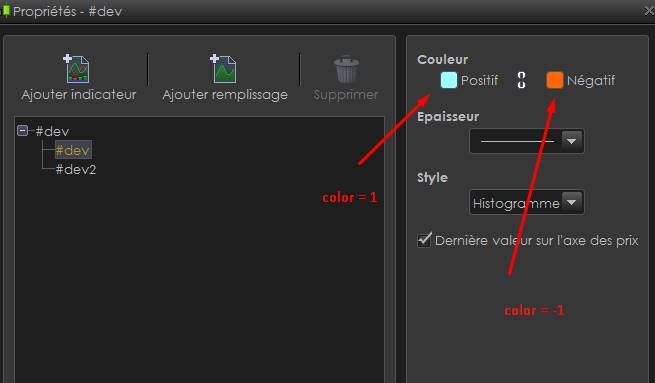
    Yes you can by using “COLOURED BY” a variable :

    if bar1>bar2 then 
     color = 1
    else
     color = -1
    endif
    
    RETURN bar1 coloured by color, bar2
    coloured-by-instruction.jpg coloured-by-instruction.jpg
    #5131 quote
    xelxel
    Participant
    Average

    Thanks a lot..!  that was for my already posted indicator.  Originally the “histogram” was settled as columns, but it’s fine to know how to do it for future reference  😀


    Cheers!

Viewing 3 posts - 1 through 3 (of 3 total)

  • You must be logged in to reply to this topic.

ProRealAI ProRealAI New

Stuck on this ProBuilder code?

Describe what this topic is trying to build, in plain English, and ProRealAI writes the ProRealTime™ indicator, screener or system for you.

Available in 7 languages
Try ProRealAI

Plotting Question…


ProBuilder: Indicators & Custom Tools

New Reply
Author
author-avatar
xel @xel Participant
Summary

This topic contains 2 replies,
has 2 voices, and was last updated by xelxel

10 years, 5 months ago.

Topic Details
Forum: ProBuilder: Indicators & Custom Tools
Language: English
Started: 04/07/2016
Status: Active
Attachments: No files
ProRealCode ProRealCode
Loading...