Plot moving averages behind bars

Viewing 6 posts - 1 through 6 (of 6 total)

  • Author
    Posts
  • #93989 quote
    OzTrader
    Participant
    Junior

    Hi

    Just wondering if its possible to plot the moving averages so that they plot behind the bars or candles instead of on top of them?

    Thanks

    #93992 quote
    Vonasi
    Moderator
    Master

    I don’t think that there is a setting that can achieve this but it is certainly possible to create an indicator that first draws the averages and then draws candles. When applied to the price chart the candles should then be on top of the averages. In fact I think that just drawing candles should put them on top of any indicators but my platform is not open at the moment to test this.

    See here for the DRAWCANDLE instruction:

    DRAWCANDLE

    robertogozzi and OzTrader thanked this post
    #94000 quote
    robertogozzi
    Moderator
    Master

    I don’t think that there is a setting that can achieve this but it is certainly possible to create an indicator that first draws the averages and then draws candles. When applied to the price chart the candles should then be on top of the averages. In fact I think that just drawing candles should put them on top of any indicators but my platform is not open at the moment to test this.

    See here for the DRAWCANDLE instruction:

    https://www.prorealcode.com/documentation/drawcandle/

    Yes, it works!

    r = 0
    g = 0
    b = 0
    IF close > open THEN
       b = 255
    ELSIF close < open THEN
       r = 255
    ENDIF
    DRAWCANDLE(open,high,low,close) COLOURED(r,g,b,255)// BORDERCOLOR(R,G,B)
    RETURN
    Vonasi and OzTrader thanked this post
    #94116 quote
    OzTrader
    Participant
    Junior

    Sorry I am new to this and I’m having trouble with the formula. What do I have wrong? When I apply this indicator to a chart does it override the “Price” that is already there?

    Thanks

    IF close > open THEN
    BARCOLOR =  COLOURED(0,0,153)
    ELSIF close < open THEN
    BARCOLOR =  COLOURED(153,0,0)
    ENDIF
    DRAWBARCHART(open,high,low,close) BARCOLOR
    RETURN
    #94118 quote
    OzTrader
    Participant
    Junior

    I may have fixed it. Thanks for the help. Just one question. Do I add this as an indicator and does it override the price settings?

    r = 0
    g = 0
    b = 0
    
    IF close > open THEN
    R = 0
    G = 0
    B = 153
    ELSIF close < open THEN
    R = 153
    G = 0
    B = 0
    ENDIF
    DRAWBARCHART(open,high,low,close) COLOURED(r,g,b,255)
    
    RETURN

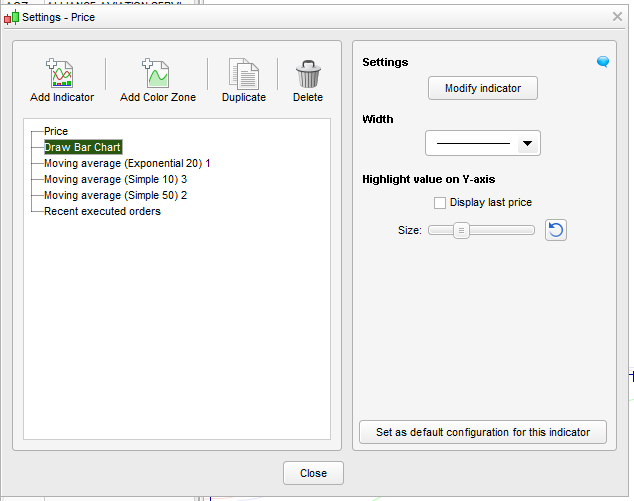
    I called the indicator “Draw Bar Chart”. Do I add it like I have done in this image.

    Bar-Chart-Indicator.png Bar-Chart-Indicator.png
    #94123 quote
    Vonasi
    Moderator
    Master

    Add the indicator to a price chart via the spanner in the price chart label. It does not override the price/candles/bars drawn on the chart but simply draws on top of them so make sure your chart is set to display the same type of price bars/candles etc.

    OzTrader thanked this post
Viewing 6 posts - 1 through 6 (of 6 total)
  • You must be logged in to reply to this topic.

Plot moving averages behind bars


ProBuilder: Indicators & Custom Tools

New Reply
Author
author-avatar
OzTrader @oztrader Participant
Summary

This topic contains 5 replies,
has 3 voices, and was last updated by Vonasi

6 years, 10 months ago.

Topic Details
Forum: ProBuilder: Indicators & Custom Tools
Language: English
Started: 03/19/2019
Status: Active
Attachments: 1 files
Logo Logo
Loading...