Hi Graha
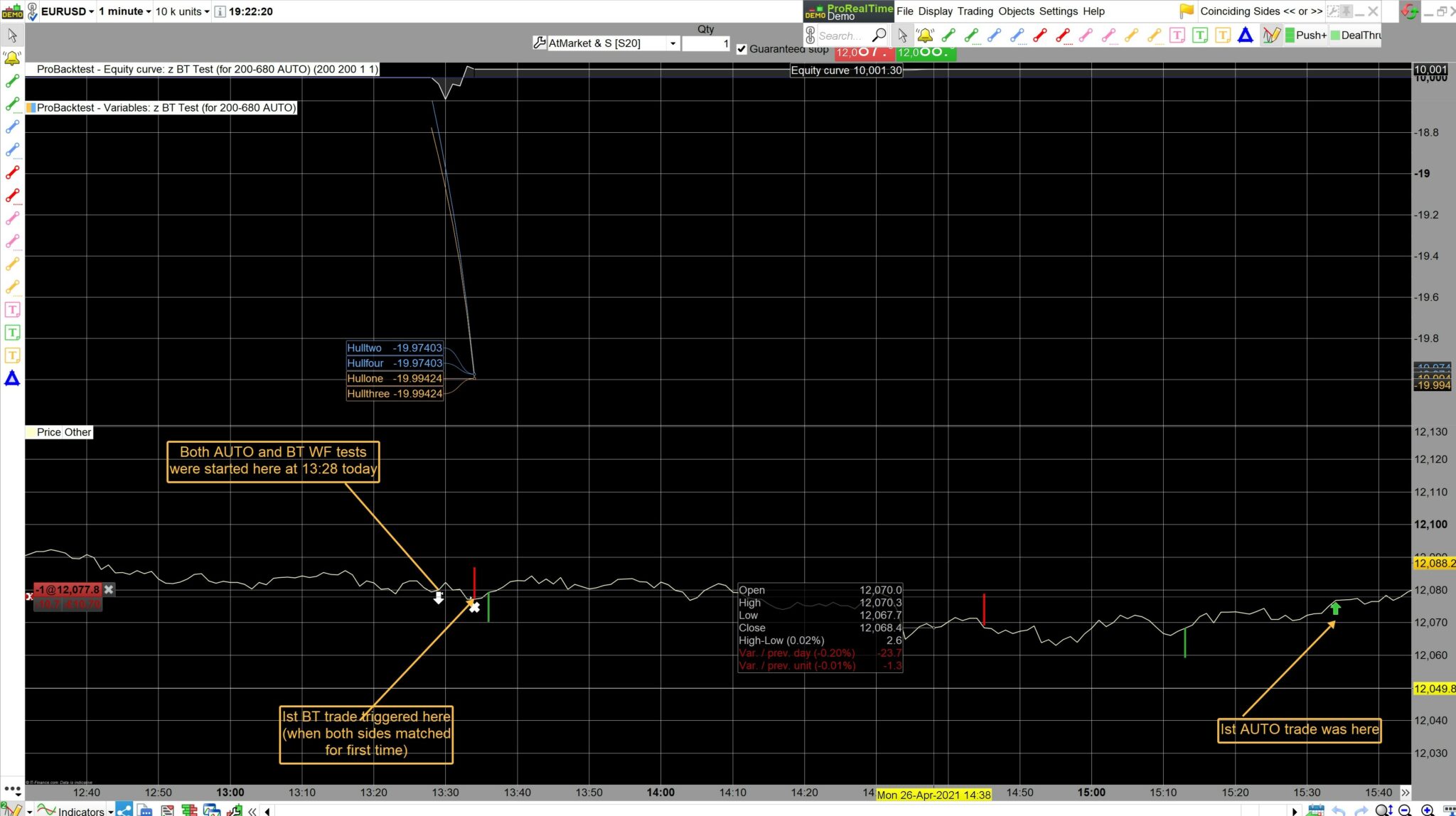
I let the above posted AUTO code run today from 1328 to 1600 and thereafter went over that same price data with the BT version of this code, bar by bar WF. I drew the BT triggers that occured when the long & short sides matched up.
The BT version made 4 trades before the AUTO even made its first trade at 1534. Screen Print attached.
Pasted below is the BT version of the above AUTO code that I used.
Now you can see the difference between AUTO and BT manual walk forward.
Hope this is clear?
defparam cumulateorders = false
defparam preloadbars = 1600

//DEFPARAM CalculateOnLastBars = 200
// MATCHNG SIDES only (and FULL)
//defparam flatbefore = 125000
//defparam flatafter = 155800

//SET TARGET PPROFIT (T)
//SET STOP PLOSS (S)

MA1=HullAverage[110](momentum[a](close))
MA2=HullAverage[120](momentum[a](close))
TS = MA1 < MA2

MA11=HullAverage[110](momentum[b](close))
MA22=HullAverage[120](momentum[b](close))
TL = MA11 > MA22

if TS and NOT TL then
sellshort at close stop
endif

if TL and NOT TS then
buy at close stop
endif

GRAPH MA1 COLOURED (255,195,77) AS "Hullone"// orange
GRAPH MA2 COLOURED (102,179,255) AS "Hulltwo"// blue

GRAPH MA11 COLOURED (255,195,77) AS "Hullthree"// orange
GRAPH MA22 COLOURED (102,179,255) AS "Hullfour"// blue
BT version of this code, bar by bar WF
I am not clear what you mean above?
I use the SAME version on Auto and Backtest.
WF / Walk Forward is different from regular backtest.
I take it by bar by bar WF you mean leaving the Algo running in realtime in the backtest window? If Yes, this is called Forward Test.
Why don’t you run the exact same version both in ProOrder and in Forward Test, then post screen shots showing equity curves and positions in both ProOrder and Forward Test … as I did where I showed both in sync.
No, I don’t leave the algo running in realtime because it needs to recalculate at the end of each new bar.
I set the Start Time and leave that Start Time for the rest of the day. Then I press the BackTest button after the end of each bar. That is why I call it a WF, because I am walking the period forward, bar by bar. (Sometimes I use a fixed period and walk that entire fixed period forward – that period can be, say, 60 minutes or thereabouts)
As time progresses, I trigger a trade whenever the Long or Short Hulls line up with each other (or go the same way, long or short)
But now you can see above that the code used for my “Walk Forward” tests does not correspond with what the AUTO code does. So maybe you agree that my coding must be incorrect?
because it needs to recalculate at the end of each new bar.
I slept on it! 🙂 Does above mean that you re-optimise at each bar? If Yes. let’s call it opti-bar for ease of reference.
code used for my “Walk Forward” tests does not correspond with what the AUTO code does.
If opti-bar, then why would you expect your AUTO code to give the same triggers as the opti-bar code?
The opti-bar code will become progressively more different than the AUTO code as each bar progresses and you backtest / re-optimise?
PS
(If anybody can see what I am not understanding here, then please join in and comment? 🙂 )
Now we are finally getting to the core of my coding problem!! – Let me explain it this way:
At the end of each bar: I need the AUTO system to read through the list of variables in my code, then it needs to choose the optimum variables, and if the Long or Short Hull’s match, it must trigger on the side that matches up.
Its easier to visualise if you look at the Orange coloured Hull’s matching up on the same side, long or short.
Hopefully this makes it clearer?
then it needs to choose the optimum variables,
Only way you are going to get a system running in ProOrder to do above is to use Machine Learning (ML)?
Its easier to visualise if you look at the Orange coloured Hull’s matching up on the same side, long or short.
Where can I see above … please post a screen shot.
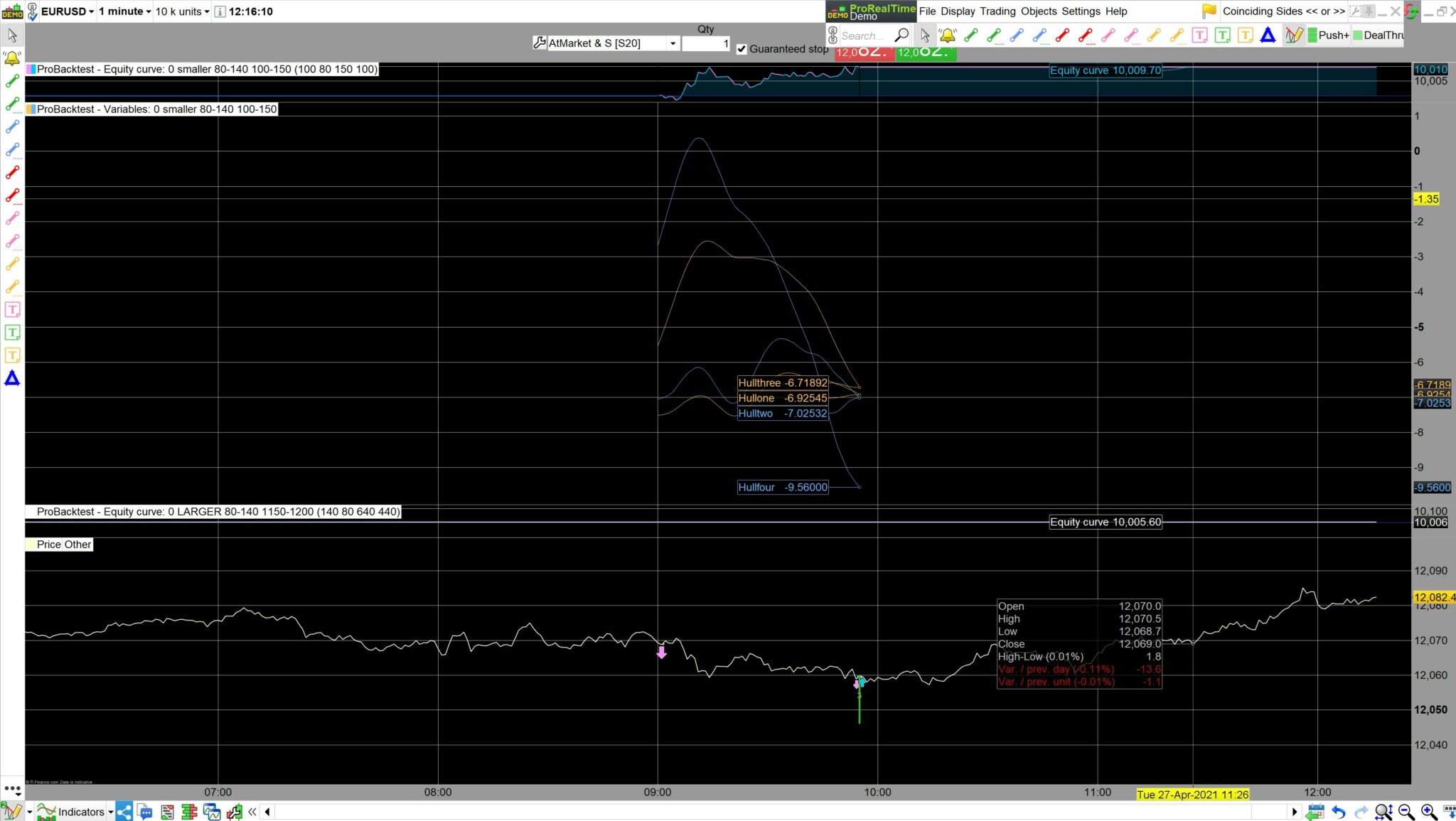
The attached screen shot shows the two Orange Hull’s matching up to trigger a long trade at 0955 this morning. (They are both above their Blue partners).
If the Hull’s match up, then a trade must be triggered in the direction of the match.
(I ignore the BackTest arrows as can be seen here, as they do not always agree with my strategy – the first BT trade here just happens to coincide with my long trigger – but not always so, as the BT program works differently to my rules)
I trigger these trades manually at present, but surely my code can be configured in such a way that the AUTO program selects the optimum variables to use? If not, which part of my AUTO code do you think is wrong?
I’m not sure why my screen shot does not want to attach??
Probably happened because I did not add a title to the attachment.
surely my code can be configured in such a way that the AUTO program selects the optimum variables to use?
Are you expecting / wanting the AUTO Code to select the optimum variables to use … on the fly / as the code is running in ProOrder?
Correct, my reasoning is that AUTO is already being used for many types of codes that have “if” conditions, so why not for mine, as I have posted?
so why not for mine, as I have posted?
Are you referring to below?
if TS and NOT TL then
sellshort at close stop
endif

if TL and NOT TS then
buy at close stop
endif
Have you tried below …
if TS and NOT TL then
sellshort at market
endif

if TL and NOT TS then
buy at market
endif