Plattform als Block minimieren

Viewing 4 posts - 1 through 4 (of 4 total)

  • Author
    Posts
  • #4127 quote
    Max33
    Participant
    New

    Hallo,

    weiß jemand, ob man einstellen kann, dass die einzelnen Teile der Plattform zusammen bleiben, also ich nicht alles einzeln schließen oder öffnen muss?

    Habe gerade erst mit Prorealtime angefangen und kenne die Funktionen noch nicht so.

    #4130 quote
    Fruehlingh
    Participant
    New

    …. ich denke da musst du dir eine Vorlage basteln und diese dann unter Vorlagen abspeichern …..   Diese Vorlage kannst du dann immer wieder aufrufen!

    #4153 quote
    Markus
    Moderator
    New

    Hallo,

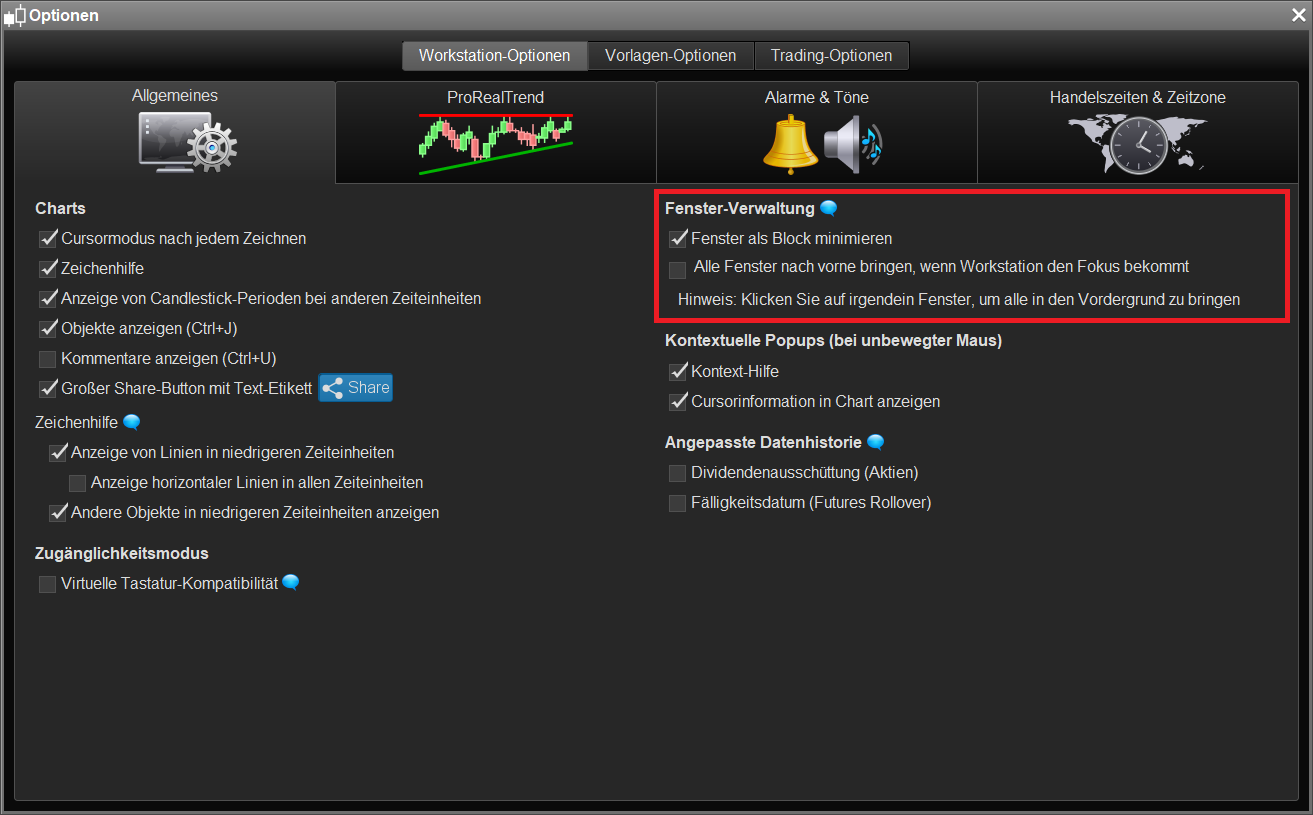
    Es gibt auch eine Option in der Workstation, die erlaubt, alle Fenster als Block zu minimieren. Oder sonst Minimierung zum System-Tray mit Tastenkombination “Strg+H”.

    #61880 quote
    Ulrike
    Moderator
    Senior

    Die entsprechende Option findet sich übrigens unter “Optionen” => Workstation-Optionen” => “Allgemeines” (unteres Bild). Dabei wird dann ein Fenster unten in der Toolbar des Computers angezeigt.

    Über die Tastenkombination Strg+H kann die Plattform in den System-Tray platziert werden; es wird in diesem Fall nur noch ein kleiner Button mit zwei Candlesticks links neben Datum und Uhrzeit angezeigt.

    [attachment file=61881]

Viewing 4 posts - 1 through 4 (of 4 total)

  • You must be logged in to reply to this topic.

Plattform als Block minimieren


Plattform-Support ProRealTime

New Reply
Author
author-avatar
Max33 @max33 Participant
Summary

This topic contains 3 replies,
has 4 voices, and was last updated by Ulrike

7 years, 11 months ago.

Topic Details
Forum: Plattform-Support ProRealTime
Language: German
Started: 03/22/2016
Status: Active
Attachments: 1 files
Logo Logo
Loading...