




Platform settings not saved

Viewing 4 posts - 31 through 34 (of 34 total)
  • Author
    Posts
  • #227231 quote
    PeterSt
    Participant
    Master

    the changes will then be to all your workspaces, Default or not.

    If that really is so, it would be utterly wrong.
    But I think I dare to state that this is not true. Luckily the changes applied to the one workspace do not end up in the other. I have this situation too, although for V11. This works fine (for me !).
    But :

    The other day I found a situation which is a kind of upside down, and with that hard to explain :

    • Start PRT for an account on PC-B and have it converted to V12.
    • Set the Home Template to that PC-B.
    • Start PRT for that same account on PC-A.
    • Set the Home Template to that PC-A which you started under V11.
    • Apply all the changes you need on that PC-A. Different charts etc.
    • Find all changes being applied to PC-B as well which was nicely started under V12 (I am counting for the 45 saving issues 🙂 )
    • Shout WTF outloud, and redo (set back) all for PC-B under V12 and carefully check each step for PC-A not being destroyed which is always started under V11. This appears to be OK.


    The conclusion : This Home stuff works fine, but not the first time. And the worse part of that : You apparently can let influence with the V11 instance, the V12 instance – in this case on another PC.

    I said it is complex for poor ProRealTime engineers.
    And I also claim only half works and that it bothers us each day (probably several times).
    The worst part of it is that you can keep on making tickets for it … nothing is solved ever. Let’s say that this is because all of these odd situations (like described above) can not be mimicked. Or can not be repeated after an initial failure somewhere.

    GraHal thanked this post
    #227424 quote
    PeterSt
    Participant
    Master

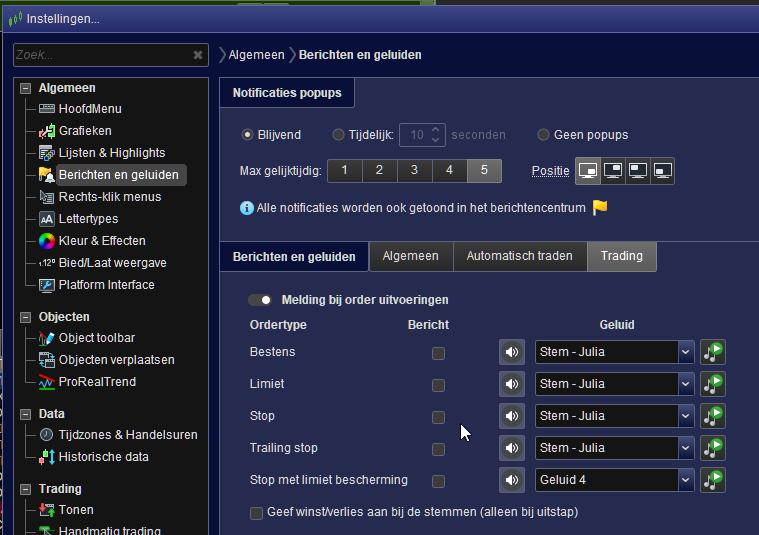
    Nah, 8-10 days or so to sustain those Notification settings, was really too much.
    They have disappeared again.

    image_2024-02-05_153739900.png image_2024-02-05_153739900.png
    #228497 quote
    Andre36
    Participant
    New

    Oh wow. New user here. Spent two hours with my new “toy” getting all exited. Saved all my settings and templates etc. Shut it down. Booted it back and there was all the issues everyone is pointing out. So frustrating. I haven’t got the patience so back to tradingview I guess.

    GraHal thanked this post
    #228612 quote
    Andre36
    Participant
    New
Viewing 4 posts - 31 through 34 (of 34 total)
  • You must be logged in to reply to this topic.

Platform settings not saved


Platform Support: Charts, Data & Broker Setup

New Reply
Author
author-avatar
prcds2020 @prcds2020 Participant
Summary

This topic contains 33 replies,
has 4 voices, and was last updated by Andre36

1 year, 11 months ago.

Topic Details
Forum: Platform Support: Charts, Data & Broker Setup
Language: English
Started: 01/30/2024
Status: Active
Attachments: 21 files
Logo Logo
Loading...
