Pivot 4/2 High Low

Viewing 2 posts - 1 through 2 (of 2 total)
  • Author
    Posts
  • #38060 quote
    stevestevestevesteve
    Participant
    New

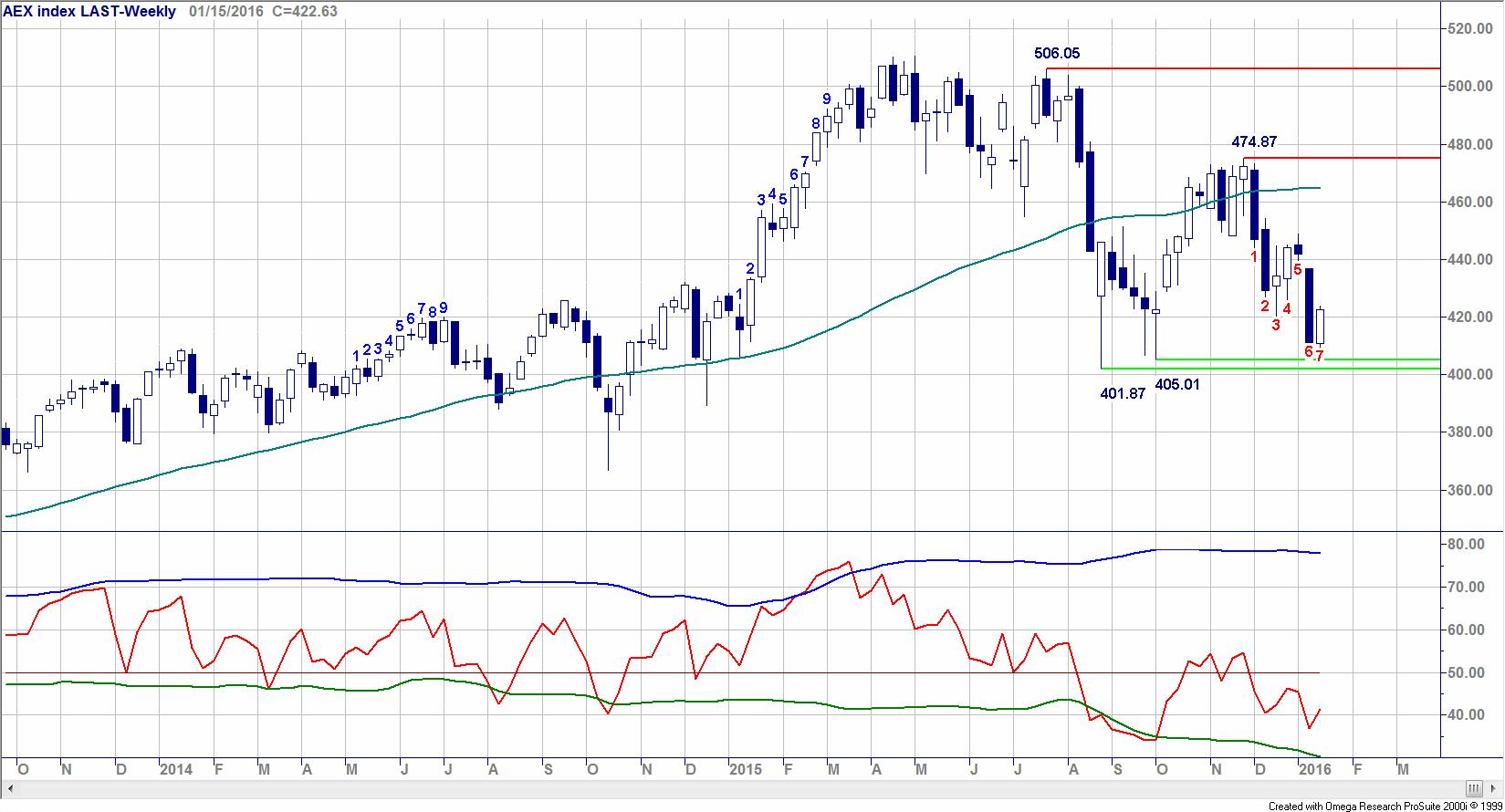
    I’m looking for an indicator that automatically shows the last pivot high and low.

    Here is a code from another program:

    {- Filename: Nico Bakker 4-2 PH&PL -}
    var
    i,x,y,Cnt : integer;
    TheEndofX,TheEndofY : Boolean;
    
    aStart_x: array[0..2000] of integer;
    aEnd_x : array[0..2000] of integer;
    aPrice_x: array[0..2000] of real;
    
    aStart_y: array[0..2000] of integer;
    aEnd_y : array[0..2000] of integer;
    aPrice_y: array[0..2000] of real;
    
    begin
    
    with Indicator do
    begin
    RequiredBars := 10;
    NewBand := false;
    ScaleRange := srCommon;
    end;
    
    for i := firstvalidIndex(High)+ 6 to BarCount - 1 do
    begin
    
    if (High[i] < High[i-2]) and (High[i-1] < High[i-2]) and (High[i-2] > High[i-3]) and (High[i-2] > High[i-4])and (High[i-2] > High[i-5])and (High[i-2] > High[i-6]) then
    begin
    if not TheEndofX then aEnd_x[x]:= i-2;
    x := x + 1;
    aStart_x[x] := i-2;
    aPrice_x[x] := High[i-2];
    TheEndofX := false;
    end;
    if not TheEndofX and (High[i] > aPrice_x[x]) then
    begin
    aEnd_x[x] := i;
    TheEndofX := true;
    end;
    if i = barcount-1 then
    begin
    if aEnd_x[x] = 0 then aEnd_x[x] := i;
    for Cnt := 1 to x do
    begin
    with CreateTrendline(Barposition[aStart_x[Cnt]], aPrice_x[Cnt], Barposition[aEnd_x[Cnt]], aPrice_x[Cnt])do
    begin
    Color := clRed;
    Style := lsDash;
    end;
    end;
    end;
    if (Low[i] > Low[i-2]) and (Low[i-1] > Low[i-2]) and (Low[i-2] < Low[i-3]) and (Low[i-2] < Low[i-4])and (Low[i-2] < Low[i-5])and (Low[i-2] < Low[i-6]) then
    begin
    if not TheEndofY then aEnd_y[y]:= i-2;
    y := y + 1;
    aStart_y[y] := i-2;
    aPrice_y[y] := Low[i-2];
    TheEndofY := false;
    end;
    if not TheEndofY and (Low[i] < aPrice_y[y]) then
    begin
    aEnd_y[y] := i;
    TheEndofY := true;
    end;
    if i = barcount-1 then
    begin
    if aEnd_y[y] = 0 then aEnd_y[y] := i;
    for Cnt := 1 to y do
    begin
    with CreateTrendline(Barposition[aStart_y[Cnt]], aPrice_y[Cnt], Barposition[aEnd_y[Cnt]], aPrice_y[Cnt])do
    begin
    Color := clBlue;
    Style := lsDash;
    end;
    end;
    end;
    end;
    end.
    Pivot.jpg Pivot.jpg
    #38078 quote
    NicolasNicolas
    Keymaster
    Legend
Viewing 2 posts - 1 through 2 (of 2 total)
  • You must be logged in to reply to this topic.

ProRealAI ProRealAI New

Stuck on this ProBuilder code?

Describe what this topic is trying to build, in plain English, and ProRealAI writes the ProRealTime™ indicator, screener or system for you.

Available in 7 languages
Try ProRealAI

Pivot 4/2 High Low


ProBuilder: Indicators & Custom Tools

New Reply
Author
author-avatar
stevesteve @stevesteve Participant
Summary

This topic contains 1 reply,
has 2 voices, and was last updated by NicolasNicolas

9 years, 3 months ago.

Topic Details
Forum: ProBuilder: Indicators & Custom Tools
Language: English
Started: 06/11/2017
Status: Active
Attachments: 1 files
ProRealCode ProRealCode
Loading...