






ProRealCode - Trading & Coding with ProRealTime™
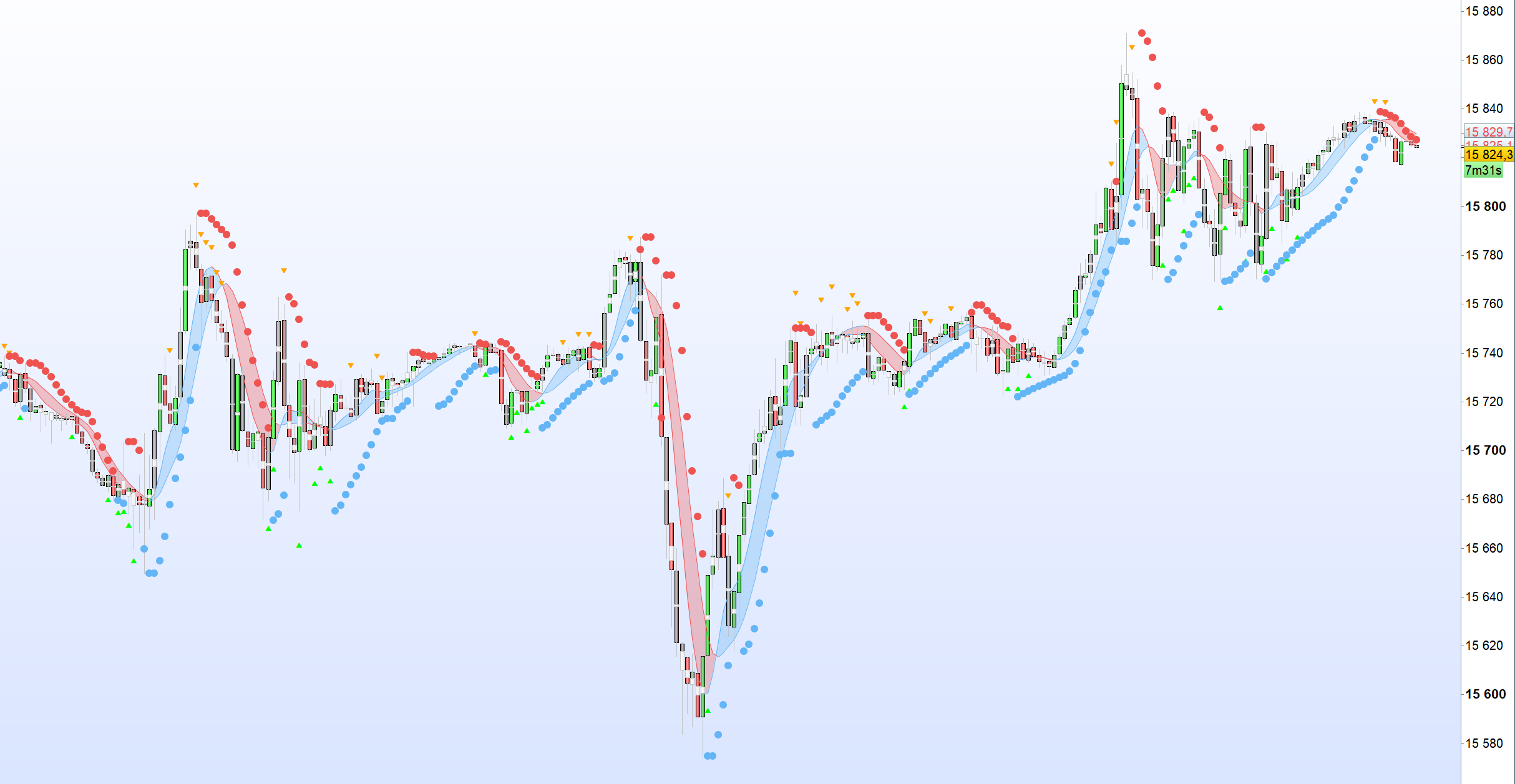
Spent few hours with chatgpt helping me (or maybe i was helping him?:-)) to translate an indicator from tradingview.
Finally we did it, but it tooks twice or 3 times more times than if i did it alone…
Original code : https://fr.tradingview.com/script/5zoE62bC-TKP-T3-Trend-With-Psar-Barcolor/
//this script is intended to help identify reversals and attempt to anticiapate them. Psar and Tilson templates are from Chris Moody and TKP Trader
//@Bjorgum on Stocktwits
//Bull trends are identified by blue bars, while bear trades are identified by red. Points of reversal are indicated with yellow candles.
//Bars change to yellow as bar close crosses the Tilson moving averages. Blue or red is confrimed as the two Tilson avergaes themselves cross.
//Buy and sell signal is given on yellow bars
//TURN CANDLE BORDERS OFF
//Psar helps identify reversals and provide stop loss values
//Arrows appear above or below candles to incorporate a momentum aspect. This condition is based on a rising or falling TSI value while under or over the signal line.
//This can show momentum 'headwinds' or 'tailwinds' as TSI 'curls'.
//@version=4
// TSI Inputs
short = 5
signal = 14
// Calculate TSI
pc = close - close[1]
// Calculate double smoothed PC
firstsmooth = ExponentialAverage[long](pc)
doublesmoothedpc = ExponentialAverage[short](firstsmooth)
// Calculate double smoothed absolute PC
abspc = abs(pc)
firstsmoothabs = ExponentialAverage[long](abspc)
doublesmoothedabspc = ExponentialAverage[short](firstsmoothabs)
tsivalue = 100 * (doublesmoothedpc / doublesmoothedabspc)
// Calculate Signals
data = tsivalue > tsivalue[1] AND tsivalue < ExponentialAverage[signal](tsivalue)
dtat = tsivalue < tsivalue[1] AND tsivalue > ExponentialAverage[signal](tsivalue)
// Define ATR
atr = AverageTrueRange[14](close)
// Plot Upward-Pointing Triangle using drawtext for "Curl Up" with color "green"
IF data THEN
DRAWTEXT("▴", barindex, low - atr / 2, dialog, bold, 25) coloured(0, 255, 0, 255)
ENDIF
// Plot Downward-Pointing Triangle using drawtext for "Curl Down" with color "orange"
IF dtat THEN
DRAWTEXT("▾", barindex, high + atr / 2, dialog, bold, 25) coloured(255, 165, 0, 255)
ENDIF
// Parabolic Stop and Reverse
startValue = 0.043
incrementValue = 0.043
maximumValue = 0.34
// Calculate PSAR
sarUp = SAR[startValue, incrementValue, maximumValue]
sarDown = SAR[startValue, incrementValue, maximumValue]
// Define Colors
colUpR = 100
colUpG = 181
colUpB = 246
colDownR = 239
colDownG = 83
colDownB = 80
// Condition to check if close is greater or equal to sarDown
IF close >= sarDown THEN
DRAWPOINT(barindex, sarUp, 3) coloured(colUpR, colUpG, colUpB, 255)
ENDIF
// Condition to check if close is less or equal to sarUp
IF close <= sarUp THEN
DRAWPOINT(barindex, sarDown, 3) coloured(colDownR, colDownG, colDownB, 255)
ENDIF
// T3 MA5
aLength = 5
AxPrice = close
axe1 = ExponentialAverage[aLength](AxPrice)
axe2 = ExponentialAverage[aLength](axe1)
axe3 = ExponentialAverage[aLength](axe2)
axe4 = ExponentialAverage[aLength](axe3)
axe5 = ExponentialAverage[aLength](axe4)
axe6 = ExponentialAverage[aLength](axe5)
ab = 0.7
ac1 = -ab * ab * ab
ac2 = 3 * ab * ab + 3 * ab * ab * ab
ac3 = -6 * ab * ab - 3 * ab - 3 * ab * ab * ab
ac4 = 1 + 3 * ab + ab * ab * ab + 3 * ab * ab
anT3Average = ac1 * axe6 + ac2 * axe5 + ac3 * axe4 + ac4 * axe3
p2 = anT3Average
colOne = anT3Average > anT3Average[1]
colTwo = anT3Average < anT3Average[1]
IF colOne THEN
T3ColorR = 100
T3ColorG = 181
T3ColorB = 246
ELSIF colTwo THEN
T3ColorR = 239
T3ColorG = 83
T3ColorB = 80
ELSE
T3ColorR = undefined
T3ColorG = undefined
T3ColorB = undefined
ENDIF
// T3 MA8
Length = 8
xPrice = close
xe1 = ExponentialAverage[Length](xPrice)
xe2 = ExponentialAverage[Length](xe1)
xe3 = ExponentialAverage[Length](xe2)
xe4 = ExponentialAverage[Length](xe3)
xe5 = ExponentialAverage[Length](xe4)
xe6 = ExponentialAverage[Length](xe5)
b = 0.7
c1 = -b * b * b
c2 = 3 * b * b + 3 * b * b * b
c3 = -6 * b * b - 3 * b - 3 * b * b * b
c4 = 1 + 3 * b + b * b * b + 3 * b * b
nT3Average = c1 * xe6 + c2 * xe5 + c3 * xe4 + c4 * xe3
p1 = nT3Average
upCol = nT3Average > nT3Average[1]
downCol = nT3Average < nT3Average[1]
IF upCol THEN
myColorR = 100
myColorG = 181
myColorB = 246
ELSIF downCol THEN
myColorR = 239
myColorG = 83
myColorB = 80
ELSE
myColorR = undefined
myColorG = undefined
myColorB = undefined
ENDIF
// T3 area fill
fillData = nT3Average < anT3Average
fillDtat = nT3Average > anT3Average
IF fillData THEN
FillColorR = 100
FillColorG = 181
FillColorB = 246
ELSIF fillDtat THEN
FillColorR = 239
FillColorG = 83
FillColorB = 80
ELSE
FillColorR = undefined
FillColorG = undefined
FillColorB = undefined
ENDIF
COLORBETWEEN(nT3Average, anT3Average, FillColorR, FillColorG, FillColorB, 80)
// Heikin-Ashi Bar Input
haClose = (open + high + low + close) / 4
haOpen = (open + close) / 2
IF NOT haOpen[1] = undefined THEN
haOpen = (haOpen[1] + haClose[1]) / 2
ENDIF
haHigh = MAX(high, MAX(haOpen, haClose))
haLow = MIN(low, MIN(haOpen, haClose))
// Define colors
BullTrendColorR = 100
BullTrendColorG = 181
BullTrendColorB = 246
BearTrendColorR = 239
BearTrendColorG = 83
BearTrendColorB = 80
BullReversalColorR = 255
BullReversalColorG = 241
BullReversalColorB = 118
BearReversalColorR = 255
BearReversalColorG = 241
BearReversalColorB = 118
// Bar Color
uc = (close > nT3Average) AND (anT3Average >= nT3Average)
dc = (close < nT3Average) AND (anT3Average <= nT3Average)
dr = (close < nT3Average) AND (anT3Average >= nT3Average)
ur = (close > nT3Average) AND (anT3Average <= nT3Average)
hauc = (haClose > nT3Average) AND (anT3Average >= nT3Average)
hadc = (haClose < nT3Average) AND (anT3Average <= nT3Average)
hadr = (haClose < nT3Average) AND (anT3Average >= nT3Average)
haur = (haClose > nT3Average) AND (anT3Average <= nT3Average)
hadu = haClose >= haOpen
hadd = haClose < haOpen
IF uc THEN
BarColorR = BullTrendColorR
BarColorG = BullTrendColorG
BarColorB = BullTrendColorB
ELSIF dc THEN
BarColorR = BearTrendColorR
BarColorG = BearTrendColorG
BarColorB = BearTrendColorB
ELSIF dr THEN
BarColorR = BearReversalColorR
BarColorG = BearReversalColorG
BarColorB = BearReversalColorB
ELSIF ur THEN
BarColorR = BullReversalColorR
BarColorG = BullReversalColorG
BarColorB = BullReversalColorB
ELSE
BarColorR = undefined
BarColorG = undefined
BarColorB = undefined
ENDIF
// Heikin-Ashi Bar Color
IF hauc THEN
HABarColorR = BullTrendColorR
HABarColorG = BullTrendColorG
HABarColorB = BullTrendColorB
ELSIF hadc THEN
HABarColorR = BearTrendColorR
HABarColorG = BearTrendColorG
HABarColorB = BearTrendColorB
ELSIF hadr THEN
HABarColorR = BearReversalColorR
HABarColorG = BearReversalColorG
HABarColorB = BearReversalColorB
ELSIF haur THEN
HABarColorR = BullReversalColorR
HABarColorG = BullReversalColorG
HABarColorB = BullReversalColorB
ELSIF hadu THEN
HABarColorR = BullTrendColorR
HABarColorG = BullTrendColorG
HABarColorB = BullTrendColorB
ELSE
HABarColorR = BearTrendColorR
HABarColorG = BearTrendColorG
HABarColorB = BearTrendColorB
ENDIF
haover = 0 // Overlays HA bars in place of regular candles.
rPrice = 0 // Displays 'real close' level
IF haover THEN
DRAWCANDLE(haOpen, haHigh, haLow, haClose) COLOURED(HABarColorR, HABarColorG, HABarColorB, 255)
ELSE
DRAWCANDLE(haOpen, haHigh, haLow, haClose) COLOURED(255, 255, 255, 255) // Default color (white) when haover is not active.
ENDIF
IF rPrice THEN
DRAWsegment(barindex - 1, close, barindex, close) COLOURED(HABarColorR, HABarColorG, HABarColorB, 255) // Displaying the real close level
ENDIF
c = (close > nT3Average[1] AND close[1] < nT3Average) OR (close < nT3Average[1] AND close[1] > nT3Average)
d = (nT3Average > anT3Average[1] AND nT3Average[1] < anT3Average) OR (nT3Average < anT3Average[1] AND nT3Average[1] > anT3Average)
// These conditions can be used in ProRealTime to create alerts.
RETURN nT3Average coloured(myColorR, myColorG, myColorB, 255), anT3Average coloured(T3ColorR, T3ColorG, T3ColorB, 255)
Thanks a lot Lucas! I’m adding this indicator into the Library. Don’t hesitate to add more! 😉
manque la variable : long
Variables have been added directly to the code… You can add the variables in the input table of probuilder if you want to.
manque la variable : long
Sorry, don”t know how it was working without…
Nevermind, you can add line 14 : long = 25
Thanks a lot; what prompt did you use?
Whatever the prompt i use at the begining Chatgpt does a lot of errors, syntax errors and confusion between the different languages (for example, it sometimes creats new instruction when it does not know how to translate to probuilder…)
What i don’t like is that sometimes it seems to forget all i’ve said before and does simple syntax errors it did not before… Weird! AI they said? Then Ai is dumb from time to time…
For functions, the prompt that seems to work is to tell him : whenever you meet a function, do not translate it because probuilder dos not support functions yet, but instead apply the logic of the function each time the pine script will call the function later in the code.
Also, chatgpt (v4) is not comfortable with probuilder when it comes to ploting… So it often needs some hints to know which instructions to use for plotting (Drawsegment, drawcandle, drawpoint, drawtext or simply return…)
When it comes to color, i tell him to split colors in 3 differents variables with r g and b values.
I tried to feed him with a list of all instructions that exist in probuilder, but his level in prorealtime coding remain the same from my point of view…
For example, for the conversion of this code which is rather simple, i had to help him a lot, as it was lost with nz() and na() instructions and how to translate them (even with using if then else). It tooks more than 3 hours while i would have need only 1h to do it without chatgpt…
If Barindex >35 then
// First xsa call:
srcValue1 = 100*(close - Lowest[27](low)) / (Highest[27](high) - Lowest[27](low))
lenValue1 = 5
weiValue1 = 1
sumf1 = 0
ma1 = 0
out1 = 0
sumf1 = (not (sumf1[1] = undefined)) * sumf1[1] - ((not (srcValue1[lenValue1] = undefined)) * srcValue1[lenValue1] + srcValue1)
ma1 = not (srcValue1[lenValue1] = undefined) * (sumf1 / lenValue1)
IF out1[1] = 0 THEN
out1 = ma1
ELSE
out1 = (srcValue1 * weiValue1 + out1[1] * (lenValue1 - weiValue1)) / lenValue1
ENDIF
// Now, 'out1' is the result of the first xsa.
// Second xsa call with out1 as the input:
srcValue2 = out1
lenValue2 = 3
weiValue2 = 1
sumf2 = 0
ma2 = 0
out2 = 0
sumf2 = (NOT (sumf2[1] = UNDEFINED)) * sumf2[1] - ((NOT (srcValue2[lenValue2] = UNDEFINED)) * srcValue2[lenValue2] + srcValue2)
ma2 = not (srcValue2[lenValue2] = UNDEFINED) * (sumf2 / lenValue2)
IF out2[1] = UNDEFINED THEN
out2 = ma2
ELSE
out2 = (srcValue2 * weiValue2 + out2[1] * (lenValue2 - weiValue2)) / lenValue2
ENDIF
// Now, 'out2' is the result of the second xsa.
// Fund trend final calculation:
fundtrend = (3 * out1 - 2 * out2 - 50) * 1.032 + 50
// Defining typical price for banker fund
typ = (2*close + high + low + open) / 5
// Lowest low with mid term fib # 34
lol = lowest[34](low)
// Highest high with mid term fib # 34
hoh = highest[34](high)
// Define banker fund flow bull bear line
bullbearline = exponentialaverage[13]((typ - lol) / (hoh - lol) * 100)
// Define banker entry signal using 'crosses over'
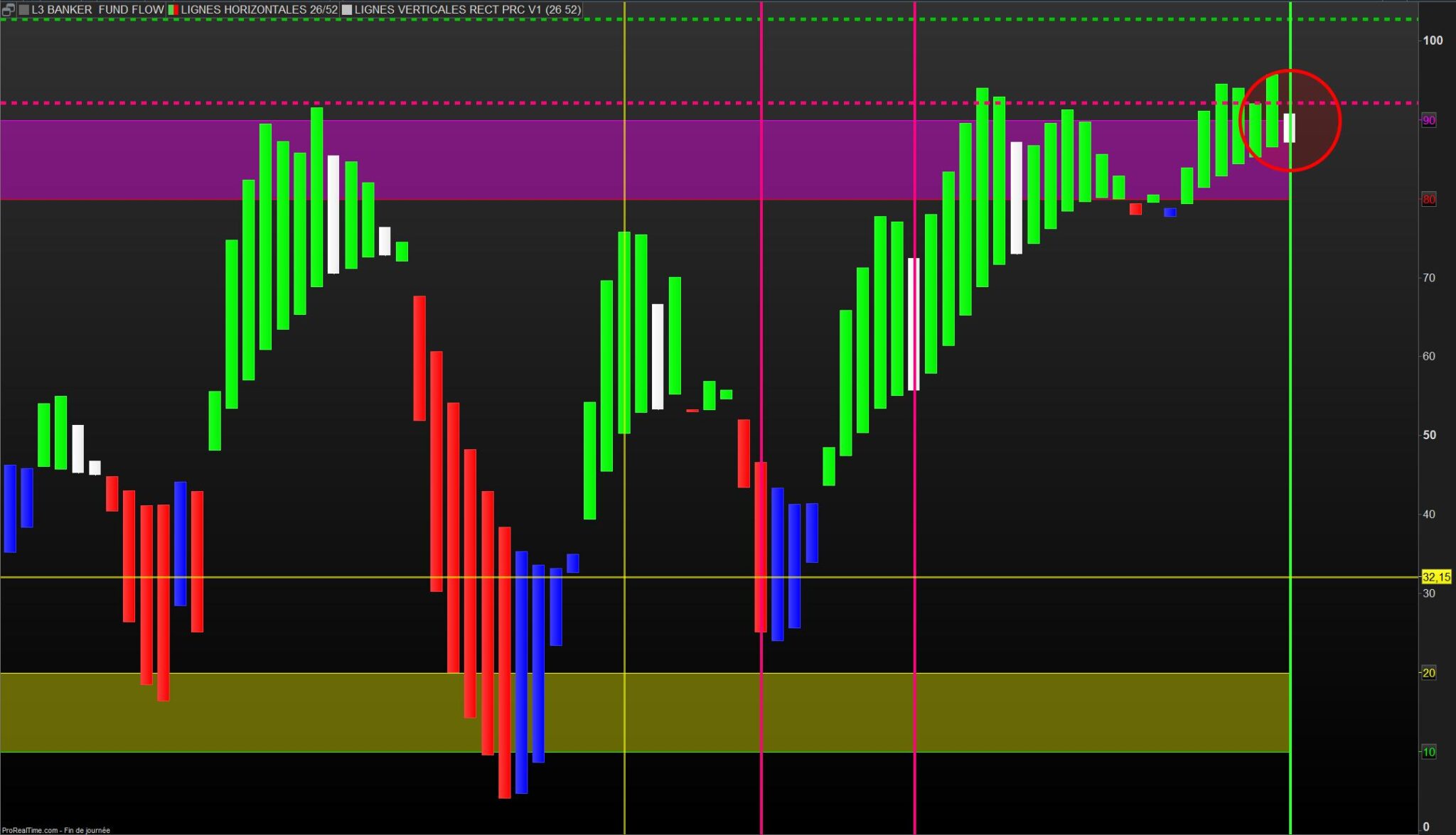
bankerentry = (fundtrend crosses over bullbearline) AND bullbearline < 25
//banker fund entry with yellow candle
IF bankerentry THEN
DRAWCANDLE(0, 50, 0, 50) COLOURED(255,255,0)// Yellow color
ENDIF
//banker increase position with green candle
IF fundtrend > bullbearline THEN
DRAWCANDLE(fundtrend, bullbearline, fundtrend, bullbearline) COLOURED(0,255,0) // Green color
ENDIF
//banker decrease position with white candle
IF fundtrend < (fundtrend[1] * 0.95) THEN
DRAWCANDLE(fundtrend, bullbearline, fundtrend, bullbearline) COLOURED(255,255,255)// White color
ENDIF
//banker fund exit/quit with red candle
IF fundtrend < bullbearline THEN
DRAWCANDLE(fundtrend, bullbearline, fundtrend, bullbearline) COLOURED(255,0,0) // Red color
ENDIF
//banker fund Weak rebound with blue candle
IF fundtrend < bullbearline AND fundtrend > (fundtrend[1]*0.95) THEN
DRAWCANDLE(fundtrend, bullbearline, fundtrend, bullbearline) COLOURED(0,0,255) // Blue color
ENDIF
h1 = 80
h2 = 20
h3 = 10
h4 = 90
// Coloring between the lines
colorbetween(h1, h4, 255, 0, 255, 100) // Fuchsia shade between 80 and 90
colorbetween(h2, h3, 255, 255, 0, 100) // Yellow shade between 20 and 10
Endif
RETURN h1 style(line,1) coloured(255,0,0), h2 style(line,1) coloured(255,255,0), h3 style(line,1) coloured(0,255,0), h4 style(line,1) coloured(255,0,255)
Hola Lucas
I don’t see a yellow candle for entry in position ? have you an example please
this indicator feel good !
have a nice day.
Hola Lucas
I don’t see a yellow candle for entry in position ? have you an example please
this indicator feel good !
have a nice day.
I made the conversion yesteerday of 3 or 4 indicators, so i had no time to test them yet.
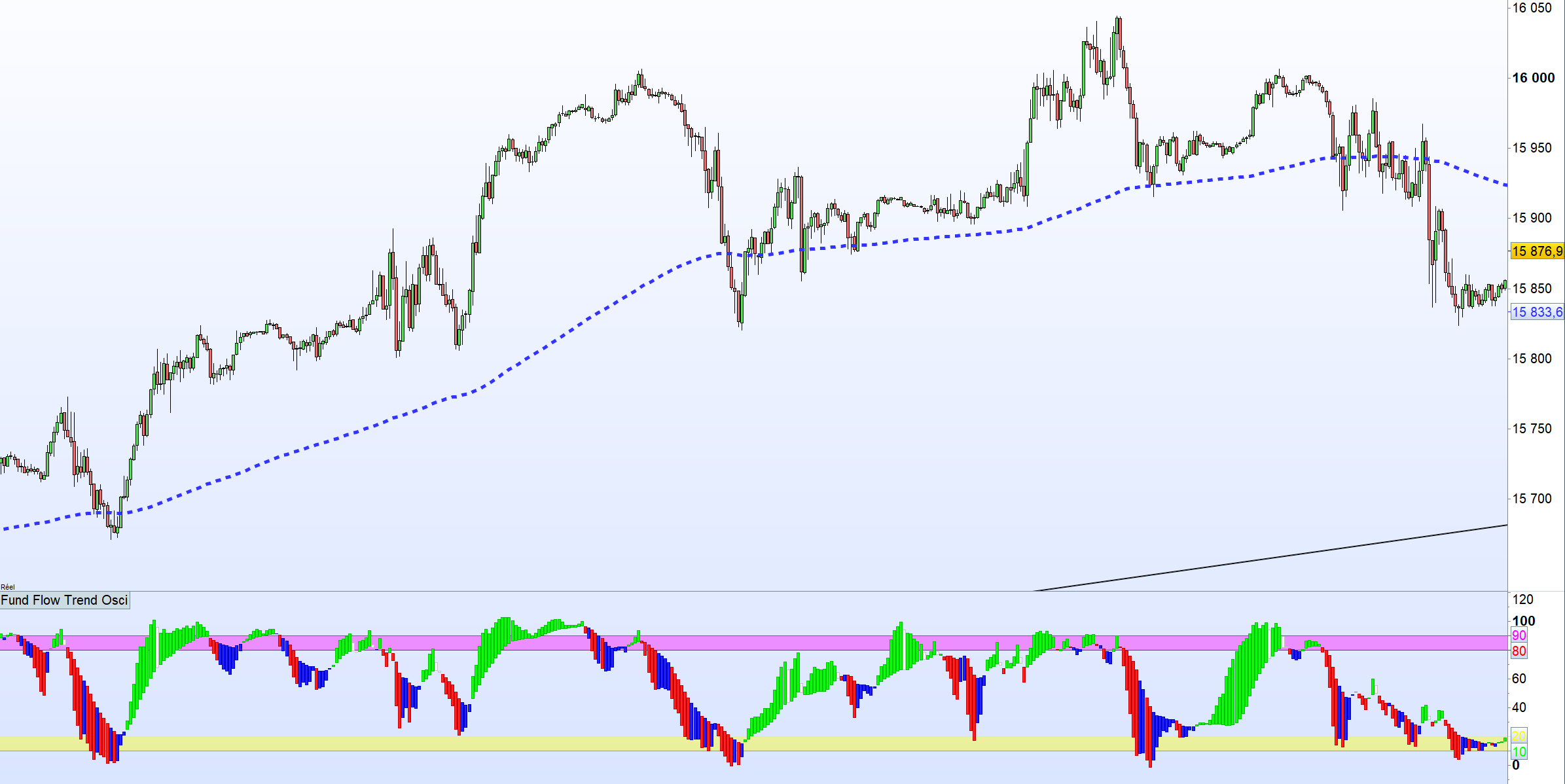
But, i think yellow candle does not appears very often also in the original post on tradingview :
https://www.tradingview.com/script/791WkWcm-blackcat-L3-Banker-Fund-Flow-Trend-Oscillator/
As you can see, even while scrolling left and right the chart, yellow candle appears only once.
It is because of line 62 :
bankerentry = (fundtrend crosses over bullbearline) AND bullbearline < 25
You need to have a cross over while bullbearline is below 25.
What you can do is to add a variable call it SupertitiThrshold = 25 (by default)
Change line 62 :
bankerentry = (fundtrend crosses over bullbearline) AND bullbearline < SupertitiThrshold
Then play in configuration table with that SupertitiThrshold until you see as much yellow candle as you would like
Hola a todos,
Here is the screener for the white candlesticks above 80…
Que disfruteis
// L3 BANKER WHITE SCREENER by DID 17.09.2023
// L3 BANKER FUND FLOW TREND OSCILLATOR by Lucasbest 17.09.2023
// defparam calculateonlastbars = 150
If Barindex >35 then
// First xsa call:
srcValue1 = 100*(close – Lowest[27](low)) / (Highest[27](high) – Lowest[27](low))
lenValue1 = 5
weiValue1 = 1
sumf1 = 0
ma1 = 0
out1 = 0
sumf1 = (not (sumf1[1] = undefined)) * sumf1[1] – ((not (srcValue1[lenValue1] = undefined)) * srcValue1[lenValue1] + srcValue1)
ma1 = not (srcValue1[lenValue1] = undefined) * (sumf1 / lenValue1)
IF out1[1] = 0 THEN
out1 = ma1
ELSE
out1 = (srcValue1 * weiValue1 + out1[1] * (lenValue1 – weiValue1)) / lenValue1
ENDIF
// Now, ‘out1’ is the result of the first xsa.
// Second xsa call with out1 as the input:
srcValue2 = out1
lenValue2 = 3
weiValue2 = 1
sumf2 = 0
ma2 = 0
out2 = 0
sumf2 = (NOT (sumf2[1] = UNDEFINED)) * sumf2[1] – ((NOT (srcValue2[lenValue2] = UNDEFINED)) * srcValue2[lenValue2] + srcValue2)
ma2 = not (srcValue2[lenValue2] = UNDEFINED) * (sumf2 / lenValue2)
IF out2[1] = UNDEFINED THEN
out2 = ma2
ELSE
out2 = (srcValue2 * weiValue2 + out2[1] * (lenValue2 – weiValue2)) / lenValue2
ENDIF
// Now, ‘out2’ is the result of the second xsa.
// Fund trend final calculation:
fundtrend = (3 * out1 – 2 * out2 – 50) * 1.032 + 50
// Defining typical price for banker fund
typ = (2*close + high + low + open) / 5
// Lowest low with mid term fib # 34
lol = lowest[34](low)
// Highest high with mid term fib # 34
hoh = highest[34](high)
// Define banker fund flow bull bear line
bullbearline = exponentialaverage[13]((typ – lol) / (hoh – lol) * 100)
// Define banker entry signal using ‘crosses over’
bankerentry = (fundtrend crosses over bullbearline) AND bullbearline < 25
//banker fund entry with yellow candle
IF bankerentry THEN
//DRAWCANDLE(0, 50, 0, 50) COLOURED(255,255,0)// Yellow color
ENDIF
//banker increase position with green candle
IF fundtrend > bullbearline THEN
//DRAWCANDLE(fundtrend, bullbearline, fundtrend, bullbearline) COLOURED(0,255,0) // Green color
ENDIF
//banker decrease position with white candle
IF fundtrend < (fundtrend[1] * 0.95) THEN
//DRAWCANDLE(fundtrend, bullbearline, fundtrend, bullbearline) COLOURED(255,255,255)// White color
ENDIF
//banker fund exit/quit with red candle
IF fundtrend < bullbearline THEN
//DRAWCANDLE(fundtrend, bullbearline, fundtrend, bullbearline) COLOURED(255,0,0) // Red color
ENDIF
//banker fund Weak rebound with blue candle
IF fundtrend < bullbearline AND fundtrend > (fundtrend[1]*0.95) THEN
//DRAWCANDLE(fundtrend, bullbearline, fundtrend, bullbearline) COLOURED(0,0,255) // Blue color
ENDIF
//h1 = 80
//h2 = 20
//h3 = 10
//h4 = 90
// Coloring between the lines
//colorbetween(h1, h4, 255, 0, 255, 100) // Fuchsia shade between 80 and 90
//colorbetween(h2, h3, 255, 255, 0, 100) // Yellow shade between 20 and 10
Endif
//RETURN h1 style(line,1) coloured(255,0,0), h2 style(line,1) coloured(255,255,0), h3 style(line,1) coloured(0,255,0), h4 style(line,1) coloured(255,0,255)
//Entrée du banquier dans le fonds avec une bougie jaune
//augmentation de la position de la banque avec la bougie verte
//Banker diminue sa position avec une bougie blanche
//Sortie du fonds bancaire/quit avec la bougie rouge
//Fonds bancaire Faible rebond avec la bougie bleue
C1 = fundtrend >80
C2 = fundtrend < (fundtrend[1] * 0.95)
SCREENER [C1 and C2 ]
Sometimes ChatGPT is funny… Or maybe upset as i made him work to much ? See below his last answer :
“If you’re serious about porting this over to ProBuilder, you might consider working with a developer familiar with both Pine Script and ProBuilder to ensure accurate and functional translation.”
Just a tip, this kind of “direct” translation from Pinescript is not accurate :
ma1 = not (srcValue1[lenValue1] = undefined) * (sumf1 / lenValue1)
(in this case you are multiplying the result of the boolean with (sumf1 / lenValue1) )
The original code was using a single conditional statement within a single line, and with (na) testing:
ma := na(src[len]) ? na : sumf/len
IMO, it should be coded as below:
ma = undefined
if srcValue1[lenValue1] >0 then
ma = sumf/len
endif
You are right Nicolas, with my convrsion ma would be equal to 0 or equal to sumf/len, in yours ma would be undfined or equal to sumf/len
To be clear, think of this:
ma := na(src[len]) ? na : sumf/len
as this:
if IsNaN(src[len]) then ma = NaN else ma = sumf / len
in ProBuilder, there is no “NaN” state (Not a Number) by default, until you declare a variable as UNDEFINED. So it is better to test if it’s equal to 0, because all variables equal to 0 at start of code.
Sometimes it is useful to set a variable to UNDEFINED, to make it not visible on chart until its first calculation for instance, but keep in mind, that UNDEFINED can only be assign once.
Pine script conversion using ChatGPT 4
This topic contains 41 replies,
has 7 voices, and was last updated by LucasBest
2 years, 3 months ago.
| Forum: | General Trading: Market Analysis & Manual Trading |
| Language: | English |
| Started: | 09/11/2023 |
| Status: | Active |
| Attachments: | 11 files |

The information collected on this form is stored in a computer file by ProRealCode to create and access your ProRealCode profile. This data is kept in a secure database for the duration of the member's membership. They will be kept as long as you use our services and will be automatically deleted after 3 years of inactivity. Your personal data is used to create your private profile on ProRealCode. This data is maintained by SAS ProRealCode, 407 rue Freycinet, 59151 Arleux, France. If you subscribe to our newsletters, your email address is provided to our service provider "MailChimp" located in the United States, with whom we have signed a confidentiality agreement. This company is also compliant with the EU/Swiss Privacy Shield, and the GDPR. For any request for correction or deletion concerning your data, you can directly contact the ProRealCode team by email at privacy@prorealcode.com If you would like to lodge a complaint regarding the use of your personal data, you can contact your data protection supervisory authority.