Pine Scipt conversion – Polynomial Regression Extrapolation

Viewing 15 posts - 1 through 15 (of 23 total)
  • Author
    Posts
  • #201933 quote
    Khaled
    Participant
    Veteran

    Hello, can someone please help converting this code?

    I’m aware we don’t have multidimentional Arrays in PRT yet. I suspect, we can come over by splitting into multiple Arrays.

    Thank you in advance

    // This work is licensed under a Attribution-NonCommercial-ShareAlike 4.0 International (CC BY-NC-SA 4.0) https://creativecommons.org/licenses/by-nc-sa/4.0/
    // © LuxAlgo
    
    //@version=5
    indicator("Polynomial Regression Extrapolation [LuxAlgo]"
      , overlay = true
      , max_lines_count = 500)
    //------------------------------------------------------------------------------
    //Settings
    //-----------------------------------------------------------------------------{
    length      = input.int(100
      , minval = 0)
    
    extrapolate = input.int(10
      , minval = 0)
    
    degree      = input.int(3, 'Polynomial Degree'
      , minval = 0
      , maxval = 8)
    
    src         = input(close)
    
    lock        = input(false, 'Lock Forecast')
    
    //Style
    up_css = input.color(#0cb51a, 'Upward Color'
      , group = 'Style')
      
    dn_css = input.color(#ff1100, 'Downward Color'
      , group = 'Style')
    
    ex_css = input.color(#ff5d00, 'Extrapolation Color'
      , group = 'Style')
      
    width  = input(1, 'Width'
      , group = 'Style')
    
    //-----------------------------------------------------------------------------}
    //Fill lines array
    //-----------------------------------------------------------------------------{
    var lines = array.new_line(0)
    
    if barstate.isfirst
        for i = -extrapolate to length-1
            array.push(lines, line.new(na, na, na, na))
    
    //-----------------------------------------------------------------------------}
    //Get design matrix & partially solve system
    //-----------------------------------------------------------------------------{
    n = bar_index
    
    var design   = matrix.new<float>(0, 0)
    var response = matrix.new<float>(0, 0)
    
    if barstate.isfirst
        for i = 0 to degree
            column = array.new_float(0)
            
            for j = 0 to length-1
                array.push(column, math.pow(j,i))
            
            matrix.add_col(design, i, column)
    
    var a = matrix.inv(matrix.mult(matrix.transpose(design), design))
    var b = matrix.mult(a, matrix.transpose(design))
    
    //-----------------------------------------------------------------------------}
    //Get response matrix and compute roling polynomial regression
    //-----------------------------------------------------------------------------{
    var pass = 1
    var matrix<float> coefficients = na
    var x = -extrapolate
    var float forecast = na
    
    if barstate.islast 
        if pass
            prices = array.new_float(0)
            
            for i = 0 to length-1
                array.push(prices, src[i])
            
            matrix.add_col(response, 0, prices)
            
            coefficients := matrix.mult(b, response)
            
            float y1 = na
            idx = 0
            
            for i = -extrapolate to length-1
                y2 = 0.
                
                for j = 0 to degree
                    y2 += math.pow(i, j)*matrix.get(coefficients, j, 0)
                
                if idx == 0
                    forecast := y2
                    
                //------------------------------------------------------------------
                //Set lines
                //------------------------------------------------------------------
                css = y2 < y1 ? up_css : dn_css
                
                get_line = array.get(lines, idx)
                
                line.set_xy1(get_line, n - i + 1, y1)
                
                line.set_xy2(get_line, n - i, y2)
                
                line.set_color(get_line, i <= 0 ? ex_css : css)
                
                line.set_width(get_line, width)
                
                y1 := y2
                idx += 1
                
            if lock
                pass := 0
        else
            y2 = 0.
            x -= 1
            
            for j = 0 to degree
                y2 += math.pow(x, j)*matrix.get(coefficients, j, 0)
            
            forecast := y2
    
    plot(pass == 0 ? forecast : na, 'Extrapolation'
      , color     = ex_css
      , offset    = extrapolate
      , linewidth = width)
    
    //-----------------------------------------------------------------------------}
    #219832 quote
    LucasBest
    Participant
    Average

    If you want to come over multidimentional Arrays in PRT, the solution is not to split it into multiple Arrays, because this would mean changing the code of the script each time one or both size of the multidimentional Arrays will change… which is not possible!

    In reality, coming over 2 dimensions arrays (in PRT) with only 1 dimension array is not a big deal. It has ben done for years since early stage of computer science. What you see on your screen can be compared to a 2 dimentional array (rows and columns of the screen) and it is simply stored in the memory of the computer in a one dimention array… It is possible as far as you know how much rows and columns you need to store in your 1 dimension array.

    I did the conversion of the begining of Polynomial Regression Extrapolation by LuxAlgo. You can find it below.

    The biggest deal here is to come over those built-in function for multidimentional Arrays that come with pine script.

    For example “matrix.inv” calculate the inverse of a square matrix, which is not easy to code and will require several lines of code and take long time to calculate if it is not done in a built-in function…

    defparam drawonlastbaronly = true
    Maxlength = 500
    long = Min(barindex,Min(Maxlength,length))
    // degree = 0-8 Polynomial Degree
    src = customclose
    // lock = Lock Forecast
    once init = 1
    
    n = barindex
    
    If init = 1 then
    For k = 0 to degree*long-1 do
    $design[k]=0
    Next
    For i = 0 to degree do
    For j = 0 to long-1 do
    P = pow(j,i)
    $designT[i*long+j]= P
    $design[j*degree+i]= P
    Next
    Next
    //Matrix.mult
    For i = 0 to degree do
    For j = 0 to degree do
    sum = 0
    For k = 0 to long-1 do
    sum=sum+$designT[i*long+k]*$design[k*degree+j]
    Next
    $produit[i*degree+j]=sum
    Next
    Next
    init = 0
    Endif
    
    ...
    
    Khaled thanked this post
    #219834 quote
    Khaled
    Participant
    Veteran

    @LucasBest Bravo. It’s clear, you’re talented. How can I finish translating the remaining part so that I can get the full code working? Thanks

    #219835 quote
    LucasBest
    Participant
    Average

    I am trying to found a way to code simply the calculation of the inverse of a square matrix.

    If someone can help me to do so, it would be appreciate, because all i learned in school about matrix is very far now… 🙂

    The rest of LuxAlgo pine script will be quit easy to translate then.

    For example, in the link below the script in c++ for inverse matrix calculation…

    https://www.tutorialspoint.com/cplusplus-program-to-find-inverse-of-a-graph-matrix

    Khaled thanked this post
    #219836 quote
    Khaled
    Participant
    Veteran

    Lucas, can i suggest that you replace this inverse matrix by whatever pleases you to get over this step (for now until we find a solution) and continue the rest with an alternative option to this inverse matrix? Thanks

    #219839 quote
    LucasBest
    Participant
    Average

    Impossible! It would be like cooking a sauerkraut without cabbage or a couscous without semolina…
    We need this matrix inversion to calculate Matrix a, then Matrix b, and everything that come after!

    #219841 quote
    Khaled
    Participant
    Veteran

    Fair enough! Bravo anyway! France has talents.

    #219846 quote
    PeterSt
    Participant
    Master

    will require several lines of code and take long time to calculate


    like cooking a sauerkraut without cabbage

    The latter can be overwon by a. growing the gabbage and b. ferment it. Yes, take many months for that indeed. The semolina needs further investigation.

    #219847 quote
    LucasBest
    Participant
    Average

    The latter can be overwon by a. growing the gabbage and b. ferment it. Yes, take many months for that indeed. The semolina needs further investigation.

    Hey Peter,

    this is funny, but it does not help me to code the inverse function of a matrix… 😉

    #219882 quote
    LucasBest
    Participant
    Average
    defparam drawonlastbaronly = true
    Maxlength = 500
    long = Min(barindex,Min(Maxlength,length))
    // degree = 0-8 Polynomial Degree
    src = customclose
    // lock = Lock Forecast
    once init = 1
    
    n = barindex
    
    If init = 1 then
    For k = 0 to degree*long-1 do
    $design[k]=0
    Next
    For i = 0 to degree-1 do
    For j = 0 to long-1 do
    P = pow(j,i)
    $designT[i*long+j]= P
    $design[j*degree+i]= P
    Next
    Next
    //Matrix.mult
    For i = 0 to degree-1 do
    For j = 0 to degree-1 do
    sum = 0
    For k = 0 to long-1 do
    sum=sum+$designT[i*long+k]*$design[k*degree+j]
    Next
    $produit[i*degree+j]=sum
    Next
    Next
    
    //Extracting Minors Matrix i,j
    Minordegree = degree-1
    For i = 0 to Minordegree do
    For j = 0 to Minordegree do
    m = 0
    For k = 0 to degree*degree-1 do
    If (j<>k mod degree) and (i<>floor(k/degree)) then
    $Minor[m]=$produit[k]
    m=m+1
    Endif
    Next
    //Calculation Determinant
    If Minordegree = 1 then
    determinant = $Minor[1]
    Elsif Minordegree = 2 then
    determinant = $Minor[1]*$Minor[4]-$Minor[2]*$Minor[3]
    Elsif Minordegree = 3 then
    determinant = $Minor[1]*($Minor[5]*$Minor[9]-$Minor[6]*$Minor[8])-$Minor[2]*($Minor[4]*$Minor[9]-$Minor[6]*$Minor[7])+$Minor[3]*($Minor[4]*$Minor[8]-$Minor[5]*$Minor[7])
    Endif
    //Setting cofactor Matrix
    $cofactor[i*degre+j]=pow(-1,i+j)*determinant
    Next
    Next
    //Calculating overall determinant
    determinant = 0
    For k = 0 to degree-1 do
    determinant = determinant + $produit[k]*$cofactor[k]
    $Inverse[k] = 0
    Next
    //Setting Inverse Matrix
    For i = 0 to degree-1 do
    For j = 0 to degree-1 do
    $Inverse[i+j*degree] = $cofactor[i*degree+j]*(1/determinant)
    Next
    Next
    init = 0
    Endif

    Lucas, can i suggest that you replace this inverse matrix by whatever pleases you to get over this step (for now until we find a solution) and continue the rest with an alternative option to this inverse matrix? Thanks

    Ok, i did not replace, but i found a solution for calculating the inverse of the matrix, until degree 4… Now i can finish and will found a solution later for inversing bigger square matrix

    Nicolas thanked this post
    #219918 quote
    LucasBest
    Participant
    Average

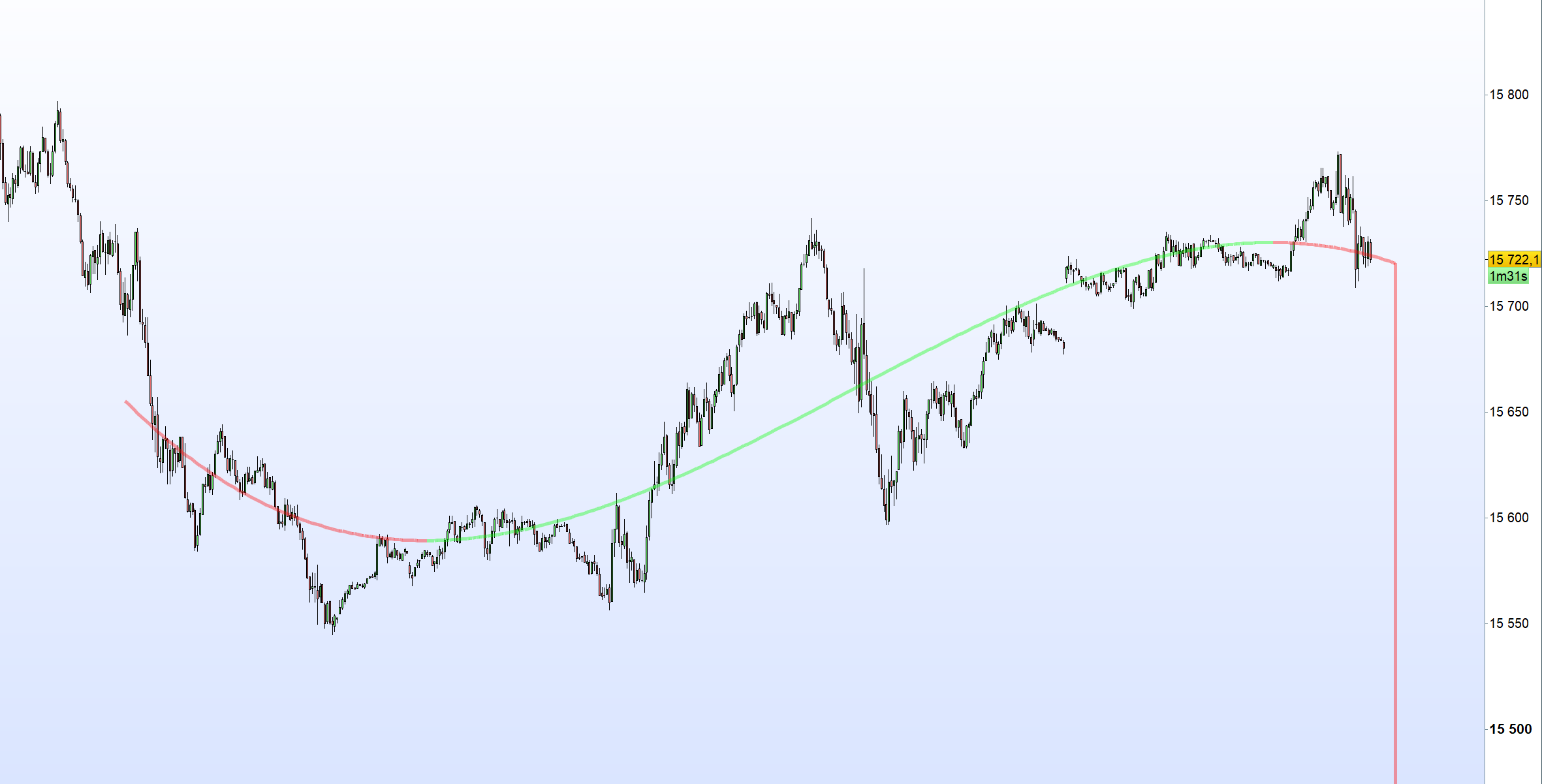
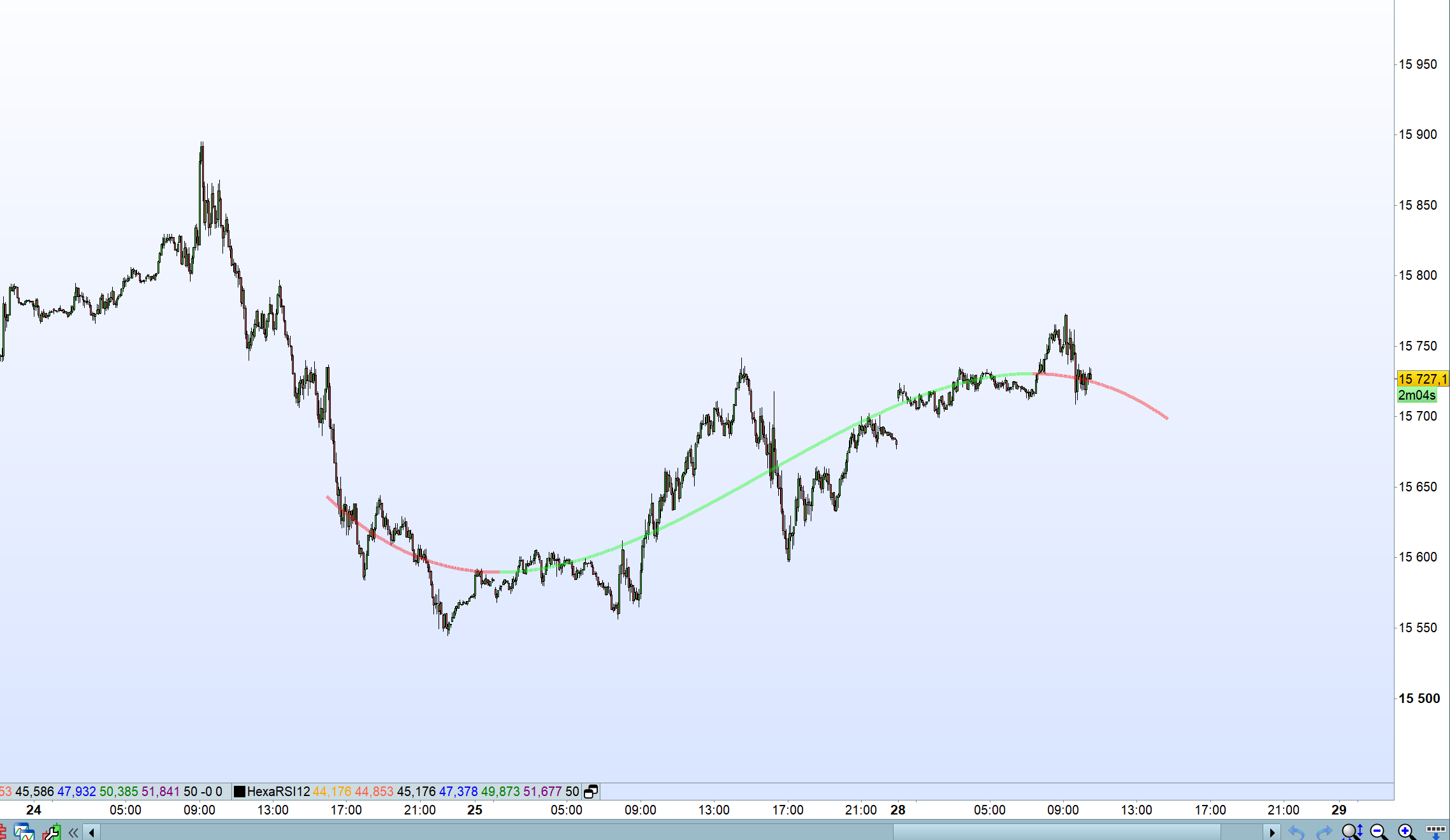
    It is working now, but there is still some bugs…

    defparam drawonlastbaronly = true
    Maxlength = 500
    long = Min(barindex,Min(Maxlength,length))
    // degree = 0-8 Polynomial Degree
    src = customclose
    // lock = Lock Forecast
    once init = 1
    
    n = barindex
    
    If init=1 and long=length then
    For k = 0 to degree*long-1 do
    $design[k]=0
    Next
    For i = 0 to degree-1 do
    For j = 0 to long-1 do
    P = pow(j,i)
    $designT[i*long+j]= P
    $design[j*degree+i]= P
    Next
    Next
    //Matrix.mult
    For i = 0 to degree-1 do
    For j = 0 to degree-1 do
    sum = 0
    For k = 0 to long-1 do
    sum=sum+$designT[i*long+k]*$design[k*degree+j]
    Next
    $produit[i*degree+j]=sum
    Next
    Next
    
    //Extracting Minors Matrix i,j
    Minordegree = degree-1
    For i = 0 to Minordegree do
    For j = 0 to Minordegree do
    m = 0
    For k = 0 to degree*degree-1 do
    If (j<>k mod degree) and (i<>floor(k/degree)) then
    $Minor[m]=$produit[k]
    m=m+1
    Endif
    Next
    //Calculation Determinant
    If Minordegree = 1 then
    determinant = $Minor[0]
    Elsif Minordegree = 2 then
    determinant = $Minor[0]*$Minor[3]-$Minor[1]*$Minor[2]
    Elsif Minordegree = 3 then
    determinant = $Minor[0]*($Minor[4]*$Minor[8]-$Minor[5]*$Minor[7])-$Minor[1]*($Minor[3]*$Minor[8]-$Minor[5]*$Minor[6])+$Minor[2]*($Minor[3]*$Minor[7]-$Minor[4]*$Minor[6])
    Endif
    //Setting cofactor Matrix
    $cofactor[i*degree+j]=pow(-1,i+j)*determinant
    Next
    Next
    //Calculating overall determinant
    determinant = 0
    For k = 0 to degree-1 do
    determinant = determinant + $produit[k]*$cofactor[k]
    Next
    //Setting Inverse Matrix => $a
    For k = 0 to degree*degree-1 do
    $a[k]=0
    Next
    For i = 0 to degree-1 do
    For j = 0 to degree-1 do
    $a[i+j*degree] = $cofactor[i*degree+j]*(1/determinant)
    Next
    Next
    
    For i = 0 to degree-1 do
    For j = 0 to degree-1 do
    $a[i+j*degree] = $cofactor[i*degree+j]*(1/determinant)
    Next
    Next
    //Setting Mult matrice => $b
    For i = 0 to degree-1 do
    For j = 0 to long-1 do
    sum = 0
    For k = 0 to degree-1 do
    sum=sum+$a[i*degree+k]*$designT[k*long+j]
    Next
    $b[i*long+j]=sum
    Next
    Next
    init = 0
    Endif
    
    once pass = 1
    once x = -1 * Extrapolate
    once forecast = 0
    
    If IsLastBarUpdate then
    If pass = 1 then
    For i = 0 to long-1 do
    $response[i] = src[i]
    Next
    //Setting Mult matrice => $coefficients
    For i = 0 to degree-1 do
    j = 0
    sum = 0
    For k = 0 to long-1 do
    sum=sum+$b[i*long+k]*$response[k]
    Next
    $coefficients[i]=sum
    Next
    once y1 = 0
    idx = 0
    For i = -Extrapolate to long-1 do
    y2 = 0
    for j = 0 to degree-1 do
    y2 = y2+pow(i,j)*$coefficients[j]
    Next
    If idx = 0 then
    forecast = y2
    Endif
    If y2 < y1 then
    r = 10
    g = 255
    b = 10
    else
    r = 255
    g = 10
    b = 10
    Endif
    DRAWSEGMENT(n-i, y2, n-i+1, y1)style(line,5)coloured(r,g,b,100)
    y1 = y2
    idx = idx+1
    
    If lock then
    pass = 0
    Endif
    Next
    else
    y2 = 0
    x = x -1
    For j = 0 to degree do
    y2 = y2+pow(x,j)*$coefficients[j]
    Next
    forecast = y2
    Endif
    
    If pass = 0 then
    DRAWPOINT(n+extrapolate, forecast, 5)
    Endif
    Endif
    
    Return
    
    #219923 quote
    LucasBest
    Participant
    Average

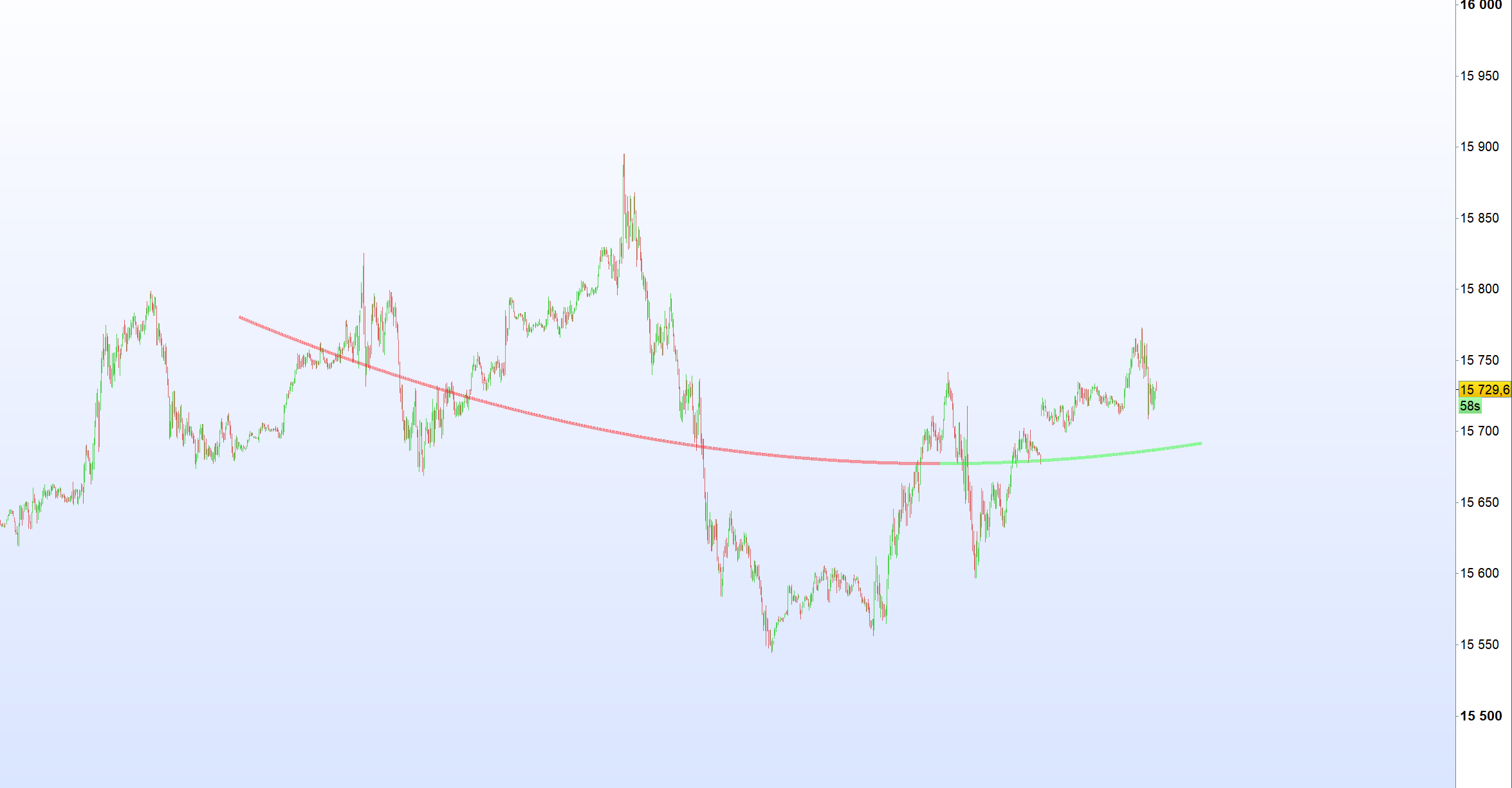
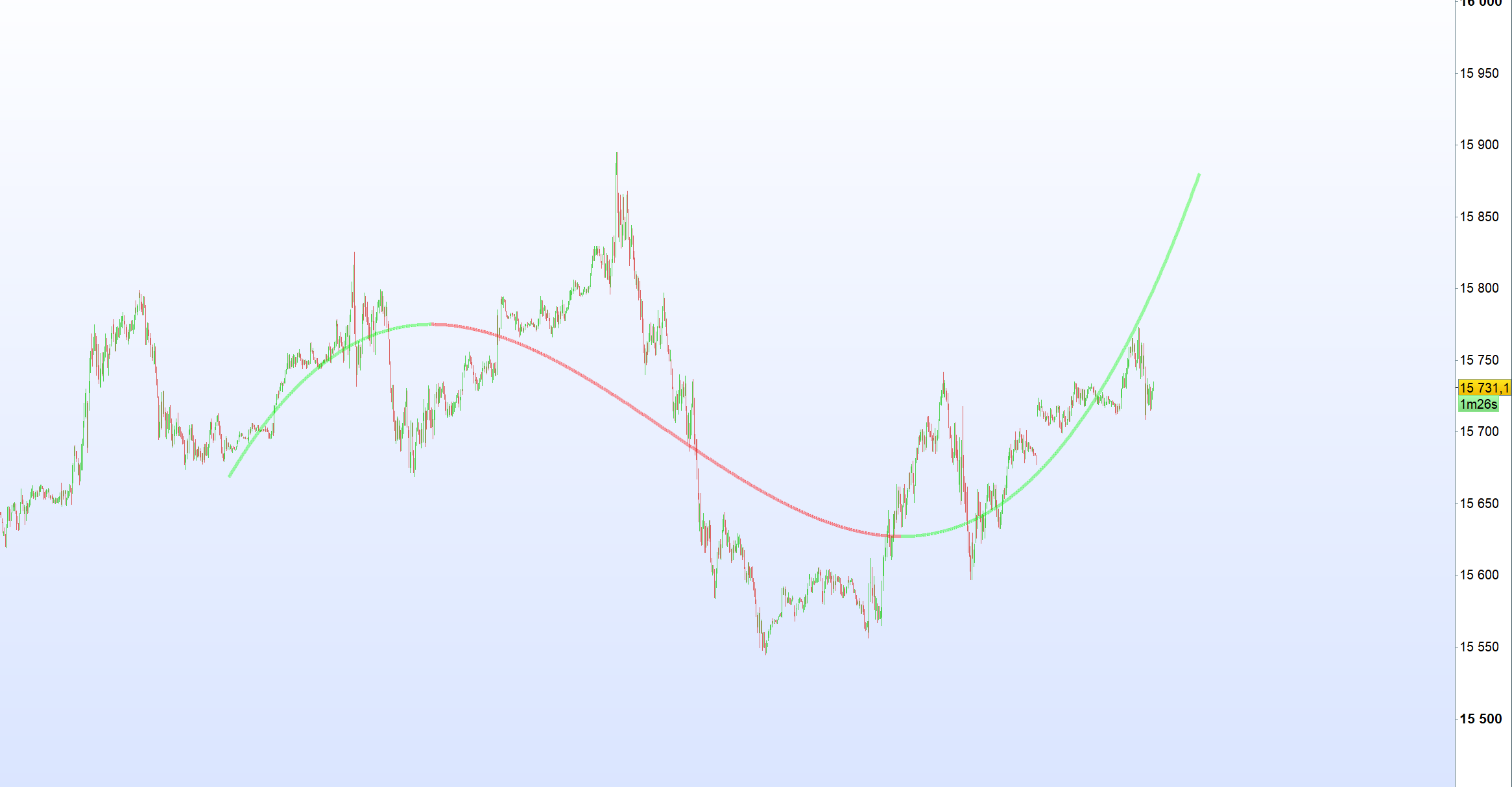
    With 3 and 4 degree and a different lngth… forecast can be completly different while increasing/decreasing degree or length.
    I think this kind of indicator, that repaint, and only shows what we want to see are completly useless for trading.

    #219927 quote
    LucasBest
    Participant
    Average

    There is still some bugs/issues, but i add here the last itf i have. I will try to found the bugs later wheni will have time.

    Khaled and robert123 thanked this post
    #219930 quote
    Khaled
    Participant
    Veteran

    Bravo Lucas. Yes, it repaints like the Center of Gravity. But anyway, bravo for having solved such a complex mathematical/coding problem. We can have separate discussion on the relevance of Indicators in general for a Retail Trader. After a few yers of observation of the Futures markets (never trader Forex), the Indicators do offer very limited success for day trading. They might be uselful on higher timeframe, but up to 30 minutes, what matters is Order Flow and Price Action, which unless you have access to sophisticated tools and an army of quants and programmers can be a huge task for a Retail Trader. The HFT Algos use the information available in the DOM to grab a few ticks and play games of manipulation and spoofing. Merci encore!

    #219955 quote
    Aragorna
    Participant
    Junior

    Hi, I tried to put it on but it doesn’ show anything. Very strange!

Viewing 15 posts - 1 through 15 (of 23 total)
  • You must be logged in to reply to this topic.

Pine Scipt conversion – Polynomial Regression Extrapolation


ProBuilder: Indicators & Custom Tools

New Reply
Author
author-avatar
Khaled @khaled Participant
Summary

This topic contains 22 replies,
has 6 voices, and was last updated by LucasBest

2 years, 5 months ago.

Topic Details
Forum: ProBuilder: Indicators & Custom Tools
Language: English
Started: 10/05/2022
Status: Active
Attachments: 7 files
Logo Logo
Loading...