Pinbar on MA + Validation

Viewing 5 posts - 1 through 5 (of 5 total)

  • Author
    Posts
  • #226450 quote
    ChristosDG
    Participant
    New

    Hello everyone,


    I’m trying to build a detector for pinbars on 1 minute charts rebounding on H1 & D1 moving averages, pinbars followed by a validation candlestick (meaning that the following candlestick has to at least break the pinbar in its intended direction).


    I’m confused… it doesn’t work that well…

    Meaning by that that many pinbars on MA remain undetected.


    Would you please have a look?

    // Parameters
    
    myATR = AverageTrueRange[14](close[1])
    distance = 10*TICKSIZE
    
    // MA
    
    timeframe(1 hour)
    MA20H1 = Average[20](close)
    MA50H1 = Average[50](close)
    MA200H1 = Average[200](close)
    
    timeframe(1 day)
    MA20D1 = Average[20](close)
    MA50D1 = Average[50](close)
    MA200D1 = Average[200](close)
    
    timeframe(1 minute)
    IF Close[1] > MA20H1 - distance AND Close[1] < MA20H1 THEN
    result = 2
    ELSIF Close[1] < MA20H1 + distance AND Close[1] > MA20H1 THEN
    result = 1
    ELSIF Close[1] > MA50H1 - distance AND Close[1] < MA50H1 THEN
    result = 2
    ELSIF Close[1] < MA50H1 + distance AND Close[1] > MA50H1 THEN
    result = 1
    ELSIF Close[1] > MA20D1 - distance AND Close[1] < MA20D1 THEN
    result = 2
    ELSIF Close[1] < MA20D1 + distance AND Close[1] > MA20D1 THEN
    result = 1
    ELSIF Close[1] > MA50D1 - distance AND Close[1] < MA50D1 THEN
    result = 2
    ELSIF Close[1] < MA50D1 + distance AND Close[1] > MA50D1 THEN
    result = 1
    ELSIF Close[1] > MA200H1 - distance AND Close[1] < MA200H1 THEN
    result = 2
    ELSIF Close[1] < MA200H1 + distance AND Close[1] > MA200H1 THEN
    result = 1
    ELSIF Close[1] > MA200D1 - distance AND Close[1] < MA200D1 THEN
    result = 2
    ELSIF Close[1] < MA200D1 + distance AND Close[1] > MA200D1 THEN
    result = 1
    ELSE
    result = 0
    ENDIF
    
    // Pinbar + validation + MA
    
    IF result = 2 THEN
    IF close[1] + myATR > close[0] + 3*TICKSIZE OR close[1] - myATR < close[0] - 3*TICKSIZE THEN
    IF (high[1] - low[1]) > 2*abs(close[1] - open[1]) THEN
    IF (close[1] < open[1]) AND (open[1] - low[1]) < 0.33*(high[1] - low[1]) OR (close[1] - low[1]) < 0.33*(high[1]-low[1]) AND open[0] < (high[1] - myATR) THEN
    DRAWARROWDOWN(barindex[1],high[1]+6*TICKSIZE)coloured(255,10,10)
    ELSIF (close[1] < open[1]) AND (open[1] - low[1]) < 0.33*(high[1] - low[1]) OR (close[1] - low[1]) < 0.33*(high[1]-low[1]) AND open[0] > (high[1] - myATR) THEN
    DRAWARROWDOWN(barindex[1],high[1]+6*TICKSIZE)coloured(255,10,10)
    ENDIF
    ENDIF
    ENDIF
    ELSIF result = 1 THEN
    IF close[1] + myATR > close[0] + 3*TICKSIZE OR close[1] - myATR < close[0] - 3*TICKSIZE THEN
    IF (high[1] - low[1]) > 2*abs(close[1] - open[1]) THEN
    IF (open[1] < close[1]) AND (high[1] - open[1]) < 0.33*(high[1] - low[1]) OR (high[1] - close[1]) < 0.33*(high[1]-low[1]) AND open[0] > (low[1] + myATR) THEN
    DRAWARROWUP(barindex[1],low[1]-6*TICKSIZE)coloured(10,255,10)
    ELSIF (open[1] < close[1]) AND (high[1] - open[1]) < 0.33*(high[1] - low[1]) OR (high[1] - close[1]) < 0.33*(high[1]-low[1]) AND open[0] > (low[1] + myATR) THEN
    DRAWARROWUP(barindex[1],low[1]-6*TICKSIZE)coloured(10,255,10)
    ENDIF
    ENDIF
    ENDIF
    ENDIF
    
    RETURN


    Thanks a bunch!

    #226501 quote
    JC_Bywan
    Moderator
    Master

    Hi,

    There are many “if”, it is likely a pinbar you consider should have been detected is filtered away by the combination of ifs, the best way to proceed is to name your all conditions for each “if”, not just the ones in “timeframe(1mn)” but also these in “Pinbar + validation + MA”, for example c1=… , c2=… , and add use “if c1 then if c2 then…”, but you can choose more explicit variable names to know right away what each condition is about if you wish. Then you can add them to your return line, and display this indicator second version in a separate pane.

    return c1 as “c1”, c2 as “c2”, etc…

    This way, when you see a pinbar you consider should have been detected instead of filtered away, you can check exactly what condition isn’t met in the separate pane of conditions. From there, you can conclude whether it was in fact rightly undetected and no modifiction is needed, or if it’s an error to fix in the code not reflecting your desired criteria now knowing exactly what condition is at fault.

    #226562 quote
    ChristosDG
    Participant
    New

    Thanks for the suggestion.


    I made a few tweaks to the code.


    And as to be able to test it correctly, I just use a small part of the code, instead of the whole thing (see below).


    My main preoccupation for the moment is that, no matter what I input as “Average[XX](close)”, the rebound only happen on the MA 20 1 minute (where XX = 1200 periods = H1).


    I don’t see what’s wrong in the code, really…


    // If you wish to change the time unit, don’t forget to adjust the periods of the moving averages (according to the stockmarket’s open hours as well)

    // Parameters

    myATR = AverageTrueRange[14](close[1]) // Confirmation distance of the pattern from the highest / lowest of the pinbar (on the next candlestick)
    distance = 6*PIPSIZE // Limit within which the pinbar must be contained (around each moving average)

    ma11 = Average[1200](close) // Moving average 20 (H1) in a 1 minute time unit (for markets open from 9h to 17h30)

    // Patterns within MA distance

    c01 = High[1] < ma11 + distance AND High[1] > ma11 // High contained above and in the defined limit around the MA
    c02 = High[1] > ma11 – distance AND High[1] < ma11 // High contained below and in the defined limit around the MA
    c03 = Close[1] < ma11 + distance AND Close[1] > ma11 // Close contained above and in the defined limit around the MA
    c04 = Close[1] > ma11 – distance AND Close[1] < ma11 // Close contained below and in the defined limit around the MA
    c05 = Low[1] < ma11 + distance AND Low[1] > ma11 // Low contained above and in the defined limit around the MA
    c06 = Low[1] > ma11 – distance AND Low[1] < ma11 // Low contained below and in the defined limit around the MA
    c07 = High[1] > Open[1] AND High[1] > Close[1] // High > Open & Close
    c08 = Low[1] < Open[1] AND Low[1] < Close[1] // Low < Open & Close

    // MA – Only 1 MA on 3 kept / Only 1 pattern on 4 kept

    IF c06 AND c03 AND c08 THEN
    result = 1

    ENDIF

    // Pinbar + validation + MA

    IF result = 2 THEN
    IF (high[1] – low[1]) > 2*abs(close[1] – open[1]) THEN
    IF (close[1] < open[1]) AND (open[1] – low[1]) < 0.33*(high[1] – low[1]) OR (close[1] – low[1]) < 0.33*(high[1]-low[1]) AND open[0] < (high[1] – myATR) THEN
    DRAWARROWDOWN(barindex[1],high[1]+6*TICKSIZE)coloured(255,10,10)
    ELSIF (close[1] < open[1]) AND (open[1] – low[1]) < 0.33*(high[1] – low[1]) OR (close[1] – low[1]) < 0.33*(high[1]-low[1]) AND open[0] > (high[1] – myATR) THEN
    DRAWARROWDOWN(barindex[1],high[1]+6*TICKSIZE)coloured(255,10,10)
    ENDIF
    ENDIF
    ELSIF result = 1 THEN
    IF (high[1] – low[1]) > 2*abs(close[1] – open[1]) THEN
    IF (open[1] < close[1]) AND (high[1] – open[1]) < 0.33*(high[1] – low[1]) OR (high[1] – close[1]) < 0.33*(high[1]-low[1]) AND open[0] > (low[1] + myATR) THEN
    DRAWARROWUP(barindex[1],low[1]-6*TICKSIZE)coloured(10,255,10)
    ELSIF (open[1] < close[1]) AND (high[1] – open[1]) < 0.33*(high[1] – low[1]) OR (high[1] – close[1]) < 0.33*(high[1]-low[1]) AND open[0] > (low[1] + myATR) THEN
    DRAWARROWUP(barindex[1],low[1]-6*TICKSIZE)coloured(10,255,10)
    ENDIF
    ENDIF
    ENDIF

    RETURN

    #226691 quote
    ChristosDG
    Participant
    New

    Reducing to the maximum…


    Let’s have a look at the conditions here…


    // Parameters

    distance = 6*PIPSIZE // Limit within which the pinbar must be contained (around each moving average)

    ma11 = Average[1200](close) // Moving average 20 (H1) in a 1 minute time unit (for markets open from 9h to 17h30)

    // 1 OPHL position on 6

    c01 = High[1] < ma11 + distance AND High[1] > ma11 // High contained above and in the defined limit around the MA
    c02 = Close[1] < ma11 + distance AND Close[1] > ma11 // Close contained above and in the defined limit around the MA
    c03 = Low[1] > ma11 – distance AND Low[1] < ma11 // Low contained below and in the defined limit around the MA
    c04 = High[1] > Open[1] AND High[1] > Close[1] // High > Open & Close

    // MA

    IF c01 AND c02 AND c03 AND c04 THEN
    result = 1


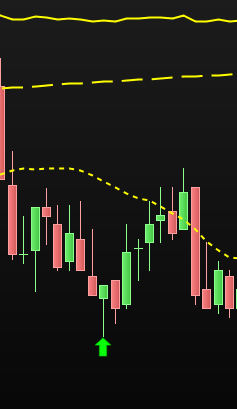
    How can it provide such a selection?? (see picture)

    #226693 quote
    ChristosDG
    Participant
    New

    Okay…


    As a start, I forgot to integrate:


    ELSE

    result = 0


    Which is maybe my only bad…

Viewing 5 posts - 1 through 5 (of 5 total)
  • You must be logged in to reply to this topic.

Pinbar on MA + Validation


ProBuilder: Indicators & Custom Tools

New Reply
Author
author-avatar
ChristosDG @christosdg Participant
Summary

This topic contains 4 replies,
has 2 voices, and was last updated by ChristosDG
2 years ago.

Topic Details
Forum: ProBuilder: Indicators & Custom Tools
Language: English
Started: 01/17/2024
Status: Active
Attachments: 1 files
Logo Logo
Loading...