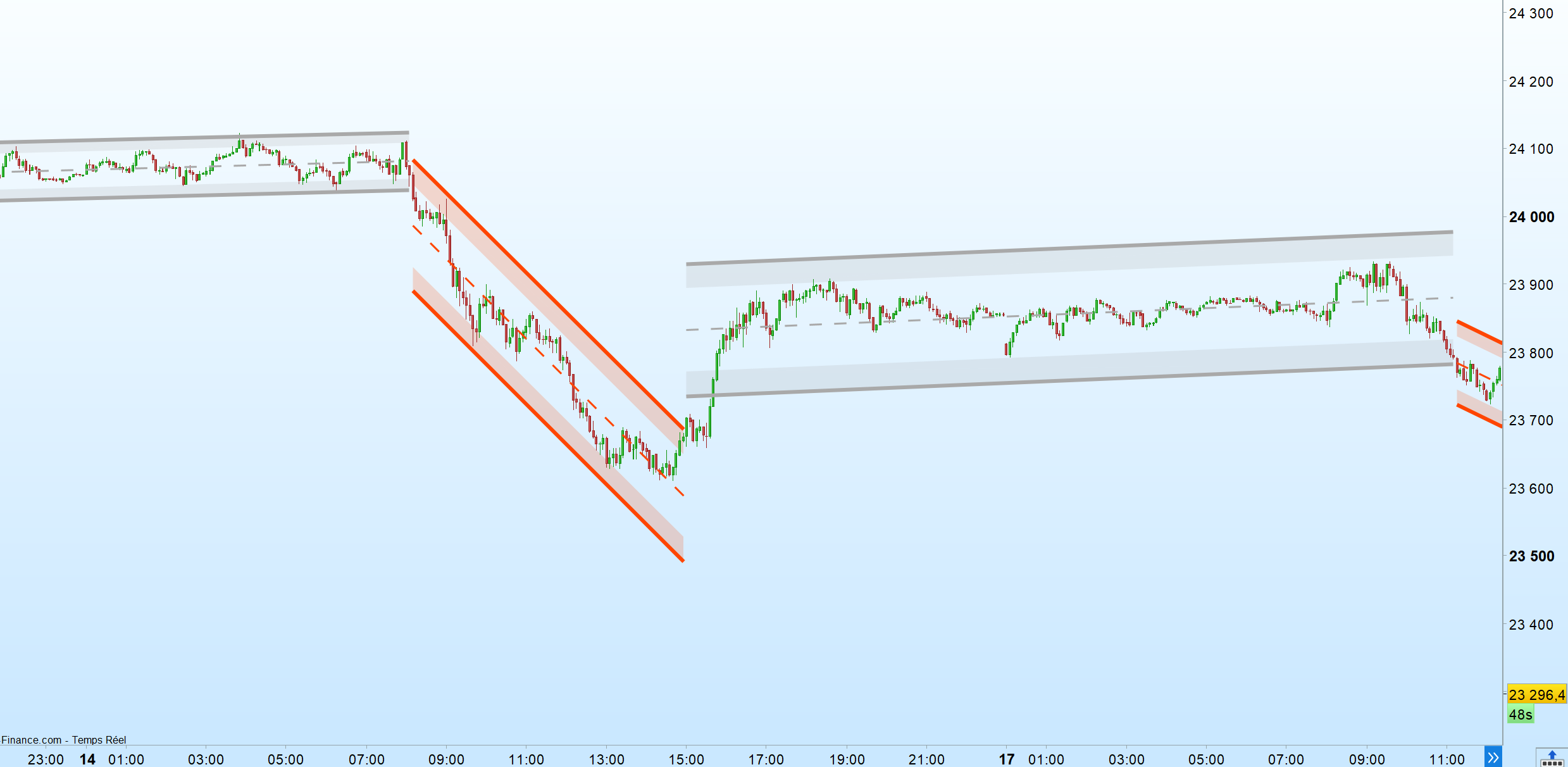
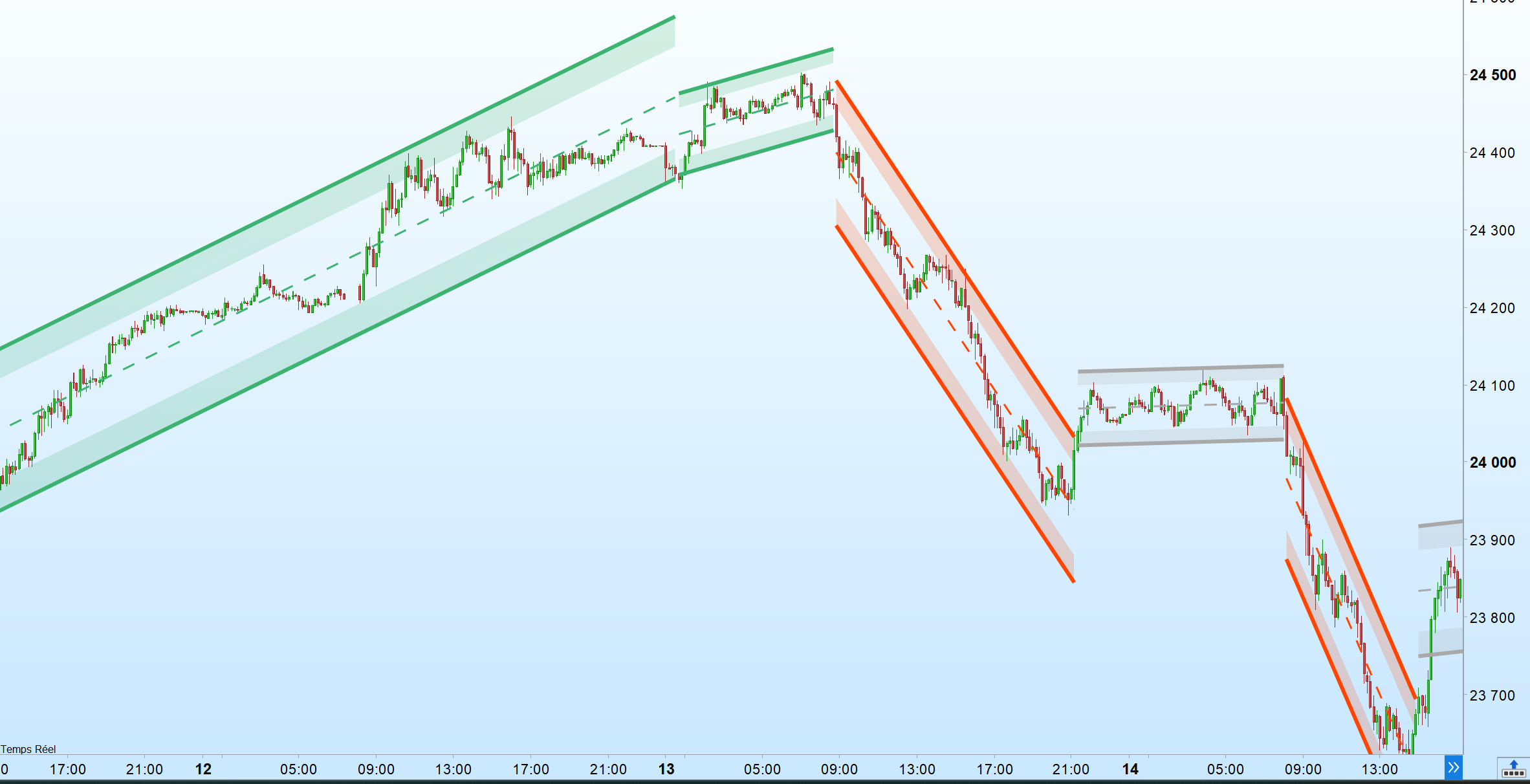
DefParam DrawOnLastBarOnly = true

ColorGreenR = 60
ColorGreenG = 179
ColorGreenB = 113  // Green color
ColorRedR = 255
ColorRedG = 69
ColorRedB = 0  // Red color
ColorGrayR = 169
ColorGrayG = 169
ColorGrayB = 169  // Gray color

UpperMultInput = MultInput
LowerMultInput = MultInput


// Initialize variables for calculations
once ChannelsIndex = 0
once StartIndex = 1
LengthInput = barindex - StartIndex + 1

SumX = 0
SumY = 0
SumXSqr = 0
SumXY = 0

FOR i = 0 TO LengthInput - 1 DO
Val = close[i]
Per = i + 1
SumX = SumX + Per
SumY = SumY + Val
SumXSqr = SumXSqr + Per * Per
SumXY = SumXY + Val * Per
NEXT

IF LengthInput * SumXSqr - SumX * SumX <> 0 THEN
Slope = (LengthInput * SumXY - SumX * SumY) / (LengthInput * SumXSqr - SumX * SumX)
ELSE
Slope = 0
ENDIF

AvgVal = SumY / LengthInput
Intercept = AvgVal - Slope * SumX / LengthInput + Slope

StartPrc = Intercept + Slope * (LengthInput - 1)
EndPrc = Intercept

// Calculation for Deviation
UpDev = 0
DnDev = 0
StdDevAcc = 0
Dsxx = 0
Dsyy = 0
Dsxy = 0
Periods = LengthInput - 3
DayValue = Intercept + Slope * Periods / 2
Val = Intercept

FOR j = 0 TO Periods DO
Prc = high[j] - Val
IF Prc > UpDev THEN
UpDev = Prc
ENDIF
Prc = Val - low[j]
IF Prc > DnDev THEN
DnDev = Prc
ENDIF
Prc = close[j]
Dxt = Prc - AvgVal
Dyt = Val - DayValue
Prc = Prc - Val
StdDevAcc = StdDevAcc + Prc * Prc
Dsxx = Dsxx + Dxt * Dxt
Dsyy = Dsyy + Dyt * Dyt
Dsxy = Dsxy + Dxt * Dyt
Val = Val + Slope
NEXT

IF Periods = 0 THEN
StdDev = SQRT(StdDevAcc)
ELSE
StdDev = SQRT(StdDevAcc / Periods)
ENDIF

IF Dsxx = 0 OR Dsyy = 0 THEN
PearsonR = 0
ELSE
PearsonR = Dsxy / SQRT(Dsxx * Dsyy)
ENDIF

UpperStartPrc = StartPrc + UpperMultInput * StdDev
UpperEndPrc = EndPrc + UpperMultInput * StdDev
LowerStartPrc = StartPrc - LowerMultInput * StdDev
LowerEndPrc = EndPrc - LowerMultInput * StdDev


/*IF (high > UpperEndPrc OR low < LowerEndPrc) THEN
If high > UpperEndPrc then
Drawarrowdown(barindex,high+5)coloured("red",255)
else
Drawarrowup(barindex,low-5)coloured("green",255)
Endif
Endif
*/

IF (close > UpperEndPrc OR close < LowerEndPrc) THEN

$channelsX1[ChannelsIndex] = barindex - LengthInput + 1
$channelsY1[ChannelsIndex] = StartPrc
$channelsX2[ChannelsIndex] = barindex - 1
$channelsY2[ChannelsIndex] = EndPrc
$channelsWidth[ChannelsIndex] = StdDev
ChannelsIndex = ChannelsIndex + 1

StartIndex = barindex


ELSIF islastbarupdate THEN

j = (close > UpperEndPrc OR close < LowerEndPrc)
MidPrc = (EndPrc+StartPrc[j])/2
PercentPrcChg = 100*(EndPrc-StartPrc[j]) / MidPrc
TF = GetTimeFrame
CandlePercentPrcChg = PercentPrcChg / (LengthInput-j)
a = CandlePercentPrcChg * 3600 / TF  // PercentPrcChg per Hour = Speed of change

If a>0.02 then
R = ColorGreenR
G = ColorGreenG
B = ColorGreenB
elsif a<-0.02 then
R = ColorRedR
G = ColorRedG
B = ColorRedB
else
R = ColorGrayR
G = ColorGrayG
B = ColorGrayB
endif

DRAWSEGMENT(barindex - LengthInput + 1, StartPrc[j], barindex - j, EndPrc[j]) style(dottedline2,2) COLOURED(R,G,B,200)
DRAWSEGMENT(barindex - LengthInput + 1, UpperStartPrc[j], barindex - j, UpperEndPrc[j])style(line,4) COLOURED(R,G,B,100)
DRAWSEGMENT(barindex - LengthInput + 1, LowerStartPrc[j], barindex - j, LowerEndPrc[j])style(line,4)COLOURED(R,G,B,100)

DrawTriangle(barindex - LengthInput + 1, UpperStartPrc[j], barindex - j, UpperEndPrc[j], barindex - LengthInput + 1, UpperStartPrc[j] - StdDev) bordercolor(R,G,B,0) coloured(R,G,B,50)
DrawTriangle(barindex - LengthInput + 1, UpperStartPrc[j] - StdDev, barindex - j, UpperEndPrc[j], barindex - j, UpperEndPrc[j] - StdDev) bordercolor(R,G,B,0) coloured(R,G,B,50)

DrawTriangle(barindex - LengthInput + 1, LowerStartPrc[j], barindex - j, LowerEndPrc[j], barindex - LengthInput + 1, LowerStartPrc[j] + StdDev) bordercolor(R,G,B,0) coloured(R,G,B,50)
DrawTriangle(barindex - LengthInput + 1, LowerStartPrc[j] + StdDev, barindex - j, LowerEndPrc[j], barindex - j, LowerEndPrc[j] + StdDev) bordercolor(R,G,B,0) coloured(R,G,B,50)

ENDIF

If ChannelsIndex>0 then
FOR k = 0 TO ChannelsIndex-1 DO

MidPrc = ($channelsY2[k]+$channelsY1[k])/2
PercentPrcChg = 100*($channelsY2[k]-$channelsY1[k]) / MidPrc
TF = GetTimeFrame
CandlePercentPrcChg = PercentPrcChg / ($channelsX2[k]-$channelsX1[k])
a = CandlePercentPrcChg * 3600 / TF  // PercentPrcChg per Hour = Speed of change

If a>0.02 then
R = ColorGreenR
G = ColorGreenG
B = ColorGreenB
elsif a<-0.02 then
R = ColorRedR
G = ColorRedG
B = ColorRedB
else
R = ColorGrayR
G = ColorGrayG
B = ColorGrayB
endif
DRAWSEGMENT($channelsX1[k], $channelsY1[k], $channelsX2[k], $channelsY2[k]) style(dottedline2,2) COLOURED(R,G,B,255)
DRAWSEGMENT($channelsX1[k], $channelsY1[k] + UpperMultInput * $channelsWidth[k], $channelsX2[k], $channelsY2[k] + UpperMultInput * $channelsWidth[k]) style(line,4) COLOURED(R,G,B,255)
DRAWSEGMENT($channelsX1[k], $channelsY1[k] - LowerMultInput * $channelsWidth[k], $channelsX2[k], $channelsY2[k] - LowerMultInput * $channelsWidth[k]) style(line,4) COLOURED(R,G,B,255)

DrawTriangle($channelsX1[k], $channelsY1[k] + UpperMultInput * $channelsWidth[k], $channelsX2[k], $channelsY2[k] + UpperMultInput * $channelsWidth[k], $channelsX1[k], $channelsY1[k] + (UpperMultInput-1) * $channelsWidth[k]) bordercolor(R,G,B,0) coloured(R,G,B,50)
DrawTriangle($channelsX1[k], $channelsY1[k] + (UpperMultInput-1) * $channelsWidth[k], $channelsX2[k], $channelsY2[k] + UpperMultInput * $channelsWidth[k], $channelsX2[k], $channelsY2[k] + (UpperMultInput-1) * $channelsWidth[k]) bordercolor(R,G,B,0) coloured(R,G,B,50)

DrawTriangle($channelsX1[k], $channelsY1[k] - LowerMultInput * $channelsWidth[k], $channelsX2[k], $channelsY2[k] - LowerMultInput * $channelsWidth[k], $channelsX1[k], $channelsY1[k] - (LowerMultInput-1) * $channelsWidth[k]) bordercolor(R,G,B,0) coloured(R,G,B,50)
DrawTriangle($channelsX1[k], $channelsY1[k] - (LowerMultInput-1) * $channelsWidth[k], $channelsX2[k], $channelsY2[k] - LowerMultInput * $channelsWidth[k], $channelsX2[k], $channelsY2[k] - (LowerMultInput-1) * $channelsWidth[k]) bordercolor(R,G,B,0) coloured(R,G,B,50)

NEXT

Endif

RETURN