


Output differences at low levels

Viewing 10 posts - 1 through 10 (of 10 total)

  • Author
    Posts
  • #227132 quote
    ashehzi
    Participant
    Average

    Hi,

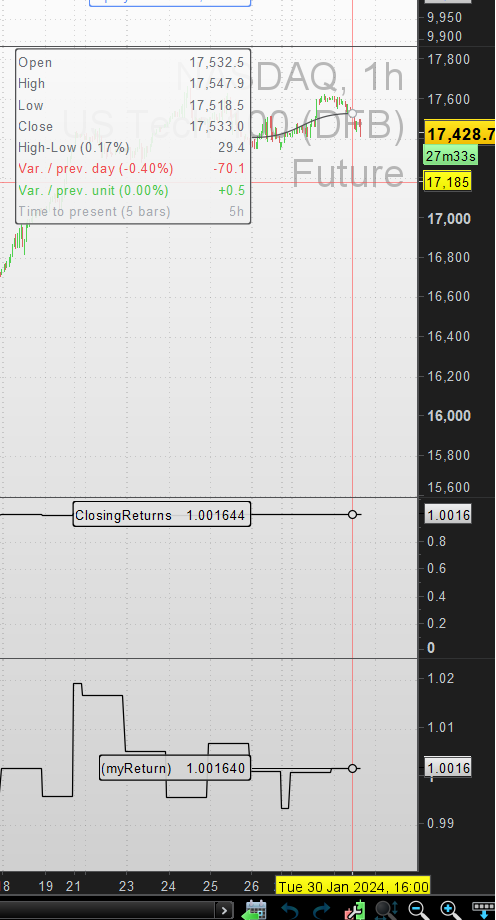
    When I run e.g. close[0]/close[1] on PRT as indicator and use the same in PRT ProOrder Trading, the results are different e.g. in the attached picture, middle panel is for the indicator (value is 1.00.1644) while when same is run in proOrder, value is 1.001640. Why is there a different even in the last decimal digit?


    timeframe(daily, updateonclose)
    myReturn = Close[0]/Close[1]
    timeframe(default)
    
    // for proder add below 
    graph(myReturn)

    This is resulting in inconsistency of my manual and auto trading. I would like to know why there is such a difference in internal implementation. It must be fixed imho.

    Regards,

    Ash

    #227145 quote
    Nicolas
    Keymaster
    Master

    What is the code of your indicator please?

    A reminder, if you use “updateonclose”, the data used are from the last closed candle, in this case, the one from yesterday.

    #227163 quote
    ashehzi
    Participant
    Average

    Code is same as shown above.

    In case of indicator, you can use

    “return myreturn”

    while in case of proOrder, you can use graph. This way you can compare the result.

    I understand what you mean by updateOnClose. The above issue persists whether you use updateonclose or not. This is irrelevant in this case imho.

    #227164 quote
    ashehzi
    Participant
    Average

    Attaching the picture which I thought was there when I posted the issue initially. Sorry it seems I forgot 1st time.

    DIff_between_prt_proOrder_Vals.png DIff_between_prt_proOrder_Vals.png
    #227291 quote
    ashehzi
    Participant
    Average

    Has the prt team got an idea why there is difference of implementation?

    #227423 quote
    Nicolas
    Keymaster
    Master

    Yes, it’s just that the number of significant digits isn’t the same. In backtesting, it’s fixed at 10^-5, in indicators it’s variable depending on the floating point of the value.

    There may be very rare cases where a resistance/support will not be touched/crossed, for example, but it’s very rare. If you encounter recurring differences, the problem must come from somewhere else, I think.

    #227439 quote
    ashehzi
    Participant
    Average

    The issue is there in auto tradng (not just backtest). It results in difference of 5-10 points on nas and completely disturbs the trading levels.

    #227440 quote
    ashehzi
    Participant
    Average

    The code for indicator and auto trading is same, it is just that when run in auto trading or back testing, it results in different levels and is apparent when using graph() against the indicator levels I see on the chart. Eg today my breakout level on my indicator on nas was 17627 but auto trading had 17633 for the same code.

    I have been thinking if there is a workaround I need to apply to make it work but why workarounds.

    #227455 quote
    PeterSt
    Participant
    Master

    Hi Ash – can you share the .itf (both strategy and indicator) of his ? Only the essential parts are necessary.
    At this moment I can not imagine the error you perceive, so I’d like to investigate it.

    Peter

    #240302 quote
    ashehzi
    Participant
    Average

    Hi Nicolas,

    When you say “… In backtesting, it’s fixed at 10^-5, in indicators it’s variable depending on the floating point of the value.”, does it mean if we deploy the Algo in Automatic Trading (not a Probacktest), it will be same as real indicator?

    Thanks.

Viewing 10 posts - 1 through 10 (of 10 total)
  • You must be logged in to reply to this topic.

Output differences at low levels


ProOrder: Automated Strategies & Backtesting

New Reply
Author
author-avatar
ashehzi @ashehzi Participant
Summary

This topic contains 9 replies,
has 3 voices, and was last updated by ashehzi

1 year, 3 months ago.

Topic Details
Forum: ProOrder: Automated Strategies & Backtesting
Language: English
Started: 01/30/2024
Status: Active
Attachments: 1 files
Logo Logo
Loading...

