Order Entry n Candles after Trigger

Viewing 7 posts - 1 through 7 (of 7 total)

  • Author
    Posts
  • #83200 quote
    Welshtrader
    Participant
    Junior

    Hi all,

    I’m just getting started with Prorealtime coding, so apologies up front if this is a noddy question. I have a basic strategy I’m trying to set up for testing.

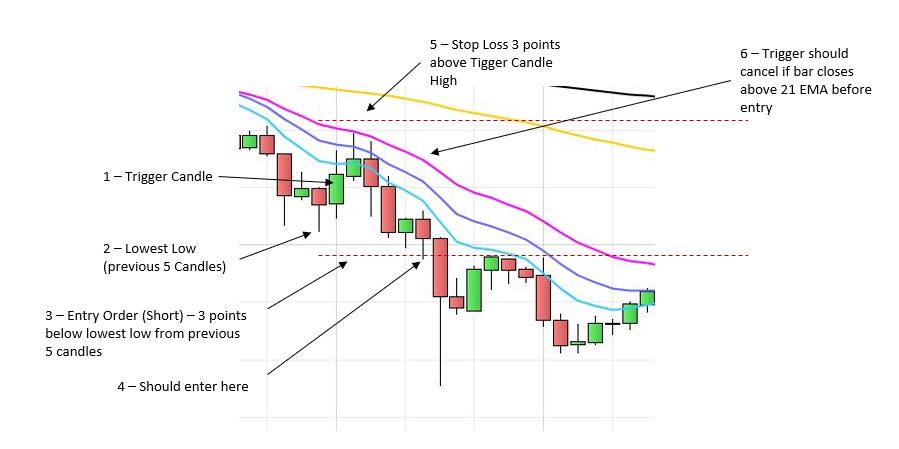
    The idea is to catch a pullback into a trend (downtrend in the example here, but inverse would apply for uptrend) by identifying a candle which pushes up though a descending EMA but closes below, and using this as a trigger from which to place an order. As an example, a short entry 3 points below the lowest Low of the 5 candles preceding the Trigger candle. I’ve managed to get as far as identifying the Trigger candle and coding an entry which works provided the candle immediately following the Trigger candle hits the entry price, but if I’m understanding correctly, the order effectively dies if not hit by this next candle. I want to keep the order valid until hit, or cancelled by an intervening close above an EMA. Hopefully the attached image illustrates.

    Any pointers greatly appreciated.

    Regards

    WT

    #83201 quote
    Welshtrader
    Participant
    Junior

    Image didn’t attach 🙁

    #83223 quote
    GraHal
    Participant
    Master

    Easiest way to get an answer is to post your code thus far (using the Insert PRT Code on the toolbar above each new post).

    Are you using the Select File button below each new post to (try) and attach an image?

    Welshtrader thanked this post
    #83227 quote
    Vonasi
    Moderator
    Master

    Just set a flag to keep putting the order on the market until you no longer want to: Something like:

    if not onmarket and (your signal candle conditions) then
    flag = 1
    endif
    
    if flag and not onmarket then
    sellshort 1 contract at (my price) stop
    endif
    
    if onmarket or (your stop placing orders condition) then
    flag = 0
    endif
    

    Not tested.

    Welshtrader thanked this post
    #83234 quote
    Welshtrader
    Participant
    Junior

    Thanks for the replies both, I’ll have a play around and see what I can do. Is it the case then that if I assign a variable a value, that value is ‘remembered’ beyond the next candle? Is it just the Order that gets forgotten?

    Re. the image yeah I tried the Select File thing… In fact I’ll try it again here now…

    Question.jpg Question.jpg
    #83237 quote
    Vonasi
    Moderator
    Master

    Variable values are remembered candle to candle. You can use the instruction ONCE before assigning a variable value and this means that that value is only set on the very first run through the code and not on subsequent candles.

    Limit and stop orders last for just one candle.

    Your image is very clear and should be easy to code. Often the best way to code is to write down what you want in clearly defined steps and often you will find that the code is not far off what you have written down so you are half way there already.

    I think it is best if you have a crack at it yourself and ask any questions that crop as you will learn so much more doing it that way.

    Welshtrader thanked this post
    #83316 quote
    Welshtrader
    Participant
    Junior

    Absolutely, thanks very much for the response. Will have a go over the next few days.

    cheers,

    WT

Viewing 7 posts - 1 through 7 (of 7 total)

  • You must be logged in to reply to this topic.

Order Entry n Candles after Trigger


ProOrder: Automated Strategies & Backtesting

New Reply
Author
Summary

This topic contains 6 replies,
has 3 voices, and was last updated by Welshtrader
7 years, 4 months ago.

Topic Details
Forum: ProOrder: Automated Strategies & Backtesting
Language: English
Started: 10/19/2018
Status: Active
Attachments: 1 files
Logo Logo
Loading...