Order Accumulation Coding

Viewing 6 posts - 1 through 6 (of 6 total)

  • Author
    Posts
  • #238119 quote
    Melchizedek
    Participant
    New

    Hello,

    defparam cumulateorders=true

    means you can have several positions open on the same instrument. However, it seems this also means stop losses and take profit will “average out”.

    How can you code it so that each trade is “individual” but still that the system allows for several positions to be opened? defparam cumulateorders=false means just one position at a time….

    thanks and best regards

    #238126 quote
    Iván González
    Moderator
    Master

    Hello,
    You are correct that defparam cumulateorders=true allows multiple positions to be opened on the same instrument, and in this mode, stop loss and take profit orders are often handled in a cumulative way. If you want to have more control over individual exits while still allowing multiple positions, you need to program different exit levels based on specific conditions.

    To achieve this, you can monitor the number of open positions and set different exit levels using stop and limit orders. Here’s how you can manage it:
    1) Track the number of open positions: Keep track of how many positions are open and apply exit conditions accordingly.
    2) Set different exit levels: Use SELL n CONTRACTS AT priceStopX STOP and SELL n CONTRACTS AT priceTPX LIMIT to define different exit levels based on your desired conditions.

    #238130 quote
    robertogozzi
    Moderator
    Master

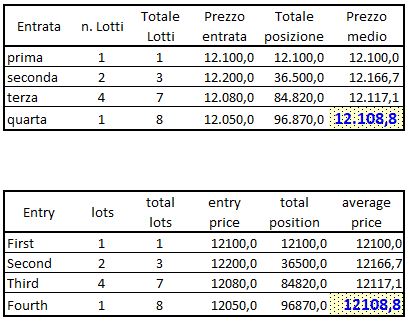
    It means that you can open additional positions, after the first one, in the same direction.

    Stop Loss and Profits will be averaged out (see attached pic and eXcel sheet).

    Be warned that drawdown and required margins will increase accordinly.

    #238137 quote
    Melchizedek
    Participant
    New

    Thanks a lot to both of you.

    The code im using is here, this is for a short strategy. Is there a simple way to change the code so that each order is “individual” basis the same conditions…?

    best regards


    defparam cumulateorders=true

    //v1.1. time settings + trailing stop modifications
    //v1.2 – %trailing modified in points; quantity of orders per stoploss size (typical money management).

    // — TIME SETTINGS
    StartHour = 120000
    EndHour = 240000
    // — ORDERS SETTINGS
    InitialCapital = 10000 // capital at start of the strategy
    // — CONSTANT SETTINGS
    VolatilityPeriod = 15
    DefaultRiskPercent = 1.33
    HighVolatilityRiskPercent = 1.33
    DefaultTrailingStopPercent = 3.0
    //HighVolatilityTrailingStopPercent = 3.0
    // — DATE SETTINGS
    $Date[0] = 20241017
    $Order[0] = 2
    $Date[1] = 20241018
    $Order[1] = 1
    $Date[2] = 20241031
    $Order[2] = 2
    $Date[3] = 20241101
    $Order[3] = 1
    $Date[4] = 20241104
    $Order[4] = 2
    $Date[5] = 20241105
    $Order[5] = 1
    $Date[6] = 20241205
    $Order[6] = 2
    $Date[7] = 20241206
    $Order[7] = 1
    $Date[8] = 20241213
    $Order[8] = 1
    $Date[9] = 20241216
    $Order[9] = 2
    $Date[10] = 20241217
    $Order[10] = 2
    $Date[11] = 20241218
    $Order[11] = 1

    // ————

    tc = time >= starthour and time < endhour

    // Calculate historical volatility
    HistoricalVolatility = HistoricVolatility[VolatilityPeriod ](close)

    // Determine risk and trailing stop based on volatility
    IF HistoricalVolatility > 25 THEN
    RiskPercent = HighVolatilityRiskPercent
    ELSE
    RiskPercent = DefaultRiskPercent
    ENDIF

    // Calculate the price movement in percentage terms from the entry price
    IF shortonmarket THEN
    priceMovement = (tradeprice – close) / tradeprice * 100
    ELSIF longonmarket THEN
    priceMovement = (close – tradeprice) / tradeprice * 100
    ENDIF

    // Adjust trailing stop loss based on price movement
    IF priceMovement >= 3.0 THEN
    trailingStopLoss = 0.99
    ELSIF priceMovement >= 1.5 THEN
    trailingStopLoss = 1.75
    ELSIF priceMovement >= 1.0 THEN
    trailingStopLoss = 2.5
    ENDIF

    // Calculate the amount to risk per trade based on account equity
    //AccountEquity = strategyprofit + initialcapital
    //RiskAmount = AccountEquity * RiskPercent / 100

    // Entries checking
    EntryDatesShort = 0
    for i = 0 to 11 do
    if date = $date[i] then
    EntryDatesShort = 1
    if $order[i] = 0 then
    continue
    else
    quantity = $order[i]
    break
    endif
    endif
    next

    //v1.2
    //MM lot size
    REM Money Management
    StopLoss = (max(trailingStopLoss, DefaultTrailingStopPercent) * close) / pointsize
    REM Calculate contracts
    equity = InitialCapital + StrategyProfit
    maxrisk = round((equity * RiskPercent) * quantity)
    PositionSize = abs(round((maxrisk / StopLoss) / PointValue, 2) * pipsize)

    // initiate order
    size = 0
    if EntryDatesShort and tc and date <> lastentrydate then
    size = PositionSize
    sellshort size shares at market
    lastentrydate = date
    endif

    //set stop %trailing TrailingStopPercent
    if trailingStopLoss > 0 then
    trailsize = (trailingStopLoss / 100) * close
    else
    trailsize = (DefaultTrailingStopPercent / 100) * close
    endif

    set stop trailing trailsize

    //graph trailsize
    //graph stoploss
    //graph positionsize
    //graph HistoricVolatility[VolatilityPeriod](close)
    //graph historicalvolatility
    //graph size
    //graph entrydatesshort and tc
    //graph riskpercent
    //graph round((RiskAmount / close) * quantity, 1)
    //graph (RiskAmount / close) * quantity coloured(“red”)

    #238208 quote
    robertogozzi
    Moderator
    Master

    Can you explain your question “so that each order is “individual” basis the same conditions…?” and possibly post an example?

    #238556 quote
    Niklas87
    Participant
    New

    You cant have seperate orders in the same stratergy.

    cumulateorders=true will just add contracts to your current position.

    The only way around that would be differnet exits for even/odd numbers off contracts or exits based on the amount off contracts in the market.

Viewing 6 posts - 1 through 6 (of 6 total)
  • You must be logged in to reply to this topic.

Order Accumulation Coding


ProBuilder: Indicators & Custom Tools

New Reply
Author
Summary

This topic contains 5 replies,
has 4 voices, and was last updated by Niklas87

1 year, 4 months ago.

Topic Details
Forum: ProBuilder: Indicators & Custom Tools
Language: English
Started: 09/27/2024
Status: Active
Attachments: 2 files
Logo Logo
Loading...