


Options Chain Charts Don’t Fully Open

Viewing 5 posts - 1 through 5 (of 5 total)

  • Author
    Posts
  • #181720 quote
    Bard
    Participant
    Master

    Hi there,

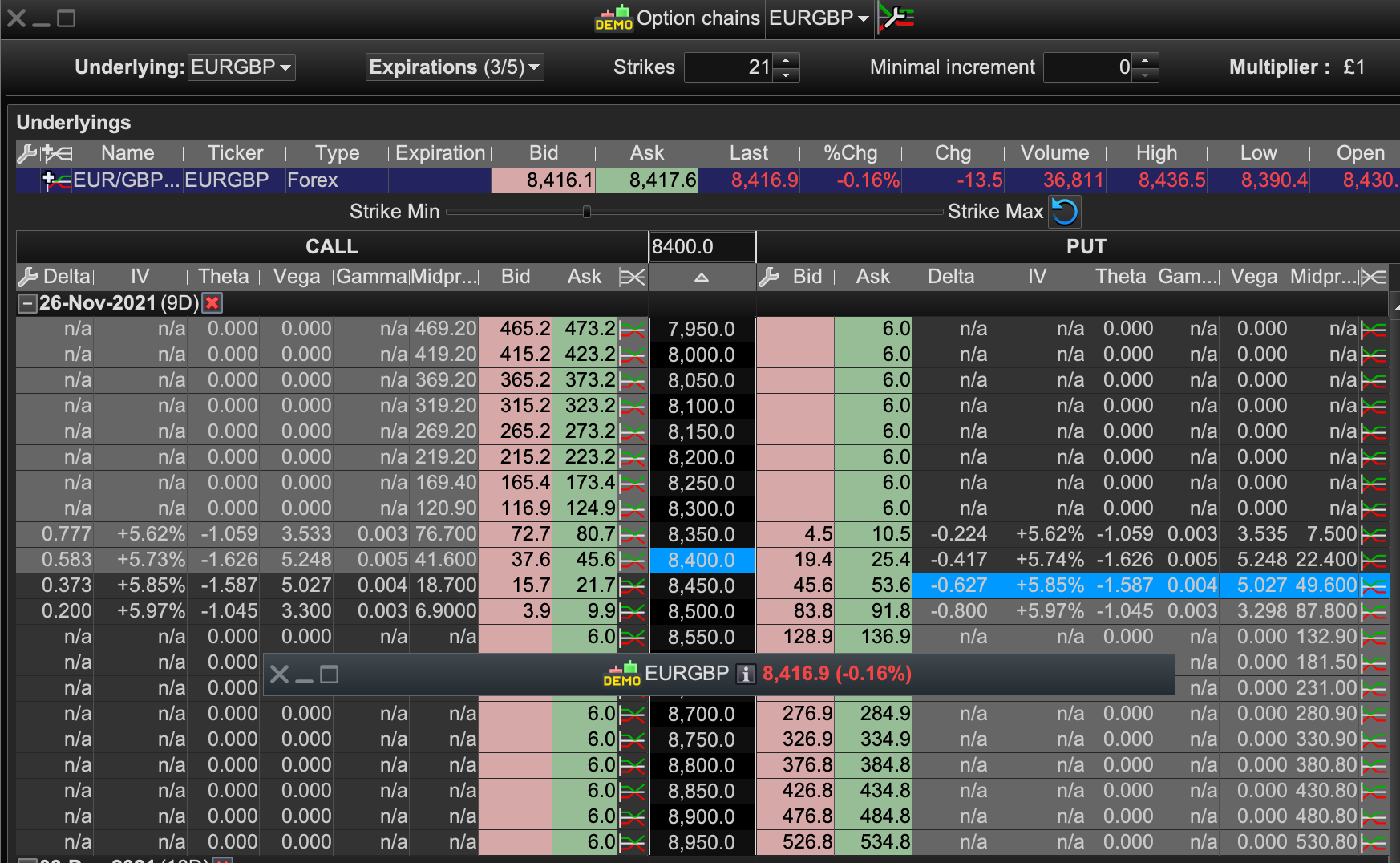
    Does anyone else experience this thing where when you open an option chart from the options Chain window, the chart opens but you have to double click it’s top bar to get it to actually open and display a graph?

    Pls see image: Chart opened was the 0.8450 Put.

    Cheers,

    closed.png closed.png
    #181724 quote
    Bard
    Participant
    Master

    Ps/ The options chart also opens as a full screen chart and there is no way to drag and resize the chart to make it take up less of the screen?

    #181726 quote
    PeterSt
    Participant
    Master

    I don’t have that issue. However, a few days back I had the same with the Optimise (variables) window – which never happened before. Restarting PRT solved that.
    Did you restart PRT to see if that helps ?

    #181728 quote
    Bard
    Participant
    Master

    Thanks @PeterSt, I think I’ve been saving the platform with those option charts already open but just showing the top bar of the chart and not know they were still “open.” A simple re-drag of that rectangle options top bar opens the chart up to display the graphs and then since saving it in that state and relaunching the charts the option chart now displays correctly. However opening a new option chart still results in a non displaying graph because all I get when I open an options chart is that narrow top rectangle bar that needs dragging from one of its corners to resize it?
    Cheers,

    #181784 quote
    RafaelN
    Moderator
    Senior

    Hello, the dimensions of the new charts you open should be the same as the last one that was opened (unless you had another one that remained opened after closing the last one, in which case it seems the new charts will have the dimensions of the one that is still opened).

    Have you tried resizing the chart so they fully display, saving your platform as is and then relaunching it and tried again, to see if you then get fully opened charts every time you open a new one? If this doesn’t work you should probably send PRT a technical report through the help menu.

Viewing 5 posts - 1 through 5 (of 5 total)
  • You must be logged in to reply to this topic.

Options Chain Charts Don’t Fully Open


Platform Support: Charts, Data & Broker Setup

New Reply
Author
author-avatar
Bard @brad Participant
Summary

This topic contains 4 replies,
has 3 voices, and was last updated by RafaelN

4 years, 3 months ago.

Topic Details
Forum: Platform Support: Charts, Data & Broker Setup
Language: English
Started: 11/17/2021
Status: Active
Attachments: 1 files
Logo Logo
Loading...

