






Optimiser – Positions of Variables affects Result!

Viewing 15 posts - 1 through 15 (of 35 total)
  • Author
    Posts
  • #194536 quote
    GraHal
    Participant
    Master

    Yep more weirdness!

    I don’t want this to turn into an all day event (again) so apologes if below is lacking in detail.

    I have this in my code …

    EntryL  = Close > Average[A21,B21](close)
    EntryS = Close < Average[A22,B22](close)
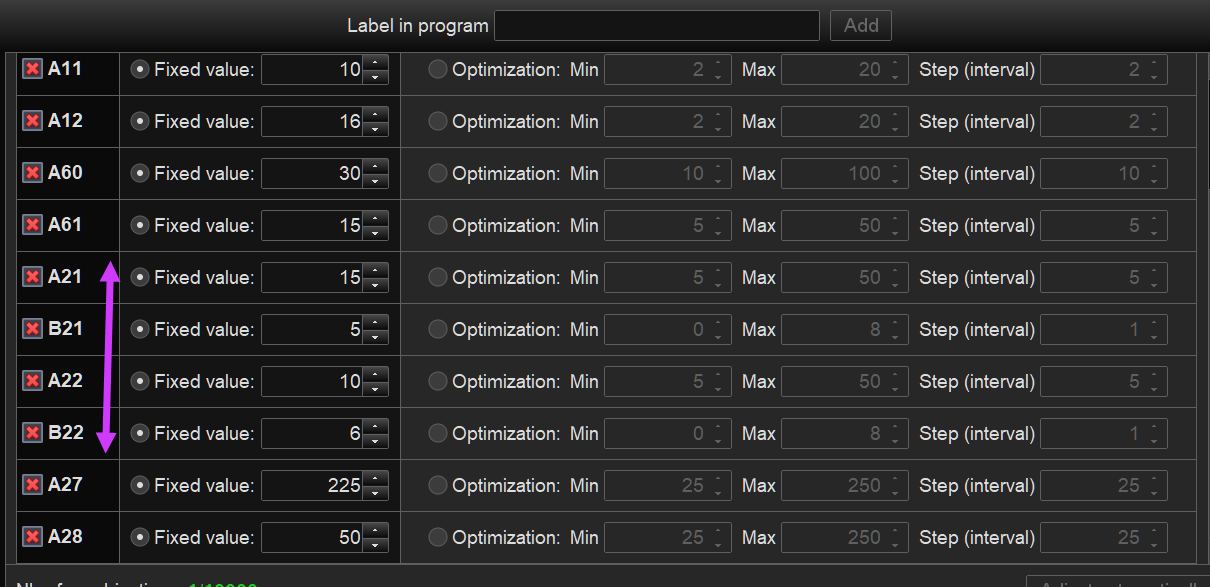
    1.  I had A21, B21 and A22 and B22 in that order in the optimiser (attached Image 1) … Result – good.

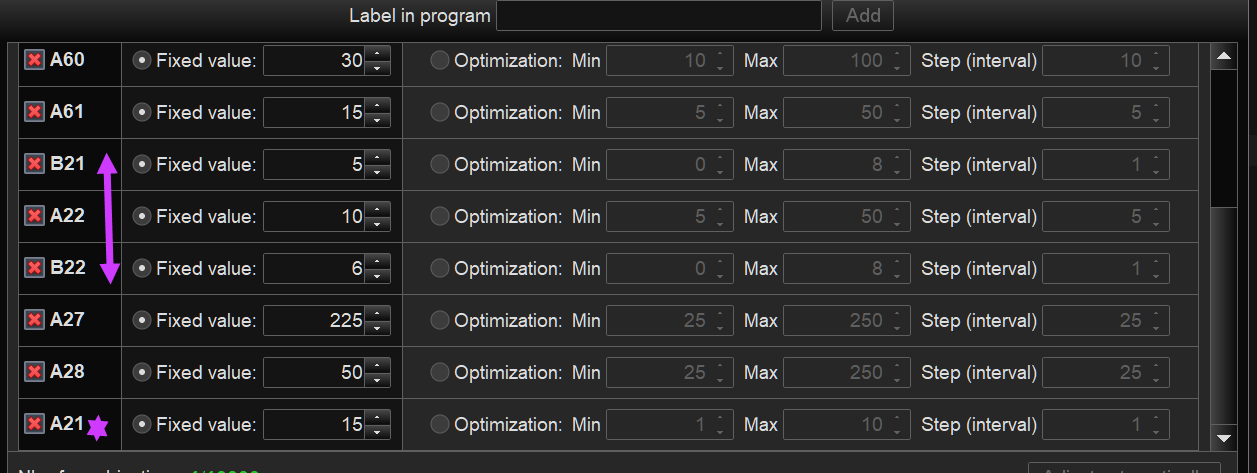
    2.  I deleted (by accident) A21 and added it back in at the bottom (attached image 2 )  Result – none /zero / flat line!!

    3.  I got my Algo going again by redoing the order (as in 1. above) and finished off what I was doing.

    4.  To double check,  I then deleted A21 again and added it back in at the bottom (attached image 2 ) … Result -none         /zero / flat line!!

    Beware there are some weird happenings in use of the optimiser this week!!

    Variables-Order-1.png Variables-Order-1.png Variables-Order-2.png Variables-Order-2.png
    #194544 quote
    robertogozzi
    Moderator
    Master

    Weird!

    What happens if you remove A21 from the optimizer and replace A21 with 15 in your code?

    #194548 quote
    GraHal
    Participant
    Master

    5.     I did it again for a 3rd / 4th time … deleted A21 and added A21 = 15 at the bottom … results as in 2. and 4. in my OP (zero / flat line) .

    6.  Leaving A21 = 15 at bottom of the code, whilst at same time replacing A21 in the code with 15 gives the same good results as having A21,B21 A22, B22 in order in the optimiser.

    7.    Deleting A21 from the optimiser, whilst at same time replacing A21 in the code with 15 gives the same good results as having A21,B21 A22, B22 in order in the optimiser.

    #194549 quote
    GraHal
    Participant
    Master

    How come this Topic is now in ProBuilder Support? 🙂

    I (correctly) posted this Topic in Platform Support?

    #194551 quote
    paisantrader
    Participant
    Senior

    GraHal, why are you always breaking everything? Can’t we have a calm week for once? 😉

    GraHal thanked this post
    #194556 quote
    PeterSt
    Participant
    Master

    I experienced the very same with an Indicator, yesterday. In the end I had removed all parameters and hard-coded the variables in de Indicator code, and the result remained zero.
    I think this happened earlier this week just the same (I even mentioned it somewhere ?).

    Something can mess up in there and it can only be solved by copying the code to a new instance (in this case Indicator). I did that this morning and all worked again.

    Might someone at PRT have the slightest idea of solving issues : this one is related to how parameters are passed; I think internally this is more fixed than it should be, and when a sequence is changed, the internals don’t come along, and the lot remains broken.
    And when do we notice ? After one hour ? two ? never ?

    #194557 quote
    robertogozzi
    Moderator
    Master

    I did not  move this topic.

    Have you tried to close the platform, then open it anew?

    #194558 quote
    GraHal
    Participant
    Master

    The weirdness is spreading!! 🙂

    See attached for what I see and yes I’ve had the PRC Site closed for an hour or so.

    Forums.png Forums.png
    #194560 quote
    PeterSt
    Participant
    Master

    The weirdness is spreading!! 🙂

    I think Roberto was only saying that he did not move the topic. It is in ProBuilder all right.

    Nevertheless the weirdness IS spreading. 🙁 But careful for the ghosts. 🙂

    #194561 quote
    PeterSt
    Participant
    Master

    PRT is haunted.

    By you and by me. Haha.

    #194563 quote
    GraHal
    Participant
    Master

    There must be a witticism as a response, but I can’t think of it!! 🙂

    #194567 quote
    PeterSt
    Participant
    Master

    They see the inside – we see the outside.

    GraHal thanked this post
    image_2022-06-03_164413709.jpg image_2022-06-03_164413709.jpg
    #194587 quote
    GraHal
    Participant
    Master

    Mods

    Please can this Topic be moved to the Platform Support Forum?

    PRT need to see it if we have any hope of a fix?

    PeterSt thanked this post
    #194592 quote
    robertogozzi
    Moderator
    Master

    Done, but the correct forum should be ProOrder.

    #194750 quote
    PeterSt
    Participant
    Master

    Done, but the correct forum should be ProOrder.

    I don’t think so.


    PRT need to see it if we have any hope of a fix?

    That was Mr Opportunistic speaking. Still it is the only chance we have, as it seems. 🙁

    GraHal thanked this post
Viewing 15 posts - 1 through 15 (of 35 total)
  • You must be logged in to reply to this topic.

Optimiser – Positions of Variables affects Result!


Platform Support: Charts, Data & Broker Setup

New Reply
Author
Summary

This topic contains 34 replies,
has 6 voices, and was last updated by GraHal
3 years, 8 months ago.

Topic Details
Forum: Platform Support: Charts, Data & Broker Setup
Language: English
Started: 06/03/2022
Status: Active
Attachments: 7 files
Logo Logo
Loading...
