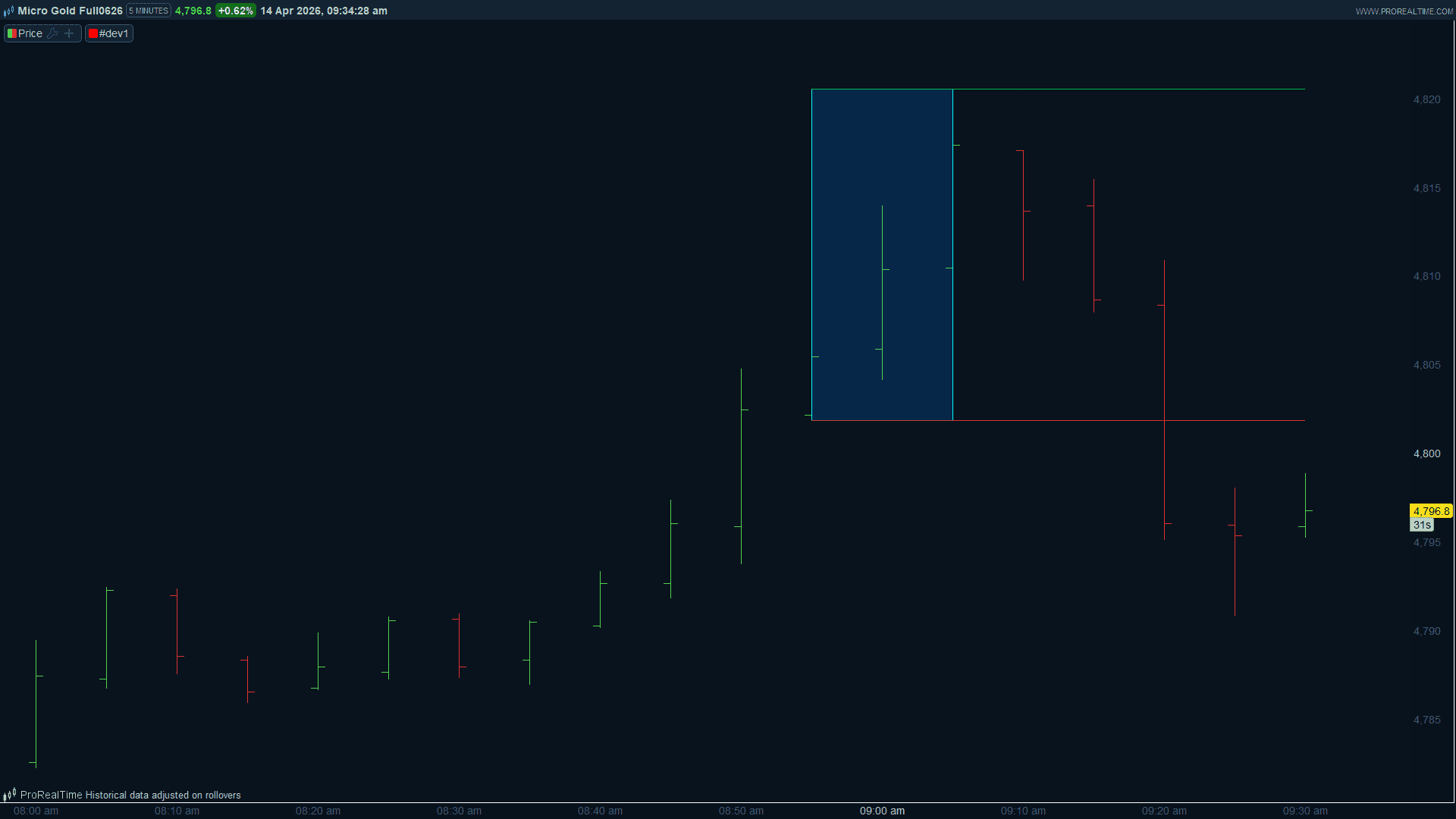
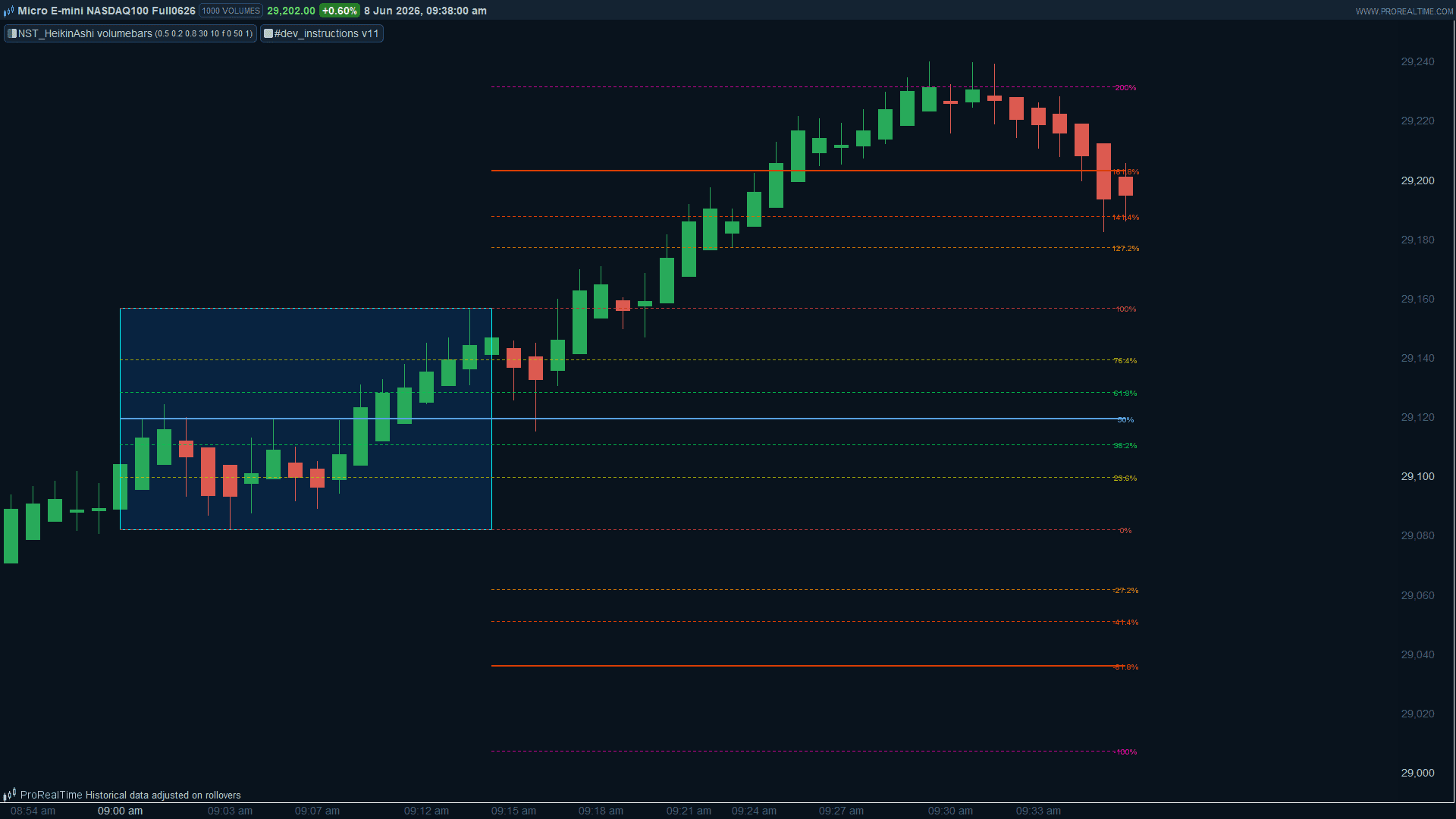
Voici ce qui a été ajouté et comment ça fonctionne :
- sessionEnd capture la dernière bougie de la journée via la variable lastSessionBar, mise à jour bougie par bougie tant qu’on est après l’OPR et avant la fin de session. C’est ce qui permet aux lignes de se prolonger au fur et à mesure, puis de s’arrêter proprement à la clôture.
- Les retracements internes (0%, 23.6%, 38.2%, 50%, 61.8%, 76.4%, 100%) partent du début de l’OPR (startBar) et s’étendent jusqu’à lastSessionBar. Le 50% est en trait plein légèrement plus épais, les autres en pointillés.
- Les extensions haussières (127.2% à 261.8%) et baissières (-27.2% à -161.8%) partent de la fin de l’OPR (endBar) pour ne pas surcharger visuellement la zone OPR elle-même.
- Les labels DRAWTEXT sont placés en fin de ligne à extEnd pour rester lisibles en bord droit du graphique.
- À adapter : sessionEnd = 173000 pour votre marché (ex. 220000 pour le Nasdaq en heure de Paris).
// OPR - Opening Price Range 15min + Niveaux Fibonacci
// Retracements internes + Extensions haussières et baissières
DEFPARAM drawonlastbaronly = true


sessionStart  = 090000   // Début OPR (adapter à votre marché)
sessionOPRend = 091500   // Fin OPR (début + 15 minutes)
sessionEnd    = 173000   // Fin de session (adapter à votre marché)


todayDate = date[0]
todayOPR  = (date = todayDate) and time >= sessionStart and time < sessionOPRend
afterOPR  = (date = todayDate) and time >= sessionOPRend and time <= sessionEnd


// Capture du range OPR
if todayOPR and not todayOPR[1] then
    startBar = barindex
    oprHigh  = high
    oprLow   = low
endif


if todayOPR then
    endBar  = barindex
    oprHigh = max(oprHigh, high)
    oprLow  = min(oprLow, low)
endif


// Suivi de la dernière bougie de la session (pour prolonger les lignes)
if afterOPR then
    lastSessionBar = barindex
endif


if islastbarupdate and startBar > 0 then
    oprRange = oprHigh - oprLow


    // --- Retracements internes à l'OPR ---
    fib000 = oprLow
    fib236 = oprLow + 0.236 * oprRange
    fib382 = oprLow + 0.382 * oprRange
    fib500 = oprLow + 0.500 * oprRange
    fib618 = oprLow + 0.618 * oprRange
    fib764 = oprLow + 0.764 * oprRange
    fib100 = oprHigh


    // --- Extensions haussières (au-dessus du High OPR) ---
    fibExt1272up = oprHigh + 0.272 * oprRange
    fibExt1414up = oprHigh + 0.414 * oprRange
    fibExt1618up = oprHigh + 0.618 * oprRange
    fibExt2000up = oprHigh + 1.000 * oprRange
    fibExt2618up = oprHigh + 1.618 * oprRange


    // --- Extensions baissières (en-dessous du Low OPR) ---
    fibExt1272dn = oprLow - 0.272 * oprRange
    fibExt1414dn = oprLow - 0.414 * oprRange
    fibExt1618dn = oprLow - 0.618 * oprRange
    fibExt2000dn = oprLow - 1.000 * oprRange
    fibExt2618dn = oprLow - 1.618 * oprRange


    extEnd = lastSessionBar


    // --- Rectangle OPR (fond bleu semi-transparent) ---
    drawrectangle(startBar, oprHigh, endBar, oprLow) coloured(0, 120, 255, 40) bordercolor("cyan")


    // --- Retracements : tracés depuis le début de l'OPR jusqu'à la fin de session ---
    drawsegment(startBar, fib000, extEnd, fib000) coloured(220, 50, 50, 220) style(dottedline, 1)
    drawtext("0%", extEnd, fib000, Dialog, Bold, 10) coloured(220, 50, 50, 220)


    drawsegment(startBar, fib236, extEnd, fib236) coloured(200, 200, 0, 200) style(dottedline, 1)
    drawtext("23.6%", extEnd, fib236, Dialog, Bold, 10) coloured(200, 200, 0, 220)


    drawsegment(startBar, fib382, extEnd, fib382) coloured(0, 200, 80, 220) style(dottedline, 1)
    drawtext("38.2%", extEnd, fib382, Dialog, Bold, 10) coloured(0, 200, 80, 220)


    drawsegment(startBar, fib500, extEnd, fib500) coloured(100, 180, 255, 220) style(line, 2)
    drawtext("50%", extEnd, fib500, Dialog, Bold, 10) coloured(100, 180, 255, 220)


    drawsegment(startBar, fib618, extEnd, fib618) coloured(0, 200, 80, 220) style(dottedline, 1)
    drawtext("61.8%", extEnd, fib618, Dialog, Bold, 10) coloured(0, 200, 80, 220)


    drawsegment(startBar, fib764, extEnd, fib764) coloured(200, 200, 0, 200) style(dottedline, 1)
    drawtext("76.4%", extEnd, fib764, Dialog, Bold, 10) coloured(200, 200, 0, 220)


    drawsegment(startBar, fib100, extEnd, fib100) coloured(220, 50, 50, 220) style(dottedline, 1)
    drawtext("100%", extEnd, fib100, Dialog, Bold, 10) coloured(220, 50, 50, 220)


    // --- Extensions haussières : partent de la fin de l'OPR ---
    drawsegment(endBar, fibExt1272up, extEnd, fibExt1272up) coloured(255, 140, 0, 200) style(dottedline, 1)
    drawtext("127.2%", extEnd, fibExt1272up, Dialog, Bold, 10) coloured(255, 140, 0, 220)


    drawsegment(endBar, fibExt1414up, extEnd, fibExt1414up) coloured(255, 100, 0, 200) style(dottedline, 1)
    drawtext("141.4%", extEnd, fibExt1414up, Dialog, Bold, 10) coloured(255, 100, 0, 220)


    drawsegment(endBar, fibExt1618up, extEnd, fibExt1618up) coloured(255, 60, 0, 220) style(line, 2)
    drawtext("161.8%", extEnd, fibExt1618up, Dialog, Bold, 10) coloured(255, 60, 0, 220)


    drawsegment(endBar, fibExt2000up, extEnd, fibExt2000up) coloured(255, 0, 180, 200) style(dottedline, 1)
    drawtext("200%", extEnd, fibExt2000up, Dialog, Bold, 10) coloured(255, 0, 180, 220)


    drawsegment(endBar, fibExt2618up, extEnd, fibExt2618up) coloured(200, 0, 255, 200) style(dottedline, 1)
    drawtext("261.8%", extEnd, fibExt2618up, Dialog, Bold, 10) coloured(200, 0, 255, 220)


    // --- Extensions baissières : partent de la fin de l'OPR ---
    drawsegment(endBar, fibExt1272dn, extEnd, fibExt1272dn) coloured(255, 140, 0, 200) style(dottedline, 1)
    drawtext("-27.2%", extEnd, fibExt1272dn, Dialog, Bold, 10) coloured(255, 140, 0, 220)


    drawsegment(endBar, fibExt1414dn, extEnd, fibExt1414dn) coloured(255, 100, 0, 200) style(dottedline, 1)
    drawtext("-41.4%", extEnd, fibExt1414dn, Dialog, Bold, 10) coloured(255, 100, 0, 220)


    drawsegment(endBar, fibExt1618dn, extEnd, fibExt1618dn) coloured(255, 60, 0, 220) style(line, 2)
    drawtext("-61.8%", extEnd, fibExt1618dn, Dialog, Bold, 10) coloured(255, 60, 0, 220)


    drawsegment(endBar, fibExt2000dn, extEnd, fibExt2000dn) coloured(255, 0, 180, 200) style(dottedline, 1)
    drawtext("-100%", extEnd, fibExt2000dn, Dialog, Bold, 10) coloured(255, 0, 180, 220)


    drawsegment(endBar, fibExt2618dn, extEnd, fibExt2618dn) coloured(200, 0, 255, 200) style(dottedline, 1)
    drawtext("-161.8%", extEnd, fibExt2618dn, Dialog, Bold, 10) coloured(200, 0, 255, 220)


endif


return