Opening and closing multiple positions after x days

Viewing 3 posts - 1 through 3 (of 3 total)
  • Author
    Posts
  • #125681 quote
    JohnnyBlaze
    Participant
    New

    Hello everybody,

    I tried to code a system that buys one new position in a stock every month (up to 12 positions) and exits each postion after roughly one year (240 days). The idea is to build up to 12 positions continuously going with the oldest one being sold after 240 days and being replaced for a new one for another 12 months.

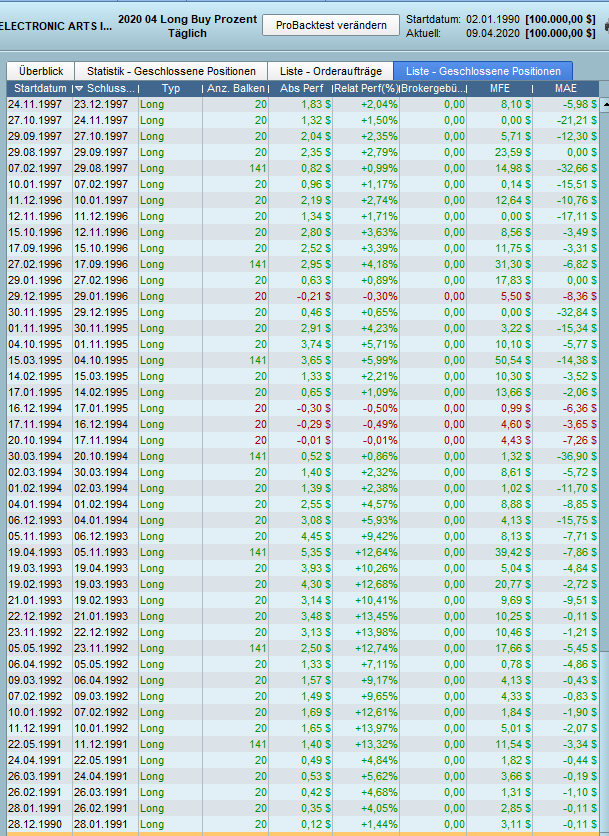
    I understand that PRT can only handle cumulated positions instead of managing multiple positions seperately. I am not a good coder and I tried to do it like this, but for some reason after buying all 12 postions the continuous exit does not work out. In the screenshot attached you see the weird exits. I had to set “AddPos” to “9” instead of “20” to end up exiting 20 days after, but I don’t understand the reason for that.

    I would appreciate any help on this. Thanks a lot!

    defparam cumulateorders = true
    
    NumberMaxPos = 12
    P = Countofposition < NumberMaxPos
    AddPos = barindex - tradeindex >= 9
    ExitDays = 240
    
    pos1 = barindex - tradeindex(1) >= ExitDays
    pos2 = barindex - tradeindex(2) >= ExitDays
    pos3 = barindex - tradeindex(3) >= ExitDays
    pos4 = barindex - tradeindex(4) >= ExitDays
    pos5 = barindex - tradeindex(5) >= ExitDays
    pos6 = barindex - tradeindex(6) >= ExitDays
    pos7 = barindex - tradeindex(7) >= ExitDays
    pos8 = barindex - tradeindex(8) >= ExitDays
    pos9 = barindex - tradeindex(9) >= ExitDays
    pos10 = barindex - tradeindex(10) >= ExitDays
    pos11 = barindex - tradeindex(11) >= ExitDays
    pos12 = barindex - tradeindex(12) >= ExitDays
    
    // Entry Rules
    IF Countofposition = 1 THEN
    ExitPos = pos1
    ELSIF Countofposition = 2 THEN
    ExitPos = pos2
    ELSIF Countofposition = 3 THEN
    ExitPos = pos3
    ELSIF Countofposition = 4 THEN
    ExitPos = pos4
    ELSIF Countofposition = 5 THEN
    ExitPos = pos5
    ELSIF Countofposition = 6 THEN
    ExitPos = pos6
    ELSIF Countofposition = 7 THEN
    ExitPos = pos7
    ELSIF Countofposition = 8 THEN
    ExitPos = pos8
    ELSIF Countofposition = 9 THEN
    ExitPos = pos9
    ELSIF Countofposition = 10 THEN
    ExitPos = pos10
    ELSIF Countofposition = 11 THEN
    ExitPos = pos11
    ELSIF Countofposition = 12 THEN
    ExitPos = pos12
    ENDIF
    
    IF P AND AddPos THEN
    BUY 1 share AT MARKET
    ENDIF
    
    //Exit Rules
    IF longonmarket AND ExitPos THEN
    SELL 1 share AT MARKET
    ENDIF
    
    positions.png positions.png
    #125686 quote
    robertogozzi
    Moderator
    Master

    Partial closures are not supportrd yet.

    When you you exit ALL open position are closed.

    This feature is planned to be supported, but there’s no deadline.

    JohnnyBlaze thanked this post
    #125691 quote
    Vonasi
    Moderator
    Master

    TRADEINDEX is exactly that – the index of the last trade whether that be to open a position or to close a position.

    If you have 12 positions open then PRT consider that to be one position at the average price that you purchased all the positions at.

    You are probably better to work with dates and then sell one position at the open of one candle and then buy another at the open of the next candle because if you ever send a BUY and a SELL order on the same candle then they just cancel each other out.

    Partial closure is not possible in real live or demo live trading on PRT so you are working on something that can only be used in back testing at the moment.

    JohnnyBlaze thanked this post
Viewing 3 posts - 1 through 3 (of 3 total)
  • You must be logged in to reply to this topic.

Opening and closing multiple positions after x days


ProOrder: Automated Strategies & Backtesting

New Reply
Author
Summary

This topic contains 2 replies,
has 3 voices, and was last updated by Vonasi

5 years, 10 months ago.

Topic Details
Forum: ProOrder: Automated Strategies & Backtesting
Language: English
Started: 04/11/2020
Status: Active
Attachments: 1 files
Logo Logo
Loading...