


OpenDate wrong

Viewing 3 posts - 1 through 3 (of 3 total)
  • Author
    Posts
  • #41012 quote
    AVT
    Participant
    Senior

    I get a wrong result with OpenDate which should return YYYYMMDD format. Any ideas? Thanks.

    defparam drawonlastbaronly=true
    ODay=OpenDay
    OMon=OpenMonth
    OYear=OpenYear
    
    ODate=OpenDate
    
    Drawtext ("OpenDay value: #ODay#",barindex,0.4,Monospaced) coloured(0,0,0)
    Drawtext ("OpenMonth value: #OMon#",barindex,0.2,Monospaced) coloured(0,0,0)
    Drawtext ("OpenYear value: #OYear#",barindex,0,Monospaced) coloured(0,0,0)
    
    Drawtext ("OpenDate value: #ODate#",barindex,-0.2,Monospaced) coloured(0,0,0)
    Return

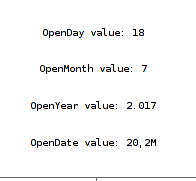
    Separate values are correct. OpenDate returns 20,2M, picture attached.

    #41584 quote
    Nicolas
    Keymaster
    Master

    The result of #ODate# is good, in fact it has been plotted in a simplified rounded number format. I don’t think there is other possibility to draw it in its real format. But you could try this instead:

    Drawtext ("OpenDate value: #OYear# #OMon# #ODay#",barindex,-0.2,Monospaced) coloured(0,0,0)

    I don’t know if this solution is working, could you confirm?

    AVT thanked this post
    #41587 quote
    AVT
    Participant
    Senior

    Confirmed.

    That’s what my alternate was: Use the separate ones and forget about using OpenDate because it is simply not returning the value as documented (which makes it impossible to work/calculate with it).

    Thanks Nicolas!

Viewing 3 posts - 1 through 3 (of 3 total)

  • You must be logged in to reply to this topic.

OpenDate wrong


ProBuilder: Indicators & Custom Tools

New Reply
Author
author-avatar
AVT @avt Participant
Summary

This topic contains 2 replies,
has 2 voices, and was last updated by AVT

8 years, 6 months ago.

Topic Details
Forum: ProBuilder: Indicators & Custom Tools
Language: English
Started: 07/18/2017
Status: Active
Attachments: 1 files
Logo Logo
Loading...
