


Open Range Euro

Viewing 7 posts - 1 through 7 (of 7 total)
  • Author
    Posts
  • #112623 quote
    RazzRazz
    Participant
    Master

    Good day
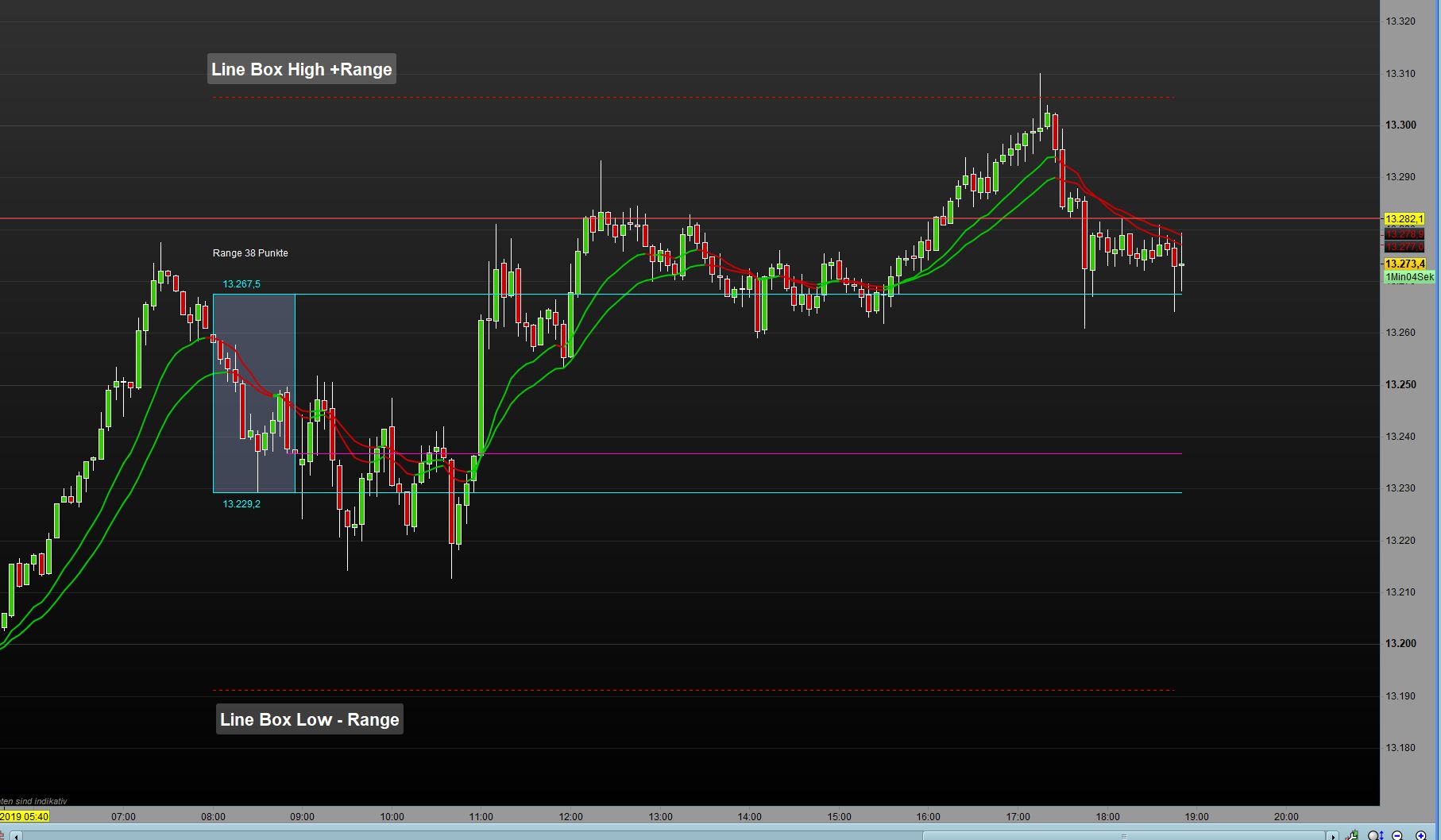
    I would like to add 2 lines to the indicator in the example dashed red, unfortunately I do not know how I can implement that. do any of you professionals know a solution? thanks

    Example.jpg Example.jpg Opening-Range-EUR.itf
    #112626 quote
    RazzRazz
    Participant
    Master
    // Opening Range EUR with Close and Open.
    // Added some changes and features.
    // - segment for opening price;
    // - segment for yesterday's closing price;
    // - Automatic detection of the timeframe;
    // - Automatic configuration for 1-5-10-15-30min charts.
    // 17.06.2019 (Release 1.1)
    // Thomas Geisler
    // Sharing ProRealTime knowledge (alt+16)
    // Original basis was Pre-Market EUR (Opening Range) | Graph Indicator Ver. 1.0
    // from Swapping
    
    // --- property settings
    //Info    = 1   // (0=false; 1=true)
    //Delta   = 10  // gap number/rectangle
    //Alpha   = 255 // transparency letter
    //HighLow = 1   // (0=false; 1=true)
    //OpenClose = 1  // (0=false; 1=true)
    // --- end
    
    DefParam CalculateOnLastBars = 1400 // enough for one day (23h) when using 1min timeframe
    
    // --- init
    alpha = max(alpha,0)
    alpha = min(alpha,255)
    // --- end
    
    //Automatic time detection
    once NbBar = 1
    if BarIndex < NbBar+2 then
    MyDay=openday
    dayminutes = 1440*(MyDay-MyDay[1])
    MyHour=openhour
    hourminutes = 60*(MyHour-MyHour[1])
    MyMin=openminute
    barminutes = MyMin - MyMin[1] + hourminutes + dayminutes
    barminutes=abs(barminutes)
    Mybarminutes = lowest[NbBar](barminutes)[1]
    endif
    
    // Select timeframe between 1 and max 30 minutes to define the parameters for drawing
    if Mybarminutes = 1  then
    Frame = 60
    myStart = 080100
    elsif Mybarminutes = 5 then // 5 minutes
    Frame = 12 // 12 candels
    myStart = 080500 // opening plus 5 min
    elsif Mybarminutes = 10 then
    Frame = 6
    myStart = 081000
    elsif Mybarminutes = 15 then
    Frame = 4
    myStart = 081500
    elsif Mybarminutes = 30 then
    Frame = 2
    myStart = 083000
    endif
    
    starttime = myStart // 08h00 Depending on the timeframe
    endtime = 090000   // 09h00
    
    if time = starttime then
    startbar = barindex
    endif
    if time = endtime then
    endbar = barindex
    endif
    
    if time >= starttime and time <= endtime then
    if high > hh then
    hh = high
    endif
    if low < ll or ll = 0 then
    ll = low
    endif
    endif
    
    if intradaybarindex = 0 then
    hh = 0
    ll = 0
    endif
    
    if time = 173000 then //Close Yesterday at time 17:30
    cl = close
    endif
    
    if date = today and time > endtime then //draw Box OpenRange (OPR) only for today
    DrawRectangle(startbar,hh,endbar,ll) coloured(0,255,255,alpha) // alpha (transparence)
    endif
    
    if date = today and time = endtime then // High/Low/Opening only for today
    upper = highest[Frame](high)
    lower = lowest[Frame](low)
    op = close
    dif = round(abs(upper-lower))
    info = info // draw the info OPR, High, Low, Using Timeframe as text
    elsif info = 1 then
    DrawText("OPR #dif#pts",startbar+5,upper+(delta+5),SansSerif,Standard,12) coloured(255,0,255,alpha)
    DrawText("#hh#",startbar+5,upper+(delta),SansSerif,Standard,12) coloured(0,255,255,alpha)
    DrawText("#ll#",startbar+5,lower-(delta),SansSerif,Standard,12) coloured(0,255,255,alpha)
    //DrawText("Timeframe #Time1o5o10o15# min.",startbar+5,lower-(delta+5),SansSerif,Standard,12) coloured(255,0,255,alpha)
    endif
    
    if date = today and time >= endtime and time <= 220000 then
    If HighLow = 1 then// Draw Segment High,Low and Opening from OPR, as Support/Resist, to select time
    DrawSegment(barindex-HighLow,upper,barindex,upper) coloured(0,255,255,alpha) // High OPR
    DrawSegment(barindex-HighLow,lower,barindex,lower) coloured(0,255,255,alpha) // Low OPR
    endif
    If OpenClose = 1 then// Draw Segment High,Low and Opening from OPR, as Support/Resist, to select time
    DrawSegment(barindex-OpenClose,op,barindex,op) coloured(255,0,204,alpha) // Opening
    DrawSegment(barindex-OpenClose,cl,barindex,cl) coloured(255,0,0,alpha)  //Close Yesterday
    endif
    endif


    return
    #112628 quote
    robertogozzirobertogozzi
    Moderator
    Legend

    To draw a horizontal line you can use DRAWHLINE, or DRAWSEGMENT between two points.

    You need to know the price level where they are to be drawn.

    #112632 quote
    RazzRazz
    Participant
    Master

    Hello Robert Thanks for the answer, unfortunately, I do not know what I should eintregen there 1. Line should represent upper + dif and the 2. Line lower – dif. Maybe they can show me how I can do that. thanks

    #112714 quote
    RazzRazz
    Participant
    Master

    Hello Robert how I can draw a line is clear to me, but I want to draw this like the line in the picture until 08:00 to 22:00

    #112743 quote
    robertogozzirobertogozzi
    Moderator
    Legend

    To draw a line from 080000 to 220000 you must tell where (price level) you want it to be drawn.

    This example will draw it on the OPEN at 080000, till 220000:

    IF OpenTime = 080000 THEN
       OpenPrice = open
       bar8 = barindex
    ENDIF
    IF OpenTime >= 080000 AND OpenTime <= 220000 THEN
       DRAWSEGMENT(bar8,OpenPrice,barindex,OpenPrice) coloured(0,128,0,255) //GREEN colour, 100% visible
    ENDIF
    RETURN
    #112821 quote
    RazzRazz
    Participant
    Master

    Thank you Robert your example helped

Viewing 7 posts - 1 through 7 (of 7 total)
  • You must be logged in to reply to this topic.

ProRealAI ProRealAI New

Stuck on this ProBuilder code?

Describe what this topic is trying to build, in plain English, and ProRealAI writes the ProRealTime™ indicator, screener or system for you.

Available in 7 languages
Try ProRealAI

Open Range Euro


ProBuilder: Indicators & Custom Tools

New Reply
Author
author-avatar
Razz @razz Participant
Summary

This topic contains 6 replies,
has 2 voices, and was last updated by RazzRazz

6 years, 10 months ago.

Topic Details
Forum: ProBuilder: Indicators & Custom Tools
Language: English
Started: 11/12/2019
Status: Active
Attachments: 2 files
ProRealCode ProRealCode
Loading...

