Range detection

Viewing 9 posts - 1 through 9 (of 9 total)
  • Author
    Posts
  • #253535 quote
    LucasBestLucasBest
    Participant
    Senior
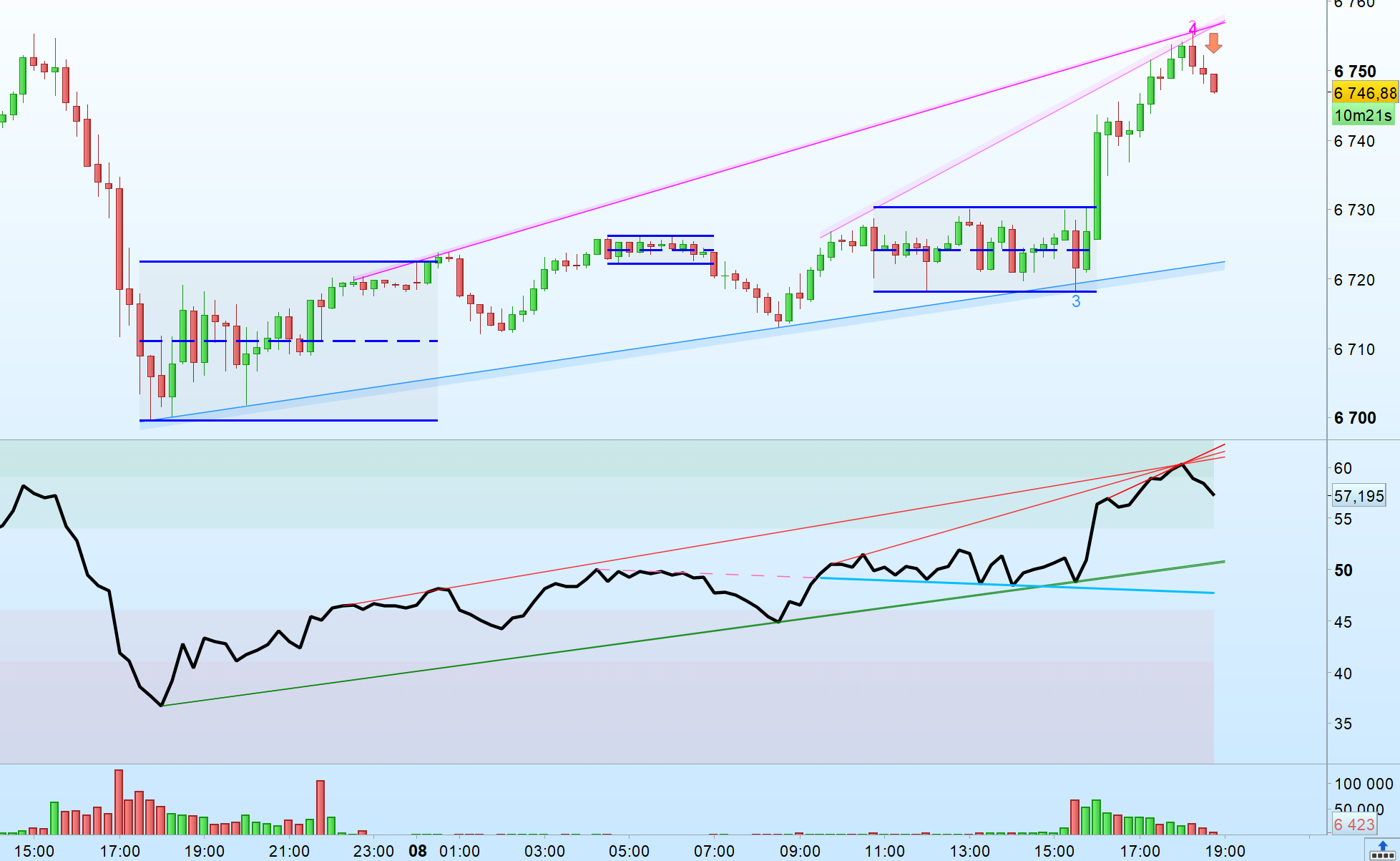
    As its name says, it help detecting sideways market.
    DefParam DrawOnLastBarOnly = true
    
    once candleLow = low
    once candleHigh = high
    once candleOpen = open
    once candleClose = close
    once insideCandles = 1
    once RangeIndex = 0
    
    MyTR = max(Range,max(abs(high - close[1]),abs(low - close[1])))
    
    if high > candleHigh[1] and close <= candleHigh[1] then
    candleHigh = high
    endif
    
    if low < candleLow[1] and close >= candleLow[1] then
    candleLow = low
    endif
    
    breakoutCandle = close > candleHigh or close < candleLow
    bullishBreak = close > candleHigh[1] and insideCandles[1] >= (minLemgth+1)
    bearishBreak = close < candleLow[1] and insideCandles[1] >= (minLemgth+1)
    
    candleMiddle = (candleHigh + candleLow)/2
    
    FiltreBreakoutCandle1 = (Average[2](MyTR[0])>F*Average[20](MyTR[1]) and breakindex>=barindex-1)
    FiltreBreakoutCandle2 = 0
    FiltreBreakoutCandle3 = 0
    If insideCandles>=3 then
    upside = insideCandles>=3 and summation[ceil((insideCandles+1)/2)](close>=candleMiddle)=ceil((insideCandles+1)/2)
    downside = insideCandles>=3 and summation[ceil((insideCandles+1)/2)](close<=candleMiddle)=ceil((insideCandles+1)/2)
    FiltreBreakoutCandle2 = upside or downside
    FiltreBreakoutCandle3 = (close >= candleHigh[2] or close <= candleLow[2]) and insideCandles>=2
    endif
    
    
    if breakoutCandle or (filtre and ((FilteringMethod=1 and FiltreBreakoutCandle1) or (FilteringMethod=2 and FiltreBreakoutCandle2) or (FilteringMethod=3 and FiltreBreakoutCandle3))) then //(Average[2](MyTR[0])>F*Average[20](MyTR[1]) and breakindex>=barindex-1)) then
    
    If not breakoutCandle and (filtre and FilteringMethod=2 and FiltreBreakoutCandle2) then
    if upside then
    candleLow = lowest[ceil((insideCandles+1)/2)](low)
    candleHigh = candleHigh
    candleOpen = open
    candleClose = close
    insideCandles = 1
    breakindex = barindex
    elsif downside then
    candleLow = candleLow
    candleHigh = highest[ceil((insideCandles+1)/2)](high)
    candleOpen = open
    candleClose = close
    insideCandles = 1
    breakindex = barindex
    endif
    
    else
    candleLow = low
    candleHigh = high
    candleOpen = open
    candleClose = close
    insideCandles = 1
    breakindex = barindex
    endif
    
    If insideCandles[1] >= (minLemgth) and insideCandles = 1 then //and $RangeStart[RangeIndex] = breakindex[1] then
    If close > candleHigh[1] then
    Drawarrowup(Barindex, Low)
    Elsif close < candleLow[1] then
    Drawarrowdown(Barindex, High)
    Endif
    
    //drawsegment($RangeStart[i],$RangeHigh[i],$RangeStart[i]+$RangeLength[i],$RangeHigh[i])style(dottedline1,2)coloured("blue",255)
    //drawsegment($RangeStart[i],$RangeLow[i],$RangeStart[i]+$RangeLength[i],$RangeLow[i])style(dottedline1,2)coloured("blue",255)
    Endif
    
    else
    insideCandles = insideCandles+1


    if insideCandles >= (minLemgth) then
    
    If $RangeStart[RangeIndex] = breakindex then
    $RangeLength[RangeIndex] = insideCandles
    $RangeHigh[RangeIndex] = candleHigh
    $RangeLow[RangeIndex] = candleLow
    Else
    RangeIndex = RangeIndex + 1
    $RangeStart[RangeIndex] = breakindex
    $RangeLength[RangeIndex] = insideCandles
    $RangeHigh[RangeIndex] = candleHigh
    $RangeLow[RangeIndex] = candleLow
    Endif
    
    drawsegment(breakindex,candleHigh,barindex+1,candleHigh)style(dottedline1,2)coloured("orange",255)
    drawsegment(breakindex,candlelow,barindex+1,candlelow)style(dottedline1,2)coloured("orange",255)
    DRAWRECTANGLE(breakindex,candleHigh,barindex+1,candlelow)coloured("orange",20)bordercolor("orange",100)
    drawsegment(breakindex,(candleHigh+candlelow)/2,barindex+1,(candleHigh+candlelow)/2)style(dottedline1,2)coloured("orange",255)
    
    endif
    endif
    
    Fin = Max(0,RangeIndex-($RangeStart[RangeIndex]=breakindex))
    
    If OnlyLastRange > 0 then
    Debut = Max(0,Fin-OnlyLastRange+1+($RangeStart[RangeIndex]=breakindex))
    Else
    Debut = 0
    Endif
    
    If RangeIndex > 1 then
    For i = Debut to Fin do
    drawsegment($RangeStart[i],$RangeHigh[i],$RangeStart[i]+$RangeLength[i],$RangeHigh[i])style(line,2)coloured("blue",255)
    drawsegment($RangeStart[i],$RangeLow[i],$RangeStart[i]+$RangeLength[i],$RangeLow[i])style(line,2)coloured("blue",255)
    DRAWRECTANGLE($RangeStart[i],$RangeHigh[i],$RangeStart[i]+$RangeLength[i],$RangeLow[i])coloured("grey",20)bordercolor(204,0,0,1)
    drawsegment($RangeStart[i],($RangeHigh[i]+$RangeLow[i])/2,$RangeStart[i]+$RangeLength[i],($RangeHigh[i]+$RangeLow[i])/2)style(dottedline1,2)coloured("blue",255)
    Next
    Endif
    
    return
    robertogozzi, Iván González, Med5 and Joey475 thanked this post
    Range-Detection.itf Range-Detection.png Range-Detection.png
    #254124 quote
    turameturame
    Participant
    Master
    Bonjour, Votre code a l’air intéressant mais il manque la définition de plusieurs variables. Pourriez-vous les poster SVP ? Merci
    #254125 quote
    jacquesgermainjacquesgermain
    Participant
    Veteran
    Hello en important le fichier Détection de portée.itf  il fonctionne
    LucasBest thanked this post
    #254246 quote
    turameturame
    Participant
    Master
    Super merci, c’est un très bon indicateur. Pour info j’ai remarqué que lors d’une sortie de range, il y a très souvent un retournement de tendance à la première bougie rouge 😉
    #254249 quote
    LaMailleLaMaille
    Participant
    Junior
    Les ranges sont soit des ranges de continuation (drapeau, fanion, etc), soit de retournement (avec souvent un fake out du mauvais côté).
    #254337 quote
    Med5Med5
    Participant
    Average

    Super indicateur, merci beaucoup

     Vous l’utilisez tel quel sur ES et NQ, ou vous ajustez les variables (avec le filtrage) ? Est-ce que le principe reste le même sur tous les timeframes pour les breakout et fake breakout ?

    Quel est l’indicateur que vous utilisez pour les trendlines sur la photo  ?

    Merci encore une fois

    #254561 quote
    Med5Med5
    Participant
    Average
    @LucasBest SVP Quel est l’indicateur que vous utilisez pour les trendlines sur la photo ? Merci
    #254564 quote
    LucasBestLucasBest
    Participant
    Senior
    C’est un indicateur personnel que j’ai programmé pour mes besoins.
    Med5 thanked this post
    #254565 quote
    Med5Med5
    Participant
    Average
    Merci pour la réponse 👍J’aime beaucoup l’approche momentum avec les trendlines , si jamais tu partages un jour une version , je suis preneur.
Viewing 9 posts - 1 through 9 (of 9 total)

  • You must be logged in to reply to this topic.

ProRealAI ProRealAI New

Stuck on this ProBuilder code?

Describe what this topic is trying to build, in plain English, and ProRealAI writes the ProRealTime™ indicator, screener or system for you.

Available in 7 languages
Try ProRealAI

Range detection


ProBuilder: Indicators & Custom Tools

New Reply
Author
author-avatar
LucasBest @lucasbest Participant
Summary

This topic contains 8 replies,
has 5 voices, and was last updated by Med5Med5

9 months, 2 weeks ago.

Topic Details
Forum: ProBuilder: Indicators & Custom Tools
Language: English
Started: 11/11/2025
Status: Active
Attachments: 2 files
ProRealCode ProRealCode
Loading...