//PRC_OnChart Stochastic | indicator
//23.05.2018
//Nicolas @ www.prorealcode.com
//Sharing ProRealTime knowledge

// --- settings
KPeriod = 26
Slowing = 5
DPeriod = 5
ATRperiod = 20
maPeriod = 20
maMethod = 0
//overBought = 80
overSold = 20
// --- end of settings

maPrice = customclose

dTR = 0
for i = 0 to ATRperiod-1
dTR=dTR+max(abs(Dhigh(i)-Dlow(i)),max(abs(Dhigh(i)-Dclose(i+1)),abs(Dlow(i)-Dclose(i+1))))
next

avgRange = dTR/ATRperiod
//avgRange = AverageTrueRange[ATRperiod]
maValue = average[maPeriod,maMethod](maPrice)
stochValue = Stochastic[Kperiod,Slowing](maPrice)
signalValue = average[Dperiod,maMethod](stochValue)
//----
//Buffer1=maValue
//Buffer2=maValue+(avgRange*(overBought-50)/100)
Buffer3=maValue-(avgRange*(50-  overSold)/100)
Buffer4=maValue+(stochValue -50)/100*avgRange
Buffer5=maValue+(signalValue-50)/100*avgRange

BearSTOCH=Buffer5>Buffer4 and Buffer5>Buffer3
I am trying to use the indicator above as an exit factor for LONG position (BearSTOCH), and for some reason it does not work.
I normally combine different indicators for entry/exit purpose in automatic trading, but as soon I include this one, no trades in simulation mode occur, not even a purchase, that should not be affected as I am only adding a condition in the exit conditions… Anyone with opened eyes today? THANKS!
Are you sure that it doesn’t open one position and never close it? This would show zero in the strategy report.
Have you got If LongonMarket or If ShortonMarket as part of your Exit Strategy?
We can – on occasions- get well weird things happening if we don’t use above.
Thank you Vonasi and GraHal being active on a Sunday!
Part of the Exit Strategy is: or longonmarket and BearSTOCH
For the same interval, it normally simulates aprox 30 trades, and zero when I add the extra exit condition as described. If I replace BearSTOCH with any other indicator strategy, it works. Kind of weird…
Have you tried adding:
DEFPARAM PRELOADBARS = 20
Without the full code we are guessing, but how are you judging that there are zero trades?
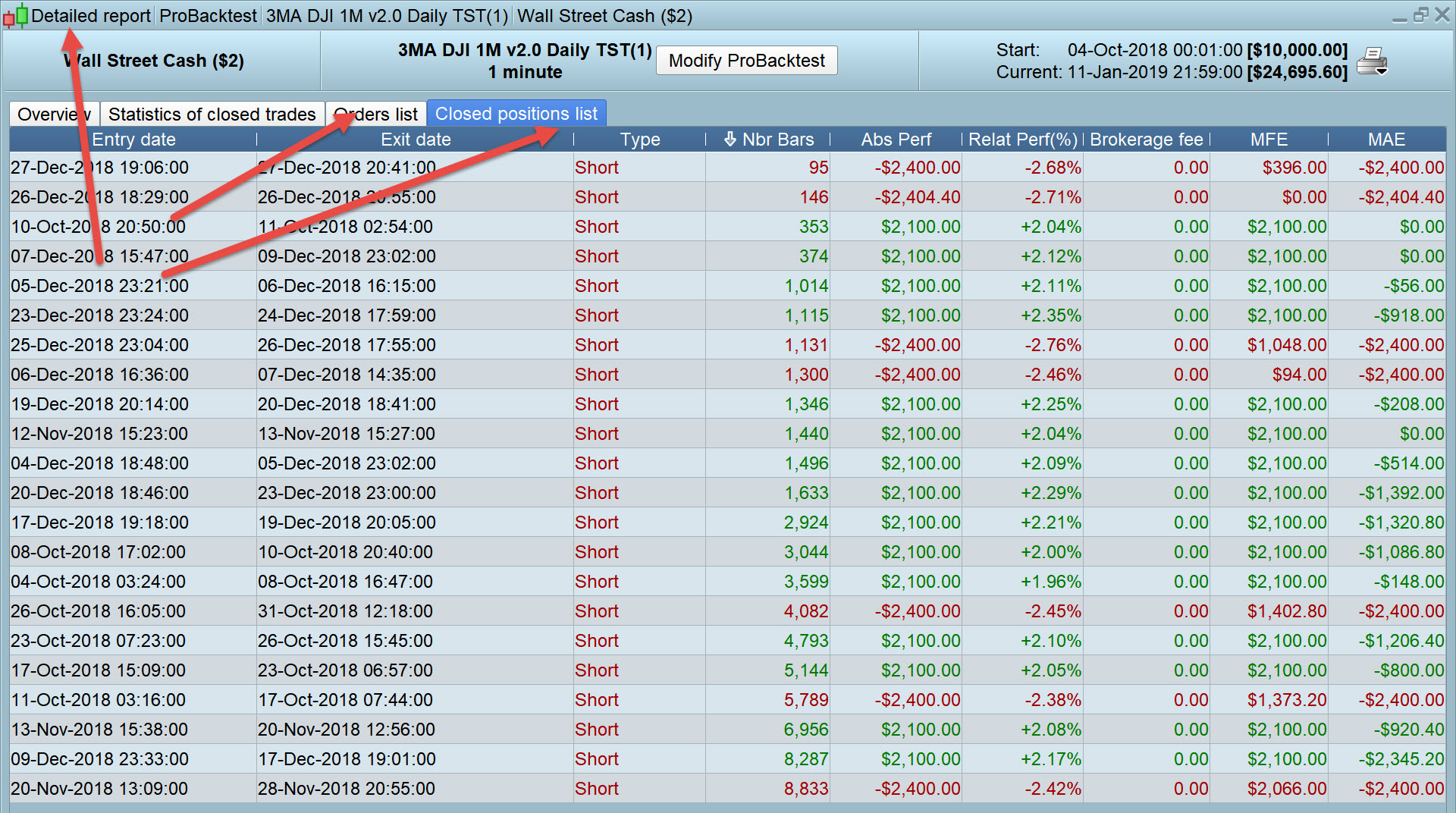
Have you looked in the Detailed Report as you may have loads of 0 bar trades which are closing / exiting just as soon as they have opened??
I’ve had the above scenario before now and on the equity curve it looks like nothing is happening and zero / no trades show on the Positions Indicator.
Just a few more thoughts / ideas to look at.
Thank you both of you!
Yes I tried adding DEFPARAM PRELOADBARS = 20, but no change
Judging by probacktesting my system without changing anything except adding the exit condition.
I think I’m with GraHal about needing the code as there is no logical reason why just adding the indicator code and an extra exit condition should stop a strategy from opening a position.
Have you tried CALLing the indicator rather than including the code in your strategy?
Judging by probacktesting my system without changing anything except adding the exit condition.
So you have nothing at all showing in the Detailed Report as attached ?
Correct, like it was blocked. Never mind, I just look for a similar indicator 🙂 Thanks for all your time!
B3=Call "PRC_OnChart Stochastic"[Buffer3]
B4=Call "PRC_OnChart Stochastic"[Buffer4]
B5=Call "PRC_OnChart Stochastic"[Buffer5]

//BullONCHARTSTO=
BearONCHARTSTO=B5>B3 and (B5>B4)
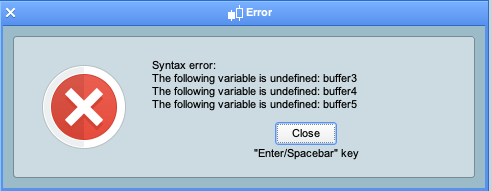
Thanks. Must admit that I have not used the call function, and it seems that I am doing something wrong as I get a syntax error…
How to use CALL is shown clearly here:
CALL
Call the indicator in just one line to get the multiple values that it returns in the RETURN line.
myValue1, myValue2, myValue3 = CALL "myIndicator"[parameter1,parameter2]
Thanks, I saw that, and I could still ignore the clearness 🙂
I did try the below, but missed out something as I got the same syntax error …
B3, B4, B5=Call "PRC_OnChart Stochastic"[Buffer3,Buffer4,Buffer5]
The indicator, as it is in the library should be CALLed with these parameters (those to the left of “=” can be used or ignored as suits you best). As for the 8 parameters within brackets they can be hard coded inside the indicator itself and, in such case, brackets can be omitted at all. In all cases, whatever variable you are using, no matter where you write it, MUST have been previously defined:
ignored, ignored, ignored, ignored, indicator2 = CALL "PRC_OnChart Stochastic"[6, 10, 3, 20, 20, 0, 80, 20](close)
reading documentation as outlined by Vonasi or browsing the thousands of lines of code in the forum (or watching some training video, here or on Youtube) will help you get the hang of it.
Thank you very much Roberto!