ON MARKET condition in an indicator
Forums › ProRealTime English forum › ProOrder support › ON MARKET condition in an indicator
- This topic has 4 replies, 3 voices, and was last updated 6 years ago by
Vonasi.
-
-
02/23/2019 at 5:49 PM #92135
Hi everyone,
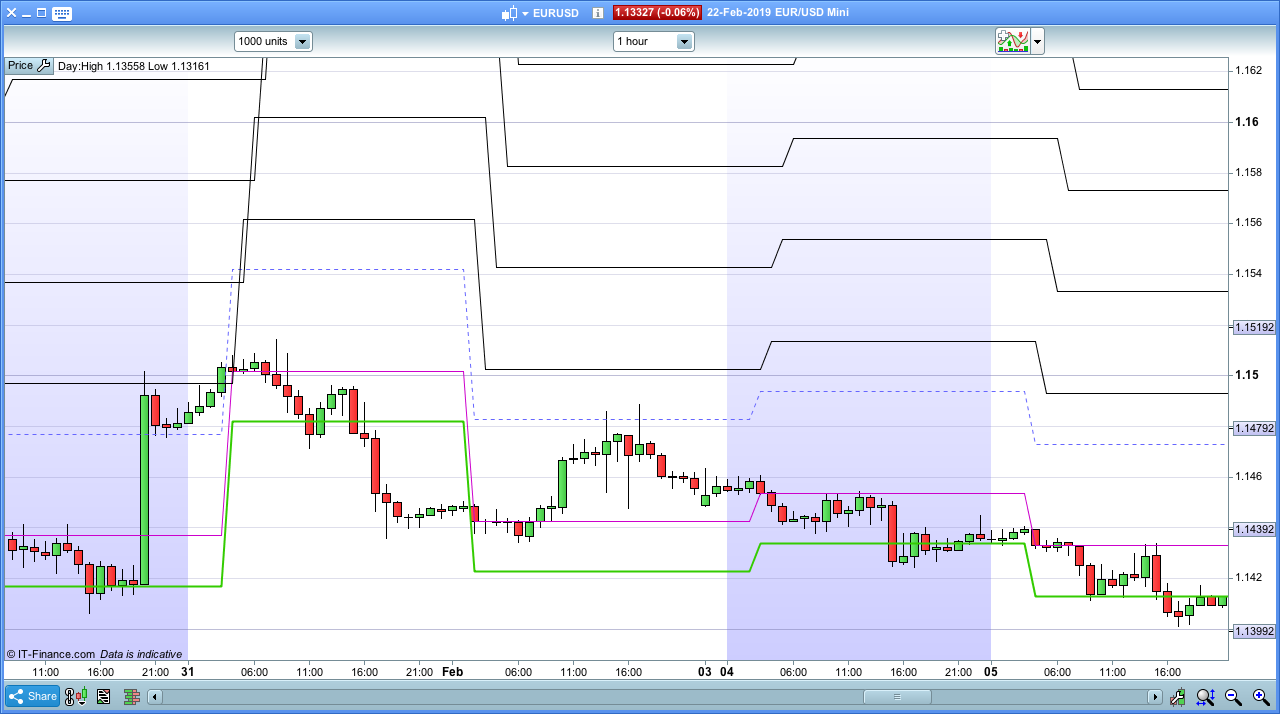
I am creating a very simple indicator for averaging down purposes. Its launched every day with different levels (grids) above from a levelZERO. The strategy (based in Nicholas’ averaging down example) always goes short. If the operation is positive, the next day start again a new levelZERO and the new grids above.
My question is that if the strategy start accumulating contracts or is above to (it is still open at the end of the day), the next day I would like to keep the original levelZERO levels, since the operation is still open.
With the strategy this is solve with the ON MARKET condition, but indicators do not allow OPEN/BUY commands. Anyone knows any trick to keep an indicator passive while ON MARKET, and start again when IS NOT ON MARKET???
I am posting the indicator. It is very simple.
Thanks in advance,
12345678910111213141516171819202122232425262728293031323334353637383940414243444546474849505152535455// AVERG DOWN indicatordefparam drawonlastbaronly= true// parametersrojo=open>close// Determinición niveles GRIDIF time=020000 AND rojo THENlevelZERO = closeENDIFIF time=030000 AND rojo AND NOT rojo[1] THENlevelZERO = closeENDIFIF time=040000 AND rojo AND NOT rojo[1] AND NOT rojo[2] THENlevelZERO = closeENDIFIF time=050000 AND rojo AND NOT rojo[1] AND NOT rojo[2] AND NOT rojo[3] THENlevelZERO = closeENDIFIF time=060000 AND rojo AND NOT rojo[1] AND NOT rojo[2] AND NOT rojo[3] AND NOT rojo[4] THENlevelZERO = closeENDIFIF time=070000 AND rojo AND NOT rojo[1] AND NOT rojo[2] AND NOT rojo[3] AND NOT rojo[4] AND NOT rojo[5] THENlevelZERO = closeENDIFIF time=080000 AND rojo AND NOT rojo[1] AND NOT rojo[2] AND NOT rojo[3] AND NOT rojo[4] AND NOT rojo[5] AND NOT rojo[6] THENlevelZERO = closeENDIFIF time=090000 AND rojo AND NOT rojo[1] AND NOT rojo[2] AND NOT rojo[3] AND NOT rojo[4] AND NOT rojo[5] AND NOT rojo[6] AND NOT rojo[7] THENlevelZERO = closeENDIFIF time=100000 AND rojo AND NOT rojo[1] AND NOT rojo[2] AND NOT rojo[3] AND NOT rojo[4] AND NOT rojo[5] AND NOT rojo[6] AND NOT rojo[7] AND NOT rojo[8] THENlevelZERO = closeENDIF// levels UPgrid=40level5up = level4up + (grid)*pipsizelevel4up = level3up + (grid)*pipsizelevel3up = level2up + (grid)*pipsizelevel2up = level1up + (grid/2)*pipsizelevel1up = levelZERO + grid*pipsizelevelprofit = levelZERO - (grid/2)*pipsizeRETURN LevelZERO as "levelZERO", level1up as "level1up", level2up as "level2up", level3up as "level3up", level4up as "level4up", level5up as "level5up", levelprofit as "levelprofit"02/23/2019 at 8:34 PM #92145Without having a chance to test it now, I would say another indicator that receives 0 or 1 from a strategy and retains it for other indicators to retrieve.
It doesn’t have to display anything on chart, just be CALLed from your indicator to return the 0 or 1 received from the strategy so that it may work or pause.
But I am not sure this is possible.
02/23/2019 at 8:48 PM #92146Sorry, it won’t work, ProOrder cannot communicate with ProBuilder.
CALLed indicators are a copy of what is on the chart. You can remove it from your chart and the strategy continues working.
No way.
02/23/2019 at 10:21 PM #92148Hi Roberto,
Thanks. I will create the selling (short) conditions in the indicator and will apply 0 or 1 to a successful trade, so next day will continue or not according to that 0 or 1.
The strategy will work anyway, but I created the indicator to visualise the entry levels. In this case, I will have to imagine those entry levels according to the (n) day in which the first sell short occurred.
Thanks so much,
Juan
02/23/2019 at 11:04 PM #92149If this is just about creating an indicator that knows whether you are on the market or not then you just have to simulate the strategies orders in the indicator and create a flag that tells the indicator whether you are on the market at the days close or not on the market at the days close. As Roberto says just switch a flag from 0 to 1 if a market entry condition is met and switch it to zero if a market exit condition is met.
1 user thanked author for this post.
-
AuthorPosts
Find exclusive trading pro-tools on