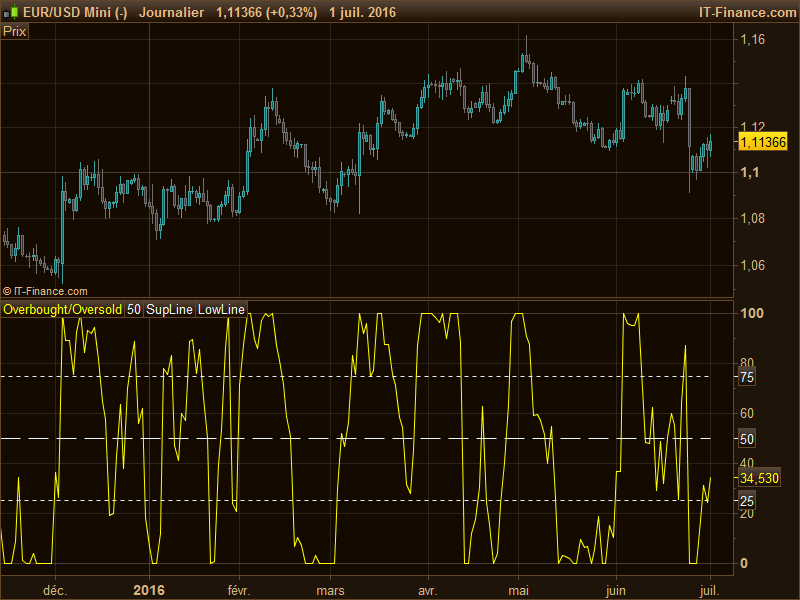
OBOS Overbought/Oversold

Viewing 7 posts - 1 through 7 (of 7 total)

  • Author
    Posts
  • #10095 quote
    Henry
    Participant
    Average

    A request that was addressed to ProRealTime:


    I have a request for you to implement the Overbought/Oversold (OBOS), which I could not find at ProRealCode.
    It is a very famous indicator, introduced by Murphy, John J. and I have made extraordinary good results with specific settings in M1 up to H1 and D1 periods.

    I think you and all PRT users will strongly benefit of this indicator for which the formula is public since it belongs to the class of standard indicators.

    I got the source from e.g. this page:
    http://partners.futuresource.com/workstation/help/charts/studies/obos.htm

    I would be very happy, if you could implement it and hope it works for you.


    Suggestion for an anwser:

    SupLine = 75
    LowLine = 25
    OBOS = ((Close - Low) / (High - Low)) * 100
    RETURN OBOS AS "Overbought/Oversold", 50 AS "50", SupLine as "SupLine", LowLine as "LowLine"


    #10100 quote
    Nicolas
    Keymaster
    Master
    Hello, I think there might be a mistake in suggested formula. The OBOS seems to be calculated within a period to find the highest close and lowest close too. The description is: Formula OBOSt = ((Ct – LCt) / (HCt – LCt)) * 100 HCt = Highest Close of period LCt = Lowest Close of period  

    Properties

     Close.  The current Close of the contract.  The default is Close.

     High.  The highest Close of the period.  The default is Close, but can be changed.  If changed to High instead of Close, the study will be calculated off of the Highest High of the period, instead of the Highest Close.

     Low.  The lowest Close of the period.  The default is Close, but can be changed.  If changed to Low instead of Close, the study will be calculated off of the Lowest Low of the period, instead of the Lowest Close.

     Period. The number of bars in a chart. If the chart displays daily data, then period denotes days; in weekly charts, the period will stand for weeks, and so on. The application uses a default of 14.   Please find my solution below:
    period = 14
    SupLine = 75
    LowLine = 25
    
    ll = lowest[period](close)
    hh = highest[period](close)
    
    OBOS = ((Close - ll) / (hh - ll)) * 100
    
    RETURN OBOS AS "Overbought/Oversold", 50 AS "50", SupLine as "SupLine", LowLine as "LowLine"
    #10577 quote
    Traderfox06
    Participant
    Average
    Hi Nicolas, I really thank you for your help an yes, the formula above is the correct one. Unfortunately, I have no idea to implement your solution. I tried to create a new indicator, but it did not work. Is there a documentation besides the programmer docu? Would it be possible to provide your solution in PRT maybe to be uploaded? If the customization could take place via a setting in the indicator menue and not by code adjustment it would be a dream. Thanks for your time. KR, Michael
    #11216 quote
    Traderfox06
    Participant
    Average
    Dear Nicolas, may I ask you, if this topic is still of interest for you? Thanks and kind regards, Michael
    #11325 quote
    Derek
    Participant
    Veteran
    Hi Michael, the code works just fine. You can download the manual here: https://www.prorealtime.com/en/pdf/probuilder.pdf?c1463576780c The chapter with fundamentals is the one you need. Or watch the video: https://www.youtube.com/watch?v=Q8vEg3FvuMo&list=
    Nicolas thanked this post
    #11360 quote
    Nicolas
    Keymaster
    Master
    Sorry TraderFox, your last message passed through all the over ones and I didn’t see it until today. Please find attached the ITF file of this indicator for direct import with the ProBuilder window.
    #11383 quote
    Traderfox06
    Participant
    Average
    Bonsoir Nicolas, merci beaucoup pour votre excellent service et à bientôt, Michael
Viewing 7 posts - 1 through 7 (of 7 total)

  • You must be logged in to reply to this topic.

OBOS Overbought/Oversold


ProBuilder: Indicators & Custom Tools

New Reply
Author
author-avatar
Henry @henry Participant
Summary

This topic contains 6 replies,
has 4 voices, and was last updated by Traderfox06

9 years, 6 months ago.

Topic Details
Forum: ProBuilder: Indicators & Custom Tools
Language: English
Started: 07/01/2016
Status: Active
Attachments: No files
Logo Logo
Loading...