


Noob question numbers down right hand column

Viewing 5 posts - 1 through 5 (of 5 total)
  • Author
    Posts
  • #239262 quote
    Kovit
    Participant
    Senior

    Hi guys

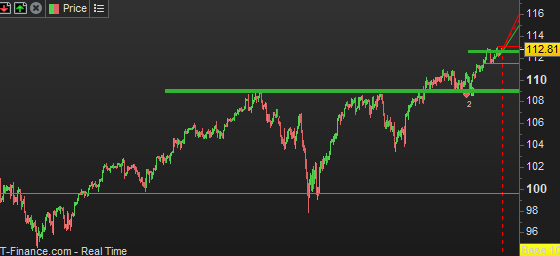
    Apologies for the noob question but can someone explain the numbers down the right hand side of this screenshot please as I would like to add them into a strategy but they don’t appear when selected in the creation by programming selection for new strategies.

    Thanks in advance.

    #239268 quote
    robertogozzi
    Moderator
    Master

    They are just the price levels, you can reference the using CLOSE.

    druby, Iván González and Kovit thanked this post
    #239271 quote
    druby
    Participant
    New

    Generally, data points are plotted on a chart, as in this case using x and y coordinates.

    The right hand side shows the y-axis scale, usually the price in a price panel.

    The chart scale can be set to different types, Linear, logarithm, percentage and Base100.

    It appears that, from image, yours is set to Base100.

    Due to the font size of your chart, the label is bigger than the space available, so the end is cut off.


    To change type, right click on the scale, then choose ‘Scale Type’, select option.

    For myself, I only have used linear and have no further comments on the different types.


    However, in coding I think that all direct references to price are linear for the open, high, low close etc. If outputting values to the chart, the linear values from code are converted and drawn to the chosen scale.

    If inputting values from a non-linear type scale , then I think that’s a different story. If you wanted to use other scales, you would have to convert the non-linear value to the linear value.

    Easy solution, stay on linear or flick to linear to get the linear value.


    Regarding the conversions, since not used, I don’t have the formula’s maybe other’s can elaborate further if needed.

    Iván González, Kovit and robertogozzi thanked this post
    #239272 quote
    druby
    Participant
    New

    Further to above, if entering a value for a relevant variable via the indicator configure window, the value entered, is has it was taken from the linear scale.
    If chart is on a non-linear scale and a value was entered for the variable from the non-linear scale, the value is again taken as linear and then converted to the chart scale.

    In this scenario, the required outcome is not correct because the value wasn’t the linear equivalent value entered.

    This is where conversion would come in with the entry value. Convert from non-linear value to linear, so it would get converted back to  non-linear scale from linear.

    I don’t think there away to determine which scale a chart is set to from inside code to automate the entry scale type.

    Kovit thanked this post
    #239313 quote
    Kovit
    Participant
    Senior

    Many thanks Roberto and Druby. 🙂

Viewing 5 posts - 1 through 5 (of 5 total)
  • You must be logged in to reply to this topic.

Noob question numbers down right hand column


ProBuilder: Indicators & Custom Tools

New Reply
Author
author-avatar
Kovit @kovit Participant
Summary

This topic contains 4 replies,
has 3 voices, and was last updated by Kovit

1 year, 3 months ago.

Topic Details
Forum: ProBuilder: Indicators & Custom Tools
Language: English
Started: 10/20/2024
Status: Active
Attachments: 1 files
Logo Logo
Loading...

