


Nicolas // Regression-Channel-Sketcher

Viewing 5 posts - 1 through 5 (of 5 total)
  • Author
    Posts
  • #115573 quote
    falco44
    Participant
    Junior

    Bonjour Nicolas,


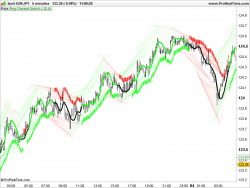
    Pourrais-tu mettre a jour le code de la regression channel sketcher stp ?

    Il ne fait apparaitre rien du tout sur les graphes, je parle de la version v11.1


    Regression Channel Sketcher

    The next ProRealTime version 10.3 and new graphical functionnalities


    Merci de ton retour,

    Cordialement,

    Romain

    prorealtime-drawtext-250x188-1.png prorealtime-drawtext-250x188-1.png
    #115615 quote
    Nicolas
    Keymaster
    Master

    Je pense que le problème vient la gestion de la transparence dans le code, il ne doit pas être adapté à tous les instruments.

    Essayons comme ceci: (non testé)

    p=20
    
    z1 = linearregression[p](high)
    z2 = linearregression[p](low)
    
    y1 = 1.5*std[p](high)+z1
    y2 = 1.5*-std[p](low)+z2
    
    if(y1>y1[p]) then
      Rh = 0
      Gh = 255
    else
      Rh = 255
      Gh = 0
    endif
    
    if(y2>y2[p]) then
      Rl = 0
      Gl = 255
    else
      Rl = 255
      Gl = 0
    endif
    
    a = (255*(y1-y2))/(300*pipsize)
    a = max(50,a)
    a = min(a,255)
    
    DRAWSEGMENT(barindex-p*1.5,y1[p],barindex+10,y1)coloured(Rh,Gh,0,a)
    DRAWSEGMENT(barindex-p*1.5,y2[p],barindex+10,y2)coloured(Rl,Gl,0,a)
    
    RETURN
    #115826 quote
    falco44
    Participant
    Junior

    Bonjour Nicolas,

    Je viens de tester le code et rien n’apparait.

    Pourrais-tu y regarder stp ?

    Cordialement,

    Romain

    #115840 quote
    Nicolas
    Keymaster
    Master

    J’ai identifié le problème, c’est l’utilisation des barindex+10, cela n’était pas possible avant mais le sera bientôt (dessiner dans le futur). Dans les versions antérieures à la v11, cela ne posait pas de problème de l’écrire dans un code, mais désormais cela sera interprété et vu que la fonctionnalité n’est pas encore active, cela a cet effet: rien ne se dessine.

    Bref, il faut remplacer les lignes DRAWSEGMENT par celles-ci :

    DRAWSEGMENT((barindex-p*1.5),y1[p],barindex,y1)coloured(Rh,Gh,0,a)
    DRAWSEGMENT((barindex-p*1.5),y2[p],barindex,y2)coloured(Rl,Gl,0,a)


    falco44 thanked this post
    #115847 quote
    falco44
    Participant
    Junior

    Merci de ton retour Nicolas

Viewing 5 posts - 1 through 5 (of 5 total)

  • You must be logged in to reply to this topic.

Nicolas // Regression-Channel-Sketcher


ProBuilder : Indicateurs & Outils Personnalisés

New Reply
Author
author-avatar
falco44 @falco44 Participant
Summary

This topic contains 4 replies,
has 2 voices, and was last updated by falco44

6 years, 2 months ago.

Topic Details
Forum: ProBuilder : Indicateurs & Outils Personnalisés
Language: French
Started: 12/29/2019
Status: Active
Attachments: 1 files
Logo Logo
Loading...
