new Prorealtime indicator: Wave Oscillator (by LazyBear)

Viewing 15 posts - 1 through 15 (of 15 total)

  • Author
    Posts
  • #9506 quote
    micha2012
    Participant
    Average

    Hello All,

    would you please help me; I need a code from tradingview.com for Prorealtime:

    https://www.tradingview.com/script/2KE8wTuF-Indicator-WaveTrend-Oscillator-WT/

    //
    // @author LazyBear
    //
    //
    study(title=”WaveTrend [LazyBear]”, shorttitle=”WT_LB”)
    n1 = input(10, “Channel Length”)
    n2 = input(21, “Average Length”)
    obLevel1 = input(60, “Over Bought Level 1”)
    obLevel2 = input(53, “Over Bought Level 2”)
    osLevel1 = input(-60, “Over Sold Level 1”)
    osLevel2 = input(-53, “Over Sold Level 2”)

    ap = hlc3
    esa = ema(ap, n1)
    d = ema(abs(ap – esa), n1)
    ci = (ap – esa) / (0.015 * d)
    tci = ema(ci, n2)

    wt1 = tci
    wt2 = sma(wt1,4)

    plot(0, color=gray)
    plot(obLevel1, color=red)
    plot(osLevel1, color=green)
    plot(obLevel2, color=red, style=3)
    plot(osLevel2, color=green, style=3)

    plot(wt1, color=green)
    plot(wt2, color=red, style=3)
    plot(wt1-wt2, color=blue, style=area, transp=80)

    As I am a newbee I dont understand coding; this new indicator gives amazing signals; I think it would help a lot.

    Please support.

    Thank you in advance.

    Regards Micha

    #9507 quote
    Nicolas
    Keymaster
    Master

    Hi micha,

    Just converted it. Seems a nice decent indicator, very similar to another one I post earlier : http://www.prorealcode.com/prorealtime-indicators/ergodic-oscillator-smi/

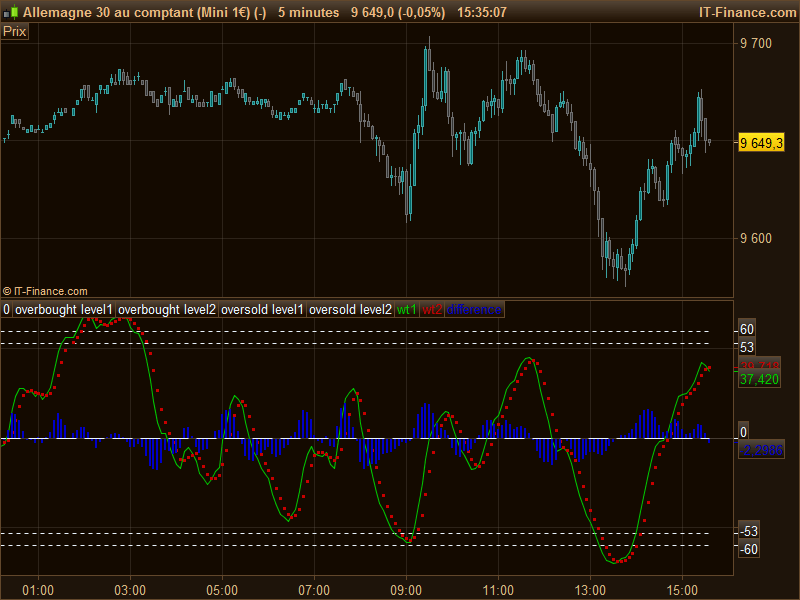
    Anyway, please find attached the Wave Oscillator for Prorealtime with a picture of how it looks. I’ll add it to the library.

    Watrend-oscillator.png Watrend-oscillator.png
    #9513 quote
    Nicolas
    Keymaster
    Master
    #9538 quote
    micha2012
    Participant
    Average

    Bonjour Nicolas,

    tres bien…merci beaucoup….

    Thank you very much for your quick reply and support. I will install and test right now!

    Wish you all the best…

    Alle les bleus!

    Merci!

    #9540 quote
    micha2012
    Participant
    Average

    Salut Nicolas,

    great…you`re the best…works absolutely fine!

    Again, merci beaucoup!

    Bye.

    #9545 quote
    supertiti
    Participant
    Master

    Lazy bear c’est un très bon !!! j’utilise un de ses indicateurs depuis plusieurs mois avec succès. C’est à mon avis un contributeur à suivre sur trading view. après chacun fait à son aise , ce n’est que mon avis


    Bon week end.

    #9546 quote
    Nicolas
    Keymaster
    Master

    @supertiti

    Quel indicateur?

    #17941 quote
    micha2012
    Participant
    Average

    Bonjour Nicola,

    I tried the last 2-3 hours to improve the Wave Oscillator by “adding” crossover dots.

    Unfortunalely I failed. …

    I want to add this from pine editor:

    plot(cross(wt1, wt2) ? wt2 : na, color = black , style = circles, linewidth = 3)
    plot(cross(wt1, wt2) ? wt2 : na, color = (wt2 – wt1 > 0 ? red : lime) , style = circles, linewidth = 2)
    barcolor(cross(wt1, wt2) ? (wt2 – wt1 > 0 ? aqua : yellow) : na)

    If “wti1” (green line) crosses over “wt2” (rot line) this is BUY Signal and Chart should show a “green dot” on wti1/wti2; if “wt2” crosses down “wt1” then SELL Signal an Chart should show “red dot”.

    Do you think this is possible to code?

    Nicola, once again I would be very thankful for your support.

    Merci beaucoup.

    Micha

    #97755 quote
    Sofitech
    Participant
    Master

    I did read you make profit trading with this indicator (in your last post with a new indicator request)
    Could explain the way you use it for your trading ?

    #97778 quote
    micha2012
    Participant
    Average

    Salut Sofitech,

    please take a look here: https://www.tradingview.com/script/2KE8wTuF-Indicator-WaveTrend-Oscillator-WT/

    – if “WO” is at botton under 55 – 60 and “green quadrat” appears –> LONG

    – if “WO” is at top over 55 – 60 and “red quadrat” appears –> SHORT

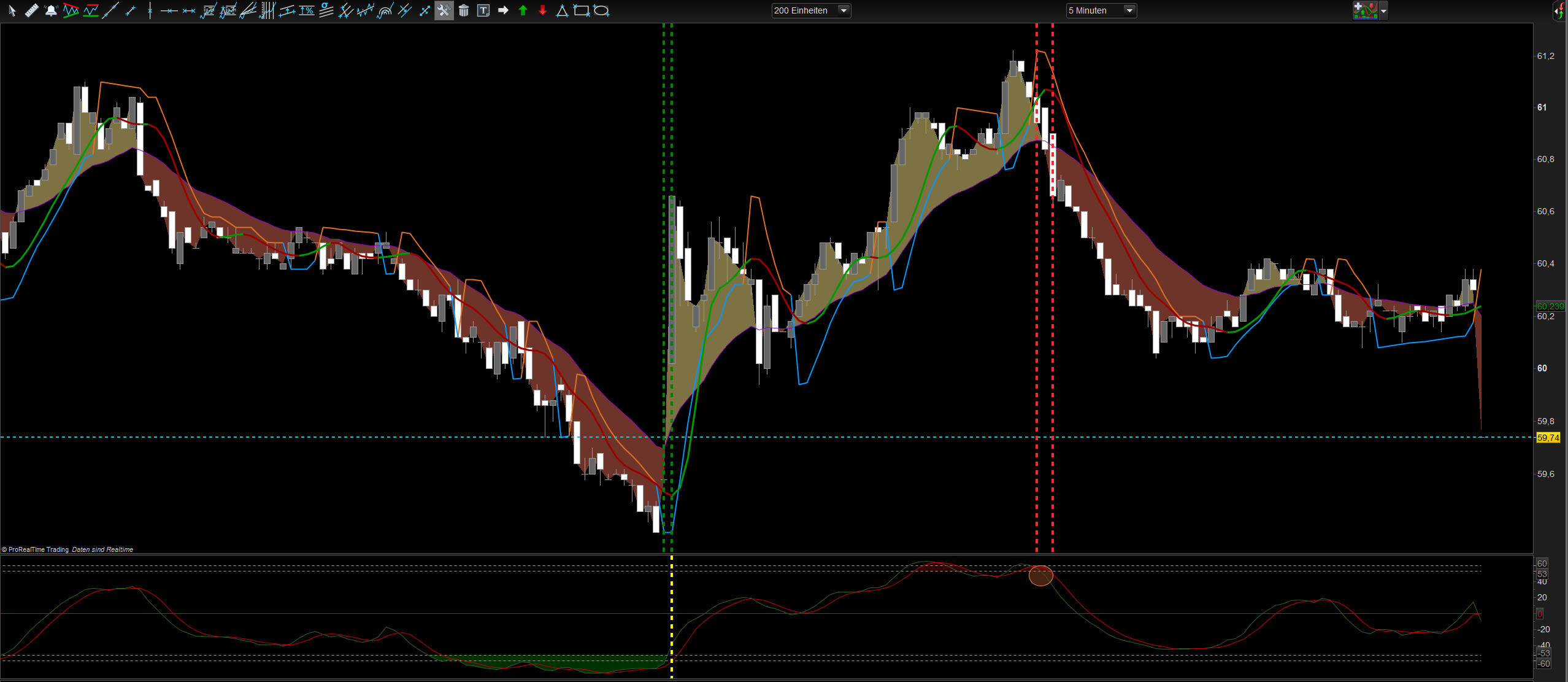
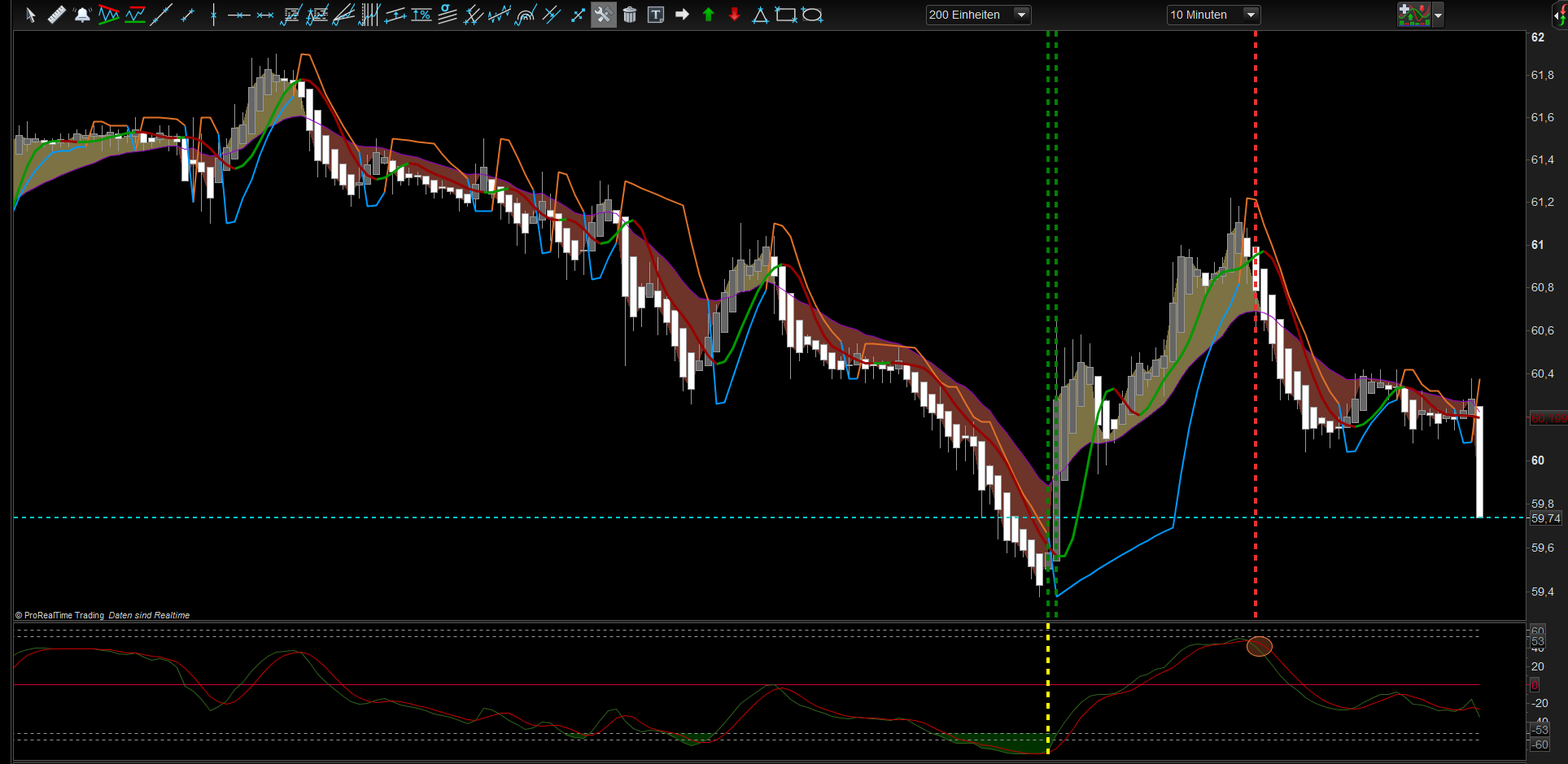
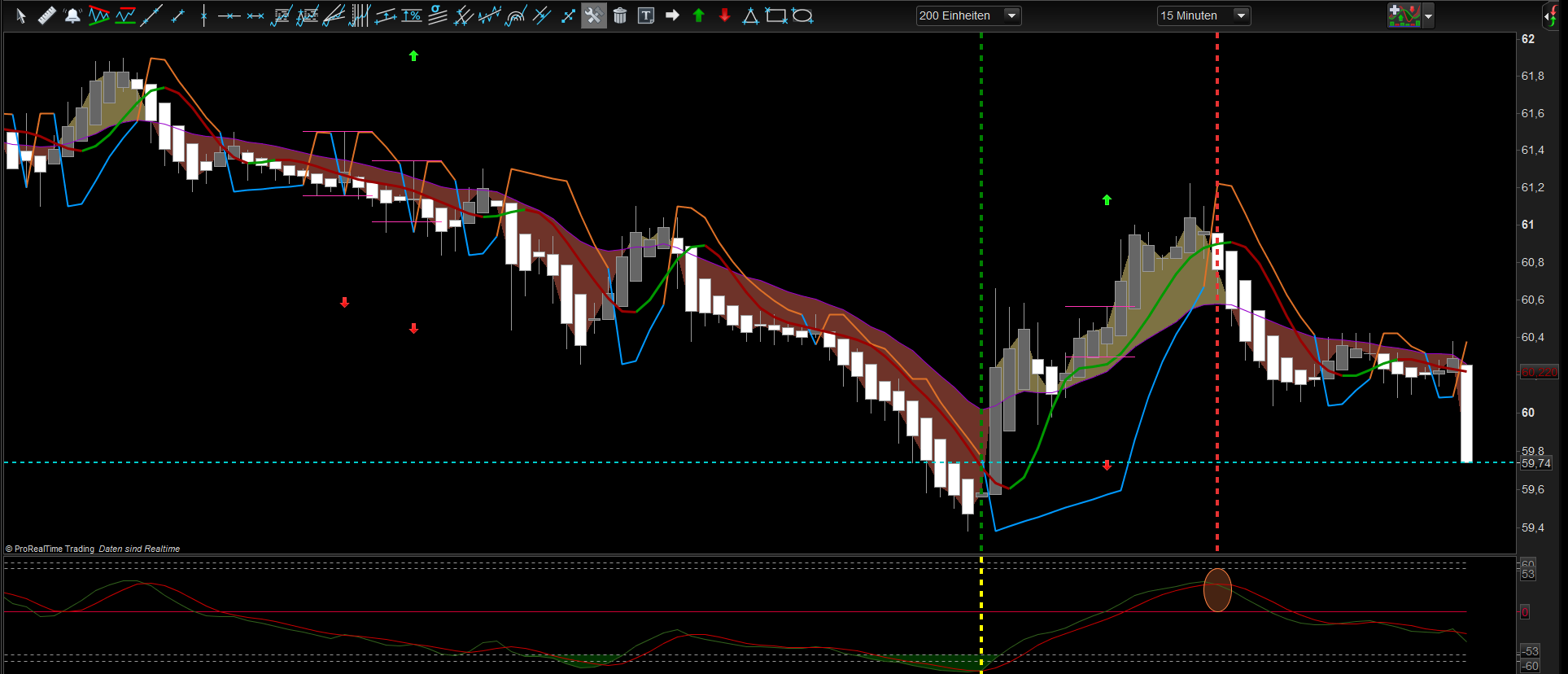
    Important: you need 2 -3x signals as a confirmation; e.g. 3min Chart – 5min- Chart – 10min- Chart !!!!! [ or higher TF, e.g. 5min. – 15min. – 30min.]

    All the best!

    Micha

    p.s. this indicator is even “stronger”…https://www.prorealcode.com/topic/new-prorealtime-indicator-cmuma-cm_ultimate_ma_mtf/

    Still waiting for support and re-coding here…

    M.Nicolas 81 thanked this post
    #98154 quote
    Nicolas
    Keymaster
    Master

    @micha2012

    People would love to get examples with screenshots. How do you exit your orders?

    M.Nicolas 81 thanked this post
    #98157 quote
    micha2012
    Participant
    Average

    @Nicolas

    Do you refer to LazyBear Wave-Indicator or to my last posted CMUMA-Indicator??

    Merci.

    Micha

    #98166 quote
    Nicolas
    Keymaster
    Master

    This one, the Wave oscillator.

    #98263 quote
    micha2012
    Participant
    Average

    Hello Nicolas,

    please find attached some pics, showing entry and exit:

    5min-Chart..10min-Chart and 15min.-Chart; you enter/exit at conformation of 15min.Chart!

    Best Regards, Micha

    Nicolas and M.Nicolas 81 thanked this post
    5min.png 5min.png 10min.png 10min.png 15min.png 15min.png
    #133007 quote
    GenesisEX
    Participant
    New

    Thank you all for your incredible contributions. This Wave Oscillator seems to work rather well and is aligned with some of the other indicators I use but is better in keeping one in the wave until it draws to an end.   Thank you Micha,  Thank you Nicolas !!

    M.Nicolas 81 thanked this post
Viewing 15 posts - 1 through 15 (of 15 total)
  • You must be logged in to reply to this topic.

new Prorealtime indicator: Wave Oscillator (by LazyBear)


ProBuilder: Indicators & Custom Tools

New Reply
Author
author-avatar
micha2012 @micha2012 Participant
Summary

This topic contains 14 replies,
has 5 voices, and was last updated by GenesisEX

5 years, 8 months ago.

Topic Details
Forum: ProBuilder: Indicators & Custom Tools
Language: English
Started: 06/17/2016
Status: Active
Attachments: 4 files
Logo Logo
Loading...