Hi guys,
I am no coder, therefor my question if my idea would be possible.
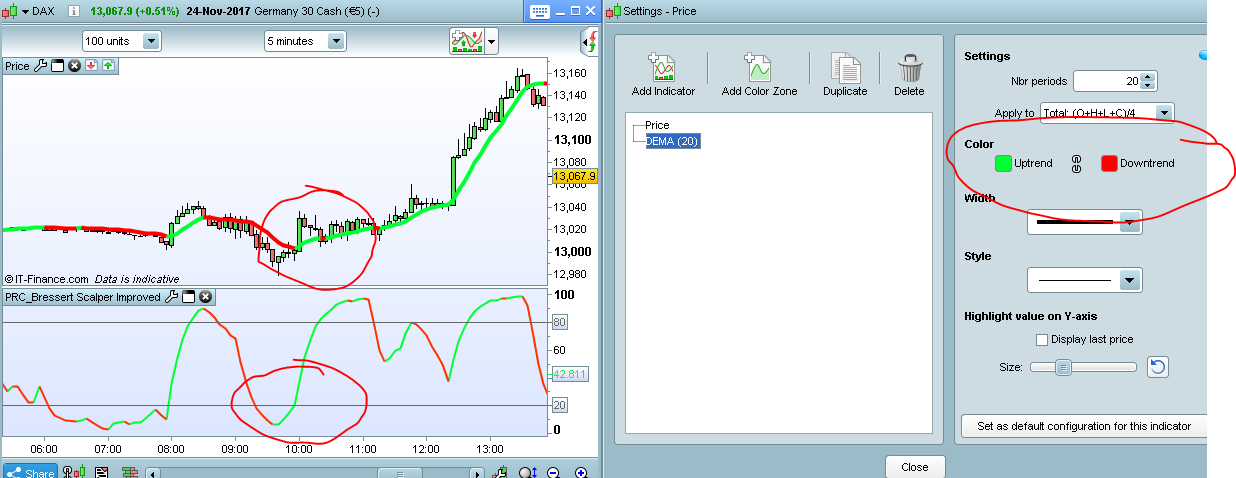
I have several indicators, such as MA, Dema, etc. I changed the collor for all the lines. So if the dema is positive, I got a green line.
Would it be possible to create an indicator who will give a signal when all those lines are green or red?
so for example. indicator X gives a signal when 3 other types of indiactors (lines) are all red or green.
I have tried it allready with a screener, but it is not possible to give a signal when the collor is changing.
Thanks for any help.
Absolutely possible but without specifics you will get no tangible help
Ok thanks, what kind of specifics do you need to know? (sorry for my neewbie questions)
 Wing
WingParticipant
Veteran
Yes. Example:
allIndicators=0

If indicator1>0 and indicator2>0 and indicator3>0 then
allIndicators=1
endif

return allIndicators
Hi, I put an image attached, this is what I mean.
so if both indicators are green (or red) I will have a signal. (dema and bressert).
Thanks.
would it be possible or not?
Of course and Wing has perfectly answered already 🙂
So what you want is a synthesis of these 2 colors and at the same time ? To be clear, both these indicators are green (or red) because their actual values are ascending or declining since the last period.
Hi Nicolas,
Yes that is correct, how can I code that in this example? Because I tried it with some not standard indicators, and then I get some errors. Only the standard dema was possible.
Sorry for my newbie questions, very much appreciated for any help with this. 😉
You need to apply this Condition to all indicators you want to be green
indicator1 = DEMA[20](close)
indicator2 = DEMA[20](close)
c1 = (indicator1[1] < indicator2)
I don’t know if you all understand what I am meaning.
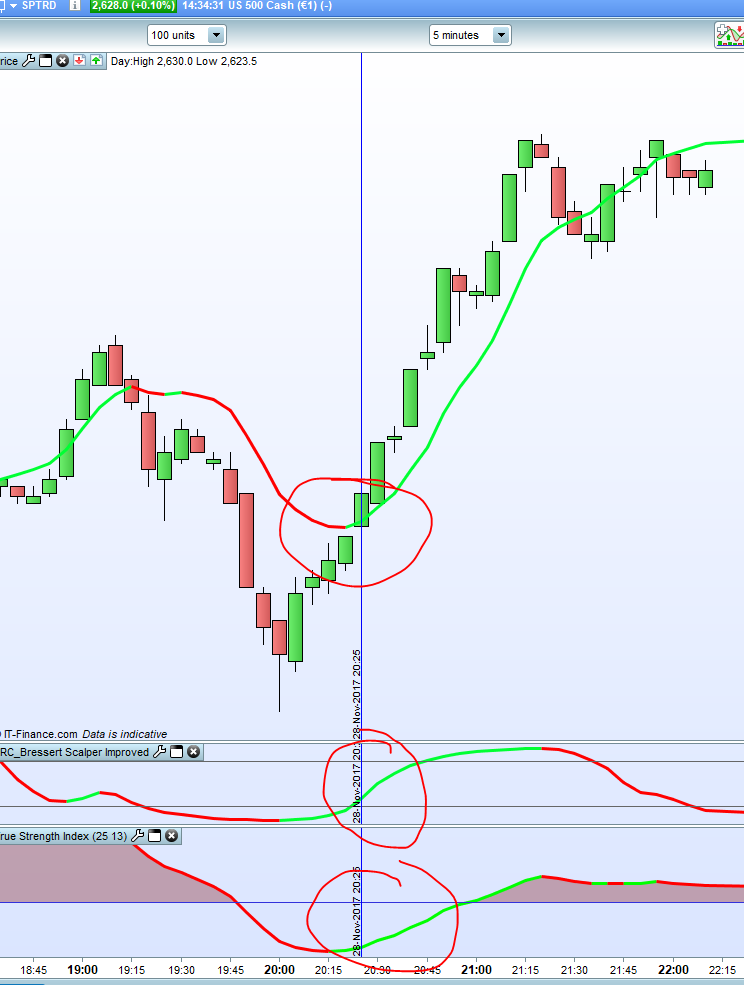
I want to have a signal (via a new indicator) when all colors are the same color, so if in this example all 3 indicators are green, then I want to have a signal.
See new picture. If it is possible, what will be the entire code for this new indicator?
Thanks.
I think everyone ” understands ” what you require but “you” will need to post the code for the indicators you require conditions for . If “you” do that someone here will do the code for you in a couple minutes .
Also what do “you” want to occur when these 3 conditions are met ??
// Definition of code parameters
DEFPARAM CumulateOrders = False // Cumulating positions deactivated

// Conditions to enter long positions
indicator1 = DEMA[21](close)
indicator2 = DEMA[21](close)
c1 = (indicator1 > indicator2[1])
indicator3, ignored = CALL "True Strength Index"
c2 = (indicator3 > indicator3[1])
indicator4, ignored, ignored = CALL "PRC_Bressert Scalper Improved"
c3 = (indicator4 > indicator4[1])

IF c1 AND c2 AND c3 THEN
BUY 1 CONTRACT AT MARKET
ENDIF
I think many people here asking for complete codes to do x y z would be better served watching some PRT tutorials on how to do this . I used the trade system creator to do this and it took all of 2 minutes after i found and installed the indicators . Its is a very easy process
I think many people here asking for complete codes to do x y z would be better served watching some PRT tutorials on how to do this . I used the trade system creator to do this and it took all of 2 minutes after i found and installed the indicators . Its is a very easy process
The old proverb comes to mind again about teaching people to fish rather than giving them a fish.
There are plenty of good books about fishing to be found on this website that should all be read before asking for a fish – but I guess some people just cannot get the whole concept of fishing and should probably give up and become vegetarian – as fishing is just not their thing.
Automated spread betting can be an expensive place for non-fishers!
Don’t give up Realtime82 – get reading and absorbing. It takes a lot of time and practice but nothing good was ever instant!
There are many people completely closed to programming, the site is for all categories, from the most neophytes to the most experienced, let us know the things ourselves 🙂
It’s great to help the people who ask for it, especially when we get a return, and that’s what happens most of the time, that’s why our community is a success (in my opinion ).
@Brisvegas, thank you for taking the time to answer the question.