new Indicator: “EasyStock” – please support

Viewing 7 posts - 1 through 7 (of 7 total)
  • Author
    Posts
  • #142125 quote
    micha2012
    Participant
    Average

    Dear Nicolas, dear all,

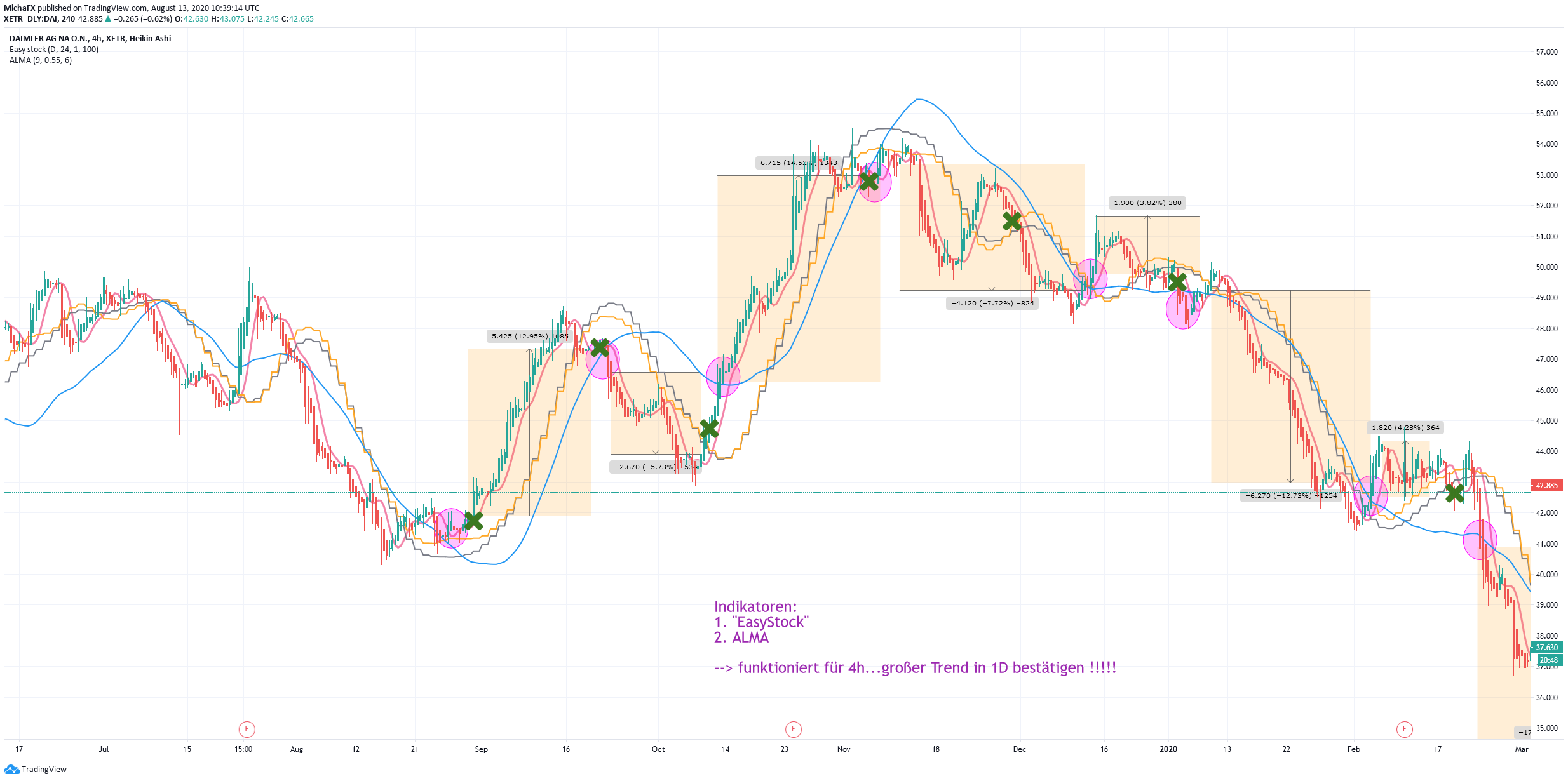
    since several weeks I`m testing following indicator from trdv (https://www.tradingview.com/script/CKn6uOk9-Easy-stock/). It is very reliable and generates continous signals.

    Please would you take the chance and code it for prorealtime? I would highly appreciate your support.

    the orig. code:

    study(title = "Easy stock", overlay = true)
    tf10 = input("W", title = "Timeframe", type = input.resolution, options = ["1", "5", "15", "30", "60","120", "240","360","720", "D", "W"])
    
    length = input(24, title = "Period", type = input.integer)
    shift = input(1, title = "Shift", type = input.integer)
    
    hma(_src, _length)=>
        wma((2 * wma(_src, _length / 2)) - wma(_src, _length), round(sqrt(_length)))
        
    hma3(_src, _length)=>
        p = length/2
        wma(wma(close,p/3)*3 - wma(close,p/2) - wma(close,p),p)
    
    
    a = security(syminfo.tickerid, tf10, hma(close, length))
    b =security(syminfo.tickerid, tf10, hma3(close, length)[shift])
    plot(a,color=color.gray)
    plot(b,color=color.yellow)
    close_price = close[0]
    len = input(100)
    
    linear_reg = linreg(close_price, len, 0)
    
    
    plot(linear_reg, color=color.blue, title="LR", linewidth=3)
    
    buy=crossover(linear_reg, b) 
    sell=crossunder(linear_reg, b) 
    plotshape(buy, title="buy", text="Buy", color=color.green, style=shape.labelup, location=location.belowbar, size=size.small, textcolor=color.white, transp=0)  //plot for buy icon
    plotshape(sell, title="sell", text="Sell", color=color.red, style=shape.labeldown, location=location.abovebar, size=size.small, textcolor=color.white, transp=0)  //plot for sell icon
    /////// Alerts /////
    alertcondition(buy,title="buy")
    alertcondition(sell,title="sell")

    The above Link shows several examples on how to enter trades.

    Thank you very much in advance.

    Best Regards,

    Micha

    4h_Easy-stock-Indikator_TOP2.png 4h_Easy-stock-Indikator_TOP2.png
    #142129 quote
    Nicolas
    Keymaster
    Master

    That’s a 4-hour linear regression crossing a weekly Hull MA. Translation done 😉

    #142131 quote
    micha2012
    Participant
    Average

    Hello Nicolas,

    thanks you very much…ha, ha..thats easy..

    BUT, how can I create weekly HULL on 4h chart? MTF needed?

    Thanks you again, Nicolas.

    Merci.

    #142139 quote
    micha2012
    Participant
    Average

    Hello Nicolas,

    ok..I checked the original code again; I found that Hull is a standard indicator; ist HULL(100) which is displayed for every requested timeframe.

    BUT, the “Linear Regression” indicator is a “weekly, displayed in 1D and 4h timeframe: And more the LR is “shifted” by 1 period!

    How can I display weekly LR-line in 4h-chart and shift by 1 the LR in PRT???

    Please Nicolas support me.

    Thank you..merci,

    Micha

    #142151 quote
    Nicolas
    Keymaster
    Master

    MTF indicator is possible but only with PRT v11. Shifting horizontally a moving average, this is possible in the indicator settings window.

    #142157 quote
    micha2012
    Participant
    Average

    Hello Nicolas,

    thank you again…MTF is possible with my PRT version! Shifting various MA is possible, as well.

    BUT, according to my request above, the “Linear Regression” indicator should be shifted by 1…this is not displayed in the settings of indicator window…..

    How could it be hard coded???

    Thank you again…

    Reagrds Micha

    #142189 quote
    Nicolas
    Keymaster
    Master

    The horizontal shift means that you refer to the Xth previous value before now, so in this case, plot the linear regression from the previous candlestick on the current one:

    lr = LinearRegression[30](close)[1]
    
    return lr
Viewing 7 posts - 1 through 7 (of 7 total)
  • You must be logged in to reply to this topic.

new Indicator: “EasyStock” – please support


ProBuilder: Indicators & Custom Tools

New Reply
Author
author-avatar
micha2012 @micha2012 Participant
Summary

This topic contains 6 replies,
has 2 voices, and was last updated by Nicolas

5 years, 5 months ago.

Topic Details
Forum: ProBuilder: Indicators & Custom Tools
Language: English
Started: 08/20/2020
Status: Active
Attachments: 1 files
Logo Logo
Loading...